> For the complete documentation index, see [llms.txt](https://academy.pentaho.com/llms.txt). Markdown versions of documentation pages are available by appending `.md` to page URLs; this page is available as [Markdown](https://academy.pentaho.com/pentaho-data-integration/data-integration/data-sources/databases/cruid/update-db-table.md).
# Update DB table
Update employees in the EMPLOYEES table using the Update step.
{% hint style="warning" %}
#### Workshop - Update DB table
Update existing rows in `EMPLOYEES` using a key lookup.\
You will change job titles for two employees.
**What you’ll do**
* Read an update file with **Text file input**
* Update matching rows with **Update**
* Validate changes with SQL
**Prerequisites**
* A working database connection. See [Database Connections](/pentaho-data-integration/data-integration/data-sources/databases/cruid/database-connections.md).
* Basic primary key concepts (`EMPLOYEENUMBER`)
**Estimated time:** 20 minutes
{% endhint %}
***
{% hint style="info" %}
**Workshop files**
Create a file named `employees_update.txt`.\
Save it in the same folder as your transformation.
This workshop assumes a comma-delimited file with **no header row**:
```
1002,Murphy,Diane,x5800,dmurphy@classicmodelcars.com,1,1000,CEO
1102,Bondur,Gerard,x5408,athompson@classicmodelcars.com,4,1056,Regional Sales Manager (EMEA)
```
{% endhint %}
***
Update employees
{% hint style="info" %}
**Create a new transformation**
Use any of these options to open a new transformation tab:
* Select **File** > **New** > **Transformation**
* Use `Ctrl+N` (Windows/Linux) or `Cmd+N` (macOS)
{% endhint %}
***
{% tabs %}
{% tab title="1. Text file input" %}
{% hint style="info" %}
#### Text file input
Read the incoming updates from `employees_update.txt`.
{% endhint %}
1. Start Spoon.
{% hint style="info" %}
{% tabs %}
{% tab title="Windows (PowerShell)" %}
```powershell
Set-Location C:\Pentaho\design-tools\data-integration
.\spoon.bat
```
{% endtab %}
{% tab title="macOS / Linux" %}
```bash
cd ~/Pentaho/design-tools/data-integration
./spoon.sh
```
{% endtab %}
{% endtabs %}
{% endhint %}
2. Drag **Text file input** onto the canvas.
3. Open the step properties.
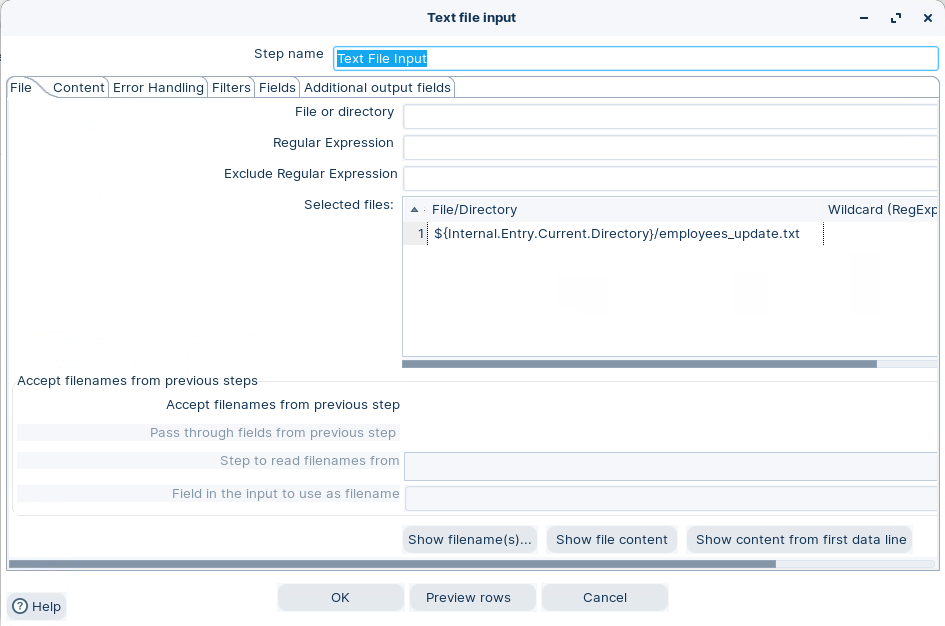
4. Configure the file path:
* **File:** `${Internal.Transformation.Filename.Directory}/employees_update.txt`
Set file path
{% hint style="info" %}
If `${Internal.Transformation.Filename.Directory}` is empty, save the transformation first.
{% endhint %}
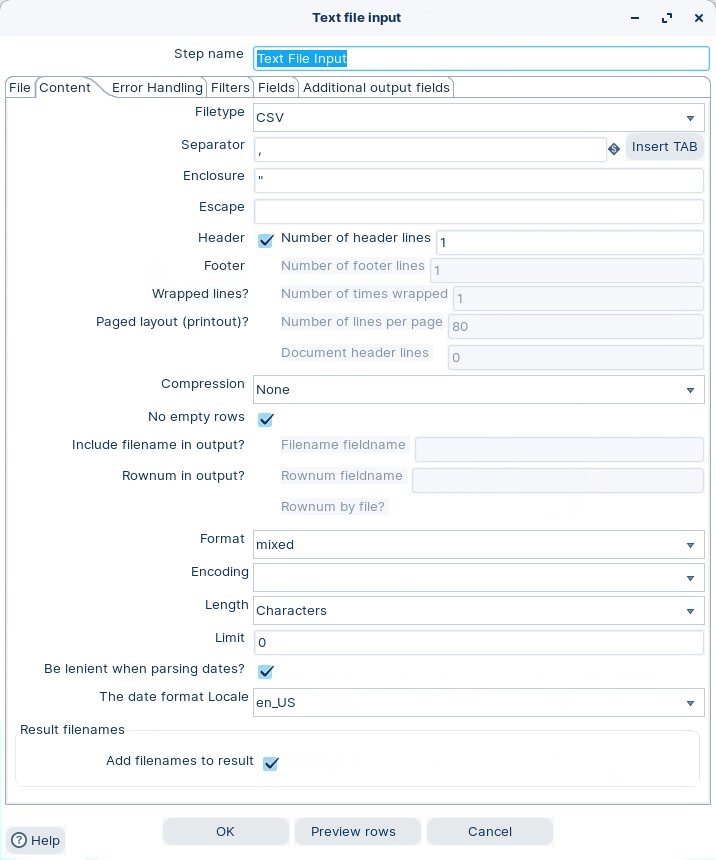
5. Select **Content**. Use the same delimiter settings as the screenshot.
Text file input - Content
6. Select **Get Fields**.
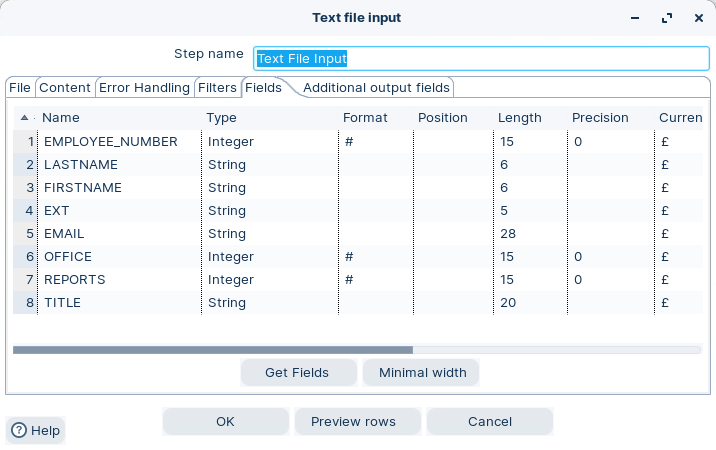
7. On **Fields**, confirm you have these stream fields:
* `EMPLOYEE_NUMBER`
* `LASTNAME`
* `FIRSTNAME`
* `EXTENSION`
* `EMAIL`
* `OFFICECODE`
* `REPORTSTO`
* `JOBTITLE`
Text file input - Fields
8. Optional: select **Preview**. Confirm you get 2 rows.
9. Select **OK**.
{% hint style="success" %}
Checkpoint: Preview shows 2 employee rows.
{% endhint %}
{% endtab %}
{% tab title="2. Update" %}
{% hint style="info" %}
#### Update
Use **Update** to update existing database rows only.\
If a key lookup does not match, the step skips that row.
{% endhint %}
{% hint style="info" %}
If you also need inserts, use [Insert / Update DB](/pentaho-data-integration/data-integration/data-sources/databases/cruid/insert-update-db.md).
{% endhint %}
1. Drag **Update** onto the canvas.
2. Create a hop from **Text file input** to **Update**.
3. Open the step properties.
4. Select your database **Connection**.
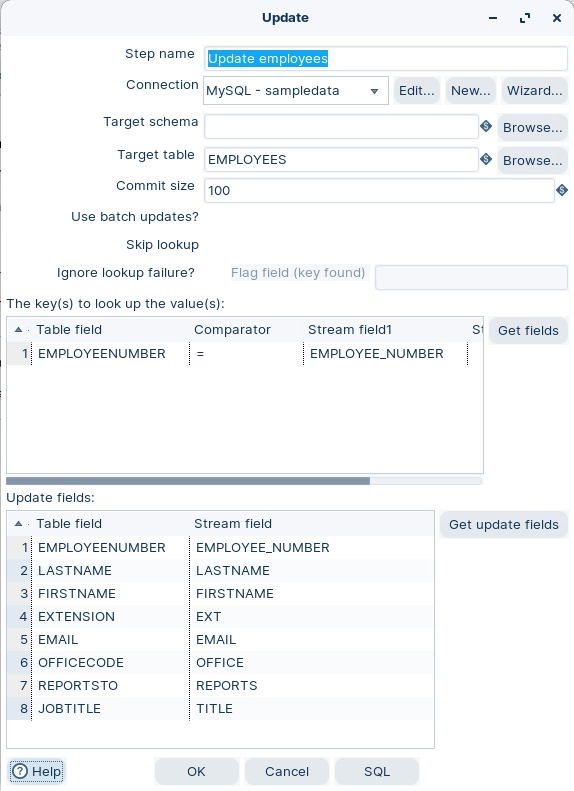
5. Set **Target table** to `EMPLOYEES`.
Update fields
{% hint style="info" %}
**Key lookup**
Map the table key `EMPLOYEENUMBER` to the stream field `EMPLOYEE_NUMBER`.
**Update fields**
Select **Get update fields**. Then confirm mappings are correct.
Do not add `EMPLOYEENUMBER` as an update field.
{% endhint %}
6. Select **OK**.
{% endtab %}
{% tab title="3. Run and validate" %}
{% hint style="info" %}
#### Run and validate
Run the transformation. Then validate the changes in the database.
{% endhint %}
1. Select **Run** in the canvas toolbar.
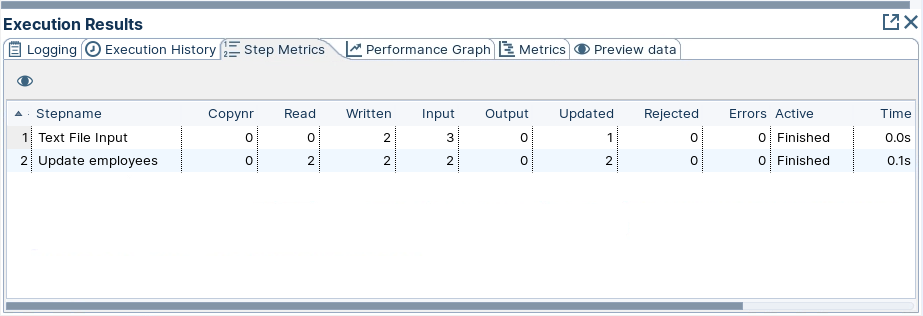
2. In **Execution Results**, open **Step Metrics**.
Step metrics
{% hint style="info" %}
You should see **2 updated** rows for the Update step.
{% endhint %}
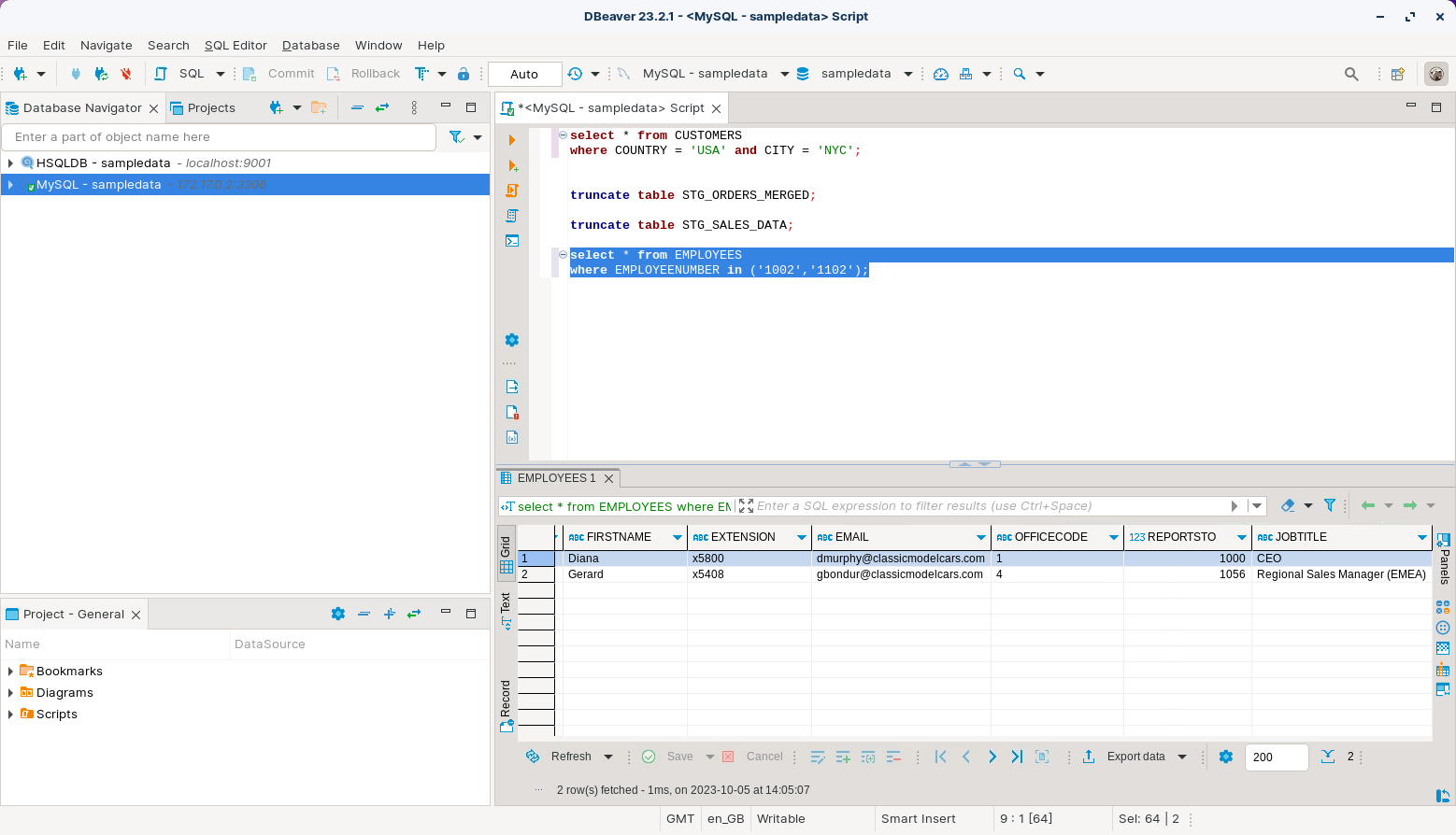
3. Verify the updated rows:
```sql
select * from EMPLOYEES
where EMPLOYEENUMBER in ('1002','1102');
```
Update employees
{% hint style="success" %}
Checkpoint: `JOBTITLE` matches the values from `employees_update.txt`.
{% endhint %}
{% endtab %}
{% endtabs %}
Troubleshooting
**Step updates 0 rows**\
Confirm `EMPLOYEENUMBER` exists in `EMPLOYEES`. The Update step does not insert.
**Updates fail with data type errors**\
Make sure `EMPLOYEE_NUMBER` is numeric. Use **Select values** to cast if needed.
**Wrong rows updated**\
Confirm the key mapping is `EMPLOYEENUMBER` (table) = `EMPLOYEE_NUMBER` (stream).
---
# Agent Instructions
This documentation is published with GitBook. GitBook is the documentation platform designed so that both humans and AI agents can read, navigate, and reason over technical content effectively. Learn more at gitbook.com.
## Querying This Documentation
If you need additional information that is not directly available in this page, you can query the documentation dynamically by asking a question.
Perform an HTTP GET request on the current page URL with the `ask` query parameter, and the optional `goal` query parameter:
```
GET https://academy.pentaho.com/pentaho-data-integration/data-integration/data-sources/databases/cruid/update-db-table.md?ask=&goal=
```
`ask` is the immediate question: it should be specific, self-contained, and written in natural language.
`goal` is optional and describes the broader end goal you are ultimately trying to accomplish on behalf of the user. GitBook uses it to tailor the answer towards what is most useful for that goal.
The response will contain a direct answer to the question and relevant excerpts and sources from the documentation.
Use this mechanism when the answer is not explicitly present in the current page, you need clarification or additional context, or you want to retrieve related documentation sections.
.png?alt=media)