> For the complete documentation index, see [llms.txt](https://academy.pentaho.com/llms.txt). Markdown versions of documentation pages are available by appending `.md` to page URLs; this page is available as [Markdown](https://academy.pentaho.com/pentaho-data-integration/data-integration/enterprise-solution.md).
# Enterprise Solution
Scale out your Solution ..
{% hint style="info" %}
**Jobs & Carte Servers**
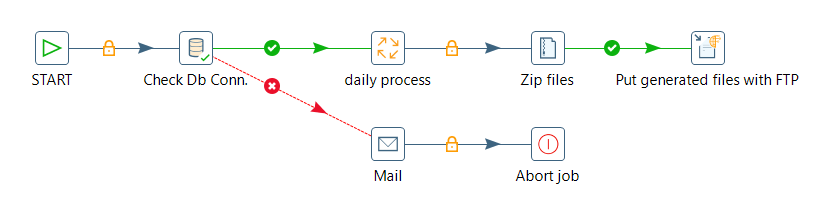
Jobs are workflows whose role is to orchestrate the execution of a set of tasks: they generally synchronize and prioritize the execution of tasks and give an order of execution based on the success or failure of the execution of the current task. These tasks are basic tasks that either prepare the execution environment for other tasks that are next in the execution workflow or that manage the artefacts produced by tasks that are preceding them in the execution workflow.
For example, there are tasks that manipulate files and directories in the local filesystem, tasks that move files between remote servers through FTP or SSH, and tasks that check the availability of a table or the content of a table. Any job can call other jobs or transformations to design more complex processes. Therefore, jobs orchestrate the execution of jobs and transformations into large ETL processes.
{% endhint %}
Job Entries
{% hint style="info" %}
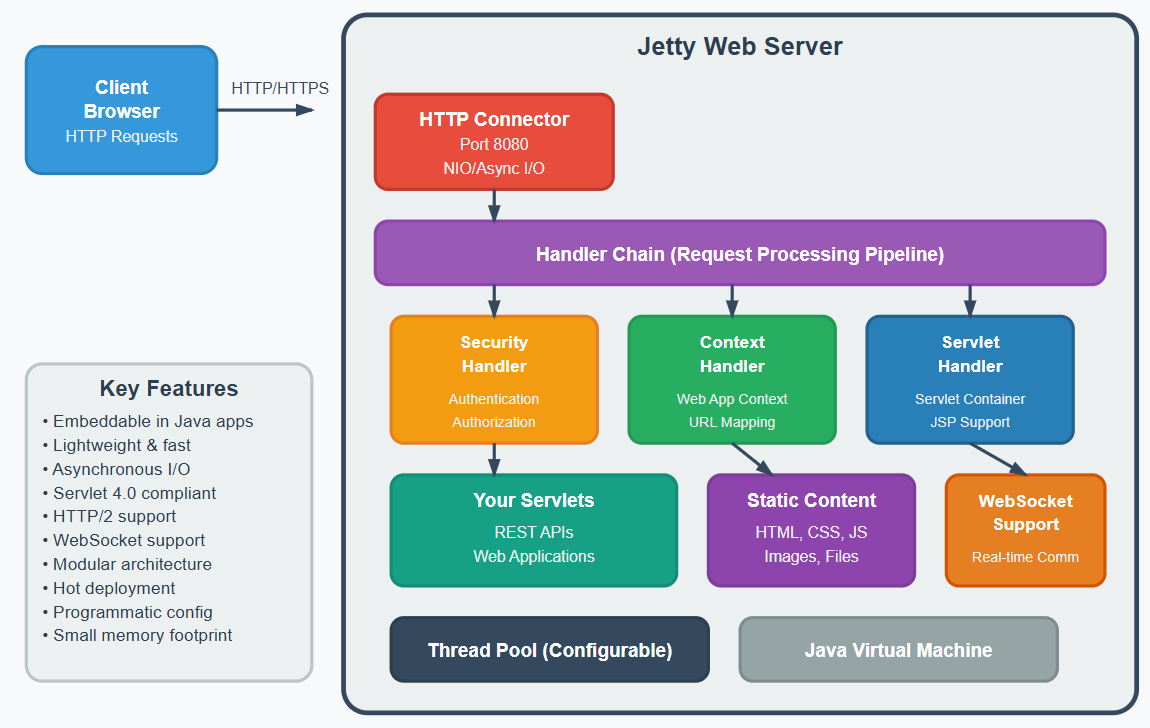
Carte is a simple web server that allows you to run transformations and jobs remotely. It receives XML (using a small servlet) that contains the transformation to run and the execution configuration. It allows you to remotely monitor, start and stop the transformations and jobs that run on the Carte server.
You can set up an individual instance of Carte to operate as a standalone execution engine for a job or transformation. In Spoon, you can define one or more Carte servers and send jobs and transformations to them. If you want to improve PDI performance for resource-intensive transformations and jobs, use Carte cluster.
{% endhint %}
Jetty - Carte server
---
# Agent Instructions
This documentation is published with GitBook. GitBook is the documentation platform designed so that both humans and AI agents can read, navigate, and reason over technical content effectively. Learn more at gitbook.com.
## Querying This Documentation
If you need additional information that is not directly available in this page, you can query the documentation dynamically by asking a question.
Perform an HTTP GET request on the current page URL with the `ask` query parameter, and the optional `goal` query parameter:
```
GET https://academy.pentaho.com/pentaho-data-integration/data-integration/enterprise-solution.md?ask=&goal=
```
`ask` is the immediate question: it should be specific, self-contained, and written in natural language.
`goal` is optional and describes the broader end goal you are ultimately trying to accomplish on behalf of the user. GitBook uses it to tailor the answer towards what is most useful for that goal.
The response will contain a direct answer to the question and relevant excerpts and sources from the documentation.
Use this mechanism when the answer is not explicitly present in the current page, you need clarification or additional context, or you want to retrieve related documentation sections.