> For the complete documentation index, see [llms.txt](https://academy.pentaho.com/llms.txt). Markdown versions of documentation pages are available by appending `.md` to page URLs; this page is available as [Markdown](https://academy.pentaho.com/pentaho-data-integration/data-integration/data-sources/databases/cruid/delete-db-table.md).
# Delete DB table
Delete rows from STG\_SALES\_DATA using transformation-driven criteria.
{% hint style="warning" %}
#### Workshop - Delete DB table
Delete rows from `STG_SALES_DATA` based on criteria in a stream.\
This workshop uses a product line list and a minimum quantity threshold.
Use this step when your delete logic is driven by transformation output.\
Use **Execute SQL script** for simple deletes.
**What you’ll do**
* Inspect the target table before you delete
* Build a delete criteria stream (product line + quantity)
* Delete matching rows with **Delete**
* Validate results with SQL
**Prerequisites**
* `STG_SALES_DATA` exists. Create it in [Create DB table](/pentaho-data-integration/data-integration/data-sources/databases/cruid/create-db-table.md).
* A working database connection. See [Database Connections](/pentaho-data-integration/data-integration/data-sources/databases/cruid/database-connections.md).
**Estimated time:** 20 minutes
{% endhint %}
***
{% hint style="info" %}
**Workshop files**
Create a file named `productlines.csv`.\
Save it in the same folder as your transformation.
This workshop assumes a single-column file with **no header row**:
```
Classic Cars
Motorcycles
Planes
Ships
Trains
Trucks and Buses
Vintage Cars
```
{% endhint %}
{% hint style="danger" %}
Back up your table before you run deletes.\
You can copy the table, or use a database snapshot.
{% endhint %}
{% file src="/files/GEjwJhmXShQ5dizQjxDb" %}
{% file src="/files/RssdwRBksrQE9M1YUkRz" %}
***
Delete
{% hint style="info" %}
**Create a new transformation**
Use any of these options to open a new transformation tab:
* Select **File** > **New** > **Transformation**
* Use `Ctrl+N` (Windows/Linux) or `Cmd+N` (macOS)
{% endhint %}
***
{% tabs %}
{% tab title="1. Inspect data" %}
{% hint style="info" %}
#### Inspect the data
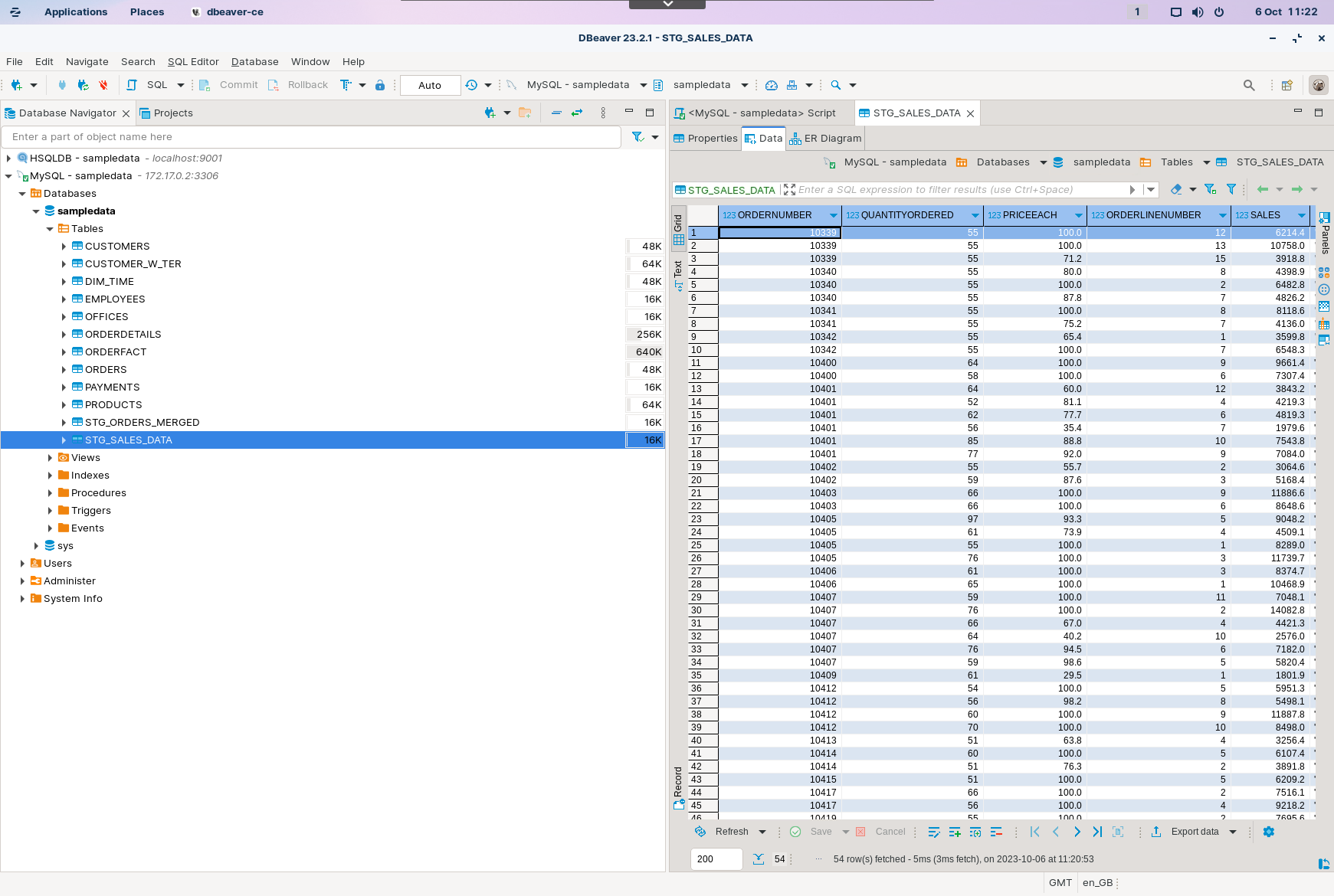
Inspect `STG_SALES_DATA` before you delete.\
You need a baseline to validate the change.
{% endhint %}
1. In your database tool, view `STG_SALES_DATA`.
STG_SALES_DATA
{% hint style="info" %}
You will filter deletes using `PRODUCTLINE` and `QUANTITYORDERED`.
{% endhint %}
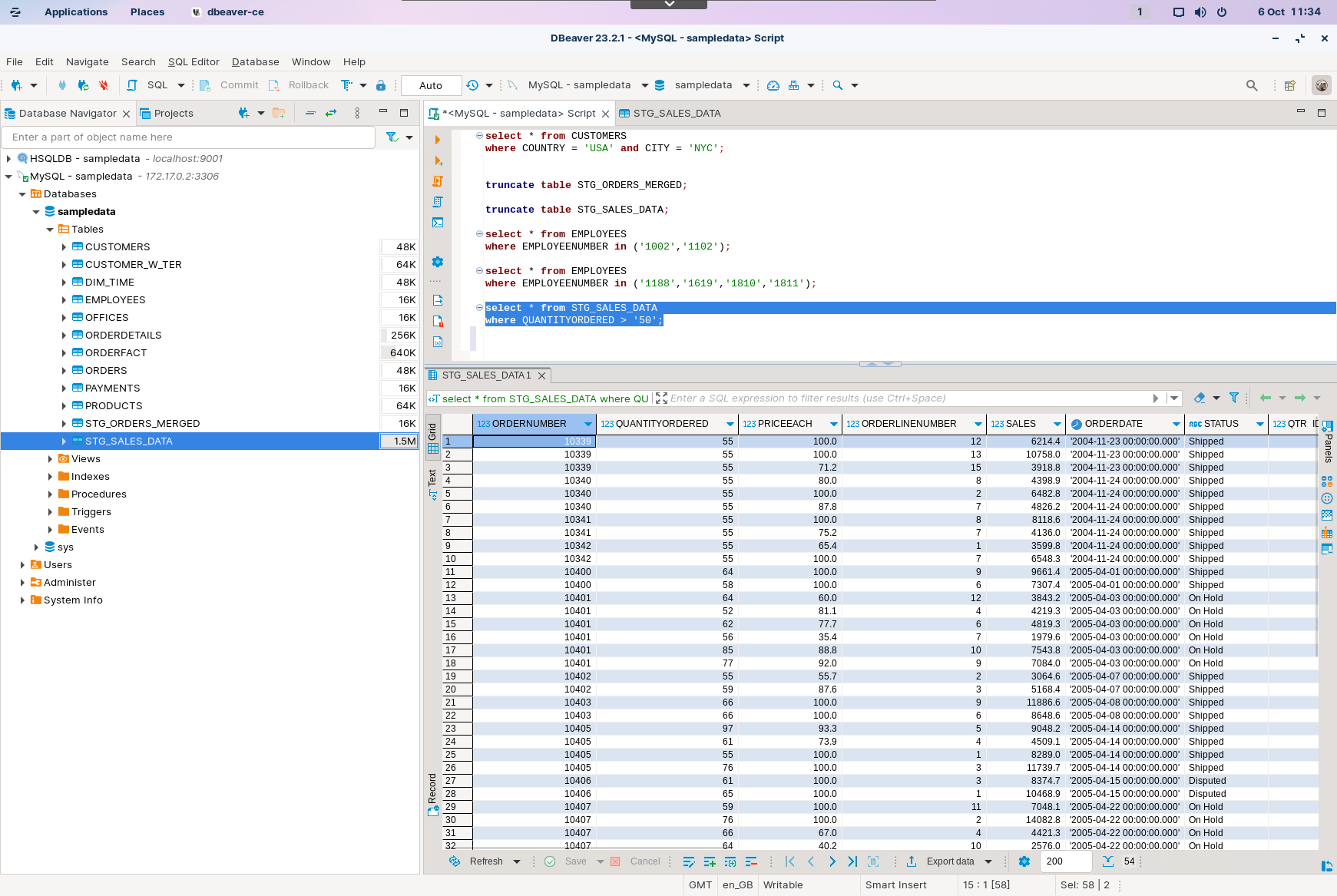
2. Run a quick check for high-quantity rows:
```sql
select * from STG_SALES_DATA
where QUANTITYORDERED > 50;
```
STG_SALES_DATA constraint QUANTITYORDERED > 50
{% endtab %}
{% tab title="2. CSV File input" %}
{% hint style="info" %}
#### CSV File input
Read `productlines.csv`. Each row is one `PRODUCTLINE` value.
{% endhint %}
1. Start Spoon.
{% hint style="info" %}
{% tabs %}
{% tab title="Windows (PowerShell)" %}
```powershell
Set-Location C:\Pentaho\design-tools\data-integration
.\spoon.bat
```
{% endtab %}
{% tab title="macOS / Linux" %}
```bash
cd ~/Pentaho/design-tools/data-integration
./spoon.sh
```
{% endtab %}
{% endtabs %}
{% endhint %}
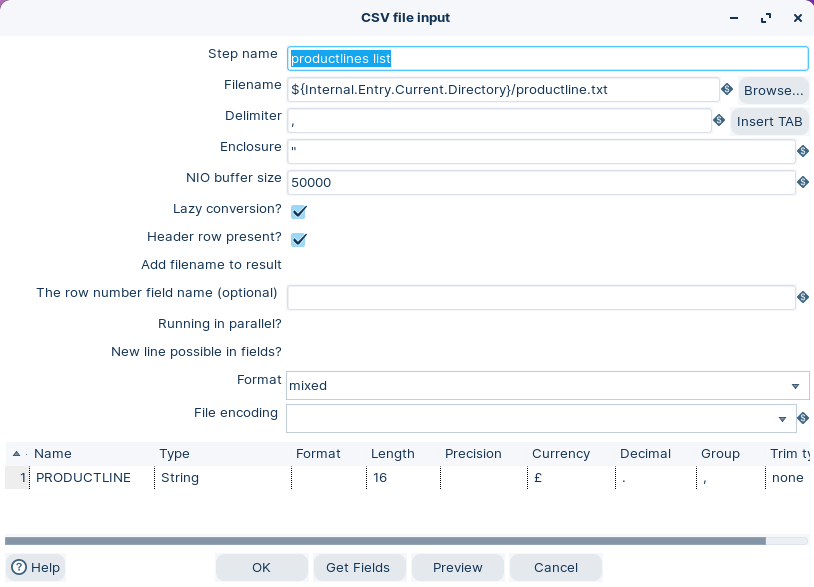
2. Drag the CSV File Input step onto the canvas.
3. Open the CSV File Input properties dialog box.
4. Configure it to read: `${Internal.Transformation.Filename.Directory}/productlines.csv`
5. Select **Get Fields**.
CSV File input - PRODUCTLINE list
{% endtab %}
{% tab title="3. Parameters" %}
{% hint style="info" %}
#### Transformation parameters
Use a parameter for your minimum quantity threshold.\
This keeps your transformation easy to reuse.
{% endhint %}
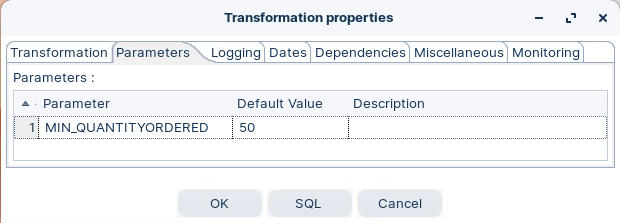
1. Double-click on the canvas and select the Parameter tab.
2. Create a parameter named `min_quantityordered`.
3. Set a default value (for example `50`).
Set parameters
{% endtab %}
{% tab title="4. Get Variables" %}
{% hint style="info" %}
#### Get variables
Bring `min_quantityordered` into the stream so the Delete step can use it.
{% endhint %}
1. Drag the Get variables step onto the canvas.
2. Open the Get variables properties dialog box.
3. Configure the step to output a field for `${min_quantityordered}`.
Get variables
{% endtab %}
{% tab title="5. Delete" %}
{% hint style="info" %}
#### Delete
Delete is a **terminal** step. It does not pass rows downstream.\
It builds `DELETE` statements from the input stream.
{% endhint %}
{% hint style="danger" %}
Be careful with the comparators in this step.\
Always validate your criteria before you run.
{% endhint %}
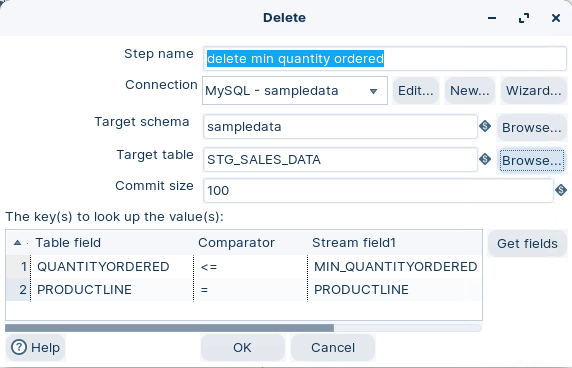
1. Drag the Delete step onto the canvas.
2. Open the Delete properties dialog box.
3. Configure the database **Connection** and set **Table name** to `STG_SALES_DATA`.
4. Map stream fields to table fields for your delete criteria.
Delete step
{% hint style="info" %}
This workshop uses criteria based on:
* `QUANTITYORDERED` and the `min_quantityordered` value
* `PRODUCTLINE` values from `productlines.csv`
{% endhint %}
{% endtab %}
{% tab title="6. Run and validate" %}
{% hint style="info" %}
#### Run and validate
Run the transformation, then validate the row counts and sample rows.
{% endhint %}
{% hint style="warning" %}
Re-run your baseline queries from the first tab.\
Confirm the results match your delete criteria.
{% endhint %}
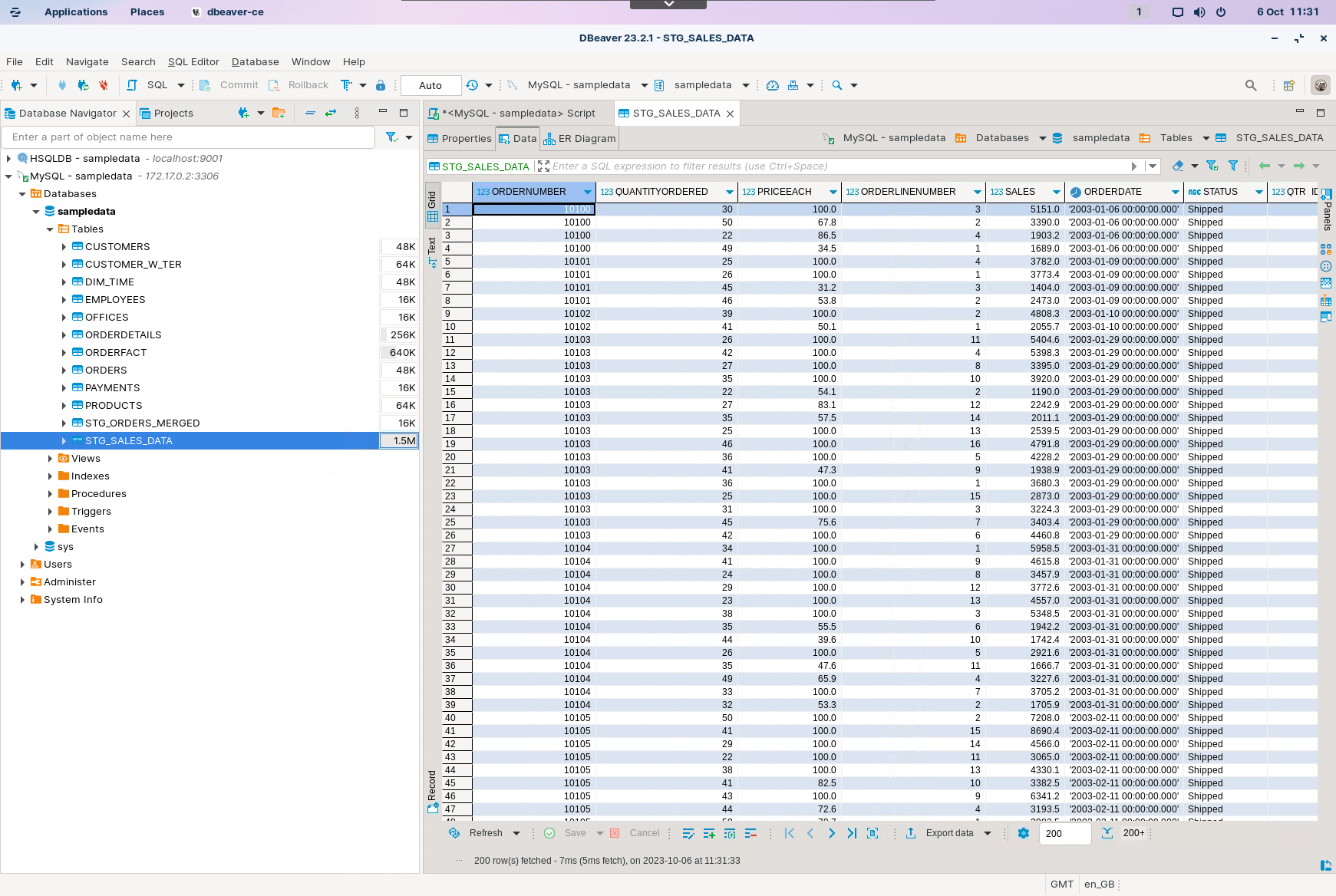
1. Select **Run** in Spoon.
2. In your database tool, inspect `STG_SALES_DATA`.
STG_SALES_DATA
{% endtab %}
{% endtabs %}
Troubleshooting
**Nothing was deleted**\
Your criteria did not match any rows. Confirm your comparator and data types.
**Too many rows deleted**\
Your comparator is too broad, or you mapped the wrong field names.
**Delete step fails with type conversion errors**\
Cast `min_quantityordered` to a number with **Select values**.
---
# Agent Instructions
This documentation is published with GitBook. GitBook is the documentation platform designed so that both humans and AI agents can read, navigate, and reason over technical content effectively. Learn more at gitbook.com.
## Querying This Documentation
If you need additional information that is not directly available in this page, you can query the documentation dynamically by asking a question.
Perform an HTTP GET request on the current page URL with the `ask` query parameter, and the optional `goal` query parameter:
```
GET https://academy.pentaho.com/pentaho-data-integration/data-integration/data-sources/databases/cruid/delete-db-table.md?ask=&goal=
```
`ask` is the immediate question: it should be specific, self-contained, and written in natural language.
`goal` is optional and describes the broader end goal you are ultimately trying to accomplish on behalf of the user. GitBook uses it to tailor the answer towards what is most useful for that goal.
The response will contain a direct answer to the question and relevant excerpts and sources from the documentation.
Use this mechanism when the answer is not explicitly present in the current page, you need clarification or additional context, or you want to retrieve related documentation sections.
.png?alt=media)
.png?alt=media)