> For the complete documentation index, see [llms.txt](https://academy.pentaho.com/llms.txt). Markdown versions of documentation pages are available by appending `.md` to page URLs; this page is available as [Markdown](https://academy.pentaho.com/pentaho-data-integration/data-integration/data-sources/databases/cruid/read-db-table.md).
# Read DB table
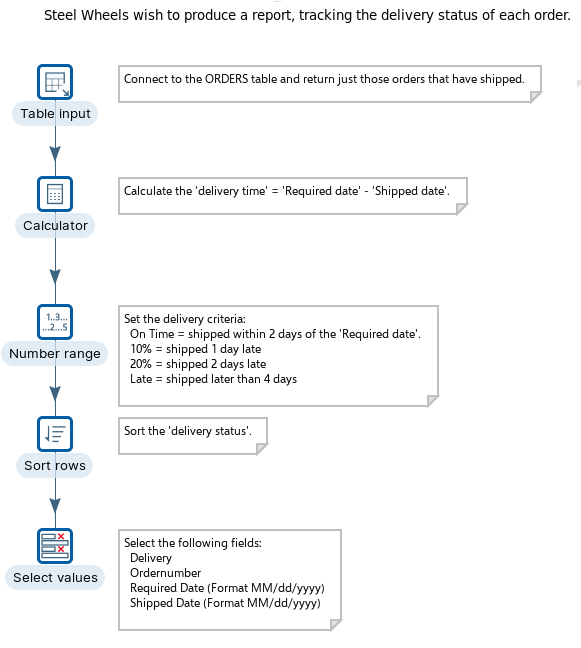
Read shipped orders from a database table using Table Input.
{% hint style="warning" %}
#### Workshop - Read DB table
Build a transformation that reads `ORDERS` rows from a database.\
Filter to shipped orders, calculate lead time, and label late shipments.
**What you’ll do**
* Read rows with **Table Input**
* Generate SQL with **Get SQL select statement**
* Add a calculated field with **Calculator**
* Bucket values with **Number range**
* Sort and format output for review
**Prerequisites**
* Pentaho Data Integration installed and configured
* A working database connection. See [Database Connections](/pentaho-data-integration/data-integration/data-sources/databases/cruid/database-connections.md).
* Basic `SELECT` and `WHERE`
**Estimated time:** 20 minutes
{% endhint %}
***
{% hint style="info" %}
**Workshop files**
Download the following files.
Keep the filenames unchanged.
Save them in your workshop folder.
{% endhint %}
{% file src="/files/EyMpG5AvaxL66l4wJtEY" %}
***
Read from a database
{% hint style="info" %}
**Create a new transformation**
Use any of these options to open a new transformation tab:
* Select **File** > **New** > **Transformation**
* Use `Ctrl+N` (Windows/Linux) or `Cmd+N` (macOS)
{% endhint %}
***
{% tabs %}
{% tab title="1. Table input" %}
{% hint style="info" %}
#### Table Input
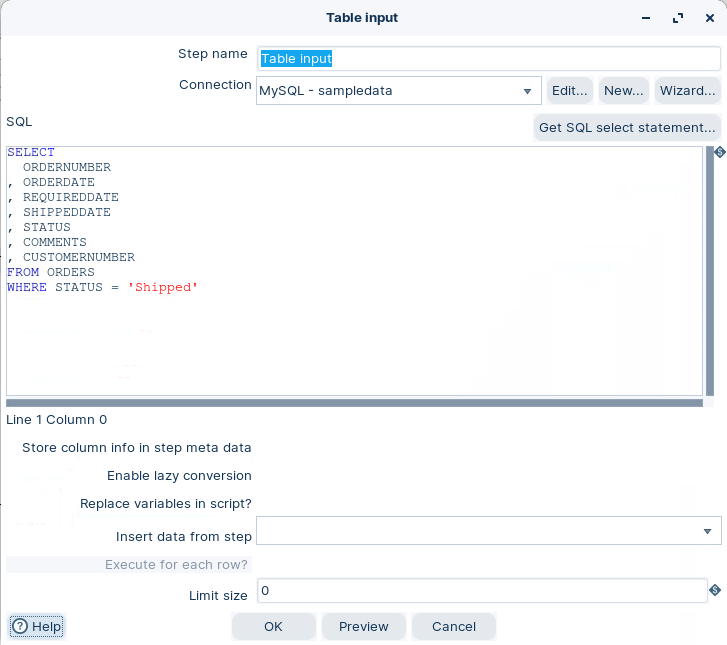
Read rows from a database using a connection and SQL.\
In this workshop, filter to orders with `STATUS = 'Shipped'`.
{% endhint %}
1. Start Spoon.
{% hint style="info" %}
{% tabs %}
{% tab title="Windows (PowerShell)" %}
```powershell
Set-Location C:\Pentaho\design-tools\data-integration
.\spoon.bat
```
{% endtab %}
{% tab title="macOS / Linux" %}
```bash
cd ~/Pentaho/design-tools/data-integration
./spoon.sh
```
{% endtab %}
{% endtabs %}
{% endhint %}
2. Drag **Table Input** onto the canvas.
3. Open the step properties.
4. Configure the step to match your environment:
* Select your database **Connection**
* Use **Get SQL select statement** to generate a base query
* Add a `WHERE` clause for shipped orders
{% hint style="info" %}
Example filter:
```sql
WHERE STATUS = 'Shipped'
```
{% endhint %}
Table input
5. Select **Preview**. Confirm you get shipped orders.
6. Select **OK**.
{% hint style="success" %}
Checkpoint: Preview shows only rows with `STATUS = 'Shipped'`.
{% endhint %}
{% endtab %}
{% tab title="2. Calculator" %}
{% hint style="info" %}
#### Calculator
Add a derived field using built-in functions.\
Use Calculator for speed and simple expressions.
{% endhint %}
1. Add a hop from **Table Input** to **Calculator**.
2. Drag **Calculator** onto the canvas.
3. Open the step properties.
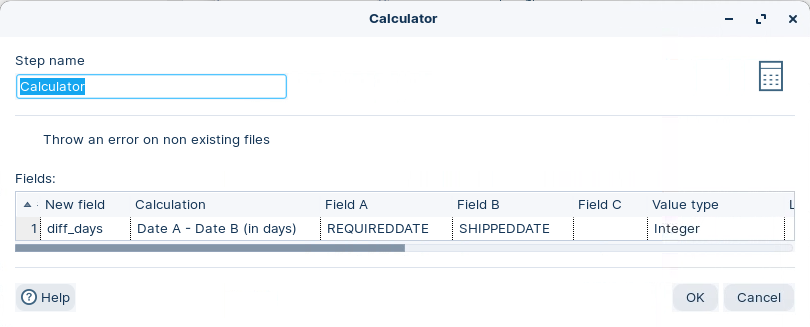
4. Configure the calculation shown in the screenshot.
Calculate diff days
5. Select **OK**.
{% hint style="info" %}
This creates `order_time`.\
It represents the day difference between required and shipped dates.
{% endhint %}
{% endtab %}
{% tab title="3. Number range" %}
{% hint style="info" %}
#### Number range
Map numeric values into named buckets.\
This makes reports easier to scan.
{% endhint %}
1. Add a hop from **Calculator** to **Number range**.
2. Drag **Number range** onto the canvas.
3. Open the step properties.
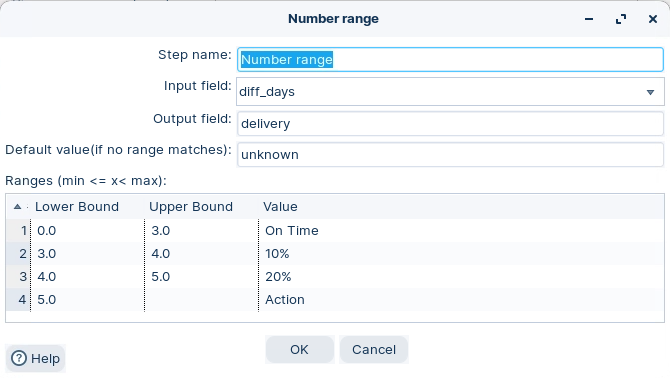
4. Configure the ranges as shown.
Number range
{% hint style="info" %}
This writes an output label (for example, `order_status`) based on `order_time`.\
Use the same labels and thresholds as the screenshot.
{% endhint %}
5. Select **OK**.
{% endtab %}
{% tab title="4. Sort rows" %}
{% hint style="info" %}
#### Sort rows
Sort output to match how you want to read it.\
This is also a common prerequisite for merge-style steps.
{% endhint %}
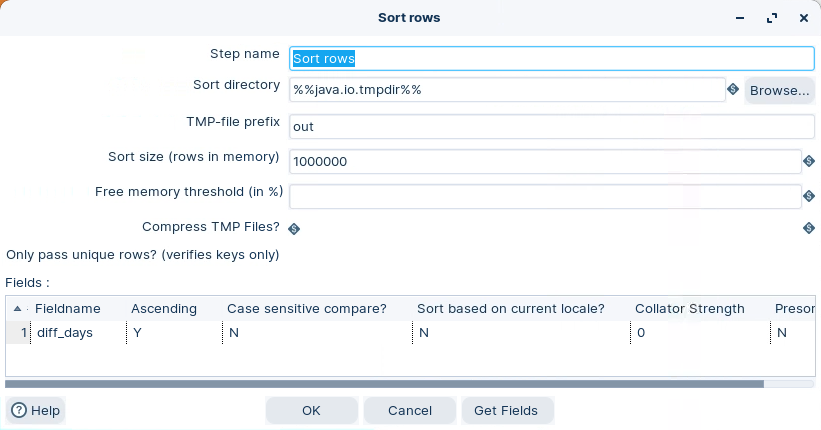
1. Add a hop from **Number range** to **Sort rows**.
2. Drag **Sort rows** onto the canvas.
3. Open the step properties.
4. Configure the sort keys as shown.
Sort rows
5. Select **OK**.
{% hint style="info" %}
If you hit memory errors, lower the sort size.\
PDI spills to temp files when needed.
{% endhint %}
{% endtab %}
{% tab title="5. Select values" %}
{% hint style="info" %}
#### Select values
Keep only fields you need.\
Fix types, lengths, and formats for downstream steps.
{% endhint %}
1. Add a hop from **Sort rows** to **Select values**.
2. Drag **Select values** onto the canvas.
3. Open the step properties.
4. Configure the field selection and type changes shown.
5. Select **OK**.
{% hint style="info" %}
This formats `REQUIREDDATE` and `SHIPPEDDATE`.
{% endhint %}
{% endtab %}
{% tab title="6. RUN" %}
{% hint style="info" %}
#### Run and validate
Run the transformation and inspect the final stream.
{% endhint %}
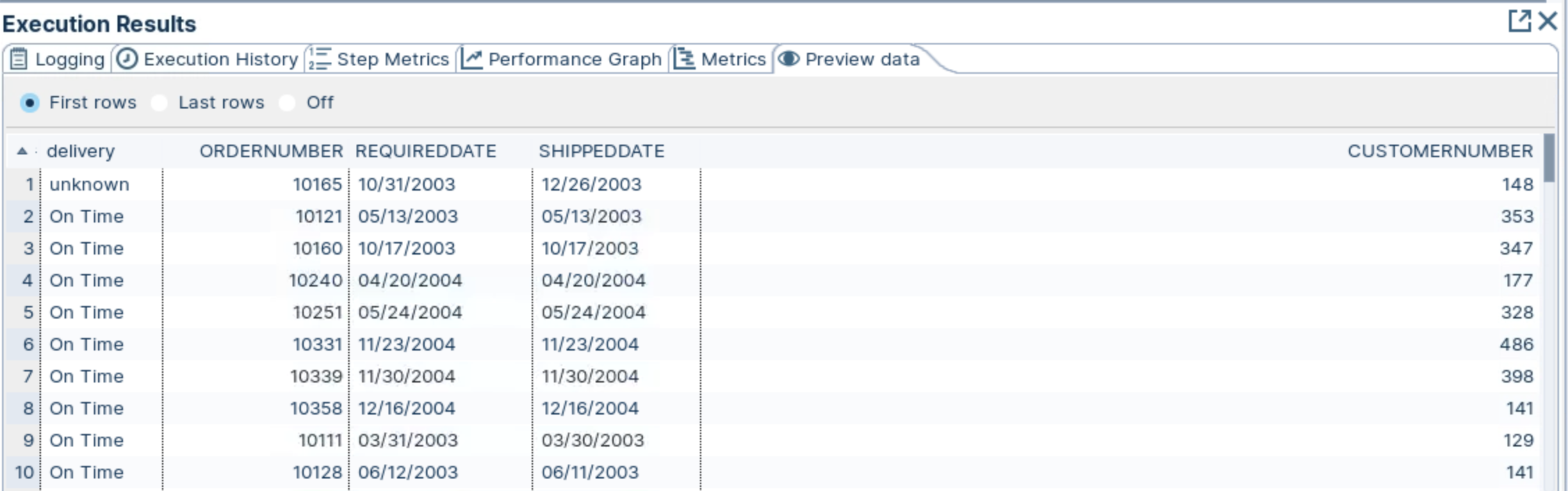
1. In Spoon, select **Run**.
2. In **Execution Results**, open **Preview data** for **Select values**.
Status of 'shipped' orders
{% hint style="success" %}
Checkpoint: You see shipped orders plus your derived fields (`order_time`, and the range label).
{% endhint %}
{% endtab %}
{% endtabs %}
Troubleshooting
**Preview shows zero rows**\
Confirm the `WHERE STATUS = 'Shipped'` filter matches your source values.
**SQL errors**\
Select **Get SQL select statement** again. Then re-apply your `WHERE` clause.
**Date or number conversion issues**\
Fix types in **Select values**. Re-run the preview.
**Out of memory during sort**\
Lower the sort size in **Sort rows**, or increase JVM memory.
---
# Agent Instructions
This documentation is published with GitBook. GitBook is the documentation platform designed so that both humans and AI agents can read, navigate, and reason over technical content effectively. Learn more at gitbook.com.
## Querying This Documentation
If you need additional information that is not directly available in this page, you can query the documentation dynamically by asking a question.
Perform an HTTP GET request on the current page URL with the `ask` query parameter, and the optional `goal` query parameter:
```
GET https://academy.pentaho.com/pentaho-data-integration/data-integration/data-sources/databases/cruid/read-db-table.md?ask=&goal=
```
`ask` is the immediate question: it should be specific, self-contained, and written in natural language.
`goal` is optional and describes the broader end goal you are ultimately trying to accomplish on behalf of the user. GitBook uses it to tailor the answer towards what is most useful for that goal.
The response will contain a direct answer to the question and relevant excerpts and sources from the documentation.
Use this mechanism when the answer is not explicitly present in the current page, you need clarification or additional context, or you want to retrieve related documentation sections.