> For the complete documentation index, see [llms.txt](https://academy.pentaho.com/llms.txt). Markdown versions of documentation pages are available by appending `.md` to page URLs; this page is available as [Markdown](https://academy.pentaho.com/pentaho-data-integration/data-integration/enrich-data/scripting/user-defined-java-class.md).
# User Defined Java Class
{% hint style="info" %}
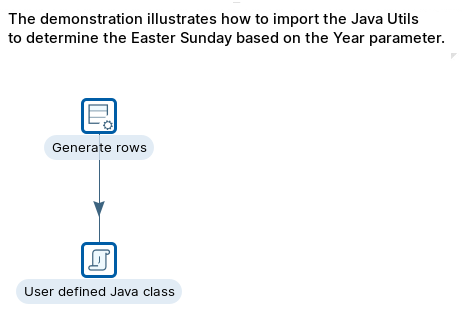
Demonstration to illustrate the Modified JavaScript Value step. We're going to use: 'Replace' function to substitute characters in a string.
In this workshop, you will:
* Configure the following steps:
* User Defined Java Class
{% endhint %}
User Defined Java Class
***
{% tabs %}
{% tab title="First Tab" %}
{% endtab %}
{% tab title="Second Tab" %}
{% endtab %}
{% endtabs %}
{% tabs %}
{% tab title="1. Generate rows" %}
{% endtab %}
{% tab title="2. UDJC" %}
{% hint style="info" %}
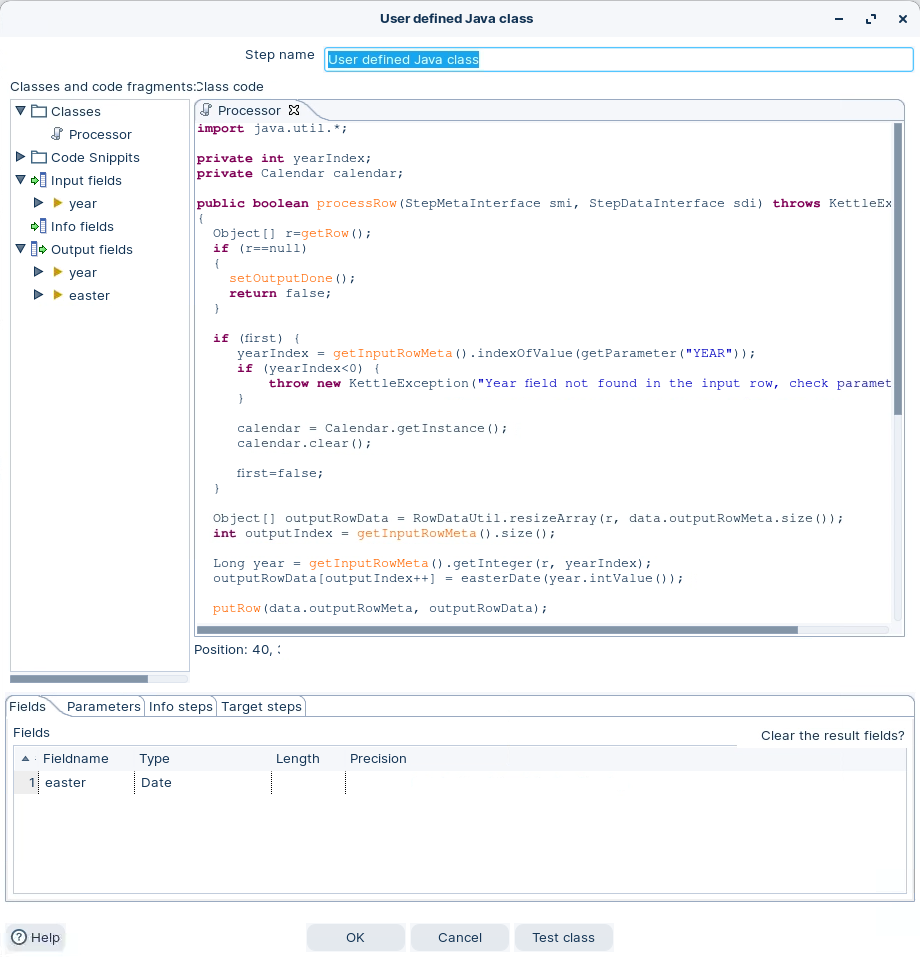
This Java code is part of a class or method that processes rows of data.
Let's break it down:
1. Import Statements:
```java
import java.util.*;
```
These statements import the `java.util` package, which includes various utility classes like `Calendar`.
2. Private Fields:
```java
private int yearIndex;
private Calendar calendar;
```
These are private instance fields of the class. `yearIndex` is an integer, and `calendar` is an instance of the `Calendar` class.
3. `processRow` Method: This method is used to process rows of data. It takes two parameters, `StepMetaInterface smi` and `StepDataInterface sdi`, and it may throw a `KettleException`.
* It checks if there is a row available for processing using `getRow()`. If there is no row, it marks the output as done and returns `false`.
* The `if (first)` block initializes some variables the first time this method is called. It finds the index of a field named "YEAR" in the input data, creates a `Calendar` instance, and clears it.
* It resizes the `outputRowData` array to match the output row's metadata size.
* It extracts the year value from the input row using `getInteger` and calculates the Easter date using the `easterDate` method.
* It adds the Easter date to the output row data and puts it into the output stream using `putRow`.
4. `easterDate` Method: This method calculates the date of Easter for a given year using the algorithm to determine the date of Easter Sunday.
* It takes the year as a parameter.
* It performs several mathematical calculations to determine the day, month, and year of Easter based on the input year.
* Finally, it sets the calculated date in the `calendar` instance and returns the `Date` object representing the Easter date.
Overall, this code is part of a data processing routine, and the `easterDate` method calculates the date of Easter for a given year using a well-known algorithm for determining Easter's date.
{% endhint %}
User Defined Java Class - Calender
{% endtab %}
{% endtabs %}
---
# Agent Instructions
This documentation is published with GitBook. GitBook is the documentation platform designed so that both humans and AI agents can read, navigate, and reason over technical content effectively. Learn more at gitbook.com.
## Querying This Documentation
If you need additional information that is not directly available in this page, you can query the documentation by asking a question.
Perform an HTTP GET request on the following URL with the `ask` and `goal` query parameters:
```
GET https://academy.pentaho.com/pentaho-data-integration/data-integration/enrich-data/scripting/user-defined-java-class.md?ask=&goal=
```
`ask` is the immediate question: it should be specific, self-contained, and written in natural language.
`goal` is what the user is ultimately trying to achieve, the reason they need the answer. Sharing it helps GitBook give you a better, more relevant answer. A goal is most helpful when it describes the outcome the user wants rather than restating the question. For example, with `ask=how do I create an API token`, a goal like `automate deployments from our CI pipeline` lets GitBook tailor the answer to that use case.
The response will contain a direct answer to the question and relevant excerpts and sources from the documentation.
Use this mechanism when the answer is not explicitly present in the current page, you need clarification or additional context, or you want to retrieve related documentation sections.