> For the complete documentation index, see [llms.txt](https://academy.pentaho.com/llms.txt). Markdown versions of documentation pages are available by appending `.md` to page URLs; this page is available as [Markdown](https://academy.pentaho.com/pentaho-data-integration/data-integration/enrich-data/merge.md).
# Merge
When you merge rows and streams check the number of fields, data types and order.
{% hint style="info" %}
**Introduction**
In Pentaho Data Integration (PDI), true record merging differs from joining and focuses on combining or consolidating duplicate records into single entries:
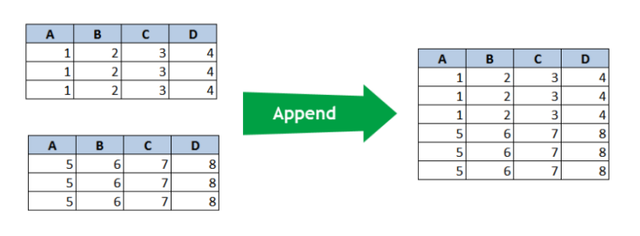
The Append operation simply stacks records from two input streams. All rows from both streams appear in the output without any sorting or matching logic applied.
With Append, the output contains all records from the first stream followed immediately by all records from the second stream. Both input streams must share the same structure with compatible field types.
{% endhint %}
Merge streams
{% hint style="info" %}
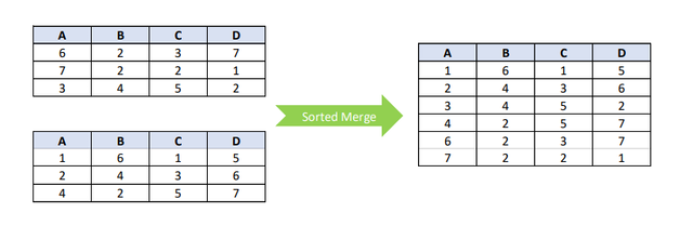
The Sorted Merge operation interleaves records from both input streams based on a predetermined sort order. This creates an integrated output where records are organized by their values.
For Sorted Merge to work properly, both input streams must be pre-sorted on the same field(s) before reaching the merge step. The operation preserves all records while maintaining the specified sort order.
Unlike joining operations, neither of these merging methods matches records based on key fields. They simply combine complete datasets according to different organizing principles - stacking for Append and interleaving by sort order for Sorted Merge.
Both techniques are valuable when you need to process records from multiple sources while maintaining all original data points.
{% endhint %}
Sorted Merge
***
{% hint style="info" %}
**Workshops**
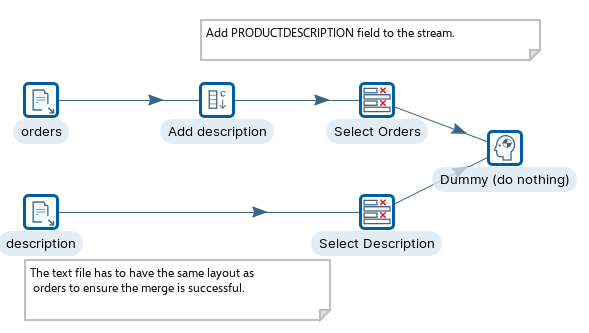
The Dummy step in Pentaho Data Integration is a simple "do nothing" transformation that passes data through unchanged. It serves as a placeholder, helps join multiple streams, creates empty data rows when needed, and improves transformation organization.
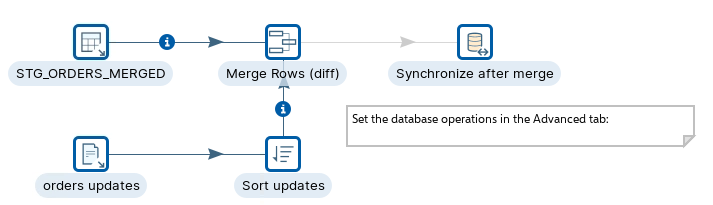
The Merge Rows step compares two input data streams with identical structures to identify differences between them. It requires configuration of reference and compare streams, key fields for matching rows, and value fields to compare. The step outputs a single stream with all rows plus a "flagfield" indicating if each row is identical, changed, new, or deleted. This functionality is particularly useful for change data capture, data synchronization, audit trails, and implementing slowly changing dimensions.
{% endhint %}
{% tabs %}
{% tab title="Merge stream" %}
{% hint style="info" %}
**Merge stream - Dummy**
The Transformation underlines the ‘rules’ for manipulating data streams. Each data stream must have the same structure / layout, before they can be merged.
In this guided demonstration, you will merge data streams based on a set of rules:
• Add constant step
{% endhint %}
Merge streams
{% content-ref url="/pages/TITwLgS97OVKMAbTSxKD" %}
[Merge Streams](/pentaho-data-integration/data-integration/enrich-data/merge/merge-streams.md)
{% endcontent-ref %}
{% endtab %}
{% tab title="Merge Rows (diff)" %}
{% hint style="info" %}
**Merge rows (diff)**
The Merge Rows (diff) compares the values between the merging rows and sets a ‘flag’.
In this guided demonstration, you will compare incoming records with reference records and then determine whether the record is Identical or needs updating, inserting, deleting:
• Merge Rows (diff) stream
• Merge Rows (diff) database
{% endhint %}
Merge Rows (diff)
{% content-ref url="/pages/1jk5exCMFFTeAUXWCl7s" %}
[Merge Rows (diff)](/pentaho-data-integration/data-integration/enrich-data/merge/merge-rows-diff.md)
{% endcontent-ref %}
{% endtab %}
{% endtabs %}
---
# Agent Instructions
This documentation is published with GitBook. GitBook is the documentation platform designed so that both humans and AI agents can read, navigate, and reason over technical content effectively. Learn more at gitbook.com.
## Querying This Documentation
If you need additional information that is not directly available in this page, you can query the documentation dynamically by asking a question.
Perform an HTTP GET request on the current page URL with the `ask` query parameter, and the optional `goal` query parameter:
```
GET https://academy.pentaho.com/pentaho-data-integration/data-integration/enrich-data/merge.md?ask=&goal=
```
`ask` is the immediate question: it should be specific, self-contained, and written in natural language.
`goal` is optional and describes the broader end goal you are ultimately trying to accomplish on behalf of the user. GitBook uses it to tailor the answer towards what is most useful for that goal.
The response will contain a direct answer to the question and relevant excerpts and sources from the documentation.
Use this mechanism when the answer is not explicitly present in the current page, you need clarification or additional context, or you want to retrieve related documentation sections.