> For the complete documentation index, see [llms.txt](https://academy.pentaho.com/llms.txt). Markdown versions of documentation pages are available by appending `.md` to page URLs; this page is available as [Markdown](https://academy.pentaho.com/pentaho-data-integration/data-integration/enrich-data/scripting/modified-javascript-value.md).
# Modified JavaScript Value
{% hint style="warning" %}
**Workshop - Modified JavaScript value**
The Modified Java Script Expression step in Pentaho Data Integration (PDI) allows users to execute custom JavaScript code to transform and manipulate data within a transformation. This step provides a powerful scripting environment where you can write JavaScript functions to perform complex calculations, data validations, string manipulations, and conditional logic that might be difficult or impossible to achieve with standard PDI steps.
The step takes input fields from the data stream, processes them through your custom JavaScript code, and outputs the results as new fields or modified existing fields. It's particularly useful for implementing business rules, data cleansing operations, or complex transformations that require programming logic beyond what built-in PDI steps can provide.
{% endhint %}
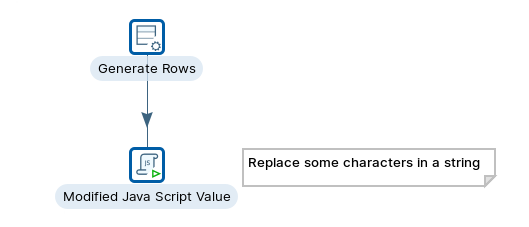
Modified JavaScript Value
***
{% tabs %}
{% tab title="First Tab" %}
{% endtab %}
{% tab title="Second Tab" %}
{% endtab %}
{% endtabs %}
{% tabs %}
{% tab title="1. Generate rows " %}
{% hint style="info" %}
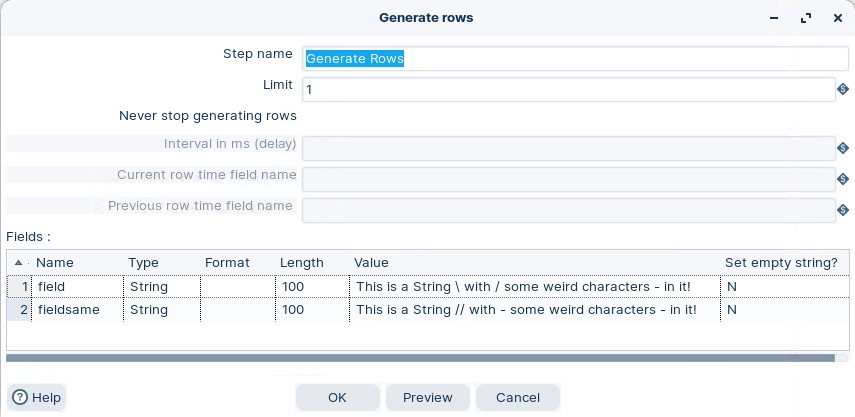
**Generate rows**
The Generate Rows step in Pentaho Data Integration (PDI) is a data generation component that creates synthetic data rows based on user-defined specifications. This step allows you to generate test data, sample datasets, or placeholder records by defining field names, data types, and value ranges or patterns.
You can specify how many rows to generate and configure various parameters like random number ranges, date intervals, or fixed values for each field. It's particularly useful for testing transformations, creating mock data for development purposes, or generating large datasets for performance testing without requiring an external data source.
{% endhint %}
Generate rows
{% endtab %}
{% tab title="2. Modified JavaScript Value" %}
{% hint style="info" %}
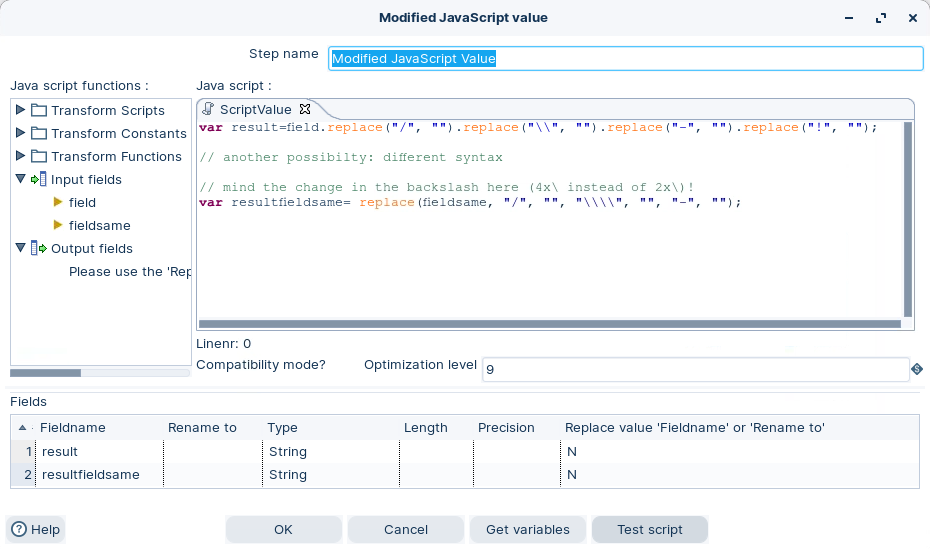
**Modified JavaScript value**
The Modified JavaScript value step provides a user interface for building JavaScript expressions that you can use to modify your data. The code you type in the script area is executed once for each input row.
* The transform allows multiple scripts in a single transform instance.
* The JavaScript step is not an input step and therefore requires an input stream from the pipeline.
{% endhint %}
Modified JavaScript value
{% hint style="info" %}
Here the name of the var = name of output data stream field. In some cases you will need to 'escape' the character.
{% endhint %}
{% endtab %}
{% endtabs %}
---
# Agent Instructions
This documentation is published with GitBook. GitBook is the documentation platform designed so that both humans and AI agents can read, navigate, and reason over technical content effectively. Learn more at gitbook.com.
## Querying This Documentation
If you need additional information that is not directly available in this page, you can query the documentation by asking a question.
Perform an HTTP GET request on the following URL with the `ask` and `goal` query parameters:
```
GET https://academy.pentaho.com/pentaho-data-integration/data-integration/enrich-data/scripting/modified-javascript-value.md?ask=&goal=
```
`ask` is the immediate question: it should be specific, self-contained, and written in natural language.
`goal` is what the user is ultimately trying to achieve, the reason they need the answer. Sharing it helps GitBook give you a better, more relevant answer. A goal is most helpful when it describes the outcome the user wants rather than restating the question. For example, with `ask=how do I create an API token`, a goal like `automate deployments from our CI pipeline` lets GitBook tailor the answer to that use case.
The response will contain a direct answer to the question and relevant excerpts and sources from the documentation.
Use this mechanism when the answer is not explicitly present in the current page, you need clarification or additional context, or you want to retrieve related documentation sections.