# Variables

{% hint style="info" %}
PDI variables can be defined in several ways, and with the different scope. You already know about predefined variables and variables defined in the kettle.properties file, but there are more options.

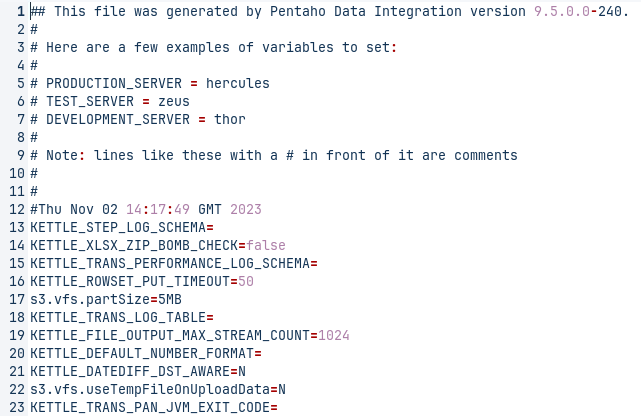
PDI variables can be used in both transformation steps and job entries. You define variables with the Set Variable step and Set Session Variables step in a transformation, manually in the kettle.properties file, or through the Set Environment Variables dialog box in the Edit menu.

The Get Variable and Get Session Variables steps can explicitly retrieve a value from a variable, or you can use it in any PDI field which has the dollar sign ![Diamond Dollar Sign](https://help.hitachivantara.com/@api/deki/files/80977/GUID-B30F4FF3-6442-4567-99AE-F71314B7CC60-low.png?revision=1) icon next to it by using a metadata string in either the Unix or Windows formats:

* `${VARIABLE}`
* `%%VARIABLE%%`
  {% endhint %}

<div align="left"><figure><img src="/files/GTayoCoZBo5FVjgKsaYj" alt=""><figcaption><p>kettle.properties</p></figcaption></figure> <figure><img src="/files/4mRNFFtohCjs5N6YkxyA" alt=""><figcaption><p>Named Parameter</p></figcaption></figure></div>

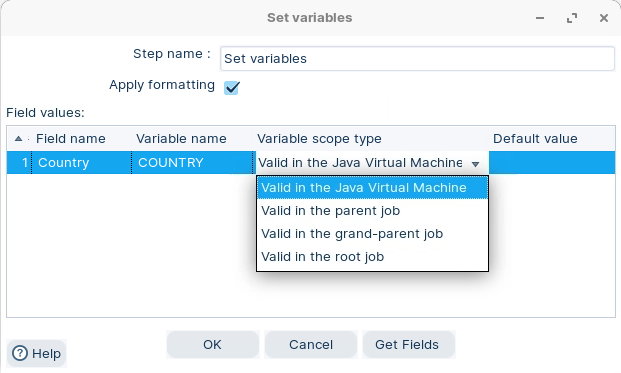
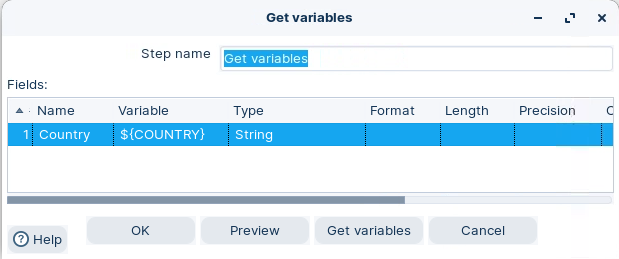
<div><figure><img src="/files/emo2wkZTnfCmk9VLYPr9" alt=""><figcaption><p>Set variables</p></figcaption></figure> <figure><img src="/files/hhIkA6SIPn9dQ3nck9UP" alt=""><figcaption><p>Get variables</p></figcaption></figure></div>

{% tabs %}
{% tab title="Predefined Variables" %}
{% hint style="info" %}
Predefined variables are Kettle variables mainly related to the environment in which PDI is running. These variables are ready to be used both in Jobs and Transformations and their scope is the Java Virtual Machine (JVM).

The following table lists some of the most used predefined variables:
{% endhint %}

<table><thead><tr><th width="330">Predefined Internal Variable</th><th>Description</th></tr></thead><tbody><tr><td><strong>Internal.Job.Filename.Directory</strong></td><td>The directory where the job file is located.</td></tr><tr><td><strong>Internal.Job.Filename.Name</strong></td><td>The name of the job file.</td></tr><tr><td><strong>Internal.Entry.Current.Directory</strong></td><td>The directory where the current entry is located.</td></tr><tr><td><strong>Internal.Transformation.Repository.Directory</strong></td><td>If you're running a transformation for the Repository, this variable will display the path.</td></tr><tr><td><strong>Internal.Cluster.Size</strong></td><td>The number of Salves in the cluster.</td></tr><tr><td><strong>Internal.Step.Name</strong></td><td>name of executing step.</td></tr></tbody></table>

<table><thead><tr><th width="328">Predefined KETTLE Variables</th><th>Description</th></tr></thead><tbody><tr><td><strong>KETTLE_HOME</strong></td><td>Location of kettle.properties file.</td></tr><tr><td></td><td></td></tr><tr><td></td><td></td></tr></tbody></table>

<table><thead><tr><th width="330">Predefined JRE Variables</th><th>Description</th></tr></thead><tbody><tr><td><strong>java.version</strong></td><td>JRE runtime version</td></tr><tr><td><strong>os.name</strong></td><td>Name of OS</td></tr><tr><td><strong>os.version</strong></td><td>OS version</td></tr><tr><td><strong>user.name</strong></td><td>User account name</td></tr><tr><td><strong>user.home</strong></td><td>User home directory</td></tr></tbody></table>

{% hint style="info" %}
To access the predefined variables, click: CTL + SPACEBAR
{% endhint %}
{% endtab %}

{% tab title="Named Variables" %}

<figure><img src="/files/Eh6xuN7eFPPBTMiS5WZy" alt=""><figcaption><p>Variables</p></figcaption></figure>

{% tabs %}
{% tab title="Tr properties" %}
{% hint style="info" %}
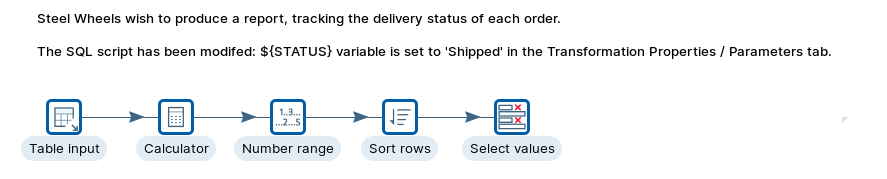
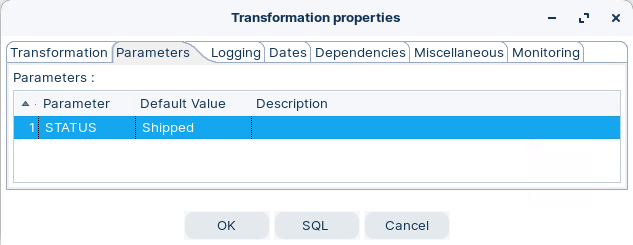
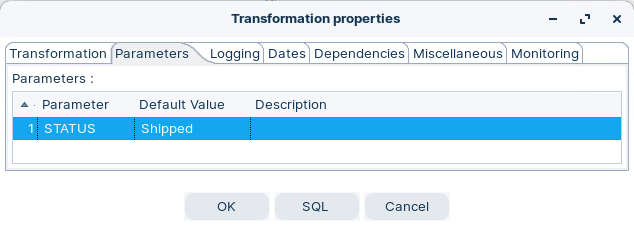
Here we set the parameter for the constraint = the WHERE clause. The report we're after is the status of the Shipped orders.
{% endhint %}

1. Open tr\_status\_variable.ktr
2. Double-click on the canvas, to open Transformation Properties.
3. Click on the Parameters tab, and configure as illustrated below:

<figure><img src="/files/bLfKumy4RfULSIRVw7rC" alt=""><figcaption><p>Parameter - STATUS = Shipped</p></figcaption></figure>

{% hint style="warning" %}
Ensure the value is exactly the same case as stored in the table.

* Capital S
  {% endhint %}
  {% endtab %}

{% tab title="Table Input" %}
{% hint style="info" %}
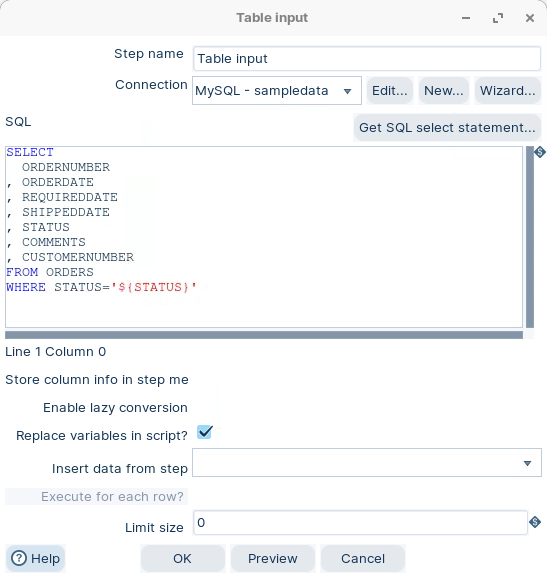
The Table Input step is used to read information from a database, using a connection and SQL.

Basic SQL statements can be generated automatically by clicking Get SQL select statement.

SQL queries can be parameterized through variables and can accept input from previous fields.
{% endhint %}

1. Double-click on the Table Input step.
2. Modify the SQL statement as illustrated below:

<figure><img src="/files/8P0wOrmUbfmnsvs7V53c" alt=""><figcaption><p>Table Input</p></figcaption></figure>

3. Add the following clause.

```bash
WHERE STATUS='${STATUS}'
```

{% endtab %}

{% tab title="Calculator" %}
{% hint style="info" %}
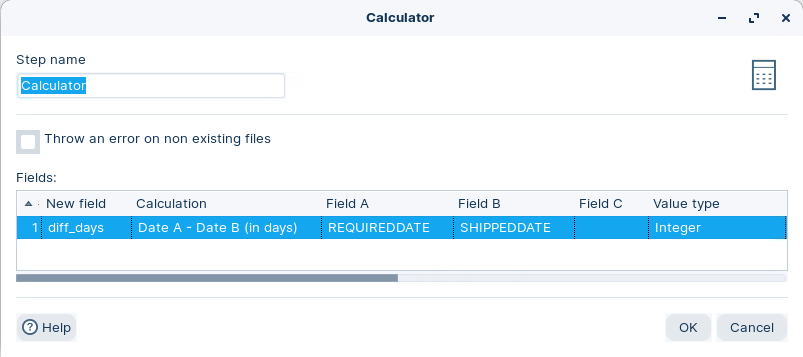
The Calculator step provides you with predefined functions that can be executed on input field values.

💡The execution speed of the Calculator is far better than the speed provided by custom scripts (JavaScript).

In addition to the arguments (Field A, Field B and Field C) you must also specify the return type of the function. You can also choose to remove the field from the result (output) after all values are calculated; this is useful in cases where you use temporary values that don’t need to end up in your pipeline fields.
{% endhint %}

1. Double-click on the Table Input step.
2. Take a look at how the new field: diff\_days is calculated:

<figure><img src="/files/vO7eBUtTWWzHdCFsAJKT" alt=""><figcaption><p>diff_days calculation</p></figcaption></figure>

{% hint style="info" %}
The dates are based on the Gregorian calender ..
{% endhint %}
{% endtab %}

{% tab title="Number range" %}
{% hint style="info" %}
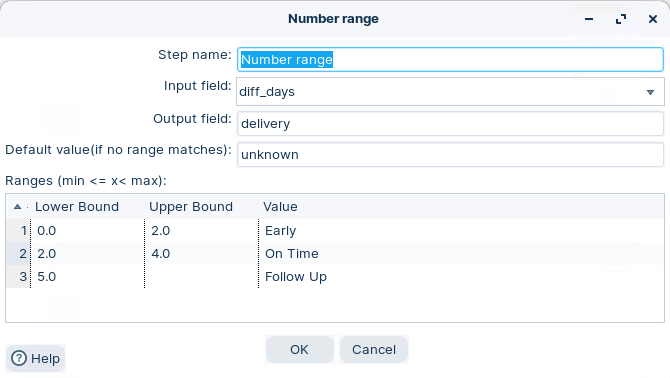
The Number Range transform creates groups numerical values into a number of predefined ranges.

* Less than 2 days - Early
* Between 2 - 3 days - On time
*

{% endhint %}

1. Double-click on the Number range step.
2. Take a look at how the new field: delivery is defined:

<figure><img src="/files/tqKRzXPtHTKQJ9gqfCdq" alt=""><figcaption><p>Number range</p></figcaption></figure>

{% hint style="info" %}
The range is set with:

* Higher or equal to the Lower bound value.
* Less than or equal to the Higher bound value.
  {% endhint %}
  {% endtab %}

{% tab title="Sort rows" %}
{% hint style="info" %}
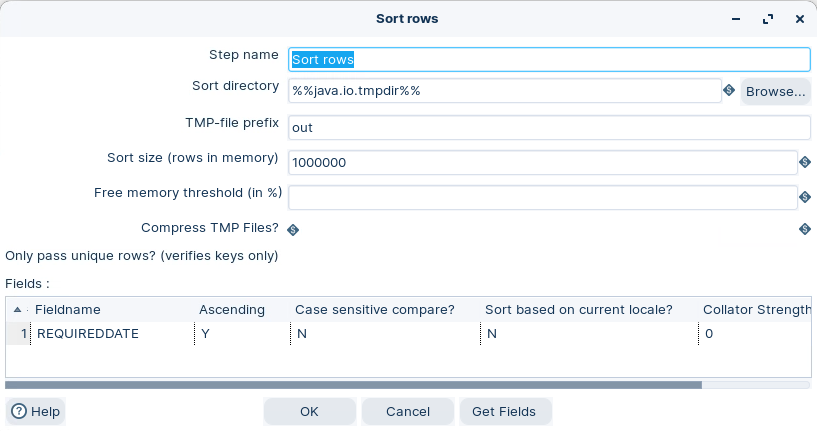
The Sort Rows transform sorts rows based on the fields you specify and on whether they should be sorted in ascending or descending order.

The step optionally passes only unique records, based on the sort keys.
{% endhint %}

1. Double-click on the Sort rows step.
2. Take a look at how the step is defined:

<figure><img src="/files/GFLvWy4Il0pnIkHlo998" alt=""><figcaption><p>Sort rows - REQUIREDDATE</p></figcaption></figure>
{% endtab %}

{% tab title="Select values" %}
{% hint style="info" %}
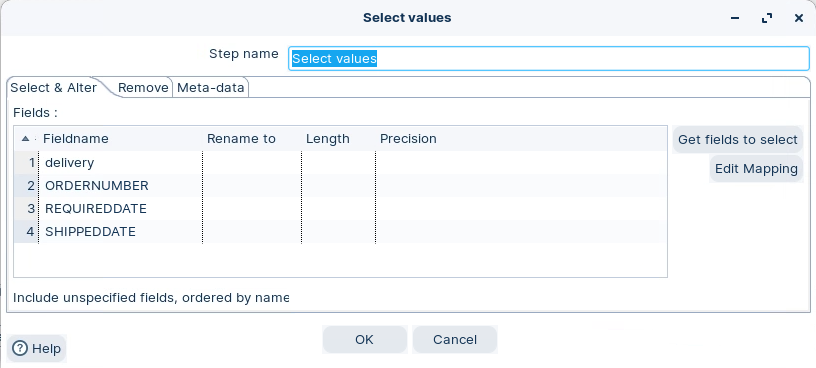
The Select Values transform is useful for selecting, removing, renaming, changing data types and configuring the length and precision of the fields on the stream.

These operations are organized into different categories:

* **Select and Alter** — Specify the exact order and name in which the fields have to be placed in the output rows
* **Remove** — Specify the fields that have to be removed from the output rows
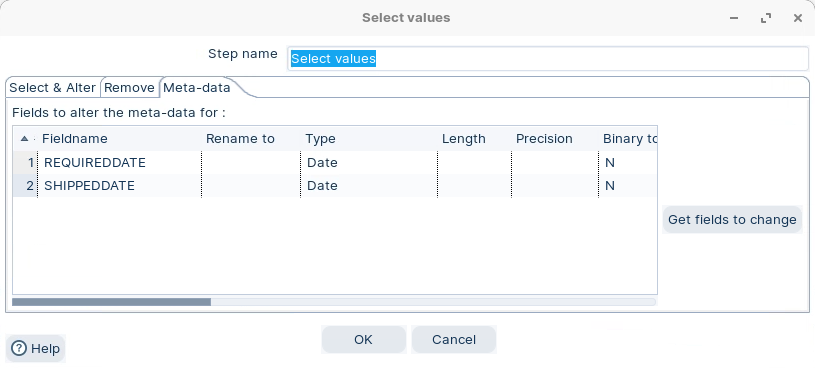
* **Meta-data** - Change the name, type, length and precision (the metadata) of one or more fields
  {% endhint %}

1. Double-click on the Select values step.
2. Take a look at how the step is defined:

<figure><img src="/files/6Ijvi2io6DzN95eBnpAk" alt=""><figcaption><p>Select values - Select fields</p></figcaption></figure>

3. Click on the meta tab.

<figure><img src="/files/Pq7jv8CFtTdcIsTiCkRL" alt=""><figcaption><p>Select values - meta tab - format dates</p></figcaption></figure>
{% endtab %}

{% tab title="RUN" %}

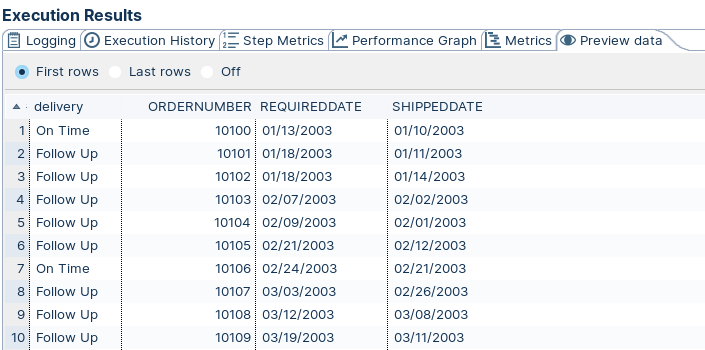
1. Click the Run button in the Canvas Toolbar.
2. Click on the Preview tab:

<figure><img src="/files/NNYAXgRShwA4dlSulxb1" alt=""><figcaption><p>Preview data - Status = Shipped</p></figcaption></figure>

{% hint style="info" %}
How would you take this report to the next level?
{% endhint %}
{% endtab %}
{% endtabs %}
{% endtab %}

{% tab title="Set / Get Variables" %}
{% hint style="info" %}
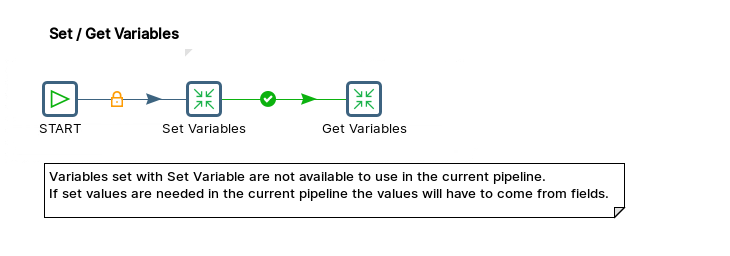
In Pentaho Data Integration, **Set Variables** and **Get Variables** are used to store and retrieve values that can be used across different transformations or jobs.
{% endhint %}

{% hint style="warning" %}
You can’t set and use a variable in the same pipeline, since all steps in a transformatiom run in parallel.
{% endhint %}

<figure><img src="/files/cSrZwc3usn4VnHWdDvNu" alt=""><figcaption><p>Set / Get Variables</p></figcaption></figure>

1. Open kb\_set\_get\_variables.kjb
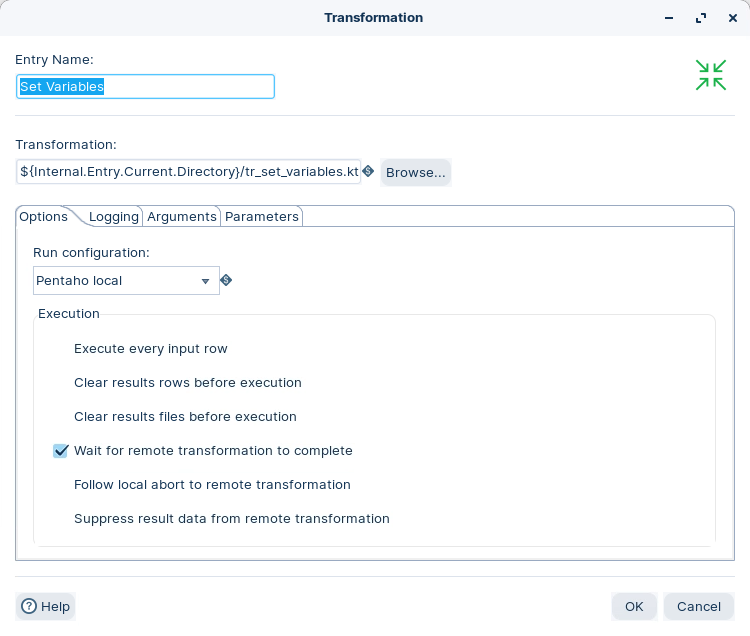
2. Double-click on the Set Variables transformation job entry.

<figure><img src="/files/ejvS1ecebi7cU0WGAOR7" alt=""><figcaption><p>Path to Transformation</p></figcaption></figure>

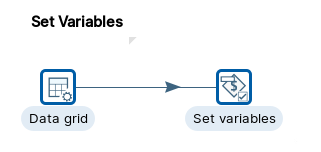
3. Open tr\_set\_variables.ktr

<figure><img src="/files/c4W8nLdDNETG8dTA7SxE" alt="" width="241"><figcaption><p>Set variables</p></figcaption></figure>

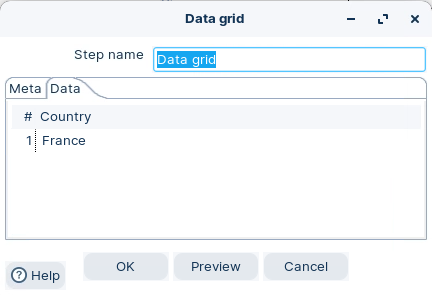
4. Open the Data grid step.

<figure><img src="/files/rDzcL4VRVOz7nxaAd42M" alt="" width="324"><figcaption><p>Data grid</p></figcaption></figure>

{% hint style="info" %}
Were going to set a varaible ${COUNTRY} = France
{% endhint %}

5. Open the Set variables step.

{% hint style="info" %}
To set a variable, you can use the **Set Variables** step. In this step, you can identify the field names that you want to set and assign each with a proper variable name. You can also define the scope of the variable with the following possible options:

* Valid in the virtual machine: The complete virtual machine will know about this variable.
* Valid in the parent job: The variable is only valid in the parent job.
* Valid in the grand-parent job: The variable is valid in the grand-parent job and all the child jobs and transformations.
* Valid in the root job: The variable is valid in the root job and all the child jobs and transformations.
  {% endhint %}

<figure><img src="/files/emo2wkZTnfCmk9VLYPr9" alt="" width="466"><figcaption><p>Set variables - ${COUNTRY}</p></figcaption></figure>

{% hint style="info" %}
The scope has been set to JVM. The ${COUNTRY} can be used in any Job or Transformation executed in this JVM.
{% endhint %}

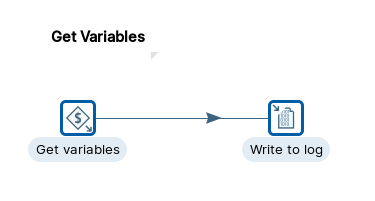
6. Open tr\_get\_variables.ktr

{% hint style="info" %}
After setting variables, you can use them in sub-jobs or transformations by using the **Get Variables** step. In this step, you need to make sure that you have specified the variable name in a correct format like `$ {variable}` or `%%variable%%`. You can also enter complete strings in the variable column, not just a variable.
{% endhint %}

<figure><img src="/files/3xWC3m43zdNJgHQy0Lpr" alt="" width="281"><figcaption><p>Get variables</p></figcaption></figure>

7. Open Get variables step.

<figure><img src="/files/hhIkA6SIPn9dQ3nck9UP" alt="" width="464"><figcaption><p>Get variables - ${COUNTRY}</p></figcaption></figure>

{% hint style="warning" %}
Be careful clicking on Get variables .. it will return all the variables ..!
{% endhint %}

7. RUN the the Job.

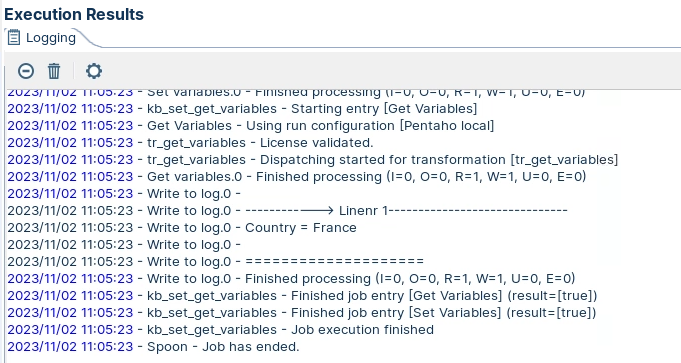
<figure><img src="/files/AyB1tqDEyKGfwsg5CHNk" alt="" width="511"><figcaption><p>Results - Variables</p></figcaption></figure>

{% hint style="info" %}
As the transformations are executed sequentialy, the ${COUNTRY} is first set and then retrieved - output write to log.
{% endhint %}
{% endtab %}

{% tab title="Job - Set variables" %}
{% hint style="info" %}
Its common to set your all project variables at a Job level ..

This is because Variables cannot be passed upstream between pipelines. Parameters are best passed downstream to avoid threading issues. A nested pipeline is technically the same pipeline, so variables are inherited in the initialization phase.

Though you cannot pass parameters and variables upstream (in nested or sequential pipelines) you can pass data rows back up a pipeline.

A variable can be set in one pipeline and be available in the next pipeline (named pipeline) that is in the loop of a pipeline executor. If you are using a pipeline executor child, the parent pipeline does not restart and does not get any set variables. The new variable name to set in a child pipeline is shown below in the second column.
{% endhint %}

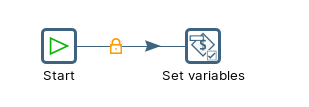
1. Open the kb\_setting\_variables.kjb.

<figure><img src="/files/Z9Ee24ejpUdDevNoimOF" alt=""><figcaption><p>Set variables</p></figcaption></figure>

2. Double-click on the Set Variables job entry.

<figure><img src="/files/emo2wkZTnfCmk9VLYPr9" alt=""><figcaption><p>Set variables - Job</p></figcaption></figure>

{% hint style="info" %}
You can then use the variable ${COUNTRY} is any transformation / job.
{% endhint %}
{% endtab %}
{% endtabs %}


---

# Agent Instructions: Querying This Documentation

If you need additional information that is not directly available in this page, you can query the documentation dynamically by asking a question.

Perform an HTTP GET request on the current page URL with the `ask` query parameter:

```
GET https://academy.pentaho.com/pentaho-data-integration/data-integration/enterprise-solution/parameters-and-variables/variables.md?ask=<question>
```

The question should be specific, self-contained, and written in natural language.
The response will contain a direct answer to the question and relevant excerpts and sources from the documentation.

Use this mechanism when the answer is not explicitly present in the current page, you need clarification or additional context, or you want to retrieve related documentation sections.