> For the complete documentation index, see [llms.txt](https://academy.pentaho.com/llms.txt). Markdown versions of documentation pages are available by appending `.md` to page URLs; this page is available as [Markdown](https://academy.pentaho.com/pentaho-data-integration/data-integration/concepts-and-terminology/error-handling.md).
# Error Handling
Handling errors in a transformation ..
{% hint style="warning" %}
#### Workshop - Error Handling
Bad data happens. Don’t fail the whole transformation because of a few rows. Route error rows to a separate stream for review and cleanup.
**What you’ll do**
* Read a CSV with a date field
* Trigger a controlled date parsing error
* Configure an error hop to capture failing rows
* Review the error metadata fields (description, field name, error code)
* Fix the date format and verify success
**Prerequisites:** Complete the **Hello World** and **Logging** workshops
**Estimated time:** 10 minutes
{% endhint %}
***
Error handling
{% hint style="info" %}
**Workshop files**
Download the following files.
Keep the filenames unchanged.
Save them in your workshop folder.
{% endhint %}
{% file src="/files/qbHHtBgSQAPhXGGQnDtE" %}
{% hint style="info" %}
**Create a new transformation**
Use any of these options to open a new transformation tab:
* Select **File** > **New** > **Transformation**
* Use `Ctrl+N` (Windows/Linux) or `Cmd+N` (macOS)
{% endhint %}
{% tabs %}
{% tab title="1. CSV file input" %}
{% hint style="info" %}
#### **CSV file input**
The CSV File Input step reads data from delimited text files into a PDI transformation. While this step is called CSV File Input, you can also use CSV File Input with many other separator types, such as pipes, tabs, and semicolons.
**Note:** The semicolon (;) is set as the default separator type for this step.
{% endhint %}
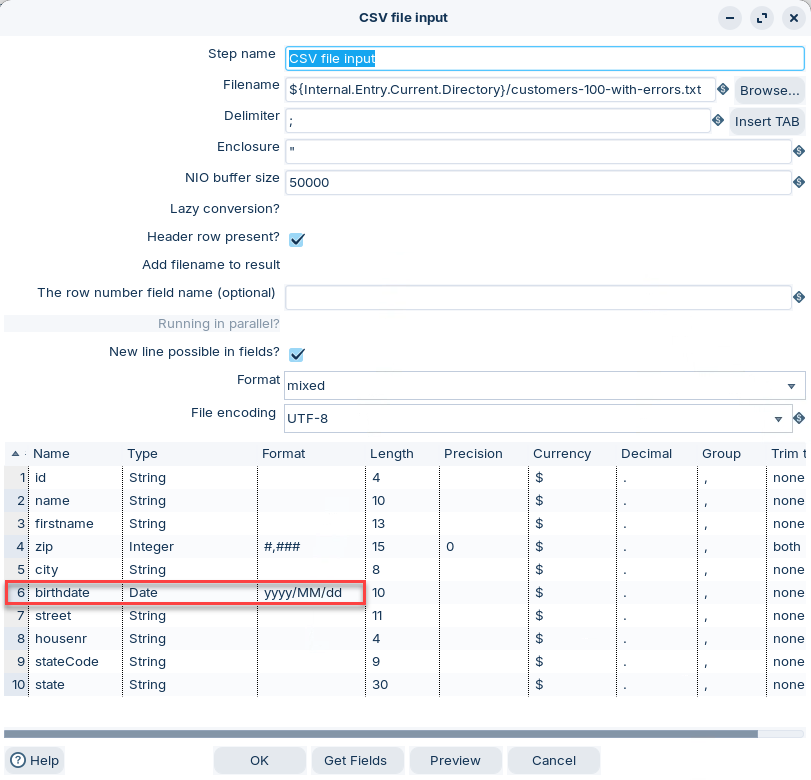
1. Double-click to edit the CSV file input step.
CSV file input
2. Set the following metadata properties for: birthdate
| Fieldname | Type | Format |
| --------- | ---- | ---------- |
| birthdate | date | yyyy/MM/dd |
{% hint style="warning" %}
If your CSV uses a different date pattern, keep `yyyy/MM/dd` for now. This mismatch is what triggers the error rows in the next step.
{% endhint %}
{% endtab %}
{% tab title="2. Error hop" %}
{% hint style="info" %}
#### Error hop
An error hop routes rows that fail in a step to a separate target step. This lets you keep processing valid rows. You also get extra error fields in the error stream.
{% endhint %}
1. Double-click the white diagonal cross on the red error hop.
Hop - Error handling
2. Set the error field names (you can pick your own).
* **Nr of errors fieldname**: Number of errors for the row.
* **Error descriptions fieldname**: Human-readable error message.
* **Error field fieldname**: The field that caused the error.
* **Error codes fieldname**: A code you can filter or group by.
{% endtab %}
{% tab title="3. Run" %}
{% hint style="info" %}
#### Run the transformation
Preview both streams. One contains valid rows. One contains error rows plus error metadata.
{% endhint %}
1. Select **Run** in the canvas toolbar.
2. Preview the **Dummy** step:
Correct birthdate format
3. Preview the **Dummy - Errors** step:
Errors for incorrectly formatted birthdates
4. Scroll to the end of the **Execution results** pane.
{% hint style="info" %}
Use `errorCodes` to route errors into targeted cleanup logic.
{% endhint %}
***
**Fix the format and verify**
1. Open **CSV file input** again.
2. Update the **Format** value for `birthdate` to match your CSV.
{% hint style="info" %}
Example: if your data looks like `2026-02-17`, use `yyyy-MM-dd`.
{% endhint %}
3. Run the transformation again.
4. Preview **Dummy - Errors**. You should see fewer rows, or none.
{% endtab %}
{% endtabs %}
***
---
# Agent Instructions
This documentation is published with GitBook. GitBook is the documentation platform designed so that both humans and AI agents can read, navigate, and reason over technical content effectively. Learn more at gitbook.com.
## Querying This Documentation
If you need additional information that is not directly available in this page, you can query the documentation dynamically by asking a question.
Perform an HTTP GET request on the current page URL with the `ask` query parameter, and the optional `goal` query parameter:
```
GET https://academy.pentaho.com/pentaho-data-integration/data-integration/concepts-and-terminology/error-handling.md?ask=&goal=
```
`ask` is the immediate question: it should be specific, self-contained, and written in natural language.
`goal` is optional and describes the broader end goal you are ultimately trying to accomplish on behalf of the user. GitBook uses it to tailor the answer towards what is most useful for that goal.
The response will contain a direct answer to the question and relevant excerpts and sources from the documentation.
Use this mechanism when the answer is not explicitly present in the current page, you need clarification or additional context, or you want to retrieve related documentation sections.