

Compliance & Data Governance
Staying on the right side of regulatory compliance ..
Compliance & Data Governance Glossary
This advanced workshop focuses on creating a Compliance & Data Governance Glossary that addresses regulatory requirements, data privacy, and security considerations. You'll learn how to identify sensitive data, apply compliance tags, and build a Glossary that supports regulatory audits and data protection initiatives.
By the end of this workshop, you will:
Identify and classify sensitive data elements
Apply regulatory compliance markers (GDPR, PCI-DSS, CCPA)
Design glossaries that support privacy-by-design
Implement data classification frameworks
Create audit-ready documentation


Accessing Data Catalog
To get started using the Data Catalog, log in using the address and credentials provided by your Data Catalog service user or administrator.
To access your catalog, please follow these steps:
Open Google Chrome web browser.
Navigate to:
Enter following email and password, then click Sign In.
Username: [email protected] (mapped to Business Steward role)
Password: Welcome123!
Understanding Regulatory Landscape
Each regulation has different requirements, penalties, and scope. GDPR can fine up to 4% of global revenue. PCI-DSS non-compliance can result in losing credit card processing abilities. We must understand what each regulation demands before we can build a compliant glossary. Think of regulations as business requirements that happen to be legally mandated.
GDPR: Broadest scope, strictest penalties, applies globally if you have EU customers
PCI-DSS: Required for any credit card processing
CCPA: Growing trend, other states following California's lead
SOX: Public company requirement, affects financial data
HIPAA excluded: Adventure Works doesn't handle health data
GDPR
EU citizens' data
Consent, right to erasure, data portability
Names, emails, addresses, phone, National Identity, etc
LGPD
Brazilian citizens' data
Similar to Europe's GDPR
Covers a broad range of PII data
PCI-DSS
Payment card data
Encryption, access control, monitoring
Credit card numbers
CCPA
California residents
Disclosure, opt-out, deletion rights
Personal information
SOX
Financial reporting
Accuracy, audit trails, internal controls
Financial records
Review the following tables:
Ask the following questions to help define a: 'Risk Assessment Matrix':
Test Glossary
Establishing a hierarchical structure by categorizing business terms into domains and specific categories simplifies data navigation and management. This organized structure boosts efficient data discovery and strengthens governance through role-based access controls. In the realm of data management, business terms are crucial in a data catalog, guaranteeing seamless identification, access, and utilization of data in line with organizational goals and compliance mandates.
Let's create a Test Glossary ..
Navigate to: Glossary
Glossary
Creating a test Glossary will help you define the hierarchy: Glossary -> Category -> Term. Exporting the Glossary will reveal how the Glossary is structured - esp the Properties - and again help understand the API call.
Under Actions select 'Add New Glossary'.

Enter 'Test Glossary' and click 'Create'.

Click on Edit: Enter a Definition & Purpose by clicking on the Edit option.

Click 'Save Changes'.
The following panels enable to track and audit any changes to the Glossary.
Properties
The Properties panel define required metadata properties that track and audit any changes to the Glossary.
Sensitivity
HIGH
Classification system that categorizes data assets based on the potential impact if that data were to be compromised, accessed inappropriately, or disclosed without authorization
Domain
Technology
List of Domains
Custodian
David Park
The user responsible for managing the glossary.
Business Steward
David Park
The user responsible for any modifications to the asset.
Critical Data Element
False
This property is usually applied to columns. These columns should be critical pieces of information that are necessary for decision making and so need to be governed with the highest care.
Status
Draft
Accepted, Draft, Review, Deprecated
Created by
The logged in user
The user who created the glossary item.
Updated by
The logged in user
The user who updated the glossary item.
Last Updated
Timestamp
A timestamp indicating when the glossary item was last updated.

You can manually add a Tag: glossary_tag

Save.
You can select the color & change the icon.

Select 'Test Glossary' Domain & then 'Add New Category'

Enter the Category Name: 'Test Category' & select Parent: 'Test Glossary'.

Click 'Create'.
Enter a Definition & Purpose by clicking on the Edit option.

Sensitivity
MEDIUM
Domain
Technology
Custodian
Elena Rodriguez
Business Steward
Elena Rodriguez
Critical Data Element
false
Status
Draft
Created by
David Park
Last Updated
David Park
Add the tag: category_tag
Click 'Save Changes'.
Term
In a data catalog, a Business Term refers to metadata that describes the business aspects of a data asset. For example, a business term might indicate whether the data represents customer demographics, financial transactions, or product inventory.
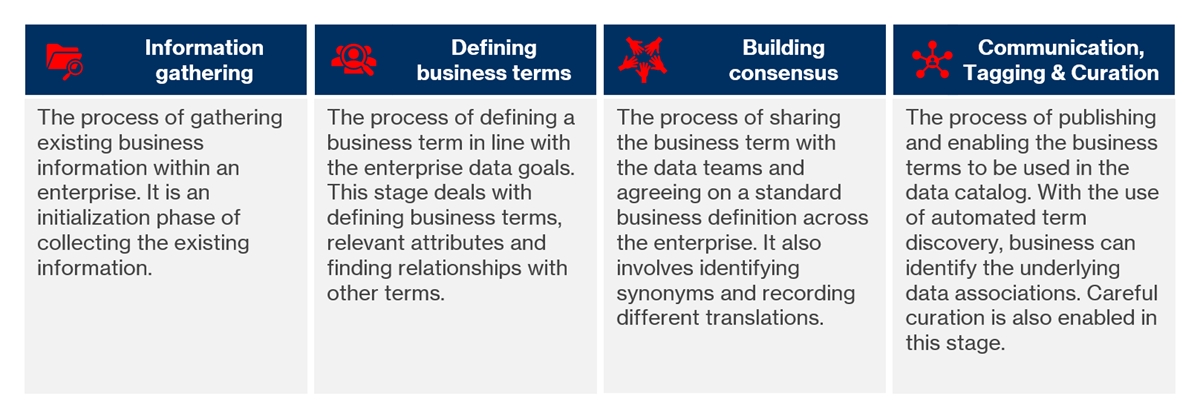
Business Terms Select 'Test Category' & then 'Add New Term'.

Enter the Term Name: 'Test Term' & select Parent: 'Test Category'.

Click 'Create'.
Enter a Definition & Purpose by clicking on the Edit option.

Custom Properties
A Glossary, Category or Term metadata properties can be 'enriched' with Custom Properties.
Custom Properties
A Glossary, Category or Term metadata properties can be 'enriched' with Custom Properties, which either be text or numerical.
For example: a Term could have 5 Levels 1 to 5
Click the 'Custom' tab.
Click the “+ Add Custom Property” button.

Enter the Label, default value and select either Free text or Select Value that will be associated with the Term.

Click 'Save'.
Related
Lists the associated business terms of the chosen glossary term. It helps you understand the broader business context and semantic associations among terms, improving data discoverability and clarity.
Relationship types such as Synonym, Deprecated, In favor of, Has A, Is a type of A, and Related to allow business stewards to define how terms are conceptually connected.
Click the 'Custom' tab.
Click the “+ Add Term” button.

x
Data Elements
Lists the associated data elements across various data sources for the selected glossary term. This association provides a direct connection between business-level terminology and the underlying technical metadata, helping you understand where and how a business term is implemented within enterprise data systems.
x
x
x
Glossary
Creating a Glossary is pretty straightforward in Data Catalog .. and that's useful if you're testing out Hierarchies, Categories and Terms to ensure they follow convention.
However, there will be a time when you'll need to do a bulk load to get up and running and that's where the fun begins. In this section we're going to take a deeper look inside the JSON Object.
There's a couple of key features to bear in mind when your creating a Glossary:
Data Catalog uses JSONL - JSON Lines is a convenient format for storing structured data that may be processed one record at a time. The values are not stored in an array, but as: One JSON Object per line.
Each field needs specific fields, in the correct order, for a successful import:
Required Fields
_id: Unique identifier (e.g., "customer-name-001")
type: Always "term" for term definitions
name: Human-readable term name
fqdn: Full hierarchical path
attributes: Container for all term-specific data
Relationship Fields
rootId: ID of the root governance entity
parentId: ID of the parent category/container
resourceId: External resource reference (often empty)
Audit Fields
createdAt/updatedAt: ISO 8601 timestamps
createdBy/updatedBy: UUID of the user
The 'attributes object' is a complex nested JSON Object that populates the Properties panel.
Attributes Structure
features.sensitivity: Data classification level
formula: Validation rules/patterns (Lexical format)
info.custodian: Data custodian UUID
info.businessSteward: Business owner UUID
info.purpose: Business purpose (Lexical format)
info.definition: Term definition (Lexical format)
info.abbreviation: Short code for the term
info.status: Lifecycle state
You cannot apply incremental updates. The timestamp means that the whole Glossary has to uploaded.
x
x
Last updated
Was this helpful?