Basic Model
Create a Classic Orders model ..
Workshop - Classic Model
While examining existing schemas helps you understand OLAP concepts, the true mastery of dimensional modeling comes from building your own Mondrian schemas from the ground up. Creating a multidimensional cube requires understanding how to connect relational tables, define hierarchies that mirror business thinking, configure measures with proper aggregation rules, and publish schemas to production environments - skills that transform you from a passive consumer of analytics to an active architect of business intelligence solutions.
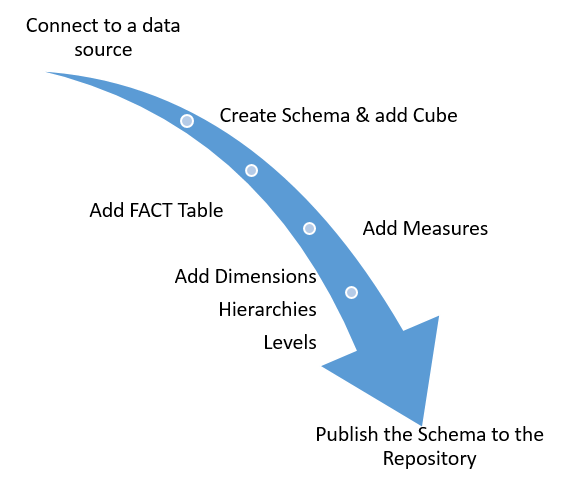
In this hands-on workshop, you'll construct a complete Mondrian schema called ClassicModelsOrders using Schema Workbench, experiencing every step of the development lifecycle from initial setup through production deployment. Unlike the SteelWheels overview where you explored a pre-built schema, this workshop guides you through creating each component yourself - establishing database connections, adding fact tables, building dimensions with hierarchies and levels, defining measures, and ultimately publishing your schema to the Pentaho BA Server where it becomes available for Analyzer reports and interactive analysis.
What You'll Accomplish:
Create a new Mondrian schema from scratch and establish proper naming conventions
Configure JDBC connections in both Schema Workbench and Pentaho Server for consistent data access
Add the ClassicModelsOrders cube as the central analytical structure
Configure the ORDERFACT fact table as the source of measurable business events
Define the Sales measure with sum aggregation and currency formatting
Build the CUSTOMERS dimension with a two-level hierarchy (Territory → Customer Name)
Create the PRODUCTS dimension with Product Line and Vendor levels
Configure foreign keys, primary keys, and level properties for proper query generation
Understand dimension types, hierarchy settings, and level uniqueness properties
Validate your schema structure and review the generated XML
Publish your completed schema to Pentaho BA Server
Test your schema by creating an Analysis Report in Pentaho Analyzer
By the end of this workshop, you'll have hands-on experience with every essential component of Mondrian schema development. You'll understand how fact tables connect to dimensions through foreign keys, how hierarchies organize data from general to specific, and how measures define what gets calculated and aggregated. Most importantly, you'll complete the full development lifecycle—from initial design through testing and deployment—validating that your schema works correctly by creating actual analysis reports that leverage your multidimensional model. This practical experience prepares you to design and build production-ready OLAP cubes for real-world business intelligence requirements.
Prerequisites: Schema Workbench and Pentaho Server installed and configured; Access to SampleData database; Basic understanding of dimensional modeling concepts, fact tables, and dimension tables
Estimated Time: 90 minutes
Start Schema Workbench:
Ensure Pentaho Server is running:
Ensure that the Pentaho Server is up and running (automatically started in Pentaho Lab):
Follow the guide below to understand how Classic Models Schema is defined:

JDBC Connection
A JDBC (Java Database Connectivity) connection in Schema Workbench establishes the link between the tool and your source database, enabling you to access physical tables and columns needed to build Mondrian schemas.
If you're using the Pentaho Lab then the driver has already been copied to the /lib directory.
To create a JDBC connection you will need to copy the H JDBC driver for your database into the PSW install directory ...\schema-workbench\lib.
Restart the Pentaho Metadata Editor, and you will see your database in the Connection Type list.
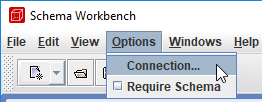
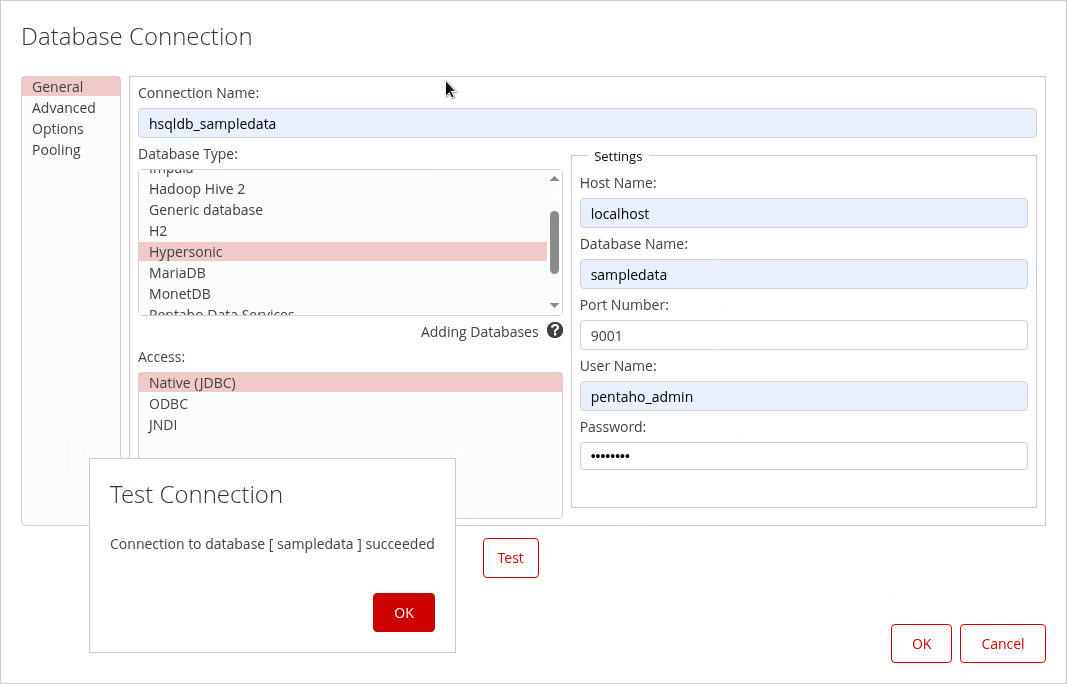
To connect to the sampledata database, from the menu select Options > Connection.

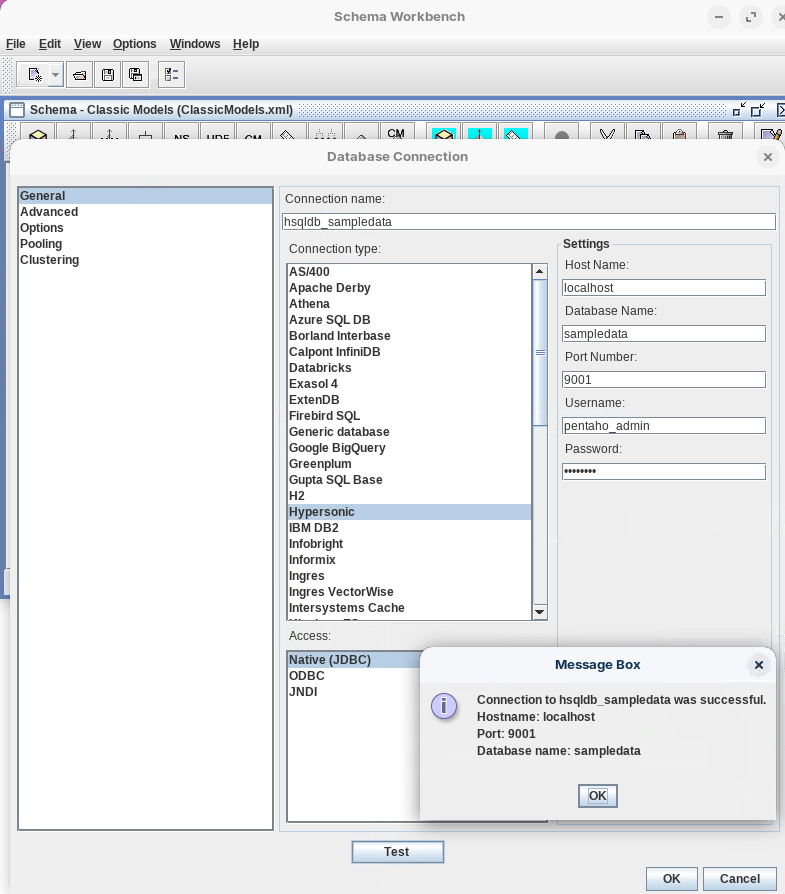
In the Database Connection dialog, type or choose the following:
Connection name
hsqldb_sampledata
Connection type
Hypersonic
Host Name
localhost
Database Name
sampledata
Port Number
9001
Username
pentaho_admin
Password
password
Click Test.

Click OK to dismiss the Message Box dialog and click OK to close the Database Connection dialog.
Pentaho Server JDBC
The workflow above creates and defines a JDBC clientside, i.e. it enables the SAchema Workbench to connect to the Hypersonic Data Source. When you Publish the Schema to the Pentaho Repository, you need to ensure that the same connection is also defined - Manage Data Sources.
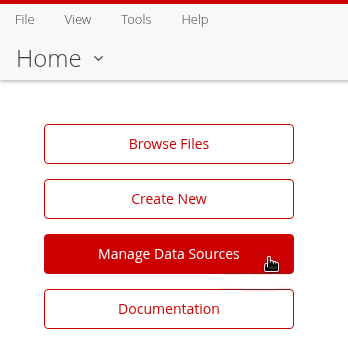
Log into the Pentaho Server Console (as Admin) > Manage Data Sources.

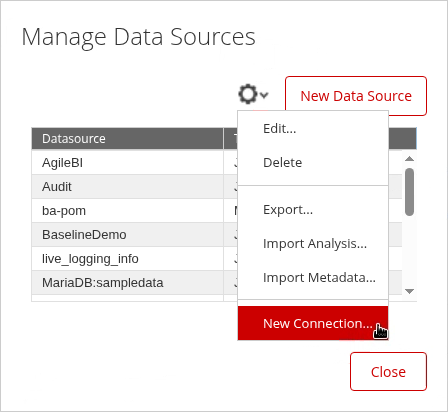
From the drop-down co wheel, select: New Connection.

In the Database Connection dialog, type or choose the following:
FieldValueConnection name
hsqldb_sampledata
Connection type
Hypersonic
Host Name
localhost
Database Name
sampledata
Port Number
9001
Username
pentaho_admin
Password
password
Test the connection.

Click OK.
The connection must have the same name as the XMLA connection - Publish.
Classic Models Schema
The ClassicModelsOrders cube is a foundational multidimensional structure built in Schema Workbench that demonstrates core OLAP design principles using sales order data from the SampleData database.
At its center is the ORDERFACT fact table, which contains transactional sales data and serves as the source for quantitative measures such as Sales (aggregated as a sum of TOTALPRICE with currency formatting).
The cube includes two primary dimensions: the CUSTOMERS dimension, which provides a hierarchical view from Territory down to individual Customer Names using the CUSTOMER_W_TER table, and the PRODUCTS dimension, which organizes product data from Product Line through Vendor using the PRODUCTS table.
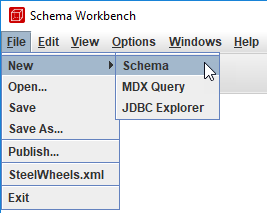
To create a new schema, from the menu choose File > New > Schema. Alternatively, from the toolbar, click the New button, and click Schema.

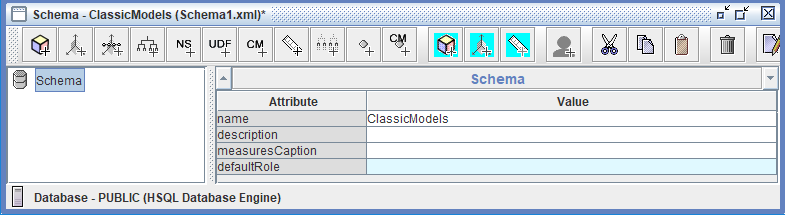
To name the schema, in the left pane, click: Schema.
In the name field, replace the existing value by typing: Classic Models, and then press Enter.

Cube
The ClassicModelsOrders cube is the primary organizational unit and multidimensional analytical space within the Classic Models schema, serving as a container that brings together all the essential components needed for business intelligence analysis.
In Mondrian terminology, a cube represents a specific business process or subject area—in this case, order transactions—and acts as the central structure that connects the ORDERFACT fact table with its associated dimensions (CUSTOMERS and PRODUCTS) and measures (Sales). The cube defines the analytical boundaries and possibilities for users, determining which questions can be answered and which combinations of data can be explored.
When published to the Pentaho BA Server, the ClassicModelsOrders cube becomes available as a data source in Analyzer, allowing business users to interactively slice, dice, drill down, and pivot the sales data across customer territories and product lines to gain insights and make data-driven decisions. Essentially, the cube transforms a flat relational database structure into a multidimensional model optimized for fast, intuitive analytical queries and exploration.
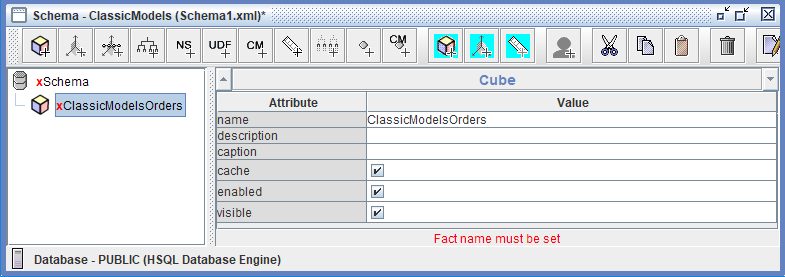
To add a cube, on the toolbar, click Add cube.
In the name field, replace the existing value by typing: ClassicModelsOrders.

To save the schema, from the menu select File > Save As.
FACT Table
The fact table holds the columns from which measures are calculated and contains references to the dimension tables.
At its centre is the ORDERFACT fact table, which contains transactional sales data and serves as the source for quantitative measures such as Sales (aggregated as a sum of TOTALPRICE with currency formatting).
The cube includes two primary dimensions: the CUSTOMERS dimension, which provides a hierarchical view from Territory down to individual Customer Names using the CUSTOMER_W_TER table, and the PRODUCTS dimension, which organizes product data from Product Line through Vendor using the PRODUCTS table.
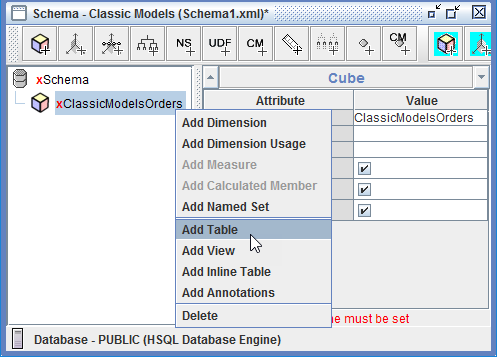
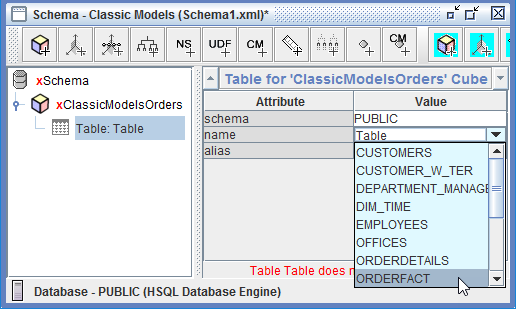
To add the ORDERFACT table, in the left pane, right-click Basic Orders, and click Add Table.

Click in the Value for name, select PUBLIC > ORDERFACT.

Save the Model.
Dimensions & Hierarchies
The ClassicModelsOrders cube contains two standard dimensions that enable multidimensional analysis of sales data. The CUSTOMERS dimension, linked to the fact table via the CUSTOMERNUMBER foreign key, provides a customer-focused analytical perspective through the "Customers" hierarchy, which includes two levels:
Territory (the top level, representing geographic sales regions with unique members) and
Customer Name (the detail level, displaying individual customer names).
The PRODUCTS dimension, connected through the PRODUCTCODE foreign key, organizes product information through the "Products" hierarchy with two levels:
Product Line (the top level, categorizing products into distinct product families with unique members such as Classic Cars, Motorcycles, and Planes) and
Vendor (the detail level, identifying the specific manufacturer or supplier of each product). Both dimensions follow a hierarchical structure from general to specific, allowing users to drill down from high-level categories (Territory or Product Line) to granular details (Customer Name or Vendor), with each level defined by specific database columns, data types (String), and uniqueness properties that determine aggregation behavior and query performance.
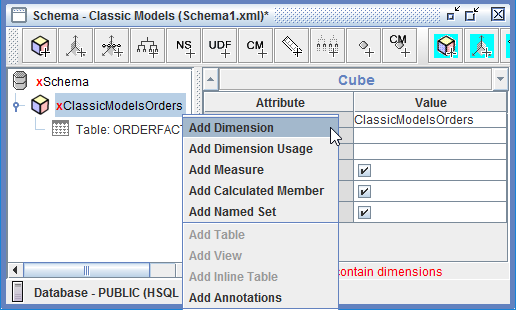
To add a dimension, in the left pane, right-click ClassicModelsOrders Cube, and click Add Dimension.

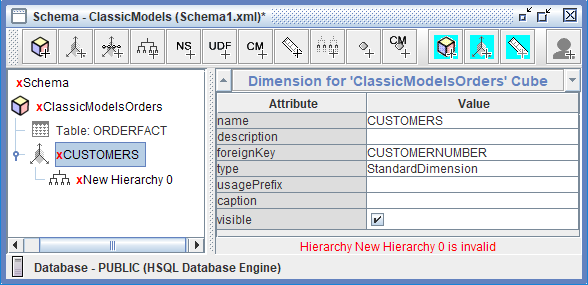
To create the CUSTOMERS dimension, type or choose:
name
CUSTOMERS
foreign key
CUSTOMERNUMBER
type
StandardDimension

To view the Hierarchy, in the left pane, expand CUSTOMERS, and then Click: New Hierarchy 0.

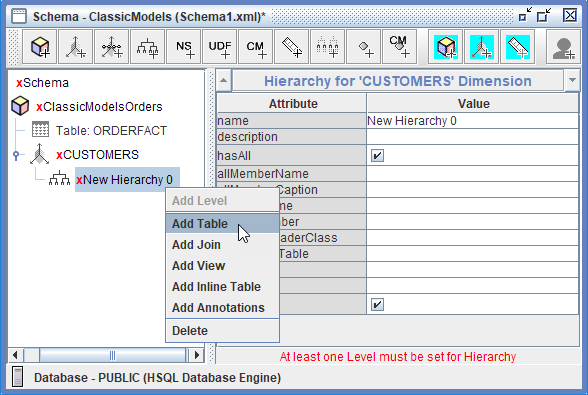
To add the CUSTOMER_W_TER table, right-click New Hierarchy 0, and Click: Add Table.
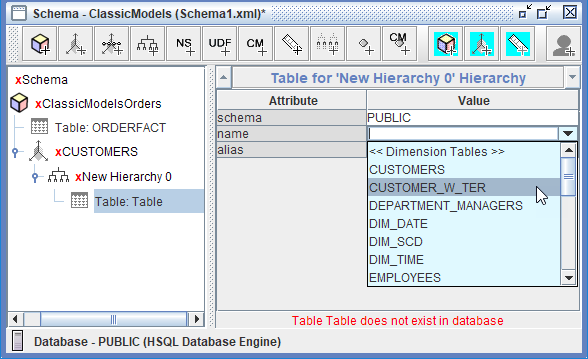
Click in the Value for name, select PUBLIC > CUSTOMER_W_TER, and press Tab.

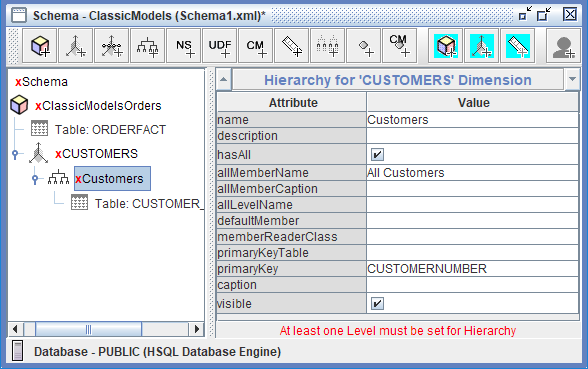
To name the hierarchy and set the primary key, click New Hierarchy 0.

To create the Customer hierarchy, type or choose:
name
Customers
hasAll
enable
allMemberName
All Customers
primaryKey
CUSTOMERNUMBER
visible
enable
Levels
Levels in the ClassicModelsOrders schema serve as the building blocks of hierarchical navigation, enabling users to analyze sales data at different levels of granularity and detail. They organize information from broad categories to specific details, allowing business users to start with high-level summaries (such as total sales by Territory or Product Line) and progressively drill down into finer details (individual Customer Names or specific Vendors) to investigate patterns, identify trends, and answer detailed business questions.
Levels also define the aggregation behavior for measures, determining how sales figures are summarized and rolled up across the hierarchy—for instance, customer-level sales automatically aggregate to the Territory level, providing meaningful subtotals at each tier.
This hierarchical structure mirrors natural business thinking, where executives might analyze performance by region while sales managers focus on individual customer performance, making OLAP cubes intuitive and aligned with real-world decision-making processes.
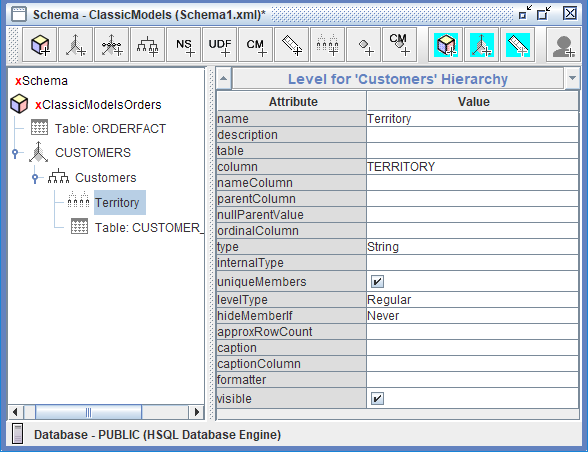
To add a level, in the left pane, right-click the Customer Hierarchy, and select Add Level.

To create the Territory level, type or choose:
name
Territory
column
TERRITORY
type
String
uniqueMembers
enable
levelType
Regular
hideMemberIf
Never
To add another level, in the left pane, right-click the Customer Hierarchy, and select Add Level.
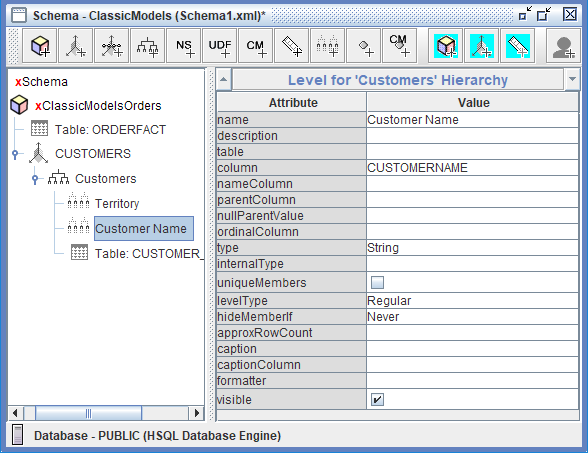
To create the Customer Name level, type or choose:
name
Customer Name
column
CUSTOMERNAME
type
string
uniqueMembers
dont enable, unless you know each Customer Name is unique.
levelType
Regular
hideMemberIf
Never

To save the schema, on the toolbar, click Save.
To add another dimension, in the left pane, right-click ClassicModelsOrders Cube, and click Add Dimension.
To create the PRODUCTS dimension, type or choose:
name
PRODUCTS
foreignKey
PRODUCTCODE
To view the hierarchy, in the left pane, expand PRODUCTS, and then click New Hierarchy 0.
To add the PRODUCTS table, right-click New Hierarchy 0, and click Add Table.
Click in the Value for name, select PUBLIC > PRODUCTS, and press Tab.
To name the hierarchy and set the primary key, click New Hierarchy 0.
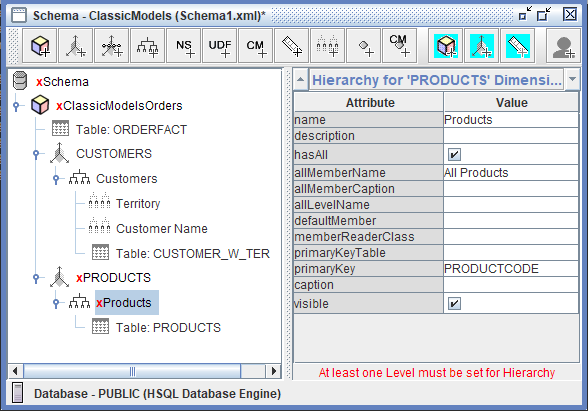
To create the Product hierarchy, type or choose:
name
Products
allMemberName
All Products
primaryKey
PRODUCTCODE
To add a level, in the left pane, right-click the Product Hierarchy, and select Add Level.

To create the Product Line level, type or choose:
name
Product Line
column
PRODUCTLINE
type
String
uniqueMembers
enable
levelType
Regular
hideMemberIf
Never
To add another level, in the left pane, right-click the Product Hierarchy, and select Add Level.

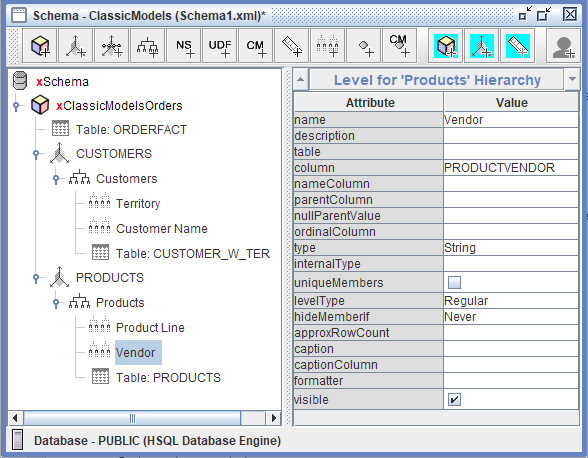
To create the Vendor level, type or choose:
name
Vendor
column
PRODUCTVENDOR
type
String
levelType
Reguslar
hideMemberIf
Never
To save the schema, on the toolbar, click Save.
Measures
Measures in the ClassicModelsOrders cube are the quantitative, numeric facts that business users analyze and aggregate across different dimensional perspectives. The primary measure in this schema is Sales, which represents the total revenue from order transactions and is defined by mapping to the TOTALPRICE column in the ORDERFACT fact table. This measure uses the sum aggregator, meaning that sales values are added together when aggregated across any dimension—whether viewing total sales by Territory, Product Line, or any combination of dimensions.
The measure is configured with a formatString of $#,###.00, ensuring that sales figures display as properly formatted currency with dollar signs, thousand separators, and two decimal places for cents, making reports immediately readable and professional for business users.
The Numeric datatype ensures mathematical operations and aggregations are performed correctly. Measures are essential because they provide the "what we're measuring" in analytics—while dimensions answer "how we're grouping the data" (by customer, by product), measures answer "what values are we calculating and comparing" (sales revenue, quantities, counts), enabling users to track performance, identify trends, and make informed business decisions based on concrete numbers rather than subjective assessments.
To add a measure, in the left pane, right-click Orders, and click Add Measure.

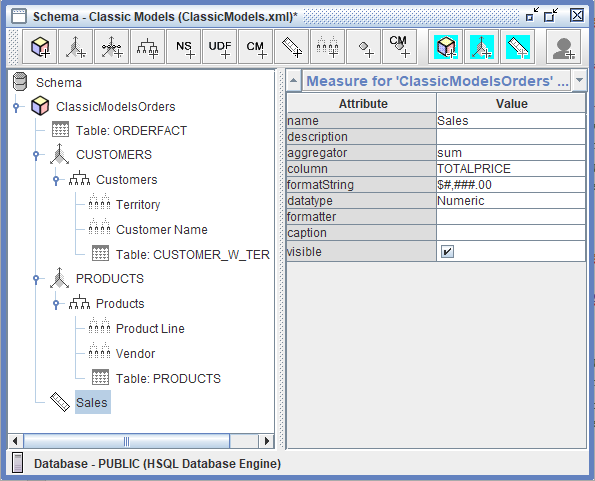
To create the Sales measure, type or choose:
name
Sales
aggregator
sum
column
TOTALPRICE
formatString
$#,###.00
dataType
Numeric
To save the schema, on the toolbar, click Save.
There should be no red crosses against any of the objects in the Schema.
The minimum requirements for Schema to be published:
Cube - FACT Table
Dimension - Dimension Table
Hierarchy
Level
Measure
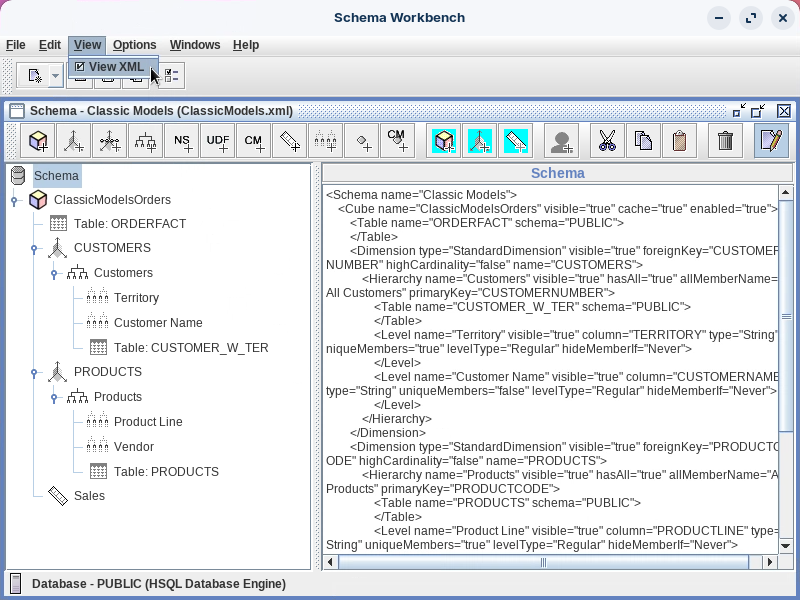
View the Schema XML.

Its Best Practice to copy the XML - Backup / Versioning
Publish
The Publish workflow in the ClassicModelsOrders schema is the critical final step that deploys your completed Mondrian schema from Schema Workbench to the Pentaho BA Server, making it available as a data source for business users creating Analyzer reports and dashboards.
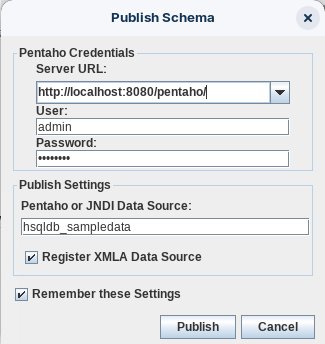
To publish the schema, from the menu, select File > Publish.

To publish the schema, type or choose::
Server URL
http://localhost:8080/pentaho/
User
admin
Password
password
Pentaho or JNDI Data Source
hsqldb_sampledata
Register XMLA Data Source
enable
Remember these Settings
enable
An XMLA (XML for Analysis) data source is a protocol for accessing multidimensional data, used primarily by SQL Server Analysis Services and Power BI semantic models through XMLA endpoints. This enables the use of various external tools for data modeling, management, monitoring, and reporting by treating these models as if they were on an Analysis Services instance.
Click: Publish.
Log into Pentaho User Console - Admin.
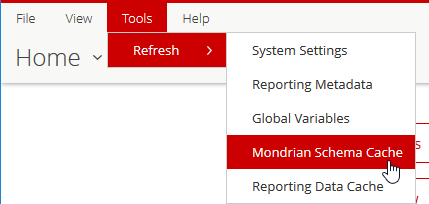
Refresh the Mondrian Schema Cache & Reporting Data Cache.

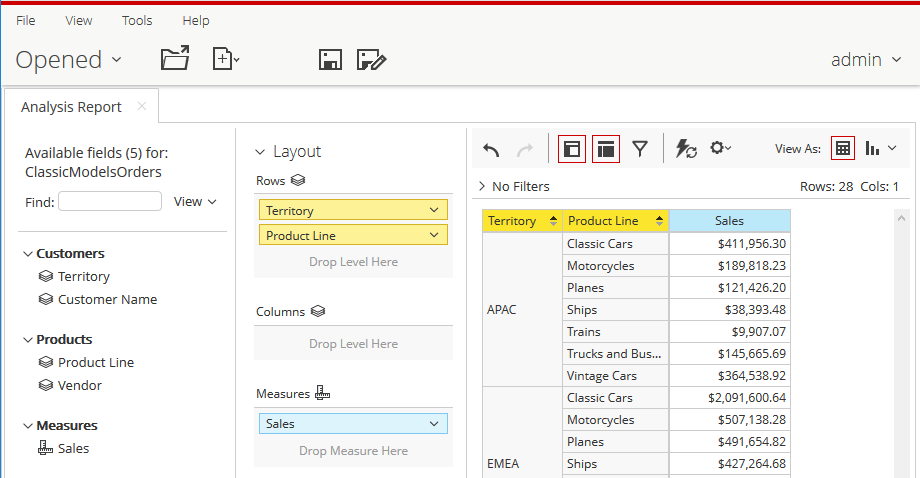
From the User Console Home Perspective, click Create New > Analysis Report.
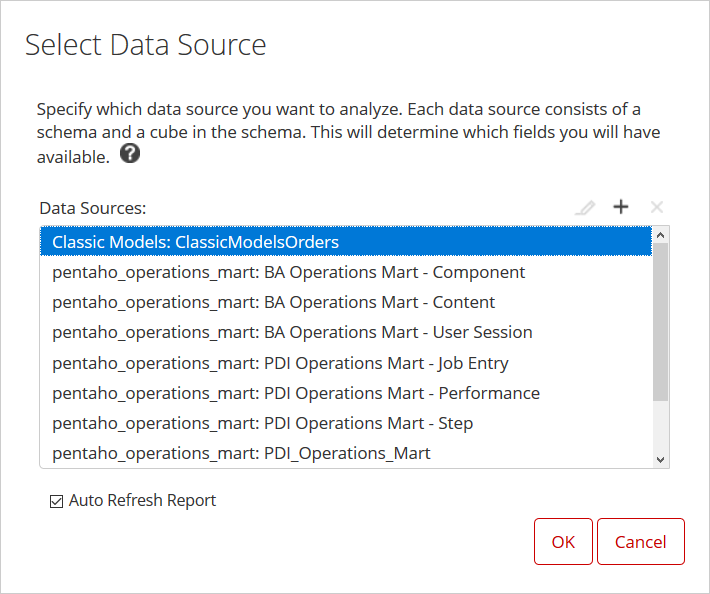
In the Select Data Source dialog, click Classic Models: ClassicModelsOrders.

Drag Sales to the Measure drop zone.
Drag Territory and Product Line to the Rows drop zone.

Once tested, Close the report.
From the View drop-down option select: Schema to display the Schema as designed.
Last updated
Was this helpful?