> For the complete documentation index, see [llms.txt](https://academy.pentaho.com/llms.txt). Markdown versions of documentation pages are available by appending `.md` to page URLs; this page is available as [Markdown](https://academy.pentaho.com/pipeline-designer/pipeline-designer.md).
# Pipeline Designer
{% hint style="info" %}
#### Pipeline Designer
**What is Pipeline Designer?**
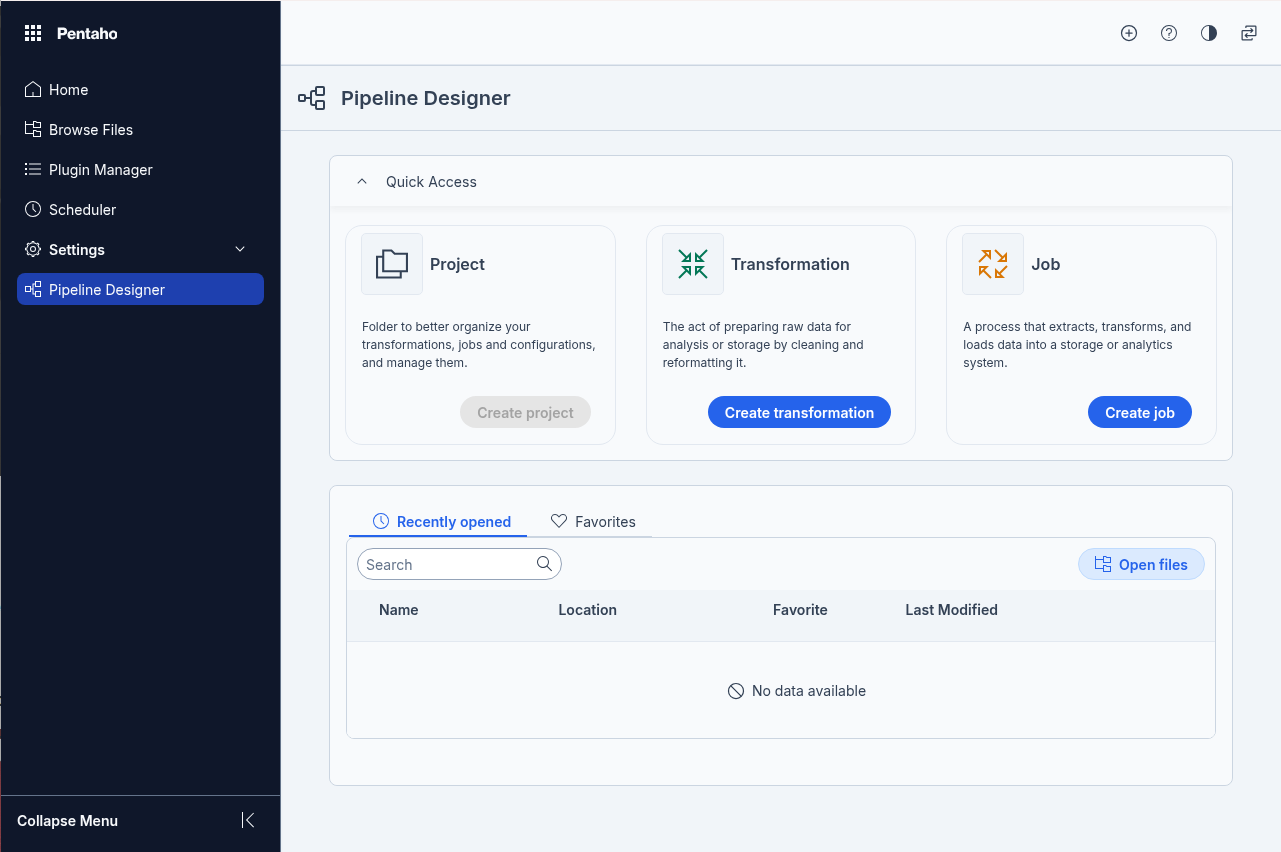
Pipeline Designer is a web-based interface that lets you design, execute, and manage data integration workflows directly in your browser. It supports a wide range of database connections, advanced transformation steps, and robust execution monitoring capabilities.
**Installation and Updates**
Pipeline Designer is installed by default when you install Pentaho Server. When updates are available, you can use the Plugin Manager to update the plugin. For details, see Update plugins.
**Note on Projects**
Projects appear on the Pipeline Designer main page but are not currently supported in Pipeline Designer. You can use Projects in the Pentaho Data Integration client instead. For details, see Organizing data integration with projects.
**Design and XML Views**
Pipeline Designer offers two ways to work with transformations and jobs. You can build workflows in the Design View using a visual interface, or review and edit the raw XML code in the XML View.
**ETL Workflow Concepts**
Pipeline Designer uses a workflow approach as the foundation for transforming your data. Workflows are built using individual steps that you connect together to create transformations and jobs. Each step is joined by a "hop" which passes data flow from one step to the next.
{% endhint %}
Pip[eline Designer
{% hint style="info" %}
**Managing Your Work**
The Pipeline Designer main page provides tools to manage your transformations and jobs. You can mark items as favorites, download them as files, create duplicates, move them between folders or to the trash, rename them, and view their details.
**Working with Transformations**
Transformations perform the actual ETL work. You create and configure transformations to define specific data processing tasks, then run them as part of your workflow. After execution, you can analyze the results to explore the data or identify improvements and problems.
**Working with Jobs**
Jobs orchestrate your ETL activities by coordinating multiple transformations and other tasks. You create and configure jobs to control the execution sequence, then run them to automate your data integration processes. Results analysis helps identify areas for improvement or troubleshooting.
**Stopping Execution**
Pipeline Designer offers two different methods for stopping running transformations or jobs. The method you choose depends on the specific processing requirements of your ETL task.
**Available Steps**
Pipeline Designer includes extensive libraries of both transformation steps and job steps. These steps extend and expand the functionality available for building your data integration workflows.
{% endhint %}
***
---
# Agent Instructions
This documentation is published with GitBook. GitBook is the documentation platform designed so that both humans and AI agents can read, navigate, and reason over technical content effectively. Learn more at gitbook.com.
## Querying This Documentation
If you need additional information that is not directly available in this page, you can query the documentation dynamically by asking a question.
Perform an HTTP GET request on the current page URL with the `ask` query parameter, and the optional `goal` query parameter:
```
GET https://academy.pentaho.com/pipeline-designer/pipeline-designer.md?ask=&goal=
```
`ask` is the immediate question: it should be specific, self-contained, and written in natural language.
`goal` is optional and describes the broader end goal you are ultimately trying to accomplish on behalf of the user. GitBook uses it to tailor the answer towards what is most useful for that goal.
The response will contain a direct answer to the question and relevant excerpts and sources from the documentation.
Use this mechanism when the answer is not explicitly present in the current page, you need clarification or additional context, or you want to retrieve related documentation sections.