Data Lineage
Automate pipelines with Apache Airflow ..
Data lineage in a data catalog outlines the lifecycle of data, detailing its journey from origin to endpoint across various processes and transformations. It offers a clear, visual map of data's provenance, its modifications, and its final location. This mapping includes tracing data from source to destination, capturing all steps, transformations, and processes it encounters along the way.
The importance of data lineage lies in its role in ensuring data integrity, supporting compliance with regulations, facilitating error root cause analysis, and enhancing overall data governance and management. By providing a comprehensive view of data’s journey, data lineage is an indispensable tool for maintaining high-quality, reliable data in a data catalog.

An automated data pipeline with Apache Airflow, OpenLineage, and Marquez consists of several integral components.
Apache Airflow serves as the orchestrator, managing the execution of workflows and ensuring tasks run in the correct sequence.
OpenLineage acts as the standard for tracking and reporting data lineage, offering a clear way to record the flow of data across different jobs and transformations.
Marquez functions as the metadata repository, storing detailed information about datasets, jobs, and their executions, enabling rich lineage tracking and metadata querying.
Together, these tools provide a robust framework for orchestrating, monitoring, and managing data workflows, ensuring data integrity, compliance, and ease of troubleshooting.

Apache Airflow plays a crucial role in orchestrating data pipelines by managing and scheduling complex workflows. It enables users to define dependencies between tasks, ensuring they run in the correct sequence.
Airflow provides a user-friendly interface to monitor task execution, visualize data flow, and troubleshoot any issues that arise. With its ability to integrate with various data processing tools, Airflow automates the entire data lifecycle, from extraction and transformation to loading and reporting, making it an essential component for scalable and reliable data pipeline management.
Pentaho Data Catalog adheres to the OpenLineage standards.
OpenLineage is an open platform for collection and analysis of data lineage. It tracks metadata about datasets, jobs, and runs, giving users the information required to identify the root cause of complex issues and understand the impact of changes. OpenLineage contains an open standard for lineage data collection, a metadata repository reference implementation (Marquez), libraries for common languages, and integrations with data pipeline tools.

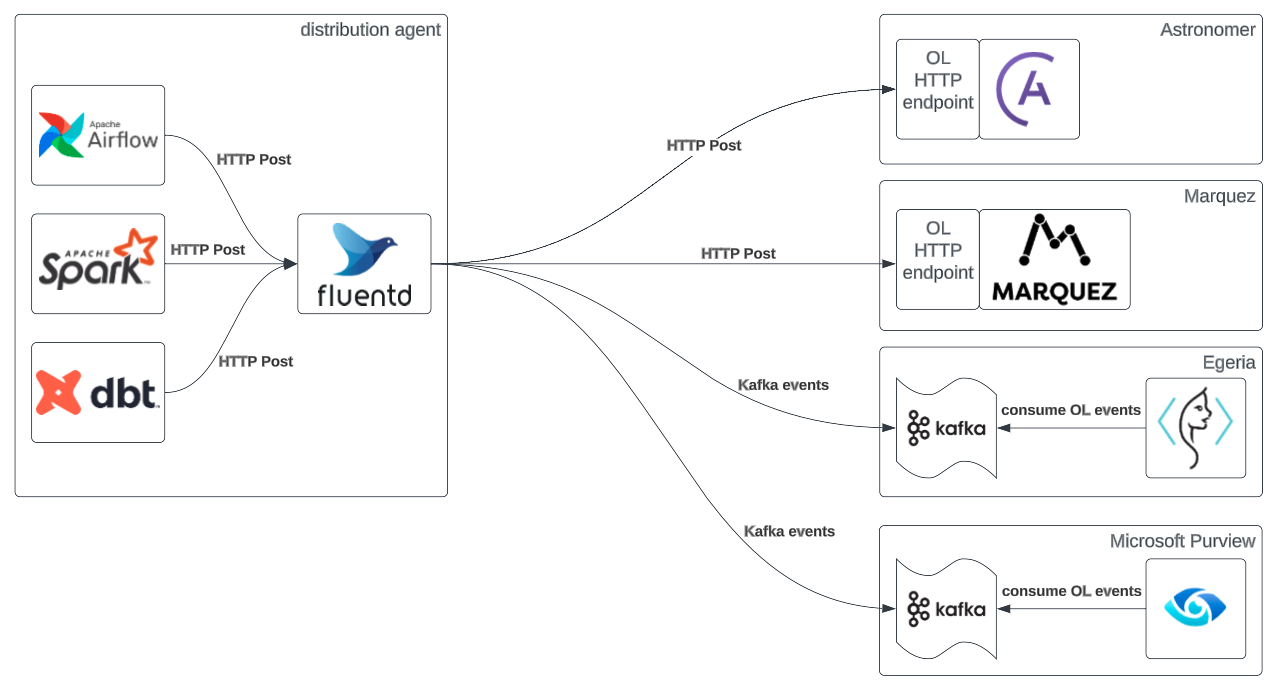
At the core of OpenLineage is a standard API for capturing lineage events. Pipeline components - like schedulers, warehouses, analysis tools, and SQL engines - can use this API to send data about runs, jobs, and datasets to a compatible OpenLineage backend for further study.
OpenLineage supports both simple deployments with single consumers and complex deployments with multiple consumers.


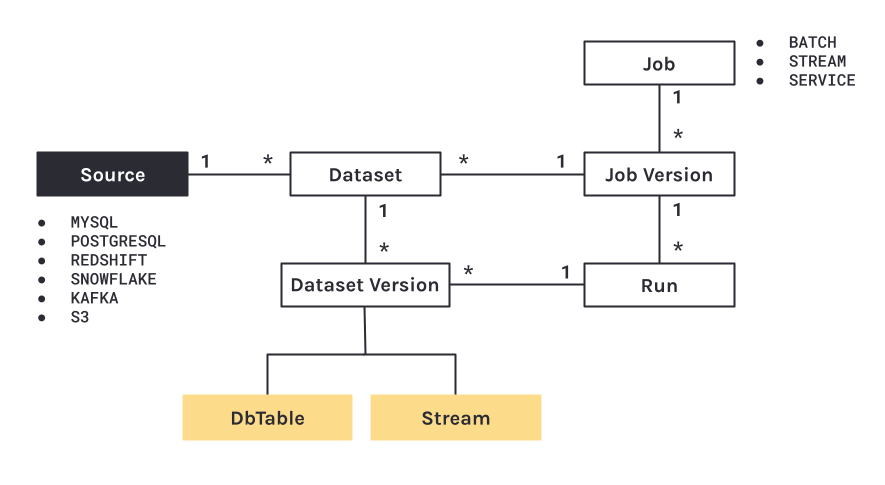
OpenLineage’s object model provides a structured approach to track the lifecycle of data across various systems, ensuring clarity and consistency. It comprises several key entities:
Datasets: These are the fundamental units representing data sources or outputs in the lineage graph. Each dataset captures critical metadata including schema, location, and other characteristics that define its structure and content. Datasets help in identifying the data at different stages of the pipeline.
Jobs: Jobs denote the processes or operations performed on datasets. They encapsulate the logic of the data transformation and include metadata about the specific task executed, its parameters, and any associated code or scripts. Jobs are essential for understanding how data is manipulated within the pipeline.
Runs: Runs are instances of job executions. They carry runtime metadata such as execution time, duration, status (e.g., success, failure), and logs. Runs provide a temporal aspect to lineage, allowing users to trace back to specific executions and understand the context and outcome of each job run.
These components interact through a standard API provided by OpenLineage. This API allows various pipeline components—such as schedulers, data warehouses, analysis tools, and SQL engines—to send lineage events to an OpenLineage backend. This integration facilitates comprehensive lineage tracking, enabling users to gain insights into data transformations, track data flows, and maintain data integrity. Through this structured model, OpenLineage helps ensure that data provenance is transparent and traceable, which is crucial for data governance, compliance, and troubleshooting.

Facets in OpenLineage provide a detailed view of metadata for lineage events, extending the core model with additional information about datasets, jobs, and runs. They are structured as key-value pairs, allowing for customizable and extensible metadata descriptions. These facets serve as building blocks that provide context and deeper insights into the data lineage, enhancing the ability to perform thorough analysis and detailed tracking.

Key types of facets include:
Data Quality Facet: This facet captures a range of data quality metrics, such as null counts, distinct counts, and summary statistics. By monitoring these metrics, the data quality facet helps to ensure that the data retains its integrity throughout its lifecycle.
Ownership Facet: This facet details ownership information, identifying the data owner or steward responsible for a dataset. It is crucial for data governance, as it clarifies accountability and provides a direct point of contact for queries or issues related to the data.
Schema Facet: This facet describes the structure of datasets, including information about column names, data types, and other structural attributes. It helps in understanding the organization and format of the data, which is essential for data processing and transformation activities.
Location Facet: This facet specifies the physical or logical location of data, such as file paths, URLs, or database addresses. Knowing where the data resides is important for data access, security, and management.
These facets enrich lineage data by adding layers of context and information, thereby facilitating comprehensive lineage tracking and detailed metadata management. They allow users to gain insights into various aspects of data and its movement, making it easier to trace data flows, understand dependencies, and maintain data integrity. The ability to extend and customize facets enables organizations to adapt the lineage model to their specific needs, supporting a wide range of data governance, compliance, and operational requirements.
Marquez is a metadata service for data lineage. It collects, stores, and visualizes metadata about datasets, jobs, and runs in a centralized repository. By integrating with various data pipeline tools, Marquez tracks end-to-end data lineage, helping users to query historical changes, investigate data dependencies, and ensure data governance. Its open metadata model and versioning capabilities enable detailed exploration of data provenance, making it easier to perform audits, troubleshoot issues, and comply with regulatory requirements.
Marquez Metadata Storage Model
Marquez’s metadata storage model centralizes the representation of end-to-end pipeline metadata, supporting versioning and flexible data lineage queries. It efficiently tracks and associates dependencies between jobs and datasets, allowing users to query historical changes and compare schema versions. This model is particularly beneficial for auditing and troubleshooting affected jobs downstream of any schema modifications. By normalizing metadata across various sources and frameworks, Marquez ensures comprehensive metadata management and lineage tracking.
The metadata storage model in Marquez employs a relational database to store the details of datasets, jobs, and runs, capturing a wide range of metadata attributes.

For datasets, it includes properties such as schema information, physical location, and version history.
Jobs, which represent the transformations applied to data, store metadata about their execution logic, parameters, and execution code.
Runs, or instances of job executions, maintain runtime details like start/end times, status, duration, and logs.
Marquez’s system also supports versioning of datasets and jobs, enabling users to navigate the historical changes and understand the evolution of their data pipelines. This is particularly valuable for compliance and governance, as it ensures that any transformations can be traced and validated. The flexible query capabilities provided by Marquez allow for detailed lineage exploration, where users can identify the upstream and downstream impacts of changes to their datasets or jobs, thus aiding in root cause analysis and impact assessment.
Integrating with various data pipeline tools, Marquez acts as a centralized metadata repository, promoting consistency and reducing fragmentation across different systems. Its open metadata model can seamlessly adapt to diverse data environments, ensuring all metadata is standardized and accessible. This harmonized approach simplifies data governance, allowing for efficient monitoring, auditing, and reporting activities.
Integrating with various data pipeline tools, Marquez acts as a centralized metadata repository, promoting consistency and reducing fragmentation across different systems. Its open metadata model can seamlessly adapt to diverse data environments, ensuring all metadata is standardized and accessible. This harmonized approach simplifies data governance, allowing for efficient monitoring, auditing, and reporting activities. x

Run-level metadata is tracked via HTTP API calls to /lineage using OpenLineage.
A run has a unique ID and records it’s code version, inputs and outputs, run args, and run state transitions.
When a run transitions to a complete state, the output datasets for the run are created if not already registered with Marquez.
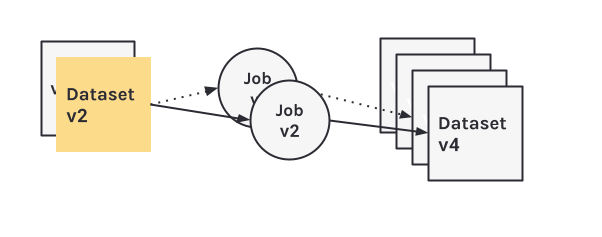
A dataset version pointer is present for each input and output dataset and maintained by Marquez keeping track of the historical set of metadata changes. Each immutable dataset version is mapped to a metadata change and the run ID that modifyed the dataset preserving it’s state at some given point in time.
A job version pointer is also present and mapped to a unique referenceable link to code, the latest run ID, and one or more versioned input and output datasets.
In this workflow, you will learn how to collect dataset and job metadata using the Marquez LineageAPI and UI.
When you submit a lineage event, you first need to define a unique run ID similar to d46e465b-d358-4d32-83d4-df660ff614dd. UUID format is recommended, and it should be unique. This run ID will enable the tracking of run-level metadata over time for a job that may have a name, like my-job.
Start a RUN
REQUEST
RESPONSE
Complete the RUN
Use d46e465b-d358-4d32-83d4-df660ff614dd to complete the run for my-job with my-output as the output dataset. We also specify the schema facet to collect the schema for my-output before marking the run as completed. Note, you don't have to specify the input dataset my-input again for the run since it has already been associated with the run ID:
REQUEST
RESPONSE
View collected lineage metadata
Browse to:
Use the search bar in the upper right-side of the page and search for the job my-job. To view lineage metadata for my-job, click on the job from the drop-down list:

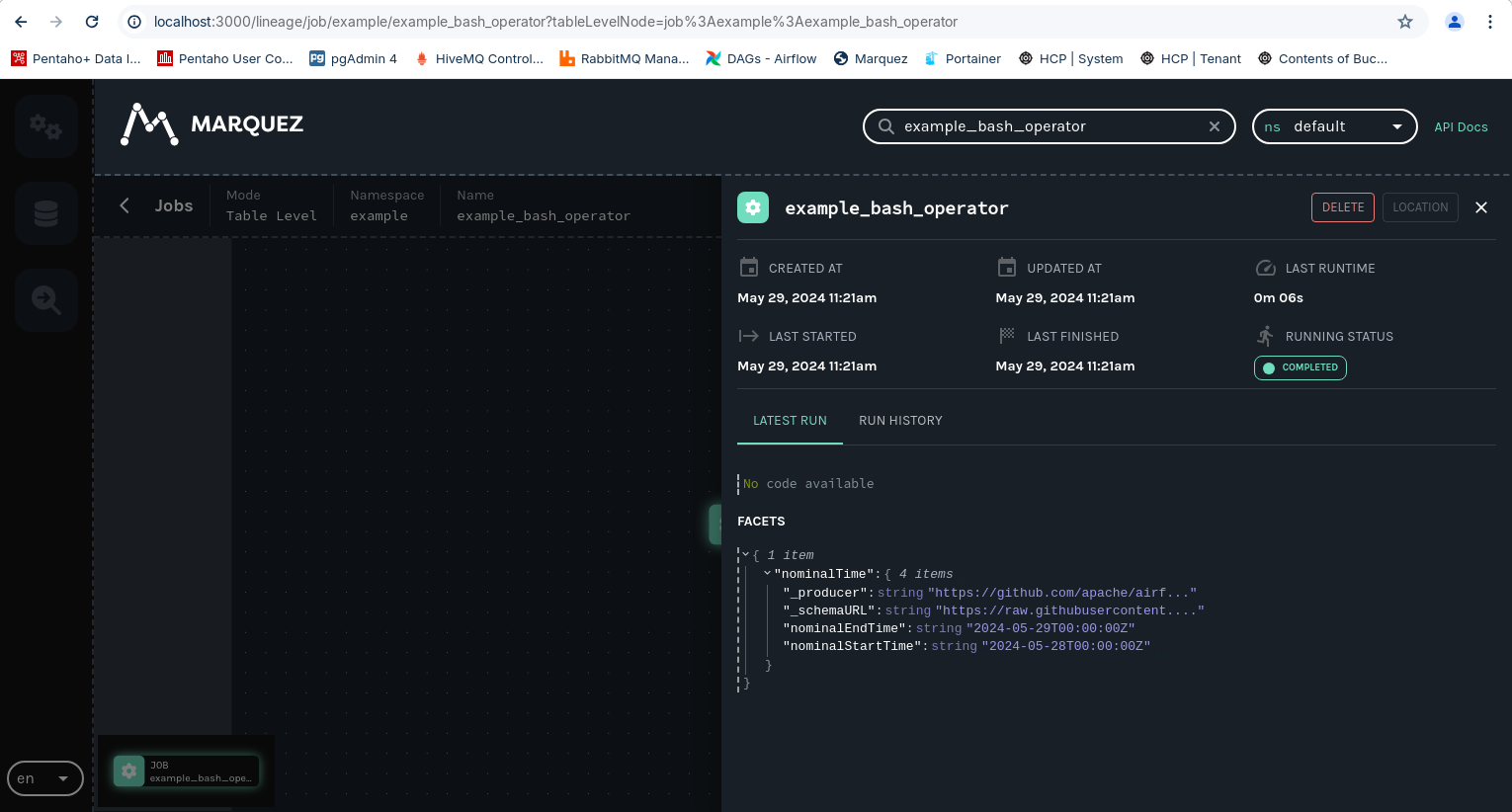
In the search result, you should see the job namespace and name, and in the lineage graph you should see my-input as an input dataset and my-output as an output dataset. In the RUN HISTORY tab on the Job Detail page below the graph, the job run state should be COMPLETED.

Finally, click on the output dataset my-output for my-job. Metadata displayed includes the name, column names, data types, and more:

Airflow-Project: (Steps 2-4)
This project focuses on:
Deploying & configuring: Apache Airflow + Openlineage + Marquez in Docker
Define a connection to exampledb database
Run a test DAG - bashOperator.py
This section is for Reference only.
Apache Airflow + Openlinegae & Marquez have been installed & configured.
Airflow-Project
An Airflow-Project contains the set of files necessary to run Airflow, including dedicated folders for your DAG files, plugins, and dependencies.
Create Airflow project folders.
Download the required Marquez scripts to download / initialze containers, docker network & create volumes.
Check the Airflow-Project directory
Add the OpenLineage Airflow Provider and the Common SQL Provider to the requirements.txt file.
Add the following Providers:
Save.
To configure Airflow to send lineage metadata to Marquez, configure database connection and allow DAGs to be triggered by params, add the following environment variables.
Add:
Save.
Create new file docker-compose.yml in your project and copy/paste the following into the file:
Create new file
docker-compose.yml
Copy and paste the following content.
Save.
Start Airflow with Marquez
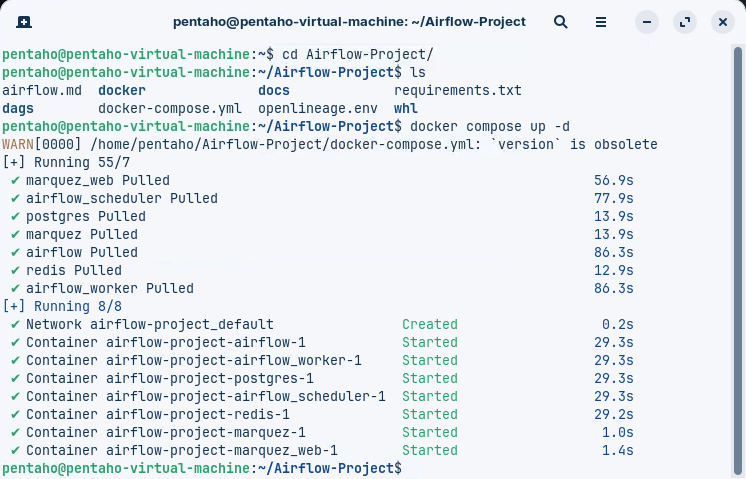
When starting the Airflow-OpenLineage-Marquez for the first time, be patient, as the Airflow-OpenLineage-Marquez environment is deployed.
Execute the following command to start Airflow-OpenLineage-Marquez environment.

• airflow-1 - The Airflow webserver is available at: http://localhost:8080
• airflow-worker-1 - The worker that executes the tasks given by the scheduler.
• airflow-postgres-1 - The database.
• airflow-scheduler-1 - The scheduler monitors all tasks and DAGs, then triggers the task instances once their dependencies are complete.
• airflow-redis-1 - The redis - broker that forwards messages from scheduler to worker.
• airflow-marquez-1 - Marquez API.
• airflow-marquez-web-1 - The Marquez webserver is available at: http://localhost:8080
To view the Airflow UI and verify it's running, open:
x
Username
airflow
Password
airflow
To view the Marquez, browse to: http://localhost:3000 .
x
Airflow variables are key value pairs that can be accessed from any DAG in your Airflow environment. Because the variable my_github_repo is used in the DAG code with a default of apache/airflow, you'll need to create the variable and give it a value in the Airflow UI to wait for a commit in your own repository.
Unlike DAG code changes, package dependency changes require a complete restart of Airflow.
Configure GitHub variable
Go to Admin -> Variables to open the list of Airflow variables.
x
Click on the + sign to open the form for adding a new variable.
Set the Key for the variable as:
airflow_github_repo
and set the Val as:
GitHub repository you have administrator access to. Make sure the Val is in the format github_account_name/repository_name
(for example apache/airflow). The repository can be private.
Click Save.
x
x
DAGs
In this step, you will create an Airflow DAG that performs simple tasks using the bashOperator. The example_bash-operator DAG
This section is for Reference only.
The exampledb databse connection has been configured in Airflow & DAG
Open the
Admin->Connectionssection of the UI.Click the
Createlink to create a new connection.Enter the following details:
Connection Id
exampleddb
Connection Type
Postgres
Description
Connection to 'example' database
Host
172.21.0.3 (Container IP)
Database
example
Login
example
Password
example
Port
5432
Test the connection.

To use this DAG:
• Ensure that OpenLineage is installed within your Airflow environment.
• Set the necessary environment variables for OpenLineage, such as the namespace and the URL or transport mechanism using provider package docs or OL docs.
• Configure the BYPASS_LATEST_VERSION_CHECK and LINEAGE_BACKEND variables as needed.
• Add the DAG file to your Airflow DAGs folder.
• Trigger the DAG manually or just enable it and allow it to run once automatically based on its schedule (@once) to perform the preflight checks.
In dags/, create a file named preflight_check.py and add the following code:
DAG Tasks
The DAG defines three main tasks that sequentially execute the above validations:
validate_ol_installation: Confirms that the OpenLineage installation is correct and up-to-date.is_ol_accessible_and_enabled: Checks if OpenLineage is accessible and enabled within Airflow.validate_connection: Verifies the connection to the specified lineage backend.
In
dags/, create a file namedexample_bashOperator.pyand add the following code:
RUN the DAG.

x
To make life easier the folks at Damavis have developed an airflow-pentaho-plugin.
airflow-pentaho-plugin
Retrieve the Webserver AirFlow containerID:
Exec into the container:
or use Portainer
Install airflow-pentaho-plugin:
Restart the container:
or Restart using Portainer
Check airflow-pentaho-plugin is installed
x
x
Last updated
Was this helpful?