# LLM Integration

{% hint style="success" %}

#### Overview - LLM

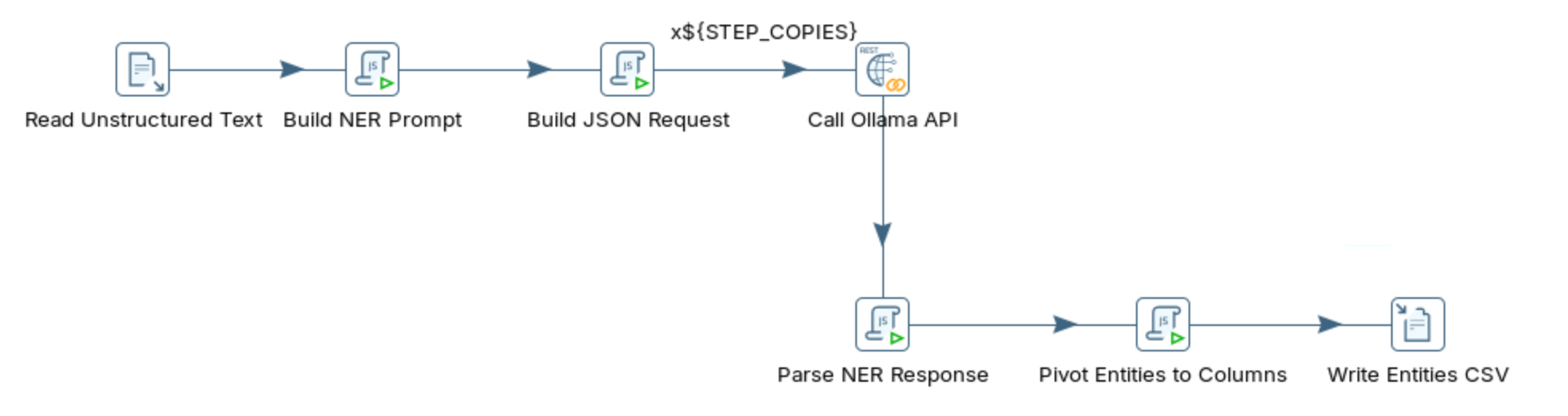
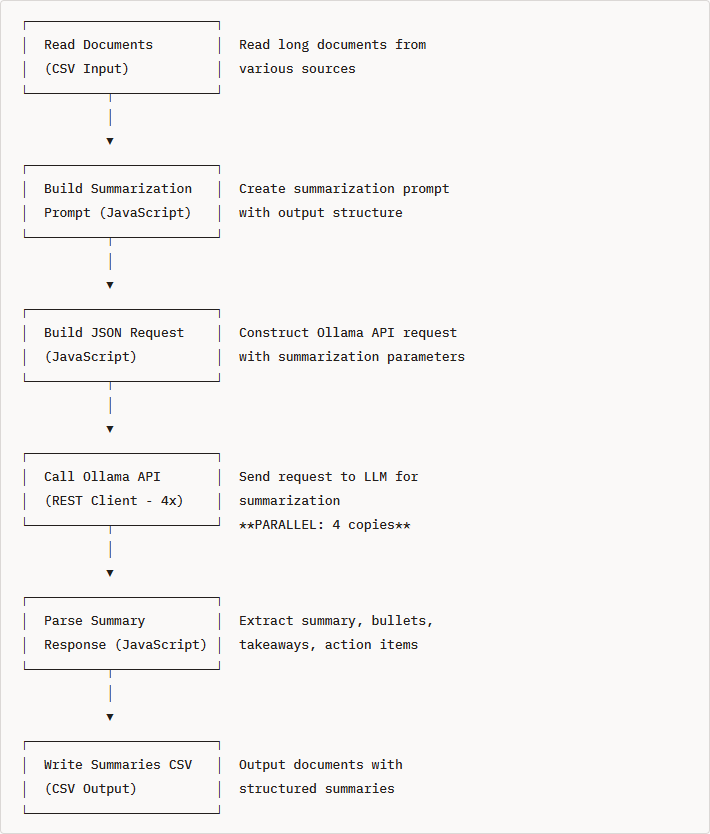
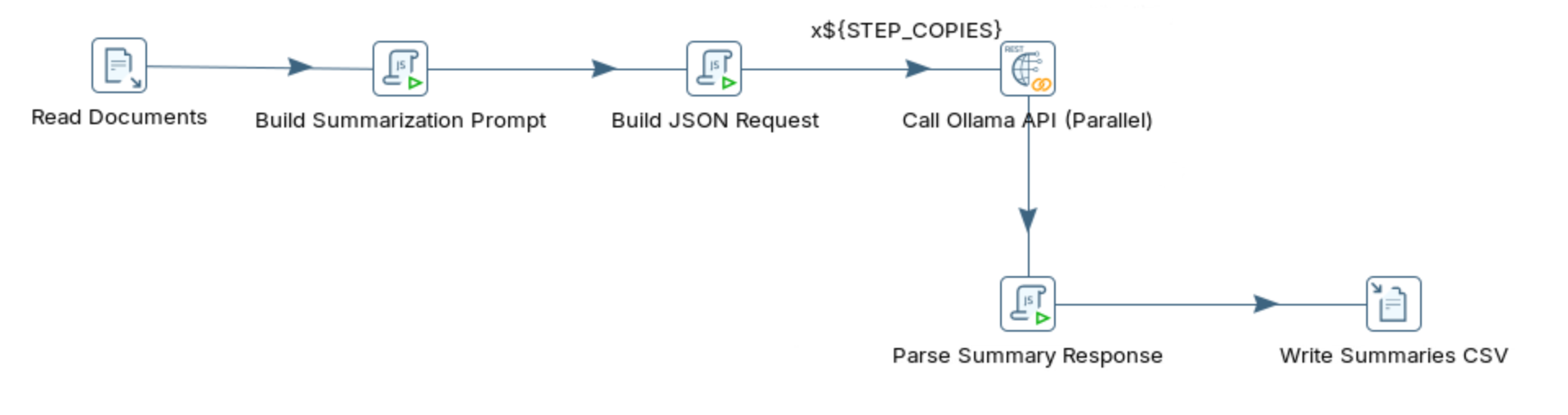
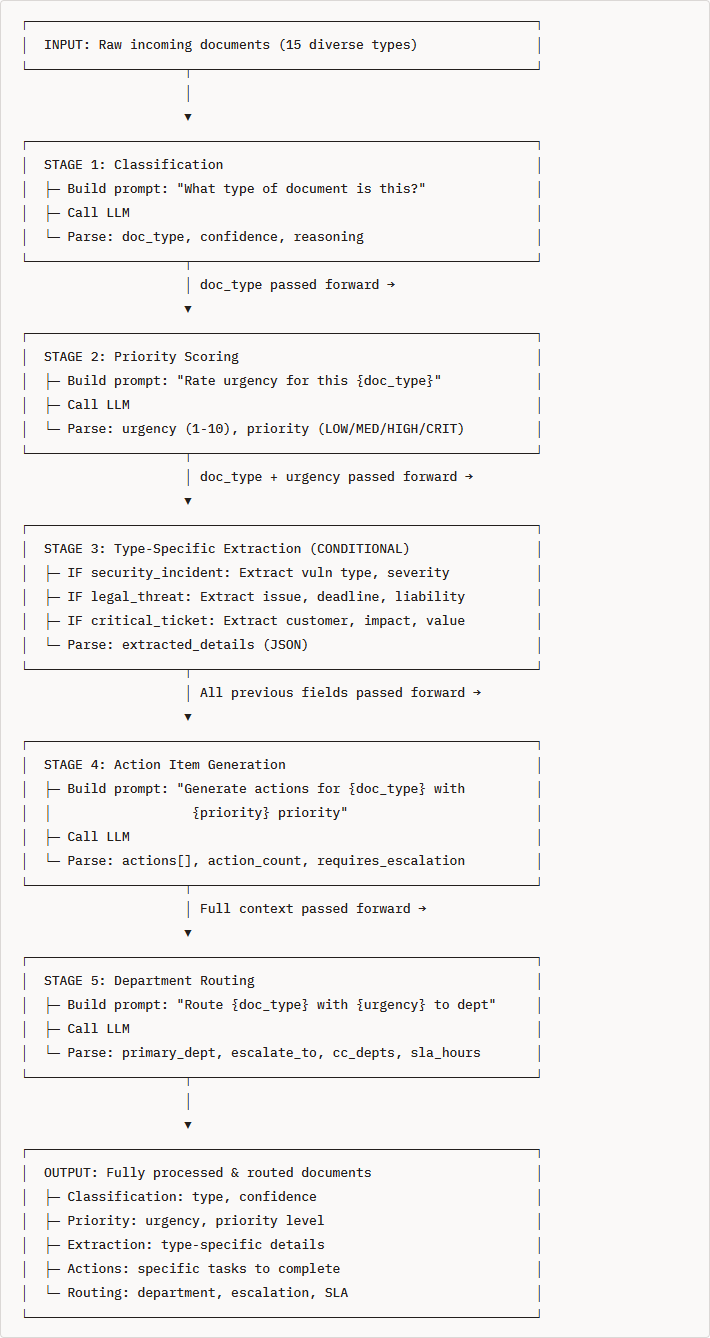
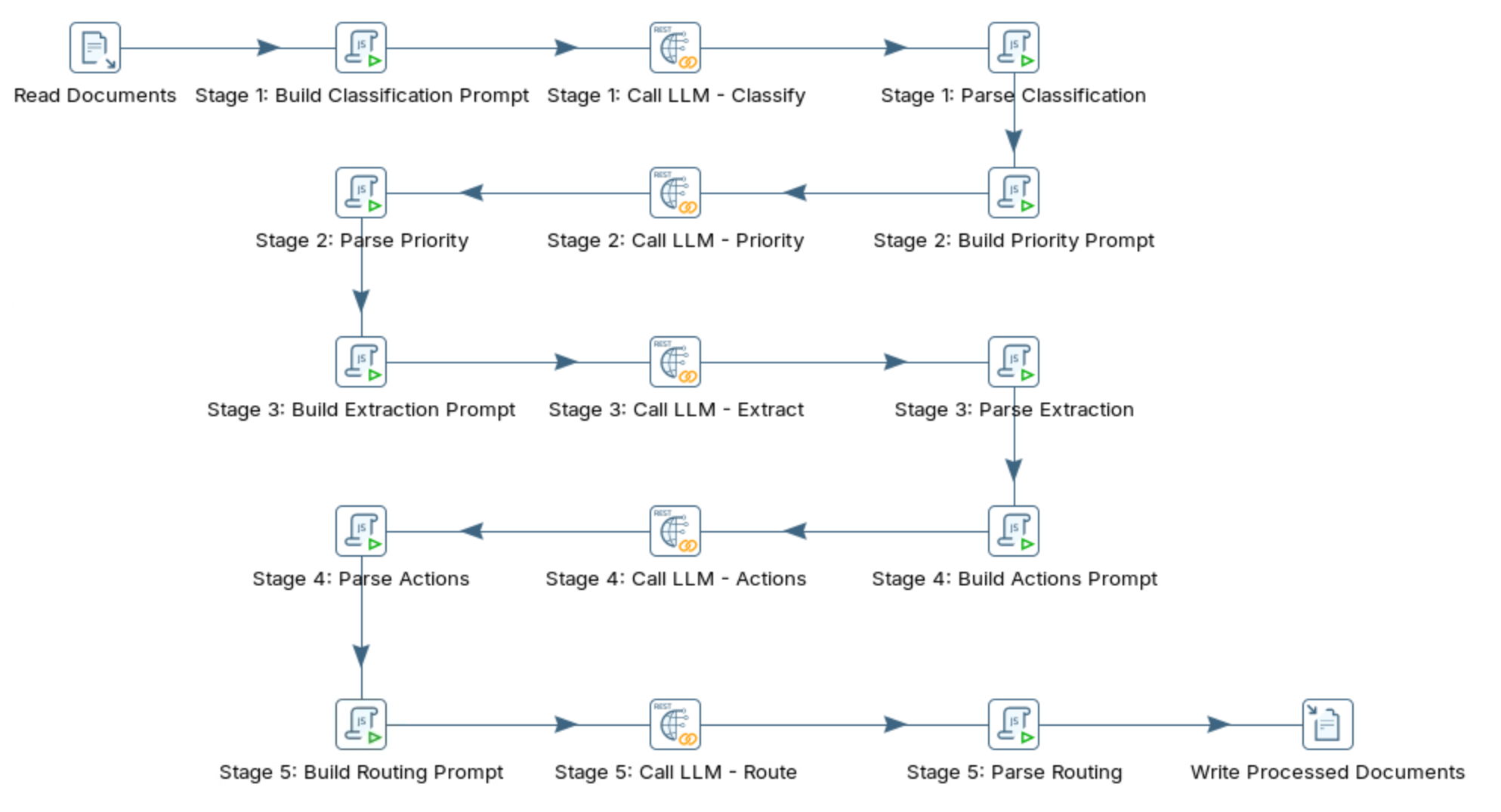
These workshops establish a repeatable architectural pattern: PDI acts as the orchestration layer, while a locally-hosted LLM (served via Ollama) handles the "intelligent" processing that rule-based ETL cannot do well. The six use cases covered - Sentiment Analysis, Data Quality, Data Enrichment, Named Entity Recognition, Text Summarization and Multi-staged - all share the same fundamental skeleton. Once you understand it once, you can adapt it to virtually any AI-enrichment task.
{% endhint %}

{% tabs %}
{% tab title="Request" %}
{% hint style="info" %}
Everything hinges on making a clean POST request to Ollama's `/api/generate` endpoint at `http://localhost:11434`. This is a local REST API, so there's no external dependency, no API key, and no network latency.
{% endhint %}

The request payload structure is:

```json
{
  "model": "llama3.2:3b",
  "prompt": "Your instruction here...",
  "stream": false,
  "format": "json",
  "keep_alive": "30m",
  "options": {
    "temperature": 0.1,
    "num_predict": 300,
    "num_ctx": 2048,
    "num_thread": 0
  }
}
```

{% hint style="info" %}
**Parameters:**

**`model`** — Which Ollama model to invoke. The workshops use `llama3.2:3b` as the default: compact enough to run on CPU-only hardware but capable enough for structured tasks. You can scale up to `llama3.1:8b` for harder problems at the cost of speed.

**`stream: false`** — This is critical for PDI. Streaming sends tokens incrementally, which is great for chat UIs but useless in an ETL row-by-row context. Setting this to `false` tells Ollama to generate the entire response, then return it as one complete JSON object — which is what PDI needs to write into a field.

**`format: "json"`** — Forces the model's output to be valid JSON. Without this, the model might add conversational preamble, markdown fences, or explanations around its JSON answer, all of which break downstream parsing.

**`keep_alive`** — This is the single biggest performance optimization for batch processing. By default Ollama unloads the model from memory after each request. Reloading takes 10–30 seconds depending on model size and disk speed. Setting `keep_alive: "30m"` keeps the model resident in RAM across all rows in a batch run, turning a multi-hour job into a fraction of that time.

**`temperature: 0.1`** — Controls randomness. Values near 0 produce near-deterministic output, meaning the same review will produce the same sentiment classification on repeated runs. This is essential for reproducible ETL — you don't want results changing every time the pipeline runs.

**`num_predict: 300`** — Caps the maximum tokens generated. This prevents runaway generation, protects processing time, and avoids unexpectedly large response payloads overwhelming downstream steps.
{% endhint %}
{% endtab %}

{% tab title="Response" %}
{% hint style="info" %}
When PDI's REST Client step receives the Ollama response, it comes back as a single JSON object with two categories of fields: the **content fields** that contain the actual result, and the **performance/telemetry fields** that tell you how the inference went.

The `response` field is a *string containing JSON*, not a nested object - which is why the pipeline requires two separate JSON Input steps: one to extract `$.response` from the Ollama wrapper, and a second to parse the actual model output into structured fields.
{% endhint %}

The response payload structure is:

```json
{
  "model": "llama3.2:3b",
  "response": "{\"sentiment\":\"positive\",\"score\":0.9}",
  "done": true,
  "done_reason": "stop",
  "total_duration": 3131161470,
  "prompt_eval_count": 64,
  "eval_count": 18
}
```

{% hint style="info" %}

#### Content Fields

**`model`** — Confirms which model actually processed the request. This is useful as a sanity check, especially in pipelines where the model name is injected via a PDI variable. If you're getting unexpected results, checking this field confirms whether the right model was used.

**`created_at`** — The UTC timestamp of when the response was generated. Useful for logging and auditing, particularly if you're persisting results to a database and need to track when the enrichment was applied.

**`response`** — This is the only field you actually care about for downstream processing. It contains the LLM's generated output as a string. Importantly, even when you pass `"format": "json"` in the request, Ollama still wraps the model's JSON output inside this string field rather than embedding it as a native JSON object. That's why the pipeline needs a JSON Input step to extract `$.response` first, then a second parsing pass to read the actual model output.

**`done`** — A boolean that signals whether generation completed. When `true`, the response is complete. When `false`, the model was interrupted or is still streaming (which shouldn't happen in PDI since you set `stream: false`, but worth checking during error handling).

**`done_reason`** — Explains *why* generation stopped. The value `"stop"` means the model reached a natural conclusion — it finished what it was saying. Other possible values include `"length"` (generation was cut off because it hit the `num_predict` token limit) and `"load"` (model was freshly loaded). If you see `"length"` in production, it means your responses are being truncated and you need to increase `num_predict`.
{% endhint %}

{% hint style="info" %}

#### Performance / Telemetry Fields

All duration values are expressed in **nanoseconds**, so divide by 1,000,000,000 to get seconds.

**`total_duration`** — The wall-clock time for the entire request from when Ollama received it to when it returned the response. This is what you'd use to track end-to-end latency per record. In the sentiment analysis example, this was \~3.1 seconds for a short review.

**`load_duration`** — How long it took to load the model into memory before inference began. When `keep_alive` is working correctly and the model is already resident in RAM, this value drops to near zero for subsequent requests. If you see `load_duration` remaining high across all rows, it means the model is being reloaded on every request, which is a sign your `keep_alive` setting isn't being applied.

**`prompt_eval_count`** — The number of tokens in your input prompt. This is the tokenized length of everything you sent to the model. Monitoring this field is important for prompt optimization — the workshops show how cutting prompt length by 50% cuts processing time proportionally. If `prompt_eval_count` is unexpectedly high, your prompt likely has verbose instructions that can be trimmed.

**`prompt_eval_duration`** — How long the model spent processing (encoding) your prompt before it started generating the response. This is the "reading the question" phase. It's typically much shorter than `eval_duration`.

**`eval_count`** — The number of tokens in the generated response. This is your output token count. If this number is hitting your `num_predict` ceiling (e.g., exactly 300 when you set `num_predict: 300`), that's a strong signal that your responses are being truncated and you need to raise the limit or shorten your expected output schema.

**`eval_duration`** — How long the model spent actually generating the response tokens. This is almost always the dominant cost in `total_duration`. On CPU-only hardware, token generation speed is the bottleneck — typically the workshops see about 2.1 seconds of generation time for an 18-token response, which gives you a rough tokens-per-second figure for capacity planning.

**`context`** — An array of integers representing the internal token IDs that make up the conversation state. This is the model's "memory" of the exchange encoded as token references. For single-turn ETL tasks you can completely ignore this field. It only becomes relevant if you're building multi-turn conversation pipelines where you want to pass context back to the model in subsequent requests to maintain continuity.
{% endhint %}
{% endtab %}

{% tab title="Prompt" %}
{% hint style="info" %}

#### Anatomy of a Good Prompt

The prompt is the only interface between your ETL data and the LLM. PDI handles reading, routing, and writing data - but the quality of what the model returns is entirely determined by how well you wrote the prompt. A vague prompt produces unpredictable output that breaks your JSON parser. A well-engineered prompt produces the same structured response every time, making the downstream pipeline reliable.
{% endhint %}

Using the sentiment analysis workshop as a concrete example, here's the prompt that gets constructed inside the Modified JavaScript Value step for each row:

```json
Analyze sentiment: "This laptop exceeded my expectations! Fast performance, 
great battery life, and the display is stunning. Worth every penny."

JSON format:
{
  "sentiment": "positive/negative/neutral",
  "score": -1.0 to 1.0,
  "confidence": 0-100,
  "key_phrases": ["phrase1", "phrase2"],
  "summary": "one sentence"
}
```

And the PDI JavaScript that builds it:

```javascript
var prompt_text = "Analyze sentiment: \"" + review_text + "\"\n" +
                  "JSON format:\n" +
                  "{\n" +
                  "  \"sentiment\": \"positive/negative/neutral\",\n" +
                  "  \"score\": -1.0 to 1.0,\n" +
                  "  \"confidence\": 0-100,\n" +
                  "  \"key_phrases\": [\"phrase1\", \"phrase2\"],\n" +
                  "  \"summary\": \"one sentence\"\n" +
                  "}";
```

{% hint style="info" %}
Every element of this prompt is doing specific work.

The instruction is a verb, not a question.\*\* "Analyze sentiment" is a direct command. Phrasing it as "Can you tell me the sentiment of this review?" wastes tokens and invites a conversational response rather than structured output.

The data is clearly delimited.\*\* Wrapping the review text in quotes separates it visually and semantically from the instruction. Without this, the model can conflate the instruction with the data, especially for reviews that contain imperative language.

The schema is shown, not described.\*\* Rather than writing "return a JSON object with a field called sentiment that can be positive, negative, or neutral", the prompt shows the exact JSON structure. The model pattern-matches against the example and fills in the values, which is far more reliable than parsing a verbal description of what you want.

Value constraints are embedded inline.\*\* Specifying `-1.0 to 1.0` for score and `0-100` for confidence directly in the schema means you don't need a separate instruction section. The model sees the range at the exact point where it needs to apply it.
{% endhint %}

***

**The Cost of Verbosity**

{% hint style="info" %}
The Data Quality workshop makes this concrete. Here's the verbose version of a data cleaning prompt:
{% endhint %}

```
Please clean and standardize the following customer record. 
For the name field, convert to Title Case format (e.g. John Smith).
For the email field, validate the format and mark as INVALID if malformed.
For the phone field, standardize to the format +1-555-123-4567.
For the address field, capitalize properly and use Street, City, State ZIP format.
For the company name, use proper business name formatting.

Customer data:
Name: john smith
Email: john@company
Phone: 555.123.4567
Address: 123 main st apt 5, new york, ny
Company: acme corp

Return your answer as JSON.
```

````xml
And the optimized version that produces identical results:
```
Clean this data. Return JSON: {"name":"Title Case","email":"valid@format",
"phone":"+1-555-123-4567","address":"St,City,ST ZIP","company_name":"Proper Name"}
Name:john smith
Email:john@company
Phone:555.123.4567
Addr:123 main st apt 5, new york, ny
Co:acme corp
````

{% hint style="info" %}
The verbose version uses roughly 120 tokens. The optimized version uses around 60. On a batch of 1,000 records running on CPU-only hardware at 23 seconds per record, that difference compounds into real time savings. The model doesn't need to be spoken to politely - it needs to be spoken to precisely.
{% endhint %}
{% endtab %}

{% tab title="Gotchas" %}
**Gotcha 1: `${VARIABLE}` syntax doesn't work inside JavaScript strings.**

{% hint style="info" %}
This is the most common failure mode in the workshops and it produces a completely silent error. When you write:
{% endhint %}

```javascript
// WRONG
var payload = JSON.stringify({
    "model": "${MODEL_NAME}"
});
```

{% hint style="info" %}
PDI does not substitute the variable. The string `${MODEL_NAME}` is sent literally to Ollama, which either returns a 400 Bad Request or — worse — tries to find a model named `${MODEL_NAME}` and fails silently. The correct approach is always `getVariable()`:
{% endhint %}

```javascript
// CORRECT
var model_name = getVariable("MODEL_NAME", "llama3.2:3b");
var payload = JSON.stringify({
    "model": model_name
});
```

The `${PARAM}` syntax only works in XML-based step configuration fields, not in JavaScript code blocks.

***

**Gotcha 2: The model adds text around your JSON even with `format: "json"`.**

{% hint style="info" %}
Even when you set `"format": "json"` in the Ollama request, some models — particularly on certain prompts — will wrap their JSON in markdown code fences or add a sentence before it:
{% endhint %}

````
Sure! Here is the sentiment analysis result:
```json
{"sentiment": "positive", "score": 0.9, "confidence": 85}
````

{% hint style="info" %}
If your JSON Input step tries to parse the full `response` field directly, it will fail because the surrounding text makes it invalid JSON. The defensive fix used in the workshops is to scan for the first `{` and last `}` in the response string and extract only that substring:
{% endhint %}

```javascript
var jsonStart = fullResponse.indexOf("{");
var jsonEnd   = fullResponse.lastIndexOf("}") + 1;

if (jsonStart >= 0 && jsonEnd > jsonStart) {
    var jsonStr = fullResponse.substring(jsonStart, jsonEnd);
    var data = JSON.parse(jsonStr);
}
```

{% hint style="info" %}
This makes your parser robust to model verbosity regardless of which model or version you're running.
{% endhint %}

***

**Gotcha 3: Silent truncation when `num_predict` is too low.**

{% hint style="info" %}
If the model's response hits the `num_predict` token ceiling mid-generation, Ollama stops and returns whatever was generated so far. The `done_reason` field will say `"length"` instead of `"stop"`, but if you're not logging that field, you'll never know.

The symptom is malformed JSON arriving at your parser - the object opens but never closes - which your error handler catches and routes to the failure path. The fix is to monitor `eval_count` in your output and raise `num_predict` if it consistently hits the ceiling.
{% endhint %}

***

**Gotcha 4: Asking for too many fields degrades accuracy.**

{% hint style="info" %}
It's tempting to extract everything you might ever want in a single prompt. The NER workshop covers 10 entity types (PERSON, ORGANIZATION, LOCATION, DATE, PRODUCT, MONEY, CONTACT, ID, TECHNOLOGY, POSITION) simultaneously.

This works for NER because entity classification is a well-defined task. But for analytical prompts - asking for sentiment, tone, intent, key phrases, competitive mentions, urgency, and a summary all at once - models tend to fill in fields speculatively rather than accurately. If accuracy matters more than throughput, it's worth splitting complex prompts into focused single-purpose calls, even at the cost of additional API round trips.
{% endhint %}

***

**Gotcha 5: Not escaping special characters in the source data.**

{% hint style="info" %}
When review text or customer data contains quotes, backslashes, or newlines, they can break your JavaScript string concatenation and produce a malformed JSON payload before it even reaches Ollama. A review like `"Best product I've ever bought — 5 stars!"` is fine, but one containing `"He said \"amazing\" and I agree"` will break the string if not handled. The fix is to sanitize input text before embedding it in the prompt:
{% endhint %}

```javascript
var safe_text = review_text.replace(/\\/g, "\\\\")
                            .replace(/"/g, '\\"')
                            .replace(/\n/g, " ")
                            .replace(/\r/g, "");

var prompt_text = "Analyze sentiment: \"" + safe_text + "\"\n" + ...
```

{% hint style="info" %}
This is especially important for free-text fields pulled from customer-facing systems where you have no control over what users type.
{% endhint %}
{% endtab %}
{% endtabs %}

Select a workshop:

{% tabs %}
{% tab title="Sentiment Analysis" %}
{% hint style="success" %}

#### Sentiment Analysis

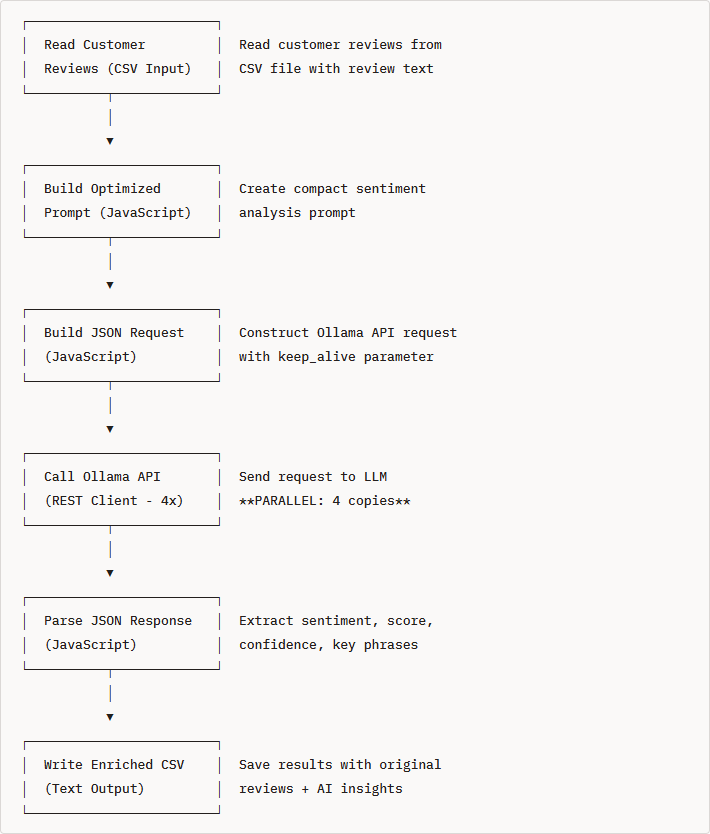
This workshop demonstrates how to integrate a Large Language Model (LLM) via Ollama with Pentaho Data Integration (PDI) to perform sentiment analysis on customer reviews. You'll learn how to build an ETL pipeline that reads customer feedback, analyzes sentiment using AI, and outputs structured results.
{% endhint %}

**Workflow**

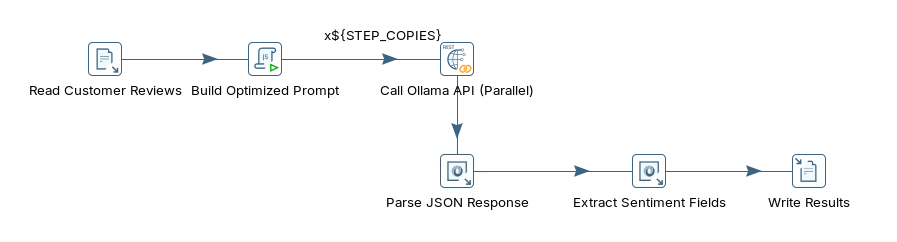
<figure><img src="https://3680356391-files.gitbook.io/~/files/v0/b/gitbook-x-prod.appspot.com/o/spaces%2FZpCSy6Skj215f4oWypdc%2Fuploads%2FHyEO4TsgXJbMTe1Zl6OA%2Fimage.png?alt=media&#x26;token=e46a5d91-e085-405e-9051-ebf938f5ae5c" alt=""><figcaption><p>sentiment_analysis_optimized</p></figcaption></figure>

1. Verify Ollama Installation.

```bash
# Check if Ollama is responding
curl http://localhost:11434/api/tags
```

Run through the following steps to build `sentiment_analysis_optimized.ktr`:

{% tabs %}
{% tab title="1. Sentiment Analysis" %}
{% hint style="info" %}

#### What is Sentiment Analysis?

Sentiment Analysis is the process of computationally identifying and categorizing opinions expressed in text to determine whether the writer's attitude toward a particular topic, product, or service is positive, negative, or neutral.
{% endhint %}

**Example Input:**

```
"This laptop exceeded my expectations! The battery life is incredible and the
performance is blazing fast. Highly recommend for anyone looking for a quality machine."
```

**Example Output (Sentiment Analysis):**

```json
{
  "sentiment": "positive",
  "score": 0.9,
  "confidence": 95,
  "key_phrases": ["exceeded expectations", "incredible battery", "blazing fast", "highly recommend"],
  "summary": "Customer extremely satisfied with laptop performance and battery life"
}
```

{% hint style="info" %}

#### Why is Sentiment Analysis Important?

**Business Applications:**

1. **Customer Feedback Analysis** - Automatically categorize thousands of reviews to identify satisfaction trends
2. **Brand Monitoring** - Track public sentiment about your brand across social media and review sites
3. **Product Improvement** - Identify which features customers love and which need improvement
4. **Customer Support Prioritization** - Route angry customers to experienced support agents first
5. **Market Research** - Understand customer opinions about competitor products
6. **Crisis Detection** - Quickly identify negative sentiment spikes that require immediate attention
   {% endhint %}

{% hint style="info" %}
**Real-World Example:** A company receives 10,000 product reviews per month. Manual analysis would take weeks. With sentiment analysis:

* **Instant categorization**: 7,500 positive, 1,800 neutral, 700 negative
* **Identify issues**: Negative reviews mention "battery life" 450 times → product team investigates
* **Measure satisfaction**: 75% positive sentiment score → track over time
* **Prioritize responses**: Route the 200 most negative reviews to customer service
  {% endhint %}

{% hint style="info" %}

#### Types of Sentiment

**1. Polarity (Basic)**

* **Positive**: "This product is amazing!"
* **Negative**: "Terrible quality, waste of money"
* **Neutral**: "The product arrived on Tuesday"

**2. Granular Sentiment (Scored)**

* **Very Positive**: +0.8 to +1.0 ("Best purchase ever!")
* **Positive**: +0.3 to +0.7 ("Good value for money")
* **Neutral**: -0.2 to +0.2 ("It works as described")
* **Negative**: -0.7 to -0.3 ("Not what I expected")
* **Very Negative**: -1.0 to -0.8 ("Complete garbage, requesting refund")

**3. Emotion-Based Sentiment** (Advanced)

* **Joy**: "So happy with this purchase!"
* **Anger**: "This company has the worst customer service!"
* **Frustration**: "Why doesn't this feature work properly?"
* **Disappointment**: "Expected better quality for the price"
  {% endhint %}

***

**How LLMs Improve Sentiment Analysis**

**Traditional Methods (Rule-Based/ML):**

```python
# Simple keyword matching
positive_words = ["good", "great", "excellent", "love"]
negative_words = ["bad", "poor", "terrible", "hate"]

if text contains more positive_words:
    sentiment = "positive"
```

{% hint style="info" %}
**Problems with Traditional Methods:**

❌ Can't handle context: "This isn't bad" → Detected as negative (contains "bad")

❌ Misses sarcasm: "Oh great, another software bug" → Detected as positive (contains "great")

❌ Ignores negation: "Not good at all" → Detected as positive (contains "good")

❌ Limited to trained categories

❌ Requires extensive labeled training data
{% endhint %}

***

**LLM-Based Sentiment Analysis:**

```
Prompt: "Analyze the sentiment of this review and respond in JSON format..."

LLM Response:
{
  "sentiment": "positive",
  "score": 0.85,
  "confidence": 90,
  "reasoning": "Customer expresses satisfaction with performance and battery,
               uses enthusiastic language ('exceeded expectations', 'incredible')"
}
```

{% hint style="info" %}
**Advantages of LLMs:**

✅ Understands context and nuance

✅ Detects sarcasm and irony

✅ Handles negation correctly

✅ Provides explanations and reasoning

✅ Extracts key phrases automatically

✅ Works in multiple languages (multilingual models)

✅ No training data required (zero-shot learning)

✅ Customizable output format (JSON, XML, etc.)
{% endhint %}

***

{% hint style="info" %}

#### Sentiment Analysis Output Components

In this workshop, our LLM will extract:

**1. Sentiment Classification**

* Category: positive, negative, or neutral
* Example: `"sentiment": "positive"`

**2. Sentiment Score**

* Numeric value from -1.0 (very negative) to +1.0 (very positive)
* Example: `"score": 0.9` (strongly positive)

**3. Confidence Level**

* How certain is the LLM about this classification (0-100%)
* Example: `"confidence": 95` (very confident)
* Low confidence (<60%) might indicate mixed or ambiguous sentiment

**4. Key Phrases**

* Important words/phrases that influenced the sentiment
* Example: `["exceeded expectations", "incredible battery", "blazing fast"]`
* Useful for identifying specific strengths or weaknesses

**5. Summary**

* One-sentence summary of the review's main point
* Example: `"Customer extremely satisfied with laptop performance and battery life"`
* Helps quickly understand what the review is about
  {% endhint %}

***

**Use Cases in This Workshop**

We'll analyze **3 customer reviews** with varying sentiments:

**Review 1 (Positive):**

```
"This laptop exceeded my expectations! The battery life is incredible..."
→ Sentiment: positive, Score: 0.9, Confidence: 90%
```

**Review 2 (Negative):**

```
"The wireless mouse I bought stopped working after just 2 weeks..."
→ Sentiment: negative, Score: -0.6, Confidence: 80%
```

**Review 3 (Neutral/Mixed):**

```
"Good laptop overall, but it gets a bit warm during intensive tasks..."
→ Sentiment: neutral, Score: -0.33, Confidence: 70%
```

{% hint style="info" %}

#### Expected Results

After running this workshop's transformation, you'll have:

* Original review text
* AI-determined sentiment (positive/negative/neutral)
* Numeric score (-1.0 to 1.0)
* Confidence percentage
* Key phrases extracted
* One-sentence summary

All in a structured CSV file ready for analysis, visualization, or database import!
{% endhint %}

{% hint style="info" %}

#### Key Takeaways

1. **Sentiment analysis automatically categorizes opinions** in customer feedback
2. **LLMs provide context-aware analysis** that traditional methods can't match
3. **Structured JSON output** makes results easy to process in ETL pipelines
4. **Confidence scores** help identify reviews that need manual review
5. **Key phrases** identify specific strengths and weaknesses
6. **Scalable processing** - analyze thousands of reviews in minutes
   {% endhint %}
   {% endtab %}

{% tab title="2. API Endpoint" %}
{% hint style="info" %}

#### Ollama API Endpoint

Ollama provides a REST API at `http://localhost:11434`

**Key Endpoint:** `/api/generate`

**Sample Request Format**

```json
{
  "model": "llama3.2:3b",
  "prompt": "Your prompt text here",
  "stream": false,
  "format": "json"
}
```

**Parameters:**

* `model`: Which LLM model to use
* `prompt`: The instruction/question for the model
* `stream`: false for complete responses (true for streaming)
* `format`: "json" to request JSON-formatted output

**Sample Response Format**

```json
{
  "model": "llama3.2:3b",
  "created_at": "2024-02-25T12:00:00.000Z",
  "response": "{\"sentiment\":\"positive\",\"score\":0.85}",
  "done": true,
  "total_duration": 2000000000
}
```

The actual LLM output is in the `response` field.
{% endhint %}

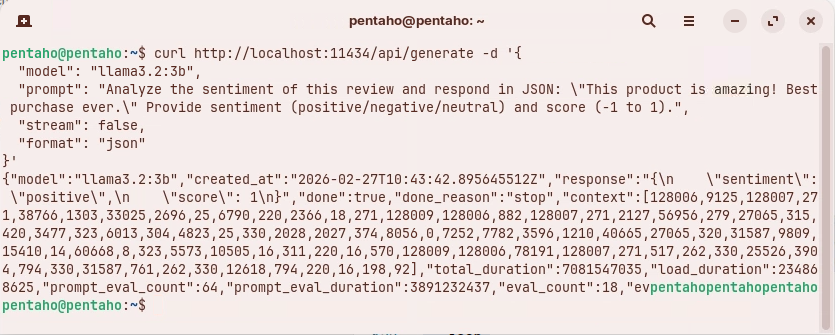
1. Test the API manually, enter this command:

```bash
curl http://localhost:11434/api/generate -d '{
  "model": "llama3.2:3b",
  "prompt": "Analyze the sentiment of this review and respond in JSON: \"This product is amazing! Best purchase ever.\" Provide sentiment (positive/negative/neutral) and score (-1 to 1).",
  "stream": false,
  "format": "json"
}'
```

<figure><img src="https://3680356391-files.gitbook.io/~/files/v0/b/gitbook-x-prod.appspot.com/o/spaces%2FZpCSy6Skj215f4oWypdc%2Fuploads%2FMpKdpWrlU4jZtBsCVMii%2Fimage.png?alt=media&#x26;token=a8aa3646-22f5-4d26-96d5-e3b9af4fe341" alt=""><figcaption><p>Response from sentiment analysis</p></figcaption></figure>

**The Response Structure**

This is a successful response from the Ollama API. Here's what each part means:

{% hint style="info" %}
**Main Fields:**

* **`"model": "llama3.2:3b"`** - Confirms which model processed your request (Llama 3.2 with 3 billion parameters)
* **`"created_at"`** - Timestamp when the response was generated
* **`"response"`** - **This is the actual AI-generated answer:**

  ```json
  {
    "sentiment": "positive",
    "score": 1
  }
  ```

  The AI correctly identified the review as **positive** with a maximum confidence score of **1** (on the -1 to 1 scale you requested)
* **`"done": true`** - Request completed successfully
* **`"done_reason": "stop"`** - Model finished naturally (not cut off due to length limits)
  {% endhint %}

{% hint style="info" %}
**Performance Metrics:**

* **`"total_duration": 3131161470`** - Total time: \~3.1 seconds (in nanoseconds)
* **`"load_duration": 220384685`** - Model loading: \~0.2 seconds
* **`"prompt_eval_count": 64`** - Your prompt used 64 tokens
* **`"prompt_eval_duration": 115063978`** - Processing prompt: \~0.1 seconds
* **`"eval_count": 18`** - Response generated 18 tokens
* **`"eval_duration": 2088187708`** - Generating response: \~2.1 seconds
  {% endhint %}

{% hint style="info" %}
**`context`**

The array of numbers represents the internal token IDs used by the model - you can ignore this unless you're doing advanced work with conversation history.
{% endhint %}

{% hint style="info" %}
**Summary**

The API successfully analyzed "This product is amazing! Best purchase ever." and correctly returned:

* **Sentiment:** Positive
* **Score:** 1.0 (maximum positivity)

The whole process took about 3 seconds. This is exactly what you'd use in your PDI transformation to get sentiment analysis results!
{% endhint %}
{% endtab %}

{% tab title="3. Transformation" %}
{% hint style="info" %}

#### PDI - Transformation

{% endhint %}

<figure><img src="https://3680356391-files.gitbook.io/~/files/v0/b/gitbook-x-prod.appspot.com/o/spaces%2FZpCSy6Skj215f4oWypdc%2Fuploads%2F6YUh0ef09zcmibXEO8G9%2Fimage.png?alt=media&#x26;token=6a73d2c3-a016-48c2-9c56-1844c66f28fd" alt=""><figcaption><p>Sentiment Analysis</p></figcaption></figure>

{% file src="<https://3680356391-files.gitbook.io/~/files/v0/b/gitbook-x-prod.appspot.com/o/spaces%2FZpCSy6Skj215f4oWypdc%2Fuploads%2FInQqeSRBQ1zCMKXzozZt%2Fcustomer_reviews.csv?alt=media&token=9fdb3736-3696-4501-8842-5b8ec8400e0e>" %}

{% file src="<https://3680356391-files.gitbook.io/~/files/v0/b/gitbook-x-prod.appspot.com/o/spaces%2FZpCSy6Skj215f4oWypdc%2Fuploads%2FPf169uw6LQydM2H1tiIC%2Fsentiment_analysis.ktr?alt=media&token=b228e547-745f-476a-abea-03f70eb4154a>" %}

{% file src="<https://3680356391-files.gitbook.io/~/files/v0/b/gitbook-x-prod.appspot.com/o/spaces%2FZpCSy6Skj215f4oWypdc%2Fuploads%2FjBVVNtCcLgkgSCG0hcMu%2Fsentiment_analysis_optimized.ktr?alt=media&token=0e6a3c0c-14e2-4f7a-83e8-7a250faf0d83>" %}

***

Run through the following steps to build `sentiment_analysis_optimized.ktr`:

{% tabs %}
{% tab title="1. Customer Reviews" %}
{% hint style="info" %}

#### CSV file input

Read customer\_reviews.csv
{% endhint %}

1. Examine the customer reviews dataset.

```bash
cd
cd /home/pentaho/LLM-PDI-Integration/workshops/workshop-01-sentiment-analysis
cat data/customer_reviews.csv | head -5
```

```csv
review_id,customer_name,product,review_text,date
1,Sarah Johnson,Laptop Pro 15,"This laptop exceeded my expectations! Fast performance, great battery life, and the display is stunning. Worth every penny.",2024-02-15
2,Mike Chen,Wireless Mouse,"The mouse stopped working after just 2 weeks. Very disappointed with the quality. Would not recommend.",2024-02-16
3,Emily Rodriguez,USB-C Hub,"Good product overall. Works as expected, though it gets a bit warm during heavy use. Decent value for money.",2024-02-17
4,David Kim,Mechanical Keyboard,"Absolutely love this keyboard! The tactile feedback is perfect, build quality is excellent, and it's a pleasure to type on. Highly recommend for programmers and writers.",2024-02-18
5,Jessica Martinez,Webcam HD Pro,"Terrible experience. The image quality is poor even in good lighting, and the microphone picks up too much background noise. Returning it tomorrow.",2024-02-19
```

{% hint style="info" %}
The dataset contains:

* **review\_id**: Unique identifier
* **customer\_name**: Customer who wrote the review
* **product**: Product being reviewed
* **review\_text**: The actual review content (this is what we'll analyze)
* **date**: Review date
  {% endhint %}

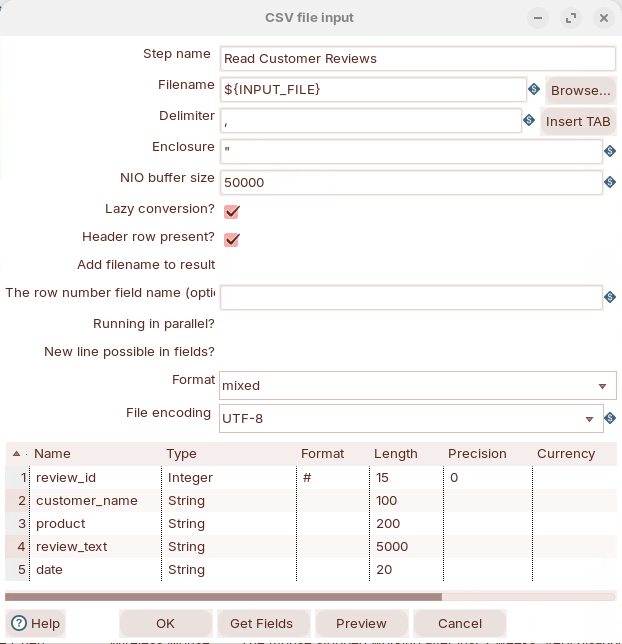
2. Double-click on the CSV file input step to review settings:

<figure><img src="https://3680356391-files.gitbook.io/~/files/v0/b/gitbook-x-prod.appspot.com/o/spaces%2FZpCSy6Skj215f4oWypdc%2Fuploads%2FaDdj1owhL7ZYkN0WzhoT%2Fimage.png?alt=media&#x26;token=fc581432-37d1-4bec-9395-21ede863fa0c" alt=""><figcaption></figcaption></figure>

* **Configuration:**
  * **File path:** `${INPUT_FILE}` (parameter, defaults to `../data/customer_reviews.csv`)
  * **Delimiter:** comma (,)
  * **Enclosure:** double quote (")
  * **Header row:** Yes
  * **Encoding:** UTF-8
* **Output Fields:** review\_id, customer\_name, product, review\_text, date

{% hint style="info" %}
The transformation uses the `INPUT_FILE` parameter for flexibility. You can override this when running:

```bash
-param:INPUT_FILE=/path/to/your/customer_reviews.csv
```

{% endhint %}
{% endtab %}

{% tab title="2. Build Prompt" %}
{% hint style="info" %}

#### Modified JavaScript Value

Construct the JSON payload for Ollama API.
{% endhint %}

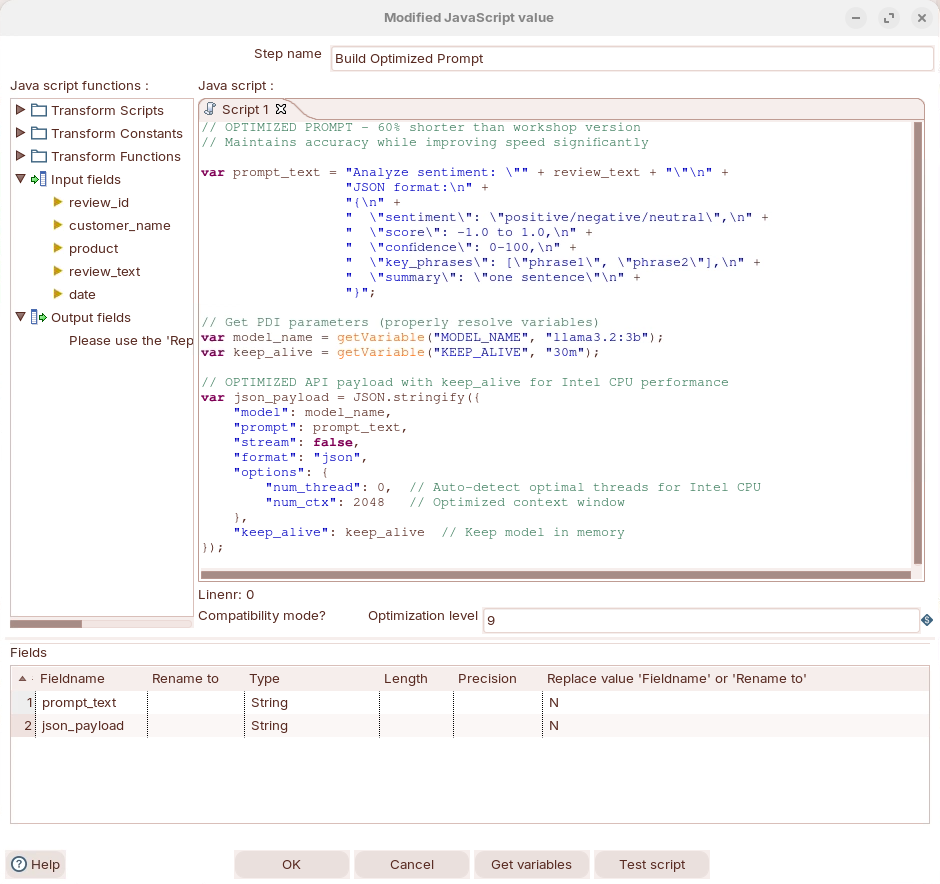
1. Double-click on the Modified JavaScript Value to review settings:

<figure><img src="https://3680356391-files.gitbook.io/~/files/v0/b/gitbook-x-prod.appspot.com/o/spaces%2FZpCSy6Skj215f4oWypdc%2Fuploads%2F6eH3sGgiTXXeTLzf4qRt%2Fimage.png?alt=media&#x26;token=356a10c1-a9ce-4ce0-8bdf-8be06981fdc5" alt=""><figcaption><p>Build your prompt</p></figcaption></figure>

**Step Type:** Modified Java Script Value

* **Purpose:** Construct the JSON payload for Ollama API
* **Key Logic:**

  ```javascript
  // =============================================================================
  // SENTIMENT ANALYSIS SCRIPT FOR PENTAHO DATA INTEGRATION (PDI)
  // =============================================================================
  // This script constructs an API request payload for a local LLM (via Ollama)
  // to perform sentiment analysis on review text. It is designed to run inside
  // a PDI "Modified JavaScript" step, where variables and row fields are
  // accessible through PDI's JavaScript scripting engine.
  //
  // Performance note: Uses keep_alive and optimized threading to maintain
  // model responsiveness across multiple rows without reloading the model
  // into memory for each request.
  // =============================================================================

  // ---------------------------------------------------------------------------
  // STEP 1: BUILD THE LLM PROMPT
  // ---------------------------------------------------------------------------
  // Constructs a structured prompt that instructs the LLM to:
  //   - Analyze the sentiment of the incoming review text
  //   - Return results in a strict JSON format for easy downstream parsing
  //
  // The variable `review_text` is expected to come from an incoming PDI row
  // field (e.g., a database column or CSV field containing customer reviews).
  //
  // The JSON schema in the prompt tells the model exactly what fields to return:
  //   - sentiment:    categorical label (positive, negative, or neutral)
  //   - score:        numeric sentiment score from -1.0 (most negative) to 1.0 (most positive)
  //   - confidence:   model's self-assessed confidence in its classification (0-100%)
  //   - key_phrases:  notable phrases from the review that drove the sentiment decision
  //   - summary:      a one-sentence summary of the review's overall meaning
  var prompt_text = "Analyze sentiment: \"" + review_text + "\"\n" +
                    "JSON format:\n" +
                    "{\n" +
                    "  \"sentiment\": \"positive/negative/neutral\",\n" +
                    "  \"score\": -1.0 to 1.0,\n" +
                    "  \"confidence\": 0-100,\n" +
                    "  \"key_phrases\": [\"phrase1\", \"phrase2\"],\n" +
                    "  \"summary\": \"one sentence\"\n" +
                    "}";

  // ---------------------------------------------------------------------------
  // STEP 2: RESOLVE PDI VARIABLES FOR MODEL CONFIGURATION
  // ---------------------------------------------------------------------------
  // Uses PDI's getVariable() function to read Kettle variables (set via
  // kettle.properties, Set Variables step, or command-line arguments).
  // This allows the model name and keep_alive duration to be changed without
  // modifying the script — useful for switching between models or tuning
  // performance across different environments (dev, staging, production).
  //
  // MODEL_NAME: The Ollama model identifier to use for inference.
  //   - Default: "llama3.2:3b" — a compact 3-billion parameter model that
  //     balances quality and speed, well-suited for structured tasks like
  //     sentiment analysis on modest hardware (e.g., Intel CPU without GPU).
  var model_name = getVariable("MODEL_NAME", "llama3.2:3b");

  // KEEP_ALIVE: How long Ollama should keep the model loaded in memory after
  //   the last request. This is critical for batch processing in PDI — without
  //   it, the model would be unloaded and reloaded for every single row,
  //   adding ~10-30 seconds of overhead per request.
  //   - Default: "30m" (30 minutes) — ensures the model stays warm throughout
  //     a typical ETL batch run.
  var keep_alive = getVariable("KEEP_ALIVE", "30m");

  // ---------------------------------------------------------------------------
  // STEP 3: CONSTRUCT THE OLLAMA API REQUEST PAYLOAD
  // ---------------------------------------------------------------------------
  // Builds the JSON payload for Ollama's /api/generate endpoint.
  // The payload is serialized with JSON.stringify() so it can be passed to
  // a subsequent "REST Client" step or HTTP Post step in the PDI transformation.
  var json_payload = JSON.stringify({

      // "model": Specifies which Ollama model to invoke. Resolved from the
      // PDI variable above so it can be swapped without code changes.
      "model": model_name,

      // "prompt": The full prompt string including the review text and the
      // desired JSON output schema. Ollama will pass this directly to the model.
      "prompt": prompt_text,

      // "stream": false — Disables streaming mode. When true, Ollama sends
      // tokens one at a time (useful for chat UIs). Setting to false tells
      // Ollama to wait until the entire response is generated and return it
      // as a single JSON object — which is what we need for PDI row processing.
      "stream": false,

      // "format": "json" — Instructs Ollama to constrain the model's output
      // to valid JSON. This prevents the model from adding conversational
      // preamble or markdown formatting, making downstream parsing reliable.
      "format": "json",

      // "options": Model-level inference parameters for performance tuning.
      "options": {
          // "num_thread": 0 — Setting to 0 tells Ollama to auto-detect the
          // optimal number of CPU threads based on the system's hardware.
          // On Intel CPUs, this typically maps to the number of performance
          // cores. You can override with a specific value (e.g., 8) if you
          // want to limit CPU usage to leave resources for other processes.
          "num_thread": 0,

          // "num_ctx": 2048 — Sets the context window size (in tokens) for
          // the model. A smaller context window uses less RAM and speeds up
          // inference. 2048 tokens is sufficient for sentiment analysis of
          // individual reviews (typically 100-500 tokens), while leaving
          // room for the prompt template and JSON output structure.
          // Increasing this (e.g., to 4096) would be needed only for very
          // long reviews but would slow down processing and use more memory.
          "num_ctx": 2048
      },

      // "keep_alive": Controls how long the model stays loaded in Ollama's
      // memory after this request completes. This is the single biggest
      // performance optimization for batch ETL workloads — model loading
      // can take 10-30+ seconds depending on model size and disk speed.
      // By keeping the model warm, subsequent rows are processed in
      // milliseconds-to-seconds rather than tens of seconds each.
      "keep_alive": keep_alive
  });


  The key things this script does in the context of a PDI transformation:

  1. **Prompt engineering** — builds a structured prompt that forces the LLM to return parseable JSON with specific sentiment fields
  2. **Externalized configuration** — uses PDI variables so the model and keep-alive settings can be changed at the transformation or job level without editing code
  3. **Batch performance tuning** — the `keep_alive`, `num_thread`, and `num_ctx` settings are specifically chosen to optimize throughput when processing many rows on CPU-only hardware (no GPU)
  ```

{% hint style="info" %}
**Output Fields:** prompt\_text, json\_payload
{% endhint %}

**PDI Parameter Resolution in JavaScript:**

PDI parameters work differently depending on where you use them:

| Location               | Syntax          | Works? | Example                                         |
| ---------------------- | --------------- | ------ | ----------------------------------------------- |
| **XML tags**           | `${PARAM}`      | ✅ YES  | `<url>${OLLAMA_URL}/api/generate</url>`         |
| **JavaScript strings** | `"${PARAM}"`    | ❌ NO   | `var x = "${MODEL_NAME}";` stays literal        |
| **JavaScript code**    | `getVariable()` | ✅ YES  | `var x = getVariable("MODEL_NAME", "default");` |

**Correct JavaScript approach:**

```javascript
// ✅ CORRECT - Use getVariable()
var model_name = getVariable("MODEL_NAME", "llama3.2:3b");
var url = getVariable("OLLAMA_URL", "http://localhost:11434");

var payload = JSON.stringify({
    "model": model_name  // Use the variable
});
```

**Incorrect approach (common mistake):**

```javascript
// ❌ WRONG - Parameters not replaced in JavaScript strings
var payload = JSON.stringify({
    "model": "${MODEL_NAME}"  // This stays as literal "${MODEL_NAME}"
});
// Result: {"model": "${MODEL_NAME}"} - causes 400 error!
```

{% hint style="info" %}
**Prompt Engineering Tips:**

* Be explicit about the desired output format
* Provide clear examples when possible
* Request structured data (JSON) for easier parsing
* Specify value ranges and types
  {% endhint %}
  {% endtab %}

{% tab title="3. Call Ollama" %}
{% hint style="info" %}

#### REST Client

The REST client transformation step enables you to consume RESTful services.

Representational State Transfer (REST) is a key design idiom that embraces a stateless client-server architecture in which web services are viewed as resources and can be identified by their URLs.

You can escape input field data by using the Calculator step and the Mask XML content from string A or Escape HTML content function.
{% endhint %}

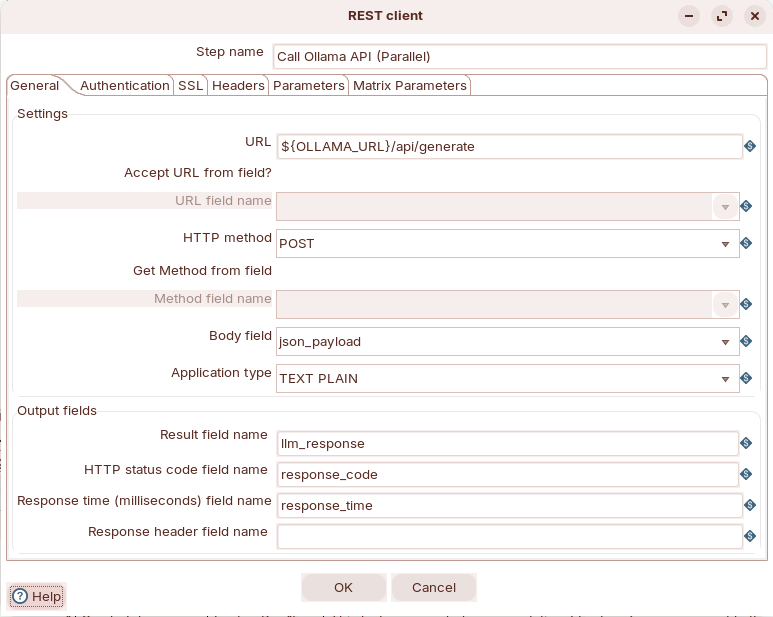
1. Double-click on the REST client step to review settings:

<figure><img src="https://3680356391-files.gitbook.io/~/files/v0/b/gitbook-x-prod.appspot.com/o/spaces%2FZpCSy6Skj215f4oWypdc%2Fuploads%2FwsXtAoSRO6KpgmWZAVW4%2Fimage.png?alt=media&#x26;token=4872df14-c8ca-4f75-a998-8f00f7403c5c" alt=""><figcaption><p>POST request to Ollama</p></figcaption></figure>

{% hint style="info" %}
Use the **REST Client** step, not the generic HTTP Client step. The REST Client is specifically designed for REST APIs and handles POST requests properly.
{% endhint %}

1. Add a "REST Client" step
2. **General Tab:**
   * Application type: TEXT PLAIN
   * HTTP method: POST
   * URL: `${OLLAMA_URL}/api/generate`
   * Body field: `json_payload`
3. **Headers Tab:**
   * Add: Content-Type = application/json
   * Add: Accept = application/json
4. **Settings Tab:**
   * Result field name: `llm_response`
   * HTTP status code field: `response_code`
   * Response time: `response_time`
   * Socket timeout: 300000
   * Connection timeout: 30000

**Common Issues & Solutions:**

| Issue                      | Cause                                     | Solution                                   |
| -------------------------- | ----------------------------------------- | ------------------------------------------ |
| **405 Method Not Allowed** | Using HTTP Client instead of REST Client  | Change step type to REST Client            |
| **400 Bad Request**        | PDI parameters not resolved in JavaScript | Use `getVariable()` in JavaScript          |
| **Timeout errors**         | Socket timeout too low                    | Increase to 300000ms (5 minutes)           |
| **Connection refused**     | Ollama not running                        | Run `curl http://localhost:11434/api/tags` |

{% hint style="info" %}
**Important Notes:**

✅ LLM inference takes 20-30 seconds per review - this is normal

✅ Set socket timeout to at least 300000ms (5 minutes)

✅ Always check `response_code` field (should be 200)

✅ Use REST Client step, not HTTP Client

✅ Test Ollama API with curl before running transformation
{% endhint %}
{% endtab %}

{% tab title="4. Parse Response" %}
{% hint style="info" %}

#### JSON Input

This step extracts the actual LLM-generated content from Ollama's response wrapper.

Parse the LLM's JSON output into separate fields.
{% endhint %}

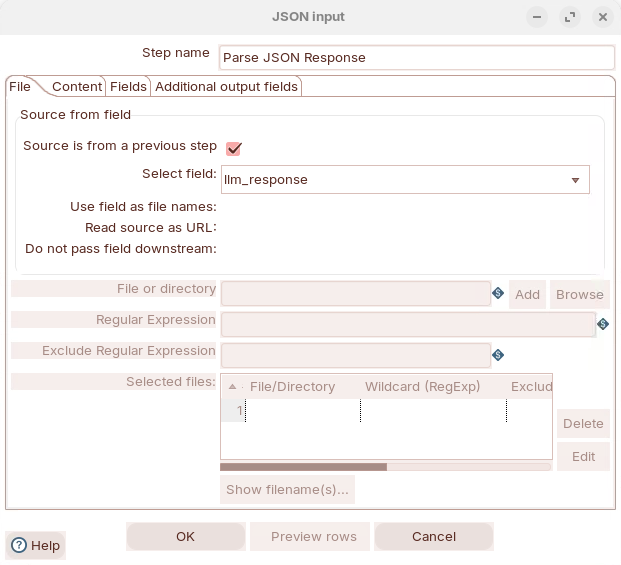
1. Double-click on the JSON Input step to review settings:

<figure><img src="https://3680356391-files.gitbook.io/~/files/v0/b/gitbook-x-prod.appspot.com/o/spaces%2FZpCSy6Skj215f4oWypdc%2Fuploads%2FJet3ZizUBazi29q03y7M%2Fimage.png?alt=media&#x26;token=3b649fc1-7be3-406b-943e-2ac4308fab64" alt=""><figcaption><p>Parse the llm_response field</p></figcaption></figure>

* **Configuration:**
  * Source: Field value (llm\_response)
  * JSON field path: `$.response`
  * Output field: `sentiment_json`
    {% endtab %}

{% tab title="5. Extract Sentiment" %}
{% hint style="info" %}

#### JSON Input

Parse the LLM's JSON output into separate fields
{% endhint %}

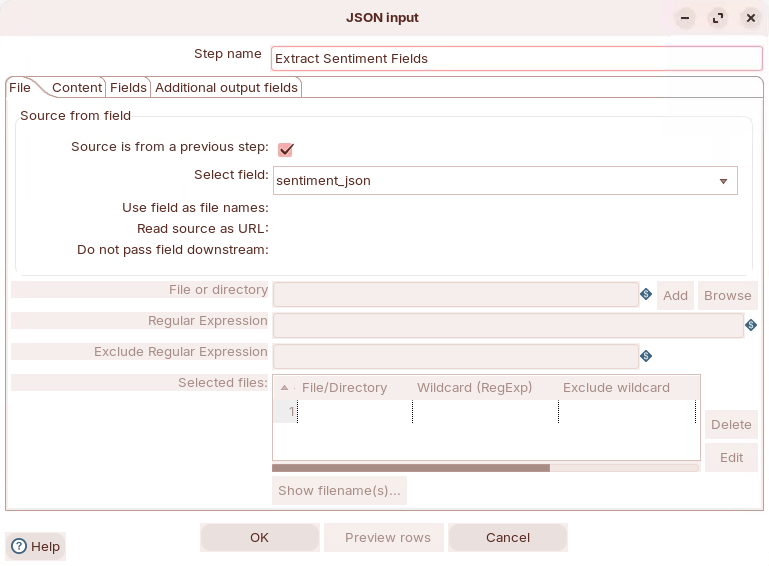
1. Double-click on JSON input step to review settings:

<figure><img src="https://3680356391-files.gitbook.io/~/files/v0/b/gitbook-x-prod.appspot.com/o/spaces%2FZpCSy6Skj215f4oWypdc%2Fuploads%2FVOMXndwav6xu4FF3lNMc%2Fimage.png?alt=media&#x26;token=65fc9648-ebef-4a5c-8020-b1f6ca5dd3d6" alt=""><figcaption><p>Extract sentiment fields</p></figcaption></figure>

* **Configuration:**
  * Source: Field value (sentiment\_json)
  * JSON paths:
    * `$.sentiment` → sentiment (String)
    * `$.score` → score (Number, format: #.##)
    * `$.confidence` → confidence (Integer)
    * `$.key_phrases` → key\_phrases (String)
    * `$.summary` → summary (String)
      {% endtab %}

{% tab title="6. Write Results" %}
{% hint style="info" %}

#### Text file output

Save enriched data to CSV
{% endhint %}

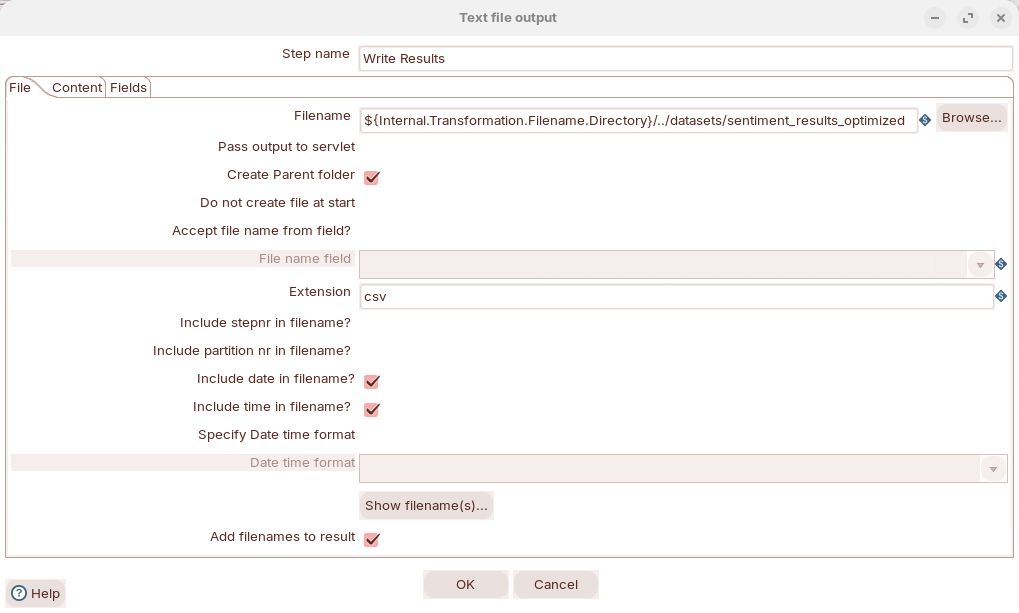
1. Double-click on Text fle output to review settings:

<figure><img src="https://3680356391-files.gitbook.io/~/files/v0/b/gitbook-x-prod.appspot.com/o/spaces%2FZpCSy6Skj215f4oWypdc%2Fuploads%2FjgTYNSybwqHSNmAZvusJ%2Fimage.png?alt=media&#x26;token=aa769c0c-5d50-44df-abbd-a6b67e939dff" alt=""><figcaption><p>Output results</p></figcaption></figure>

* **Configuration:**
  * File name: `../datasets/sentiment_results`
  * Extension: .csv
  * Add date: Yes
  * Add time: Yes
  * Format: DOS (Windows line endings)
  * Encoding: UTF-8
  * Include header: Yes
  * Fields: All original fields + sentiment fields
    {% endtab %}
    {% endtabs %}
    {% endtab %}

{% tab title="3. RUN" %}
{% hint style="info" %}

#### RUN the transformation

The transformation has been optimzed to execute on minimal spec machines.
{% endhint %}

1. Before you RUN the transformation, you will need to set the parameters.
2. Double-click anywhere on the canvas to display the transformatiom properties:

<figure><img src="https://3680356391-files.gitbook.io/~/files/v0/b/gitbook-x-prod.appspot.com/o/spaces%2FZpCSy6Skj215f4oWypdc%2Fuploads%2FBYOvfN7bNPErfkqDgYlg%2Fimage.png?alt=media&#x26;token=b76509d0-2cfa-4aff-a379-2c07b7edeebe" alt=""><figcaption></figcaption></figure>

Transformation Parameters

The transformation uses these parameters for flexibility:

**Basic Transformation (`sentiment_analysis.ktr`)**

<table data-full-width="true"><thead><tr><th width="152">Parameter</th><th width="288">Default Value</th><th width="261">Description</th></tr></thead><tbody><tr><td>OLLAMA_URL</td><td>http://localhost:11434</td><td>Ollama API endpoint</td></tr><tr><td>MODEL_NAME</td><td>llama3.2:3b</td><td>Model to use for analysis</td></tr><tr><td>INPUT_FILE</td><td>../data/customer_reviews.csv</td><td>Input data path</td></tr></tbody></table>

**Optimized Transformation (`sentiment_analysis_optimized.ktr`)**

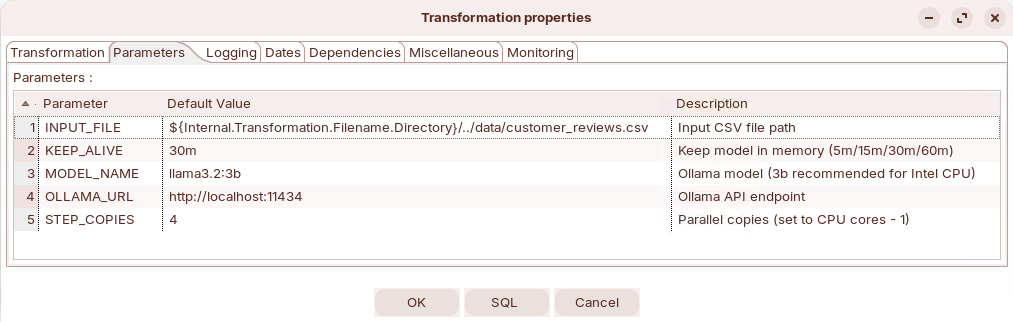
<table><thead><tr><th width="160">Parameter</th><th width="274">Default Value</th><th>Description</th></tr></thead><tbody><tr><td>OLLAMA_URL</td><td>http://localhost:11434</td><td>Ollama API endpoint</td></tr><tr><td>MODEL_NAME</td><td>llama3.2:3b</td><td>Model to use for analysis</td></tr><tr><td>INPUT_FILE</td><td>../data/customer_reviews.csv</td><td>Input data path</td></tr><tr><td><strong>KEEP_ALIVE</strong></td><td><strong>30m</strong></td><td><strong>Keep model in memory (5m/15m/30m/60m)</strong></td></tr><tr><td><strong>STEP_COPIES</strong></td><td><strong>4</strong></td><td><strong>Parallel copies (set to CPU cores - 1)</strong></td></tr></tbody></table>

{% hint style="info" %}
**Parameter Details:**

* **KEEP\_ALIVE:** Controls how long Ollama keeps the model loaded in memory

  `5m` = 5 minutes (minimal memory usage)

  `15m` = 15 minutes (balanced)

  `30m` = 30 minutes (recommended - prevents reload overhead)

  `60m` = 60 minutes (for heavy workloads)
* **STEP\_COPIES:** Number of parallel processing threads for the "Call Ollama API" step

  Recommended: CPU cores - 1 (e.g., 8 cores = set to 4)

  Higher = faster processing but more memory usage

  Default: 4 (good for most systems)
* **File Path Note:** The default INPUT\_FILE parameter points to `../data/customer_reviews.csv`. Make sure your data files are in the `data/` folder, not `datasets/`.
  {% endhint %}

***

{% hint style="info" %}
**Performance Notes**

**Processing Time**

* **3 reviews**: \~69 seconds (\~23 sec/review)
* **Expected for 100 reviews**: \~38 minutes (at 23 sec/review)
* **Optimized version** (parallel): Expected 3-4x faster

**Recommendations**

1. **For testing**: Use small datasets (3-10 reviews)
2. **For production**: Use optimized version with parallel processing
3. **Adjust STEP\_COPIES**: Set to (CPU cores - 1) for optimal performance
4. **Model choice**:
   * llama3.2:1b = faster, less accurate
   * llama3.2:3b = balanced (recommended)
   * llama2:7b = slower, more accurate
     {% endhint %}

***

**Results**

Input Data

```csv
review_id,customer_name,product,review_text,date
1,Sarah Johnson,Laptop Pro 15,"This laptop exceeded my expectations!...",2024-02-15
2,Mike Chen,Wireless Mouse,"The mouse stopped working after just 2 weeks...",2024-02-16
3,Emily Rodriguez,USB-C Hub,"Good product overall. Works as expected...",2024-02-17
```

**Output Data with Sentiment Analysis**

<table><thead><tr><th width="101">Review</th><th width="152">Customer</th><th width="155">Product</th><th width="138">Sentiment</th><th width="136">Score</th><th width="137">Confidence</th><th width="153">Result</th></tr></thead><tbody><tr><td>1</td><td>Sarah Johnson</td><td>Laptop Pro 15</td><td><strong>positive</strong></td><td><strong>0.9</strong></td><td>90%</td><td>✅ Correct</td></tr><tr><td>2</td><td>Mike Chen</td><td>Wireless Mouse</td><td><strong>negative</strong></td><td><strong>-0.6</strong></td><td>80%</td><td>✅ Correct</td></tr><tr><td>3</td><td>Emily Rodriguez</td><td>USB-C Hub</td><td><strong>neutral</strong></td><td><strong>-0.33</strong></td><td>70%</td><td>✅ Correct</td></tr></tbody></table>

View the complete results at: `~/LLM-PDI-Integration/workshops/workshop-01-sentiment-analysis/datasets/sentiment_results_optimized_timestamp.csv`
{% endtab %}
{% endtabs %}
{% endtab %}

{% tab title="Data Quality" %}
{% hint style="success" %}

#### Data Quality

Learn how to use Large Language Models (LLMs) to automatically clean, standardize, and enhance data quality in your ETL pipelines. This workshop demonstrates using Ollama with Pentaho Data Integration (PDI) to fix common data quality issues like inconsistent formatting, invalid data, and missing information.:

**Common Data Quality Problems:**

* Inconsistent name formatting (john smith vs JOHN SMITH vs John Smith)
* Invalid or malformed email addresses
* Multiple phone number formats (+1-555-123-4567 vs 555.123.4567 vs (555) 123-4567)
* Incomplete or inconsistent addresses
* Company name variations (ACME CORP vs Acme Corp vs acme corp)
  {% endhint %}

**Traditional Solutions vs LLM Approach:**

| Approach               | Pros                                      | Cons                               |
| ---------------------- | ----------------------------------------- | ---------------------------------- |
| **Regex/Rules**        | Fast, deterministic                       | Brittle, requires constant updates |
| **Data Quality Tools** | Comprehensive                             | Expensive, complex setup           |
| **Manual Cleaning**    | Accurate                                  | Doesn't scale                      |
| **LLM Approach**       | Flexible, intelligent, handles edge cases | Requires LLM infrastructure        |

**Workflow**

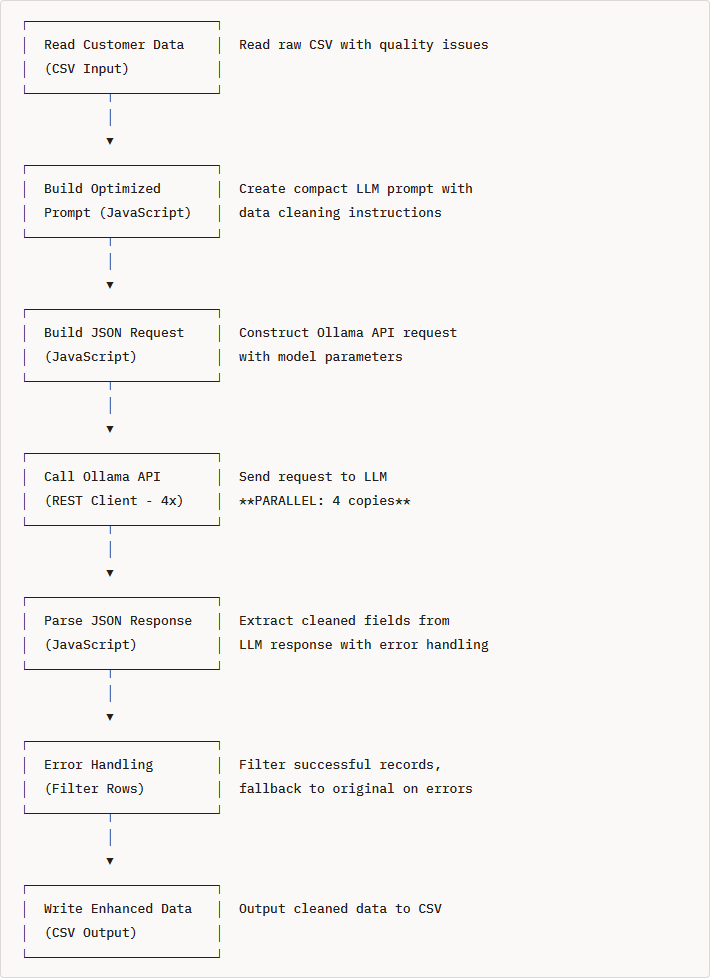
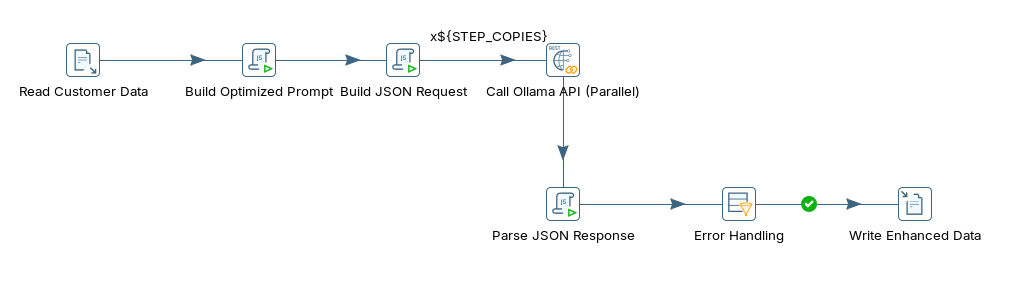
<figure><img src="https://3680356391-files.gitbook.io/~/files/v0/b/gitbook-x-prod.appspot.com/o/spaces%2FZpCSy6Skj215f4oWypdc%2Fuploads%2FK9YwiTCYXlhEI5QJhnAZ%2Fimage.png?alt=media&#x26;token=7e3385ef-cc4a-4eec-a87e-18e4e27c1422" alt=""><figcaption><p>data_quailty_optimized</p></figcaption></figure>

1. Verify Ollama Installation

```bash
# Check if Ollama is responding
curl http://localhost:11434/api/tags
```

2. Run through the following steps to build `data_quality_optimized.ktr`:

{% tabs %}
{% tab title="1. Data Quality" %}
**Understanding Data Quality Challenges**

Step 1: Examine the Raw Data

Navigate to the workshop folder and review the sample data:

```bash
cd /home/pentaho/LLM-PDI-Integration/workshops/workshop-02-data-quality
cat data/customer_data_raw.csv | head -5
```

**Sample Records:**

```csv
customer_id,name,email,phone,address,company_name
1001,john smith,JSMITH@GMAIL.COM,555.123.4567,"123 main st apt 5, new york, ny","acme corp"
1002,SARAH JOHNSON,sarah.j@company,+1-555-987-6543,"456 oak avenue, los angeles, ca 90001",TechStart Inc
1005,JAMES WILSON,james@,555-999-8888,"PO Box 456, Seattle WA 98101","Cloud Services, Inc."
1010,Bob O'Brien,bob.obrien@tech.co,(555) 111-2222,"789 pine street suite 100, san francisco, ca 94102","AI Solutions LLC"
```

**Data Quality Issues Identified:**

| Customer | Name Issue | Email Issue       | Phone Issue    | Address Issue            | Company Issue |
| -------- | ---------- | ----------------- | -------------- | ------------------------ | ------------- |
| 1001     | Lowercase  | Mixed case        | Dots separator | Lowercase, abbreviations | Lowercase     |
| 1002     | All caps   | Incomplete domain | Valid format   | Good                     | Mixed case    |
| 1005     | Good       | Missing domain    | Dashes         | Abbreviations            | Good          |
| 1010     | Good       | Valid             | Parentheses    | Lowercase                | Good          |

Step 2: Define Quality Standards

Our target output standards:

| Field       | Standard Format                     | Example                           |
| ----------- | ----------------------------------- | --------------------------------- |
| **Name**    | Title Case                          | `John Smith`                      |
| **Email**   | <lowercase@domain.com> or `INVALID` | `jsmith@gmail.com`                |
| **Phone**   | +1-555-123-4567                     | `+1-555-123-4567`                 |
| **Address** | Street, City, State ZIP             | `123 Main St Apt 5, New York, NY` |
| **Company** | Proper Business Name                | `Acme Corp`                       |

Step 3: Traditional vs LLM Approach

{% hint style="info" %}
**Common Data Quality Problems:**

* Inconsistent name formatting (john smith vs JOHN SMITH vs John Smith)
* Invalid or malformed email addresses
* Multiple phone number formats (+1-555-123-4567 vs 555.123.4567 vs (555) 123-4567)
* Incomplete or inconsistent addresses
* Company name variations (ACME CORP vs Acme Corp vs acme corp)
  {% endhint %}

**Solution Comparison:**

| Approach               | Pros                                      | Cons                                              | Example                                |
| ---------------------- | ----------------------------------------- | ------------------------------------------------- | -------------------------------------- |
| **Regex/Rules**        | Fast, deterministic                       | Brittle, requires constant updates for edge cases | `phone.replace(/[^\d]/g, '')`          |
| **Data Quality Tools** | Comprehensive features                    | Expensive ($20K-$50K+), complex setup (weeks)     | Informatica, Talend DQ                 |
| **Manual Cleaning**    | 100% accurate                             | Doesn't scale, labor intensive                    | Excel find/replace                     |
| **LLM Approach**       | Flexible, intelligent, handles edge cases | Requires LLM infrastructure                       | `"Clean and standardize this data..."` |
| {% endtab %}           |                                           |                                                   |                                        |

{% tab title="2. API Endpoint" %}
{% hint style="info" %}

#### Ollama API Endpoint

Ollama provides a REST API at `http://localhost:11434`

**Key Endpoint:** `/api/generate`

**Sample Request Format**

```json
{
  "model": "llama3.2:3b",
  "prompt": "Clean this data. Return JSON: {\"name\":\"Title Case\",\"email\":\"valid@format\",\"phone\":\"+1-555-123-4567\",\"address\":\"St,City,ST ZIP\",\"company_name\":\"Proper Name\"}\nName:john smith\nEmail:JSMITH@GMAIL.COM\nPhone:555.123.4567\nAddr:123 main st apt 5, new york, ny\nCo:acme corp",
  "stream": false,
  "keep_alive": "5m",
  "options": {
    "temperature": 0.1,
    "num_predict": 300
  }
}
```

**Key Parameters:**

* `model`: `llama3.2:3b` - Smaller, faster model optimized for structured tasks
* `prompt`: Compact instructions with example format
* `stream`: `false` - Get complete response at once
* `keep_alive`: `"5m"` - Keep model loaded for 5 minutes (faster subsequent requests)
* `temperature`: `0.1` - Low randomness for consistent formatting
* `num_predict`: `300` - Limit output tokens

**Sample Response Format**

```json
{
  "model": "llama3.2:3b",
  "created_at": "2026-02-27T14:00:00.000Z",
  "response": "{\"name\":\"John Smith\",\"email\":\"jsmith@gmail.com\",\"phone\":\"+1-555-123-4567\",\"address\":\"123 Main St Apt 5, New York, NY\",\"company_name\":\"Acme Corp\"}",
  "done": true,
  "total_duration": 1500000000,
  "load_duration": 100000000,
  "prompt_eval_count": 85,
  "prompt_eval_duration": 200000000,
  "eval_count": 45,
  "eval_duration": 1200000000
}
```

**Response Fields:**

* `response`: Contains the cleaned JSON data (as a string)
* `done`: `true` when generation is complete
* `prompt_eval_count`: Input tokens processed (85 tokens)
* `eval_count`: Output tokens generated (45 tokens)
* Total tokens: 130 tokens per record
  {% endhint %}

1. Test the API manually, enter this command:

```bash
curl http://localhost:11434/api/generate -d '{
  "model": "llama3.2:3b",
  "prompt": "Clean this data. Return JSON: {\"name\":\"Title Case\",\"email\":\"valid@format\",\"phone\":\"+1-555-123-4567\",\"address\":\"St,City,ST ZIP\",\"company_name\":\"Proper Name\"}\nName:SARAH JOHNSON\nEmail:sarah.j@company\nPhone:+1-555-987-6543\nAddr:456 oak avenue, los angeles, ca 90001\nCo:TechStart Inc",
  "stream": false
}'
```

**Expected Response:**

```json
{
  "response": "{\"name\":\"Sarah Johnson\",\"email\":\"INVALID\",\"phone\":\"+1-555-987-6543\",\"address\":\"456 Oak Avenue, Los Angeles, CA 90001\",\"company_name\":\"TechStart Inc\"}"
}
```

{% hint style="info" %}
Notice:

* Name converted to Title Case
* Email marked as `INVALID` (incomplete domain `@company`)
* Phone already in correct format
* Address capitalized and formatted
* Company name preserved (already correct)
  {% endhint %}
  {% endtab %}

{% tab title="3. Transformation" %}
{% hint style="info" %}

#### PDI Transformation

{% endhint %}

<figure><img src="https://3680356391-files.gitbook.io/~/files/v0/b/gitbook-x-prod.appspot.com/o/spaces%2FZpCSy6Skj215f4oWypdc%2Fuploads%2FNNHH3qkDRahyf6unAroi%2Fimage.png?alt=media&#x26;token=365c6297-1932-47fa-9ba0-b1eaa2b7d40c" alt=""><figcaption><p>data_quality</p></figcaption></figure>

{% file src="<https://3680356391-files.gitbook.io/~/files/v0/b/gitbook-x-prod.appspot.com/o/spaces%2FZpCSy6Skj215f4oWypdc%2Fuploads%2FmkhR3EbL0goyLDMBhGS8%2Fcustomer_data_raw.csv?alt=media&token=8b18a49e-9a00-43bd-9a8a-cf216379ad3e>" %}

{% file src="<https://3680356391-files.gitbook.io/~/files/v0/b/gitbook-x-prod.appspot.com/o/spaces%2FZpCSy6Skj215f4oWypdc%2Fuploads%2F2UORs4dCg9pIMS6gu1Fn%2Fdata_quality.ktr?alt=media&token=e47cbc99-34f3-44e9-8bc2-15ba1b11a0a1>" %}

{% file src="<https://3680356391-files.gitbook.io/~/files/v0/b/gitbook-x-prod.appspot.com/o/spaces%2FZpCSy6Skj215f4oWypdc%2Fuploads%2FGZazjTwilrIhAym4Nhg2%2Fdata_quality_optimized.ktr?alt=media&token=e86129d8-d437-4b6b-9bac-a61a7f5d1dce>" %}

***

Run through the following steps to build `data_quality_optimized.ktr`:

{% tabs %}
{% tab title="1. Read Customer" %}
{% hint style="info" %}

#### CSV file input

{% endhint %}

x

x

x

x
{% endtab %}

{% tab title="2. Build prompt" %}
{% hint style="info" %}

#### JSON input

Creates the LLM prompt from input data

**Input**: Raw customer fields (name, email, phone, address, company\_name)\
**Outpu**t: llm\_prompt (string)
{% endhint %}

x

x

**Build Optimized Prompt (Modified Java Script Value)**

JavaScript code:

```javascript
// Optimized short prompt - 50% shorter than basic version
var llm_prompt = "Clean this data. Return JSON: {\"name\":\"Title Case\",\"email\":\"valid@format\",\"phone\":\"+1-555-123-4567\",\"address\":\"St,City,ST ZIP\",\"company_name\":\"Proper Name\"}\nName:" + name + "\nEmail:" + email + "\nPhone:" + phone + "\nAddr:" + address + "\nCo:" + company_name;
```

{% hint style="info" %}
**Prompt Optimization Techniques:**

❌ Removed: Verbose explanations ("Clean and standardize this customer record...")

❌ Removed: Detailed field descriptions ("Full Name in Title Case")

✅ Kept: Clear format example in JSON

✅ Kept: Abbreviated field labels to reduce tokens

**Result**: 50% shorter → 50% faster processing
{% endhint %}

x

x

x
{% endtab %}

{% tab title="3. Build request" %}
{% hint style="info" %}

#### Modifed JavaScript value

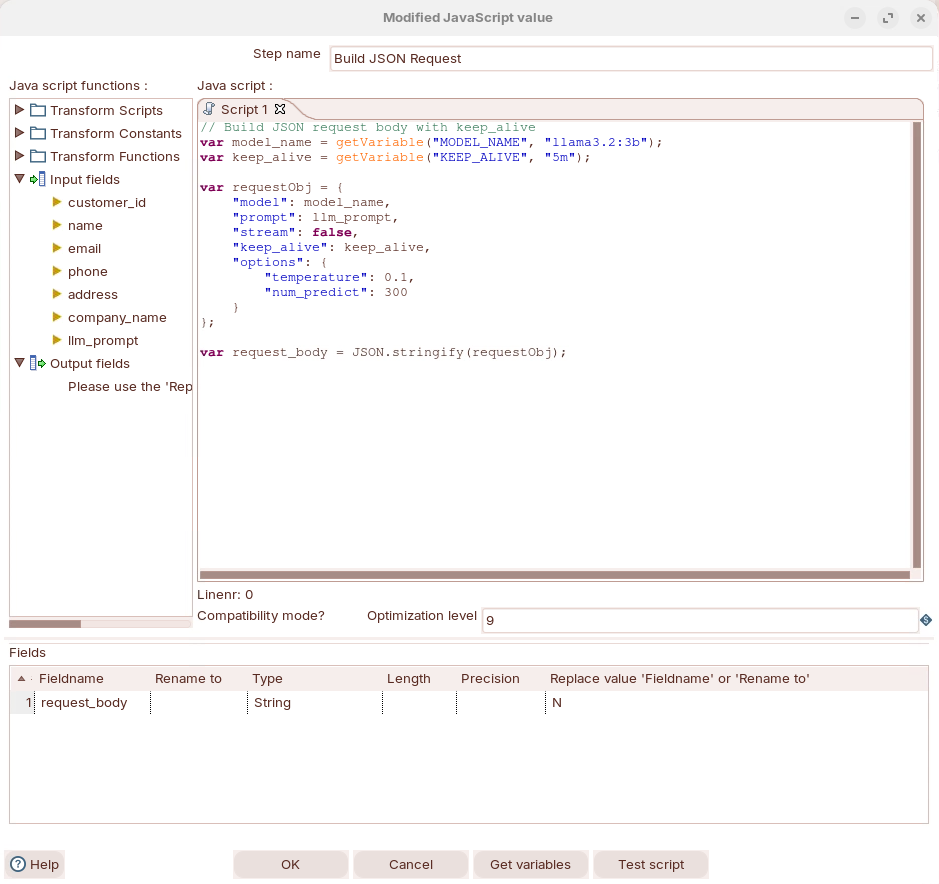
Wraps the prompt into Ollama API request format.

**Input**: llm\_prompt (from Step 2) + transformation parameters

**Output**: request\_body (JSON string ready for API)

Why separate? Handles API-specific configuration (model, temperature, keep\_alive). Separates prompt logic from API plumbing.
{% endhint %}

1. Double-click on the MJV - Build JSON prompt - to review the settimgs:

<figure><img src="https://3680356391-files.gitbook.io/~/files/v0/b/gitbook-x-prod.appspot.com/o/spaces%2FZpCSy6Skj215f4oWypdc%2Fuploads%2FhGtvvV7Z2DU2iX25fNUT%2Fimage.png?alt=media&#x26;token=fbbb9a03-494f-472c-8482-6254684d230c" alt=""><figcaption><p>Build API request</p></figcaption></figure>

**Build JSON Request (Modified Java Script Value)**

**Use `getVariable()` for Parameters**

```javascript
// =============================================================================
// OLLAMA API REQUEST BUILDER FOR PENTAHO DATA INTEGRATION (PDI)
// =============================================================================
// This script constructs a JSON request payload for Ollama's /api/generate
// endpoint, intended to run inside a PDI "Modified JavaScript" step.
//
// It takes an LLM prompt (built in a previous step or script block and stored
// in the `llm_prompt` variable) and wraps it in a properly configured API
// request body. The configuration is tuned for deterministic, concise LLM
// output — ideal for structured ETL tasks like classification, extraction,
// or summarization where consistency matters more than creativity.
//
// Key design decisions:
//   - Model and keep_alive are externalized as PDI variables so they can be
//     changed at the job/transformation level without editing this script.
//   - keep_alive keeps the model loaded in Ollama's memory between rows,
//     avoiding the costly model reload (~10-30s) on every request during
//     batch processing.
//   - Low temperature (0.1) ensures near-deterministic output, so the same
//     input produces the same result across runs — critical for reproducible
//     ETL pipelines.
//   - num_predict caps output length to prevent runaway generation, which
//     protects both processing time and memory usage.
//
// Prerequisites:
//   - `llm_prompt` must be defined in an earlier script block or mapped from
//     an incoming row field. It contains the fully constructed prompt with
//     any row-level data already interpolated.
//   - Ollama must be running and accessible from the PDI server (typically
//     at http://localhost:11434).
//   - The specified model must be pulled in Ollama (e.g., `ollama pull llama3.2:3b`).
//
// Output:
//   - `request_body`: A JSON string ready to be passed to a REST Client or
//     HTTP Post step targeting Ollama's /api/generate endpoint.
// =============================================================================

// ---------------------------------------------------------------------------
// RESOLVE PDI VARIABLES FOR MODEL CONFIGURATION
// ---------------------------------------------------------------------------
// getVariable() reads Kettle variables that can be set via:
//   - kettle.properties file
//   - A "Set Variables" step earlier in the transformation
//   - Command-line arguments (-param:MODEL_NAME=mistral:7b)
//   - Environment-level configuration in the Pentaho Server
//
// This externalization means the same transformation can target different
// models in dev vs. production without any code changes.

// MODEL_NAME: The Ollama model identifier to use for inference.
// Default: "llama3.2:3b" — a lightweight 3B parameter model that offers
// a good balance of speed and quality for structured tasks on CPU hardware.
// Can be overridden to larger models (e.g., "llama3.1:8b") for more complex
// tasks where accuracy is prioritized over throughput.
var model_name = getVariable("MODEL_NAME", "llama3.2:3b");

// KEEP_ALIVE: Duration Ollama keeps the model loaded in memory after each
// request. This is the most impactful performance setting for batch ETL —
// without it, Ollama unloads the model after each request (default: 5m),
// and reloading takes ~10-30 seconds depending on model size and disk speed.
// Default: "5m" (5 minutes) — sufficient for steady row-by-row processing.
// Increase to "30m" or higher for transformations with variable pacing or
// if rows arrive in bursts with gaps between them.
// Set to "0" to unload immediately after each request (saves memory but
// dramatically slows batch processing).
var keep_alive = getVariable("KEEP_ALIVE", "5m");

// ---------------------------------------------------------------------------
// BUILD THE OLLAMA API REQUEST OBJECT
// ---------------------------------------------------------------------------
// Constructs a JavaScript object matching the Ollama /api/generate schema.
// Each property controls a specific aspect of the inference request.
var requestObj = {

    // "model": Which Ollama model to invoke. Must match an installed model
    // name exactly (run `ollama list` to see available models).
    "model": model_name,

    // "prompt": The full prompt string to send to the model. This variable
    // should already contain the complete, formatted prompt with any
    // row-level data (e.g., review text, product names) interpolated in.
    // It is built in a prior step or script block in the transformation.
    "prompt": llm_prompt,

    // "stream": false — Returns the complete response as a single JSON
    // object rather than streaming tokens incrementally. Streaming is
    // useful for real-time chat UIs but unsuitable for PDI, which needs
    // the full response in one row field for downstream parsing.
    "stream": false,

    // "keep_alive": Passed directly to Ollama to control model residency
    // in memory. See variable definition above for detailed explanation.
    "keep_alive": keep_alive,

    // "options": Fine-grained inference parameters that control the model's
    // generation behavior. These are passed through to the underlying
    // llama.cpp engine that powers Ollama.
    "options": {

        // "temperature": 0.1 — Controls randomness in token selection.
        //   - 0.0 = fully deterministic (greedy decoding, always picks
        //           the highest-probability token)
        //   - 0.1 = near-deterministic with minimal variation — the sweet
        //           spot for structured ETL tasks where you want consistent,
        //           predictable output but allow the model slight flexibility
        //           to avoid degenerate repetition loops
        //   - 0.7-1.0 = creative/conversational (too unpredictable for ETL)
        //
        // For classification, extraction, and structured JSON output, keep
        // this at 0.1 or below to ensure reproducible results across runs.
        "temperature": 0.1,

        // "num_predict": 300 — Maximum number of tokens the model will
        // generate in its response. This acts as a safety cap to prevent:
        //   - Runaway generation (model gets stuck in loops)
        //   - Excessive processing time on long, unnecessary output
        //   - Memory bloat from unexpectedly large responses
        //
        // 300 tokens is approximately 200-250 words — sufficient for most
        // structured outputs like JSON sentiment results, classifications,
        // or short summaries. If responses are being truncated (check for
        // incomplete JSON), increase this value. If processing is slower
        // than needed, decrease it to match your actual output size.
        "num_predict": 300
    }
};

// ---------------------------------------------------------------------------
// SERIALIZE TO JSON STRING
// ---------------------------------------------------------------------------
// Converts the JavaScript object to a JSON string so it can be passed as
// the HTTP request body in a subsequent PDI "REST Client" step.
// The REST Client step should be configured with:
//   - URL: http://localhost:11434/api/generate
//   - HTTP Method: POST
//   - Body field: request_body
//   - Content-Type: application/json
var request_body = JSON.stringify(requestObj);
```

{% hint style="info" %}
**Why `getVariable()`?**

* `"${MODEL_NAME}"` → **DOES NOT WORK** in JavaScript strings (stays literal)
* `getVariable("MODEL_NAME", "llama3.2:3b")` → **WORKS** (resolves to actual value)
  {% endhint %}
  {% endtab %}

{% tab title="4. Ollama API" %}
{% hint style="info" %}

#### REST Client

The REST client transformation step enables you to consume RESTful services.

Representational State Transfer (REST) is a key design idiom that embraces a stateless client-server architecture in which web services are viewed as resources and can be identified by their URLs.

You can escape input field data by using the Calculator step and the Mask XML content from string A or Escape HTML content function.
{% endhint %}

1. Double-click on the REST client step to review settings:

<figure><img src="https://3680356391-files.gitbook.io/~/files/v0/b/gitbook-x-prod.appspot.com/o/spaces%2FZpCSy6Skj215f4oWypdc%2Fuploads%2F16deVQy76vTQWMlWsUoc%2Fimage.png?alt=media&#x26;token=a863f33f-fbdc-48e6-9c29-66ae7ccc4f2a" alt=""><figcaption><p>Call Ollama API</p></figcaption></figure>

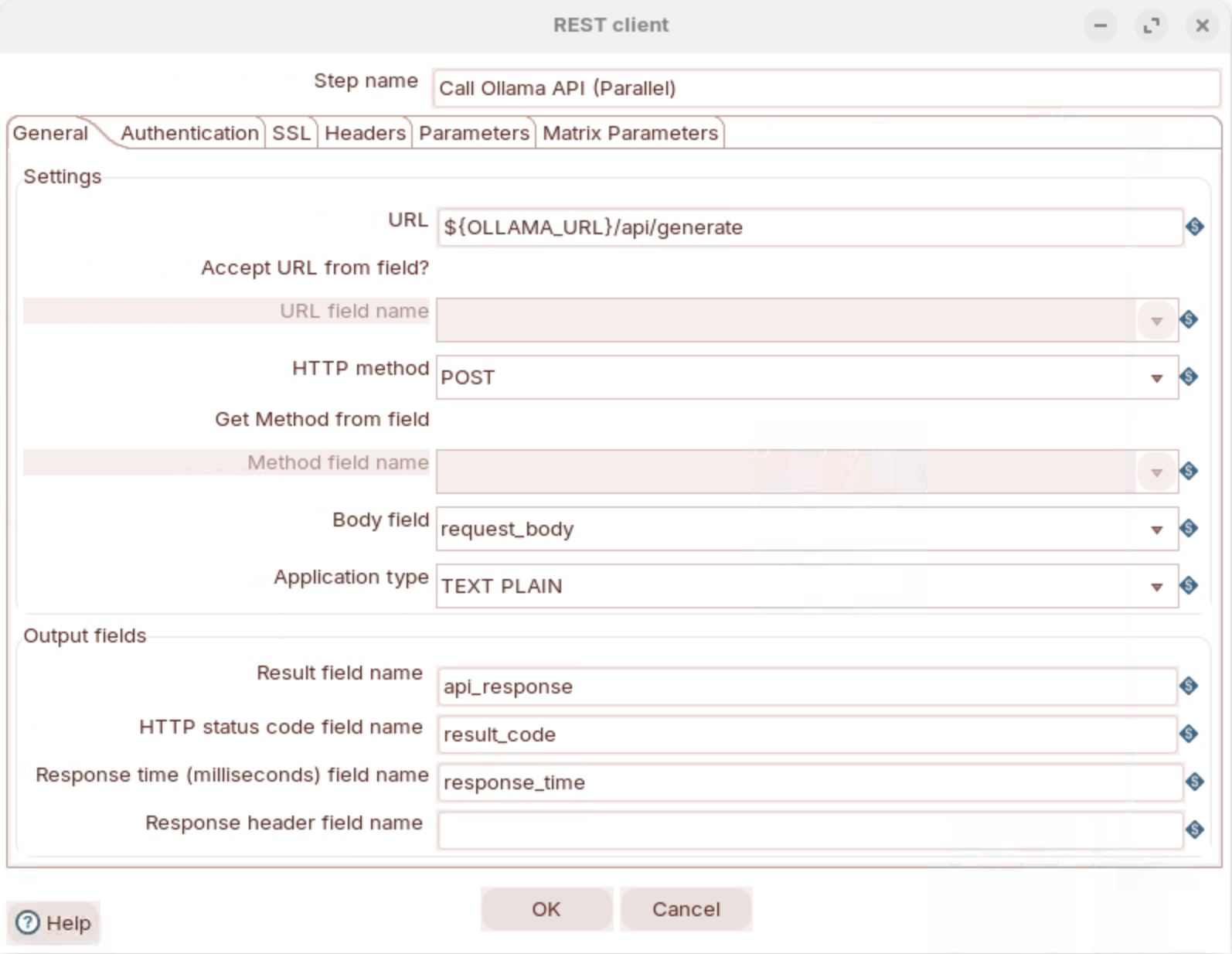
**Call Ollama API (Parallel) - REST Client**

Configuration:

* **Step Type**: `REST Client` (Rest)
* **Method**: `POST`
* **URL**: `${OLLAMA_URL}/api/generate`
* **Body Field**: `request_body`
* **Application type:** `TEXT PLAIN`
* **Result Fields**:
  * Name: `api_response`
  * Code: `result_code`
  * Response time: `response_time`
* **Headers**: *(leave empty - REST Client auto-adds Content-Type)*
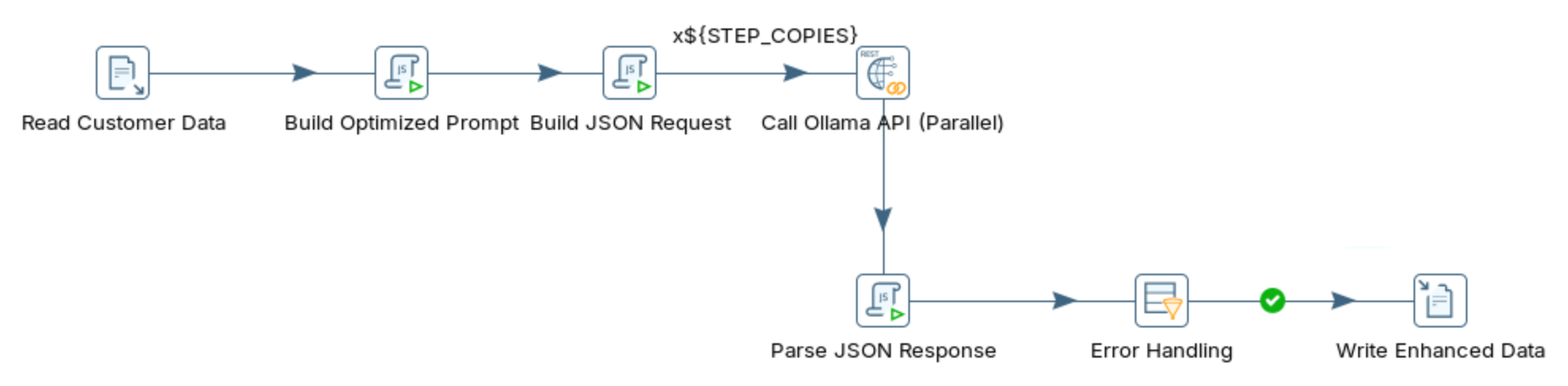
* **Step Copies**: `${STEP_COPIES}` → Default: 4 (parallel processing)

**Step 7: Write Enhanced Data (Text File Output)**

Configuration:

* **Filename**: `../data/customer_data_enhanced_optimized`
* **Extension**: `.csv`
* **Add date**: `Y` (adds `_20260227`)
* **Add time**: `Y` (adds `_134529`)
* **Result**: `customer_data_enhanced_optimized_20260227_134529.csv`
* **Fields**: `customer_id`, `enhanced_name`, `enhanced_email`, `enhanced_phone`, `enhanced_address`, `enhanced_company`

#### Transformation Parameters

**Basic Transformation (`data_quality_enhancement.ktr`)**

| Parameter   | Default Value                    | Description                    |
| ----------- | -------------------------------- | ------------------------------ |
| OLLAMA\_URL | <http://localhost:11434>         | Ollama API endpoint            |
| MODEL\_NAME | llama3.2:3b                      | Model to use for data cleaning |
| INPUT\_FILE | ../data/customer\_data\_raw\.csv | Input data path                |

**Optimized Transformation (`data_quality_enhancement_optimized.ktr`)**

| Parameter        | Default Value                    | Description                                   |
| ---------------- | -------------------------------- | --------------------------------------------- |
| OLLAMA\_URL      | <http://localhost:11434>         | Ollama API endpoint                           |
| MODEL\_NAME      | llama3.2:3b                      | Model to use (llama3.2:3b recommended)        |
| INPUT\_FILE      | ../data/customer\_data\_raw\.csv | Input data path                               |
| **KEEP\_ALIVE**  | **5m**                           | **Keep model in memory (5m/15m/30m/60m)**     |
| **STEP\_COPIES** | **4**                            | **Parallel API calls (set to CPU cores - 1)** |

**Parameter Tuning Guide:**

| CPU Cores | STEP\_COPIES | Expected Throughput |
| --------- | ------------ | ------------------- |
| 4 cores   | 4            | 1.0-1.2 rec/sec     |
| 8 cores   | 6-8          | 1.5-2.0 rec/sec     |
| 16 cores  | 12-14        | 2.5-3.5 rec/sec     |

#### Tested Configuration (Verified Working ✅)

**Test Environment:**

* OS: Ubuntu 22.04 Linux
* PDI: 11.0.0.0-237
* Ollama: Latest
* Model: llama3.2:3b
* CPU: 4 cores
* RAM: 16GB

**Verified Parameters:**

```bash
OLLAMA_URL=http://localhost:11434
MODEL_NAME=llama3.2:3b
STEP_COPIES=4
KEEP_ALIVE=5m
INPUT_FILE=../data/customer_data_raw.csv
```

x

x
{% endtab %}

{% tab title="5. Response" %}
{% hint style="info" %}

#### Modified JavaScript Value

{% endhint %}

x

**Parse JSON Response (Modified Java Script Value)**

````javascript
// ============================================================
// OLLAMA API RESPONSE PARSER
// Purpose: Extracts AI-enhanced contact fields from the raw
// Ollama API response, falling back to original values if
// parsing fails at any stage.
// ============================================================

// --- Initialize output variables with original (fallback) values ---
// These ensure downstream steps always receive valid data even if
// parsing fails. The enhanced_* variables will be overwritten only
// if valid AI-enhanced values are successfully extracted.
var enhanced_name    = name;          // Fallback: original name field from stream
var enhanced_email   = email;         // Fallback: original email field from stream
var enhanced_phone   = phone;         // Fallback: original phone field from stream
var enhanced_address = address;       // Fallback: original address field from stream
var enhanced_company = company_name;  // Fallback: original company_name field from stream

// --- Initialize error tracking variables ---
// parsing_error acts as a Y/N flag for downstream error routing steps
// error_message captures the specific failure reason for logging/debugging
var parsing_error = "N";   // Default: assume success until a failure is caught
var error_message = "";    // Default: empty; populated only on failure

try {
    // --- Stage 1: Parse the outer Ollama API response envelope ---
    // The raw api_response field is a JSON string returned by the Ollama REST API.
    // Its structure is: { "model": "...", "response": "<model output>", ... }
    // We parse it first to extract the inner "response" string produced by the LLM.
    var response = JSON.parse(api_response);

    // The "response" property contains the raw text generated by the LLM.
    // This may include prose, markdown, code fences, or other formatting
    // in addition to the JSON payload we actually need.
    var fullResponse = response.response;

    // --- Stage 2: Locate the embedded JSON object within the LLM output ---
    // LLMs often wrap JSON in explanatory text (e.g. "Here is the result: {...}"),
    // markdown code fences (```json ... ```), or other surrounding content.
    // To handle this robustly, we scan for the first "{" and last "}" rather
    // than assuming the entire response string is valid JSON.
    var jsonStart = fullResponse.indexOf("{");           // Position of opening brace
    var jsonEnd   = fullResponse.lastIndexOf("}") + 1;  // Position after closing brace

    // --- Stage 3: Extract and parse the embedded JSON if found ---
    if (jsonStart >= 0 && jsonEnd > jsonStart) {
        // Slice out only the JSON substring, discarding any surrounding text.
        // Example: "Sure! Here you go: {\"name\":\"...\"} Hope that helps!"
        //           becomes → {"name":"..."}
        var jsonStr = fullResponse.substring(jsonStart, jsonEnd);

        // Parse the extracted JSON string into a JavaScript object.
        // If the LLM produced malformed JSON this will throw and be caught below.
        var data = JSON.parse(jsonStr);

        // --- Stage 4: Map parsed fields to output variables ---
        // Use the AI-enhanced value if present and non-empty; otherwise keep
        // the original field value as the fallback (|| operator handles null,
        // undefined, and empty string cases from the parsed object).
        enhanced_name    = data.name         || name;
        enhanced_email   = data.email        || email;
        enhanced_phone   = data.phone        || phone;
        enhanced_address = data.address      || address;
        enhanced_company = data.company_name || company_name;

    } else {
        // --- Failure path: No JSON object detected in the LLM output ---
        // The model may have returned a plain-text response, an apology,
        // or a refusal. Flag the error and preserve the original fallback values.
        parsing_error = "Y";
        error_message = "No JSON found in response";
    }

} catch(e) {
    // --- Failure path: A JSON.parse() call threw a SyntaxError ---
    // This catches two possible failure points:
    //   1. The outer Ollama envelope was malformed (Stage 1 failure)
    //   2. The extracted JSON substring was malformed (Stage 3 failure)
    // In both cases we fall back to the original field values initialized above.
    parsing_error = "Y";
    error_message = e.message || "Parse error";  // Use exception message if available
}
````

{% hint style="info" %}
**Error Handling Strategy:**

* Start with original values as fallback
* Try to parse Ollama JSON response
* Extract JSON object from response text (handles markdown code blocks)
* Parse individual fields with fallback to original
* Set `parsing_error = "Y"` if anything fails
* Keep original values on error
  {% endhint %}

x

x

x
{% endtab %}

{% tab title="6. Error" %}
{% hint style="info" %}

#### Filter rows

{% endhint %}

x

x

**Error Handling (Filter Rows)**

Filter condition: `parsing_error = "N"`

* **Send TRUE to**: "Write Enhanced Data" (successfully cleaned records)
* **Send FALSE to**: *(nowhere - discard failed records or log separately)*

x

x
{% endtab %}
{% endtabs %}
{% endtab %}

{% tab title="4. RUN" %}
x

x

x

x

x

x
{% endtab %}
{% endtabs %}
{% endtab %}

{% tab title="Data Enrichment" %}
{% hint style="success" %}

#### Data Enrichment

Learn how to use Large Language Models (LLMs) to automatically enrich incomplete data by inferring missing information from context. This workshop demonstrates using Ollama with Pentaho Data Integration (PDI) to fill gaps in customer records, classify companies by industry, and adds valuable business intelligence.
{% endhint %}

**Workflow**

<figure><img src="https://3680356391-files.gitbook.io/~/files/v0/b/gitbook-x-prod.appspot.com/o/spaces%2FZpCSy6Skj215f4oWypdc%2Fuploads%2Fy61m3GEzBUsj7SO5OKbj%2Fimage.png?alt=media&#x26;token=8ed9f60e-6754-4030-86b6-5c5ac12a8d7f" alt=""><figcaption><p>data_enrichment_optimized</p></figcaption></figure>

1. Verify Ollama Installation

```bash
# Check if Ollama is responding
curl http://localhost:11434/api/tags
```

Run through the following steps to build `data_quality_optimized.ktr`:

{% tabs %}
{% tab title="1. Data Enrichment" %}
**Understanding Data Enrichment Challenges**

{% stepper %}
{% step %}
**Examine the incomplete data**

Navigate to the workshop folder and review the sample data:

```bash
cd
cd ~/LLM-PDI-Integration/workshops/workshop-03-data-enrichment
cat data/customer_data_incomplete.csv | head -10
```

**Sample records:**

```csv
customer_id,company_name,website,contact_name,phone,address,city,state,country
1001,Acme Corp,acmecorp.com,John Smith,,,,"CA",
1002,TechStart Inc,,,555-9876,123 Oak Ave,Los Angeles,,USA
1003,Global Solutions,globalsolutions.io,Sarah Chen,,,"Seattle",WA,
1004,DataFlow Systems,,Mike Johnson,+1-555-1234,456 Pine St,,"Texas",
1005,CloudFirst,cloudfirst.com,,,789 Main St,San Francisco,CA,USA
```

**Data completeness analysis:**

| Customer | Company | Website | Contact | Phone | Address | City | State | Country |
| -------- | ------- | ------- | ------- | ----- | ------- | ---- | ----- | ------- |
| 1001     | ✅       | ✅       | ✅       | ❌     | ❌       | ❌    | ✅     | ❌       |
| 1002     | ✅       | ❌       | ❌       | ✅     | ✅       | ✅    | ❌     | ✅       |
| 1003     | ✅       | ✅       | ✅       | ❌     | ❌       | ✅    | ✅     | ❌       |
| 1004     | ✅       | ❌       | ✅       | ✅     | ✅       | ❌    | ✅     | ❌       |
| 1005     | ✅       | ✅       | ❌       | ❌     | ✅       | ✅    | ✅     | ✅       |

{% hint style="info" %}
**Missing data patterns**

40% missing website.

35% missing contact name.

50% missing phone.

30% missing full address.

25% missing state.

45% missing country.
{% endhint %}
{% endstep %}

{% step %}
**Define enrichment goals**

Set target rules for each field:

<table data-full-width="true"><thead><tr><th width="221">Field</th><th width="274">Enrichment strategy</th><th width="213">Example</th></tr></thead><tbody><tr><td><strong>Website</strong></td><td>Infer from company name + domain patterns</td><td><code>acmecorp.com</code> → <code>www.acmecorp.com</code></td></tr><tr><td><strong>Contact</strong></td><td>Keep as <code>UNKNOWN</code> if not provided</td><td><code>John Smith</code> or <code>UNKNOWN</code></td></tr><tr><td><strong>Phone</strong></td><td>Infer area code from city/state</td><td><code>555-1234</code> → <code>+1-415-555-1234</code> (SF)</td></tr><tr><td><strong>Address</strong></td><td>Keep street or mark <code>UNKNOWN</code></td><td><code>123 Main St</code> or <code>UNKNOWN</code></td></tr><tr><td><strong>City</strong></td><td>Infer from state if missing</td><td>Texas → <code>Houston</code> (likely)</td></tr><tr><td><strong>State</strong></td><td>Infer from city or use 2-letter code</td><td><code>California</code> → <code>CA</code></td></tr><tr><td><strong>Country</strong></td><td>Default to <code>USA</code> if empty</td><td><code>USA</code></td></tr><tr><td><strong>Industry</strong> (new)</td><td>Classify from company name/website</td><td><code>TechStart Inc</code> → <code>Technology</code></td></tr><tr><td><strong>Employee Range</strong> (new)</td><td>Estimate from company name patterns</td><td><code>Acme Corp</code> → <code>51-200</code></td></tr></tbody></table>
{% endstep %}

{% step %}
**Compare enrichment and quality enhancement**

{% hint style="info" %}
**Workshop 2 (Data quality):**

* Goal: fix incorrect or inconsistent data.
* Input: messy but complete data.
* Output: clean, standardized data.
* Example: `john smith` → `John Smith`.

**Workshop 3 (Data enrichment):**

* Goal: add missing information.
* Input: incomplete but clean data.
* Output: complete data with inferred fields.
* Example: `Acme Corp` → Industry: `Technology`, Size: `51-200`.
  {% endhint %}

**Comparison:**

<table><thead><tr><th width="150">Aspect</th><th>Data Quality (Workshop 2)</th><th>Data Enrichment (Workshop 3)</th></tr></thead><tbody><tr><td><strong>Input</strong></td><td>Complete, messy data</td><td>Incomplete, clean data</td></tr><tr><td><strong>Process</strong></td><td>Standardize and validate</td><td>Infer and classify</td></tr><tr><td><strong>Output</strong></td><td>Clean existing fields</td><td>Add new fields</td></tr><tr><td><strong>Risk</strong></td><td>Low (validation)</td><td>Medium (inference accuracy)</td></tr><tr><td><strong>Value-add</strong></td><td>Consistency</td><td>New business intelligence</td></tr></tbody></table>
{% endstep %}

{% step %}
**Pick an enrichment method**

{% hint style="info" %}
**Traditional approaches:**

1. **Rule-based:** `if company_name contains "Tech" then industry = "Technology"`

   ❌ Brittle.

   ❌ Needs constant updates.
2. **Lookup tables:** match company name against a database.

   ❌ Limited to known companies.

   ❌ Expensive to maintain.
3. **External APIs:** call company data APIs (Clearbit, FullContact).

   ❌ Costly ($0.50+ per enrichment).

   ❌ Subject to rate limits and quotas.
   {% endhint %}

{% hint style="info" %}
**LLM approach:**

* ✅ Infers from company name, website, and location.
* ✅ Handles ambiguity with probabilistic reasoning.
* ✅ Works for unknown companies.
* ✅ Runs locally with Ollama.
* ✅ Enriches many fields in one prompt.
  {% endhint %}
  {% endstep %}

{% step %}
**Review request and response examples**

**Sample request format:**

```json
{
  "model": "llama3.2:3b",
  "prompt": "Analyze this customer record and infer missing fields. Return ONLY valid JSON...\n\nInput data:\nCompany: Acme Corp\nWebsite: acmecorp.com\nContact: John Smith\nPhone: UNKNOWN\nAddress: UNKNOWN\nCity: UNKNOWN\nState: CA\nCountry: UNKNOWN",
  "stream": false,
  "format": "json",
  "options": {
    "temperature": 0.3,
    "num_predict": 400
  }
}
```

**Key parameters:**

* `format`: `"json"` enforces JSON output.
* `temperature`: `0.3` allows some inference freedom.
* `num_predict`: `400` allows longer enriched responses.

**Sample response format:**

```json
{
  "response": "{\"company_name\":\"Acme Corp\",\"website\":\"www.acmecorp.com\",\"contact_name\":\"John Smith\",\"phone\":\"+1-800-555-ACME\",\"address\":\"UNKNOWN\",\"city\":\"San Francisco\",\"state\":\"CA\",\"country\":\"USA\",\"industry\":\"Manufacturing\",\"employee_range\":\"201-500\"}"
}
```

**Enriched fields:**

* Original: `Acme Corp`, `acmecorp.com`, `John Smith`, `CA`.
* Inferred: `www.acmecorp.com`, `San Francisco`, `USA`.
* New: `Manufacturing` (industry), `201-500` (estimated size).
  {% endstep %}

{% step %}
**Test the API manually**

```bash
curl http://localhost:11434/api/generate -d '{
  "model": "llama3.2:3b",
  "prompt": "Analyze this customer record and infer missing fields. Return ONLY valid JSON with these fields:\n{\"company_name\":\"...\",\"website\":\"...\",\"contact_name\":\"...\",\"phone\":\"...\",\"address\":\"...\",\"city\":\"...\",\"state\":\"...\",\"country\":\"...\",\"industry\":\"...\",\"employee_range\":\"...\"}\n\nRules:\n- If field is provided, keep it unchanged\n- If field is empty, infer from context or use \"UNKNOWN\"\n- Industry: Technology, Finance, Healthcare, Retail, Manufacturing, Services, etc.\n- Employee range: 1-10, 11-50, 51-200, 201-500, 501-1000, 1000+\n\nInput data:\nCompany: TechStart Inc\nWebsite: UNKNOWN\nContact: UNKNOWN\nPhone: 555-9876\nAddress: 123 Oak Ave\nCity: Los Angeles\nState: UNKNOWN\nCountry: USA",
  "stream": false,
  "format": "json"
}'
```

**Expected response:**

```json
{
  "company_name": "TechStart Inc",
  "website": "www.techstart.com",
  "contact_name": "UNKNOWN",
  "phone": "+1-310-555-9876",
  "address": "123 Oak Ave",
  "city": "Los Angeles",
  "state": "CA",
  "country": "USA",
  "industry": "Technology",
  "employee_range": "11-50"
}
```

{% hint style="info" %}
**Notice:**

* Website inferred: `techstart.com` (reasonable guess).
* Phone enriched: added LA area code `310`.
* State inferred: `CA` (from Los Angeles).
* Industry: `Technology` (from "TechStart").
* Employee range: `11-50` (startup indicator from name).
  {% endhint %}
  {% endstep %}
  {% endstepper %}
  {% endtab %}

{% tab title="2. API Endpoint" %}
x
{% endtab %}

{% tab title="3. Transformation" %}
{% hint style="info" %}

#### PDI Transformation

{% endhint %}

<figure><img src="https://3680356391-files.gitbook.io/~/files/v0/b/gitbook-x-prod.appspot.com/o/spaces%2FZpCSy6Skj215f4oWypdc%2Fuploads%2FF8iNgFKVpfzxfcEiNAbg%2Fimage.png?alt=media&#x26;token=7fc2733a-cdb0-4faf-b032-89e6a6d2410d" alt=""><figcaption><p>data_quality</p></figcaption></figure>

{% file src="<https://3680356391-files.gitbook.io/~/files/v0/b/gitbook-x-prod.appspot.com/o/spaces%2FZpCSy6Skj215f4oWypdc%2Fuploads%2FXQ0BS2pkmn6c5ss1KIzt%2Fcustomer_data_raw.csv?alt=media&token=f6679046-67d0-4acb-a4f3-80a0a4515344>" %}

{% file src="<https://3680356391-files.gitbook.io/~/files/v0/b/gitbook-x-prod.appspot.com/o/spaces%2FZpCSy6Skj215f4oWypdc%2Fuploads%2FrU4dCM4uDg6ot3RNQT9y%2Fdata_quality.ktr?alt=media&token=fa170222-ae3e-4cdf-b620-95d9e8cb41e5>" %}

{% file src="<https://3680356391-files.gitbook.io/~/files/v0/b/gitbook-x-prod.appspot.com/o/spaces%2FZpCSy6Skj215f4oWypdc%2Fuploads%2F1fPYlMgixdGS3D0Cu8XM%2Fdata_quality_optimized.ktr?alt=media&token=09109b03-ca08-4d09-a30c-d8877fee0c76>" %}

***

Run through the following steps to build `data_quality_optimized.ktr:`

{% tabs %}
{% tab title="First Tab" %}
x
{% endtab %}

{% tab title="Second Tab" %}
x
{% endtab %}
{% endtabs %}
{% endtab %}

{% tab title="4. RUN" %}

{% endtab %}
{% endtabs %}
{% endtab %}

{% tab title="Named Entity Recognition" %}
{% hint style="success" %}

#### Named Entity Recognition

This workshop demonstrates how to use Large Language Models (LLMs) with Pentaho Data Integration (PDI) to extract and classify **named entities** from unstructured text.

Named Entity Recognition (NER) is a critical NLP task that identifies and categorizes entities like people, organizations, locations, dates, and more.
{% endhint %}

**Workflow**

<figure><img src="https://3680356391-files.gitbook.io/~/files/v0/b/gitbook-x-prod.appspot.com/o/spaces%2FZpCSy6Skj215f4oWypdc%2Fuploads%2FRzw3lUWFO0Bkwr5dMbk8%2Fimage.png?alt=media&#x26;token=f058bf7a-5e58-4abc-871e-39edbf7d0a4b" alt=""><figcaption><p>named_entity_recognition_optimized</p></figcaption></figure>

1. Verify Ollama Installation

```bash
# Check if Ollama is responding
curl http://localhost:11434/api/tags
```

2. Run through the following steps to build `named_entity_recognition_optimized.ktr`:

{% tabs %}
{% tab title="1. NER?" %}
{% hint style="info" %}

#### Named Entity Recognition

Named Entity Recognition (NER) is the process of identifying and classifying named entities in unstructured text into predefined categories.
{% endhint %}

**Example Input:**

```
"Hi, this is Sarah Johnson from Acme Corporation. I'm writing about the order
I placed on December 15th, 2024. Please contact me at sarah.johnson@acmecorp.com"
```

**Example Output (Extracted Entities):**

```json
[
  {"entity": "Sarah Johnson", "type": "PERSON", "context": "this is Sarah Johnson from"},
  {"entity": "Acme Corporation", "type": "ORGANIZATION", "context": "Sarah Johnson from Acme Corporation"},
  {"entity": "December 15th, 2024", "type": "DATE", "context": "order I placed on December 15th"},
  {"entity": "sarah.johnson@acmecorp.com", "type": "CONTACT", "context": "contact me at sarah.johnson@acmecorp.com"}
]
```

#### Entity Types in This Workshop

| Entity Type      | Description                  | Examples                                           |
| ---------------- | ---------------------------- | -------------------------------------------------- |
| **PERSON**       | Names of people              | Sarah Johnson, Dr. Michael Chen, CEO Richard Davis |
| **ORGANIZATION** | Companies, institutions      | Acme Corp, Stanford University, FBI                |
| **LOCATION**     | Cities, addresses, buildings | San Francisco, 123 Main St, Room 405               |
| **DATE**         | Dates and times              | December 15th 2024, Feb 1st, 10:30 AM PST          |
| **PRODUCT**      | Product names/models         | iPhone 16, UltraBook Pro X1, Widget X-200          |
| **MONEY**        | Currency amounts             | $125,000, £250,000 GBP, $1,899.99                  |
| **CONTACT**      | Emails, phone numbers        | <user@company.com>, 555-123-4567, ext. 4521        |
| **ID**           | Identifiers, tracking codes  | CUST-98765, INV-2024-0089, ORD-2025-5678           |
| **TECHNOLOGY**   | Software, platforms          | AWS, Python, TensorFlow, Docker                    |
| **POSITION**     | Job titles, roles            | CEO, Project Manager, CFO, VP of Engineering       |

{% hint style="info" %}
**Why Use LLMs for NER?**

Traditional NER approaches (rule-based, statistical models, pre-trained NER models) have limitations:

**Traditional Approach Challenges:**

* Requires extensive labeled training data
* Struggles with domain-specific entities
* Fixed entity type schemas
* Poor performance on new/rare entity types
* Cannot adapt to context easily

**LLM-Based NER Advantages:**

* Zero-shot extraction (no training data needed)
* Flexible entity type definitions
* Handles multiple domains simultaneously
* Contextual understanding (disambiguates entities)
* Easy to add new entity types via prompt engineering
* Extracts relationships and context
  {% endhint %}

{% hint style="info" %}
**Real-World Use Cases:**

* **Customer Service** - Extract customer names, IDs, product references, dates from support tickets
* **Legal/Compliance** - Identify parties, dates, amounts, locations in contracts
* **Log Analysis** - Extract usernames, IP addresses, error codes, timestamps
* **Business Intelligence** - Pull company names, products, revenue figures from reports
* **Healthcare** - Extract patient names, medications, dates, doctors from medical records
* **Email Processing** - Identify senders, recipients, dates, action items, referenced documents
  {% endhint %}
  {% endtab %}

{% tab title="2. API Endpoint" %}

{% endtab %}

{% tab title="3. Transformation" %}
{% hint style="info" %}

#### PDI Transformation

{% endhint %}

<figure><img src="https://3680356391-files.gitbook.io/~/files/v0/b/gitbook-x-prod.appspot.com/o/spaces%2FZpCSy6Skj215f4oWypdc%2Fuploads%2Fax2uNCJZAjUdwVwK2UJS%2Fimage.png?alt=media&#x26;token=9f5f7479-de62-473a-ac5e-60df889d9fc6" alt=""><figcaption><p>named_entity_recognition</p></figcaption></figure>

{% file src="<https://3680356391-files.gitbook.io/~/files/v0/b/gitbook-x-prod.appspot.com/o/spaces%2FZpCSy6Skj215f4oWypdc%2Fuploads%2F4nLO9lFBrB5iy9jMOpPM%2Funstructured_text%20demo.csv?alt=media&token=673dc008-1aa0-4d1f-9c95-14224d5a997a>" %}

{% file src="<https://3680356391-files.gitbook.io/~/files/v0/b/gitbook-x-prod.appspot.com/o/spaces%2FZpCSy6Skj215f4oWypdc%2Fuploads%2Fz05JFlblIFSzfv8B9GwE%2Funstructured_text.csv?alt=media&token=339ddf88-61f8-4e6b-a858-485da4f4ba32>" %}

{% file src="<https://3680356391-files.gitbook.io/~/files/v0/b/gitbook-x-prod.appspot.com/o/spaces%2FZpCSy6Skj215f4oWypdc%2Fuploads%2F1F0crbf5wH0T5Vl5ittN%2Fnamed_entity_recognition.ktr?alt=media&token=1d041a7b-de35-48c0-bbe8-f436850f030e>" %}

{% file src="<https://3680356391-files.gitbook.io/~/files/v0/b/gitbook-x-prod.appspot.com/o/spaces%2FZpCSy6Skj215f4oWypdc%2Fuploads%2Fss3gCUxDQMZAfuoneiOC%2Fnamed_entity_recognition_optimized.ktr?alt=media&token=920d47fc-bb35-4dbd-b8b0-3208ee67b3ab>" %}

Run through the following steps to build `named_entity_recognition_optimized.ktr`&#x20;

***

{% tabs %}
{% tab title="First Tab" %}
x
{% endtab %}

{% tab title="Second Tab" %}
x
{% endtab %}
{% endtabs %}
{% endtab %}

{% tab title="4. RUN" %}
x

x

x

x

x
{% endtab %}
{% endtabs %}
{% endtab %}

{% tab title="Text Summarization" %}
{% hint style="success" %}

#### Text Summarization

This workshop demonstrates how to use Large Language Models (LLMs) with Pentaho Data Integration (PDI) to automatically summarize long documents into concise, actionable insights. Text summarization is a critical capability for processing large volumes of documentation, extracting key information, and enabling faster decision-making.
{% endhint %}

**Workflow**

<figure><img src="https://3680356391-files.gitbook.io/~/files/v0/b/gitbook-x-prod.appspot.com/o/spaces%2FZpCSy6Skj215f4oWypdc%2Fuploads%2F4XntdeFTj97jn80vOAz7%2Fimage.png?alt=media&#x26;token=dfacef33-6114-4ff1-b274-e5956fb89a66" alt=""><figcaption><p>text_summarization_optimized</p></figcaption></figure>

1. Verify Ollama Installation

```bash
# Check if Ollama is responding
curl http://localhost:11434/api/tags
```

2. Run through the following steps to build `text_summarization_optimized.ktr`:

{% tabs %}
{% tab title="Text Summarization" %}
{% hint style="info" %}

#### What is Text Summarization?

Text summarization is the process of condensing long documents into shorter versions while preserving the most important information and key points.
{% endhint %}

**Example Input (Meeting Notes, 450 words):**

```
Meeting held on February 15, 2025, in Conference Room A. Attendees: Sarah Johnson (CEO), Michael Chen (CTO), Jennifer Williams (VP Product), Robert Smith (VP Sales), and Linda Martinez (VP Marketing). The meeting focused on our Q1 2025 product strategy and roadmap priorities. Sarah opened the meeting by reviewing Q4 2024 performance, noting that revenue exceeded targets by 23% at $45.6 million, driven primarily by enterprise sales in North America. Michael presented the technical roadmap, highlighting three major initiatives...
```

**Example Output (Summarization):**

```json
{
  "summary": "Q1 2025 product strategy meeting covered Q4 performance review (revenue up 23% to $45.6M), technical roadmap with three major initiatives (AI platform, cloud integrations, mobile redesign), customer feedback analysis prioritizing reporting dashboards and collaboration tools, and sales pipeline projecting $38-42M for Q1.",
  "bullet_points": [
    "Q4 2024 revenue exceeded targets by 23% at $45.6 million",
    "Three major technical initiatives: AI analytics platform (March 15), cloud integrations (April), mobile redesign (May)",
    "Top customer requests: advanced reporting, real-time collaboration, API documentation",
    "Q1 sales pipeline: $38-42M projected with 15 major deals totaling $12M",
    "$2.5M marketing budget approved for Q1 campaigns"
  ],
  "key_takeaways": [
    "Strong Q4 performance driven by enterprise North American sales",
    "60% of engineering resources allocated to top customer feature requests",
    "Focus on thought leadership marketing strategy with conferences and webinars"
  ],
  "action_items": [
    "Michael: Finalize API documentation by March 1st",
    "Jennifer: Create customer advisory board by February 28th",
    "Robert: Implement new sales playbook by March 15th",
    "Linda: Launch website redesign by March 30th"
  ]
}
```

**Summarization Types**

| Type              | Description                          | Use Case                       | Length Reduction |
| ----------------- | ------------------------------------ | ------------------------------ | ---------------- |
| **Extractive**    | Selects key sentences from original  | Quick overview, news           | 50-70%           |
| **Abstractive**   | Generates new text capturing meaning | Executive summary, reports     | 70-90%           |
| **Bullet Points** | Lists key points/                    | Action tracking, presentations | 80-95%           |
| **Key Takeaways** | Main insights and conclusions        | Decision support               | 85-95%           |

{% hint style="info" %}
**LLM-Based Summarization (This Workshop)** uses **abstractive** methods to generate concise, coherent summaries that:

* Rephrase content in clearer language
* Combine related concepts
* Identify and extract action items
* Prioritize most important information
* Adapt to different document types
  {% endhint %}

{% hint style="info" %}

#### Why Use LLMs for Summarization?

Traditional summarization approaches (extractive algorithms, keyword extraction, TF-IDF) have limitations:

**Traditional Approach Challenges:**

* Cannot rephrase or generate new text
* Miss implicit meaning and context
* Struggle with complex document structures
* Limited to sentence selection
* No understanding of priorities or importance

**LLM-Based Summarization Advantages:**

* True abstractive summarization (rewrites in clearer language)
* Understands context and implicit information
* Adapts to different document types automatically
* Can extract different summary formats (bullets, paragraphs, action items)
* Handles technical, business, and conversational text equally well
* Multi-language capable
* Identifies action items and key decisions
  {% endhint %}

{% hint style="info" %}

#### Real-World Use Cases

* **Executive Reporting** - Summarize weekly status reports, meeting notes, project updates for leadership review
* **Customer Service** - Condense customer complaint details and email threads for quick agent review
* **Legal/Compliance** - Extract key terms, obligations, and deadlines from contracts and legal documents
* **Research & Analysis** - Summarize academic papers, market research, technical documentation
* **Email Management** - Create brief summaries of long email threads for quick scanning
* **Content Curation** - Generate summaries for news articles, blog posts, industry reports
* **Meeting Documentation** - Convert meeting transcripts into summaries with action items
* **Technical Documentation** - Create executive-friendly summaries of technical specifications
  {% endhint %}
  {% endtab %}

{% tab title="API Endpoint" %}
x
{% endtab %}

{% tab title="Transformation" %}
{% hint style="info" %}

#### PDI Transformation

{% endhint %}

<figure><img src="https://3680356391-files.gitbook.io/~/files/v0/b/gitbook-x-prod.appspot.com/o/spaces%2FZpCSy6Skj215f4oWypdc%2Fuploads%2Fc0HCCAm3HWoUskl95wFJ%2Fimage.png?alt=media&#x26;token=73c35878-19f6-4f17-84a1-5213f030ced0" alt=""><figcaption><p>text_summarization</p></figcaption></figure>

{% file src="<https://3680356391-files.gitbook.io/~/files/v0/b/gitbook-x-prod.appspot.com/o/spaces%2FZpCSy6Skj215f4oWypdc%2Fuploads%2FwYQhtcHTXKSIO1boHzWZ%2Fdocuments_to_summarize.csv?alt=media&token=0a0f4ced-6f82-4033-a990-adf624b8baf7>" %}

{% file src="<https://3680356391-files.gitbook.io/~/files/v0/b/gitbook-x-prod.appspot.com/o/spaces%2FZpCSy6Skj215f4oWypdc%2Fuploads%2FRtQvFpgCRlg3SjZ8DHLm%2Fdocuments_to_summarize_demo.csv?alt=media&token=c59f294a-9c9d-4f18-b2ae-4e9d2209d1ad>" %}

{% file src="<https://3680356391-files.gitbook.io/~/files/v0/b/gitbook-x-prod.appspot.com/o/spaces%2FZpCSy6Skj215f4oWypdc%2Fuploads%2FMWkReJpXvnFEK6P3UAjK%2Ftext_summarization.ktr?alt=media&token=010b0869-41b9-4c72-83f9-0d1ba811e426>" %}

{% file src="<https://3680356391-files.gitbook.io/~/files/v0/b/gitbook-x-prod.appspot.com/o/spaces%2FZpCSy6Skj215f4oWypdc%2Fuploads%2FTrUwt8KvJRSRcyHlmOrH%2Ftext_summarization_optimized.ktr?alt=media&token=4f0bb03a-4a30-4bcf-8352-d9ffa6159947>" %}

***

Run through the following steps to build `text_summarization_optimized.ktr`&#x20;

{% tabs %}
{% tab title="" %}
x

x

x

x
{% endtab %}

{% tab title="" %}
x

x

x

x

x
{% endtab %}

{% tab title="" %}
x

x

x

x

x
{% endtab %}

{% tab title="" %}

{% endtab %}
{% endtabs %}
{% endtab %}

{% tab title="RUN" %}

{% endtab %}
{% endtabs %}
{% endtab %}

{% tab title="Multi-staged" %}
{% hint style="success" %}

#### Multi-Staged

This workshop teaches the most advanced LLM-ETL pattern: **multi-stage pipelines** where multiple LLM calls are chained sequentially, with each stage building on the outputs of previous stages.

**Why Multi-Stage Pipelines?**

Single LLM calls are powerful, but real-world AI systems often require:

* **Context accumulation**: Each stage adds intelligence
* **Conditional logic**: Different processing based on classification
* **Specialized prompts**: Each stage focuses on one task
* **Error isolation**: Failures in one stage don't break entire pipeline
* **Auditability**: Track decisions at each stage
  {% endhint %}

**Workflow**

<figure><img src="https://3680356391-files.gitbook.io/~/files/v0/b/gitbook-x-prod.appspot.com/o/spaces%2FZpCSy6Skj215f4oWypdc%2Fuploads%2FBZ5PQdiLLrG6xMb89K8P%2Fimage.png?alt=media&#x26;token=38e2a50b-007f-4477-9d69-1cf8fa835a74" alt=""><figcaption><p>multi_staged_optimized</p></figcaption></figure>

1. Verify Ollama Installation

```bash
# Check if Ollama is responding
curl http://localhost:11434/api/tags
```

2. Run through the following steps to build `multi_staged_optimized.ktr`:

{% tabs %}
{% tab title="1. Multi-staged LLM" %}
{% hint style="info" %}

#### What is a Multi-Stage Pipeline?

A **multi-stage pipeline** is an AI orchestration pattern where multiple LLM calls are chained together sequentially, with each stage performing a focused task and passing enriched data to the next stage.

Think of it like an assembly line in a factory:

* **Stage 1**: Worker identifies the type of product (Classification)
* **Stage 2**: Worker assesses quality and priority (Scoring)
* **Stage 3**: Worker extracts specific components based on type (Conditional Extraction)
* **Stage 4**: Worker creates assembly instructions (Action Generation)
* **Stage 5**: Worker routes to appropriate department (Routing)

Each worker (LLM call) specializes in ONE task and has ALL the information gathered by previous workers.
{% endhint %}

{% hint style="info" %}

#### Real-World Example: Intelligent Support Ticket Routing

**Scenario**: Your company receives 1,000 support tickets per day via email, chat, and web forms. You need to:

1. Categorize each ticket (bug report, feature request, billing issue, etc.)
2. Determine urgency (critical issues need immediate attention)
3. Extract relevant details (customer info, account value, issue description)
4. Generate action items for the assigned team
5. Route to the correct department with proper escalation
   {% endhint %}

**Single-Stage Approach** (❌ What NOT to do):

```
Prompt: "Analyze this support ticket and provide:
- Category (bug/feature/billing/complaint)
- Urgency score 1-10
- Customer name, account value, issue summary
- Action items to resolve
- Department to route to
- Escalation path
All in JSON format."
```

{% hint style="info" %}
**Problems:**

❌ 200+ token prompt (expensive and slow)

❌ LLM tries to do 6 different tasks at once (lower accuracy)

❌ Can't handle conditional logic (different ticket types need different extraction)

❌ If extraction fails, you lose everything

❌ No intermediate validation

❌ Difficult to debug which part failed
{% endhint %}

**Multi-Stage Approach** (✅ What we'll build):

```
Stage 1: "What category is this ticket?" → "bug_report"
Stage 2: "Rate urgency for a bug_report" → urgency: 8, priority: HIGH
Stage 3: "Extract bug-specific details" → {error_message, steps_to_reproduce, ...}
Stage 4: "Generate actions for HIGH priority bug" → ["Assign to senior engineer", "Contact customer within 2h"]
Stage 5: "Route HIGH priority bug" → Engineering Team, escalate to VP Engineering
```

{% hint style="info" %}
**Advantages:**

✅ Focused prompts (40-80 tokens each, faster & cheaper)

✅ Higher accuracy (each LLM call does ONE thing well)

✅ Conditional logic (Stage 3 adapts based on Stage 1 result)

✅ Graceful degradation (if Stage 3 fails, you still have Stages 1-2)

✅ Auditable (see decision at each stage)

✅ Easy to debug (know exactly which stage failed)
{% endhint %}

***

{% hint style="info" %}

#### Core Principles of Multi-Stage Pipelines

**1. Single Responsibility Per Stage**

Each stage has ONE job:

* **Stage 1**: Classification ONLY
* **Stage 2**: Priority scoring ONLY
* **Stage 3**: Information extraction ONLY
* **Stage 4**: Action generation ONLY
* **Stage 5**: Routing ONLY

**Why?** Focused prompts produce better results than complex multi-task prompts.

**2. Sequential Execution with Context Passing**

Stages run in order, and each stage receives:

* Original input data
* ALL outputs from previous stages

**Example Context Flow:**

```
After Stage 1: {doc_type: "security_incident"}
After Stage 2: {doc_type: "security_incident", urgency: 10, priority: "CRITICAL"}
After Stage 3: {doc_type: "security_incident", urgency: 10, priority: "CRITICAL", vuln_type: "SQL injection", severity: "Critical"}
After Stage 4: {... all previous ..., actions: ["Alert security team", "Patch within 48h"]}
After Stage 5: {... all previous ..., route_to: "Security", escalate_to: "CTO"}
```

**Why?** Each stage makes BETTER decisions with full context from previous stages.

**3. Conditional Branching**

Different document types require different processing:

```javascript
// Stage 3: Type-Specific Extraction (CONDITIONAL LOGIC)
if (doc_type == "security_incident") {
  prompt = "Extract: vulnerability type, severity, affected systems, disclosure timeline";

} else if (doc_type == "legal_threat") {
  prompt = "Extract: legal issue, deadline, potential liability, threatening party";

} else if (doc_type == "critical_ticket") {
  prompt = "Extract: customer name, account value, business impact, issue summary";

} else {
  prompt = "Extract: generic summary and key points";
}
```

**Why?** A security incident needs different information than a billing complaint.

**4. Error Isolation & Recovery**

Each stage has fallback logic:

```javascript
try {
  doc_type = parseStage1Response(response);
} catch (error) {
  doc_type = "general_inquiry"; // Safe default
  log("Stage 1 classification failed, defaulting to general_inquiry");
}
// Pipeline continues with default value!
```

{% endhint %}

**Why?** One stage failure doesn't break the entire pipeline.

**Comparison: Single-Stage vs Multi-Stage**

<table data-full-width="true"><thead><tr><th>Aspect</th><th width="277.5">Single-Stage</th><th width="323">Multi-Stage</th></tr></thead><tbody><tr><td><strong>Prompt Length</strong></td><td>200+ tokens</td><td>40-80 tokens per stage</td></tr><tr><td><strong>Accuracy</strong></td><td>65-75% (trying to do too much)</td><td>85-95% (focused tasks)</td></tr><tr><td><strong>Processing Time</strong></td><td>60-90 seconds</td><td>50-70 seconds (5 calls @ 10-14s each)</td></tr><tr><td><strong>Cost per Document</strong></td><td>High (long prompt)</td><td>Lower (multiple short prompts)</td></tr><tr><td><strong>Conditional Logic</strong></td><td>❌ Not possible</td><td>✅ Full support</td></tr><tr><td><strong>Error Handling</strong></td><td>❌ All-or-nothing</td><td>✅ Per-stage recovery</td></tr><tr><td><strong>Debugging</strong></td><td>❌ Hard to isolate issues</td><td>✅ Know exactly which stage failed</td></tr><tr><td><strong>Auditability</strong></td><td>❌ Black box decision</td><td>✅ Track reasoning at each stage</td></tr><tr><td><strong>Extensibility</strong></td><td>❌ Hard to add features</td><td>✅ Easy to add new stages</td></tr></tbody></table>

{% hint style="info" %}

#### When to Use Multi-Stage Pipelines

**Use Multi-Stage Pipelines When:**

✅ You need conditional processing (different types → different handling)

✅ You need to make sequential decisions (Stage 2 depends on Stage 1)

✅ You need auditability (track decision-making process)

✅ You need high accuracy (focused prompts perform better)

✅ You're building production systems (error isolation critical)

✅ Documents vary significantly in type/structure

**Use Single-Stage When:**

✅ Task is simple and uniform (all documents processed identically)

✅ Minimal conditional logic needed

✅ Low-stakes application (errors acceptable)

✅ Prototyping/testing (faster to build initially)
{% endhint %}

***

**5-stage intelligent document router**

Build the document router in 5 stages. Run stages in order. Pass outputs forward.

{% stepper %}
{% step %}
**Stage 1: Classify the document**

Identify what you are processing.

* Input: raw document text
* Output: `doc_type` (for example, `security_incident`, `legal_threat`, `critical_ticket`), `confidence`
* Typical duration: 10–15 seconds
  {% endstep %}

{% step %}
**Stage 2: Score urgency and priority**

Decide how quickly to act. Use the `doc_type` to score appropriately.

* Input: raw text + `doc_type` from Stage 1
* Output: `urgency` (1–10), `priority` (LOW/MEDIUM/HIGH/CRITICAL)
* Typical duration: 10–15 seconds
  {% endstep %}

{% step %}
**Stage 3: Extract type-specific details**

Extract only the fields that matter for the `doc_type`. Use conditional branching here.

* Input: raw text + `doc_type` + `urgency`
* Output: `extracted_details` (JSON; varies by type)
* Typical duration: 10–15 seconds
  {% endstep %}

{% step %}
**Stage 4: Generate action items**

Generate concrete tasks. Use full context from Stages 1–3.

* Input: all previous context
* Output: `actions[]`, `action_count`, `requires_escalation`
* Typical duration: 10–15 seconds
  {% endstep %}

{% step %}
**Stage 5: Route to the right department**

Assign ownership. Set the escalation path and SLA.

* Input: all previous context
* Output: `primary_dept`, `escalate_to`, `cc_depts`, `sla_hours`
* Typical duration: 10–15 seconds
  {% endstep %}
  {% endstepper %}

**Total processing time:** 50–75 seconds per document (5 sequential LLM calls)

***

**How Context Accumulation Works**

Let's trace a real document through the pipeline:

**Input Document:**

```
Subject: Security Vulnerability Report
From: security-researcher@whitehat.com

Found SQL injection vulnerability in your login form.
Severity: Critical. Affects all users. Can extract password hashes.
Timeline for public disclosure: 90 days from today.
```

**Stage 1 Output:**

```json
{
  "doc_type": "security_incident",
  "confidence": 0.95,
  "reasoning": "Document reports a security vulnerability with severity and disclosure timeline"
}
```

**Stage 2 Output** (knows it's a security\_incident):

```json
{
  "urgency": 10,
  "priority": "CRITICAL",
  "reasoning": "Critical severity vulnerability affecting all users with 90-day disclosure deadline"
}
```

**Stage 3 Output** (conditional extraction for security\_incident):

```json
{
  "vuln_type": "SQL injection",
  "severity": "Critical",
  "affected_systems": "login form",
  "disclosure_days": 90
}
```

**Stage 4 Output** (knows: security + critical + SQL injection + 90 days):

```json
{
  "actions": [
    "Alert security team immediately",
    "Patch SQL injection vulnerability within 48 hours",
    "Notify legal and PR teams of upcoming disclosure",
    "Prepare disclosure statement for responsible disclosure"
  ],
  "action_count": 4,
  "requires_escalation": true
}
```

**Stage 5 Output** (knows: critical security incident requiring escalation):

```json
{
  "primary_dept": "Security",
  "escalate_to": "CTO",
  "cc_depts": ["Legal", "PR"],
  "sla_hours": 2
}
```

{% hint style="info" %}
**Final Enriched Document** has ALL this intelligence:

* Original text preserved
* Classified as security\_incident (95% confidence)
* Rated CRITICAL with urgency 10/10
* SQL injection in login form, 90-day disclosure
* 4 specific action items generated
* Routed to Security → CTO, CC Legal & PR, 2-hour SLA

**Total Time**: \~55 seconds (5 LLM calls)
{% endhint %}

{% hint style="info" %}

#### Key Benefits Demonstrated

1. **Contextual Intelligence**: Stage 2 knows it's a security\_incident (from Stage 1), so it applies appropriate urgency heuristics
2. **Conditional Processing**: Stage 3 extracts vulnerability-specific details because Stage 1 identified it as security\_incident
3. **Compound Context**: Stage 4 generates security-specific actions because it knows type + urgency + vulnerability details
4. **Intelligent Routing**: Stage 5 routes to Security + CTO because it knows: CRITICAL + security + requires\_escalation

**Without multi-stage?** You'd get generic results. With multi-stage? You get specialized, context-aware intelligence at every step.
{% endhint %}

***

**Common Multi-Stage Patterns**

**Pattern 1: Classification → Conditional Processing**

```
Classify document → IF legal THEN extract legal details
                  → IF technical THEN extract tech details
```

**Pattern 2: Scoring → Priority-Based Routing**

```
Score urgency → IF urgent >= 9 THEN escalate to executives
              → IF urgent < 5 THEN route to junior team
```

**Pattern 3: Extract → Validate → Enrich**

```
Extract fields → Validate completeness → IF incomplete THEN request more info
                                       → IF complete THEN enrich with external data
```

**Pattern 4: Analyze → Recommend → Execute**

```
Analyze problem → Generate recommendations → Auto-execute low-risk actions
                                           → Route high-risk to human approval
```

***

**Real-World Applications**

**1. Customer Support Automation**

* Classify ticket type
* Score urgency based on type
* Extract customer info & issue
* Generate resolution steps
* Route to appropriate team with SLA

**2. Contract Review Pipeline**

```
Classify contract type → Score risk level → Extract key terms (conditional) →
Identify red flags → Route to legal review (if risky)
```

**3. Content Moderation**

```
Detect content type → Score toxicity → Extract violations (if toxic) →
Generate moderation action → Route to human review (if borderline)
```

**4. Resume Screening**

```
Extract candidate info → Score qualifications → Assess culture fit →
Generate interview questions → Route to hiring manager (if qualified)
```

**5. Financial Document Processing**

```
Classify doc type (invoice/receipt/PO) → Extract amounts & dates →
Validate against rules → Flag anomalies → Route to AP/AR/Audit
```

***

{% hint style="info" %}

#### Performance Considerations

**Sequential Processing Tradeoff:**

* **Pro**: Each stage makes better decisions with accumulated context
* **Con**: Slower than single-stage (5 calls vs 1 call)
* **Mitigation**: Each call is faster (shorter prompts), net time comparable

**Optimal Pipeline Length:**

* **3-5 stages**: Sweet spot for most use cases
* **2 stages**: Usually better as single-stage
* **6+ stages**: Consider if all are necessary (diminishing returns)

**When to Parallelize:**

* Parallel processing WITHIN stages (4 copies of Stage 1 for 4 documents)
* NOT between stages (Stage 2 needs Stage 1 output)
  {% endhint %}

{% hint style="info" %}

#### Key Takeaways

1. **Multi-stage pipelines chain LLM calls** where each stage builds on previous outputs
2. **Context accumulation** enables smarter decisions at each stage
3. **Conditional logic** allows different processing paths for different document types
4. **Error isolation** prevents cascade failures
5. **Single responsibility** per stage improves accuracy
6. **Production-grade** pattern used by companies processing millions of documents
7. **Auditability** tracks decision-making at every step
   {% endhint %}
   {% endtab %}

{% tab title="2. API Endpoint" %}
x
{% endtab %}

{% tab title="3. Transformation" %}
{% hint style="info" %}

#### PDI Transformation

{% endhint %}

<figure><img src="https://3680356391-files.gitbook.io/~/files/v0/b/gitbook-x-prod.appspot.com/o/spaces%2FZpCSy6Skj215f4oWypdc%2Fuploads%2FC7hVa52VSfDKQq3OmbAT%2Fimage.png?alt=media&#x26;token=092e959e-f035-4550-b949-f75f6f1038f1" alt=""><figcaption><p>multi-staged</p></figcaption></figure>

{% file src="<https://3680356391-files.gitbook.io/~/files/v0/b/gitbook-x-prod.appspot.com/o/spaces%2FZpCSy6Skj215f4oWypdc%2Fuploads%2FgAkd8fki3VMdmH6OFVGt%2Fincoming_documents.csv?alt=media&token=68766e6c-e40b-48ae-8ca2-f84799df205e>" %}

{% file src="<https://3680356391-files.gitbook.io/~/files/v0/b/gitbook-x-prod.appspot.com/o/spaces%2FZpCSy6Skj215f4oWypdc%2Fuploads%2FPKRpTI74zOgK1cPcxr6M%2Fincoming_documents_demo.csv?alt=media&token=76176e1b-3a3f-406c-a780-c0bb75c0d44e>" %}

{% file src="<https://3680356391-files.gitbook.io/~/files/v0/b/gitbook-x-prod.appspot.com/o/spaces%2FZpCSy6Skj215f4oWypdc%2Fuploads%2FZL9v50iQJ46koCT7cHxJ%2Fmulti_stage_pipeline.ktr?alt=media&token=e9c6fa0d-e78d-4967-897e-75ce7f6f9948>" %}

***

Run through the following steps to build `multi_staged_optimized.ktr`

{% tabs %}
{% tab title="First Tab" %}
x
{% endtab %}

{% tab title="Second Tab" %}
x
{% endtab %}
{% endtabs %}

x
{% endtab %}

{% tab title="4. RUN" %}
{% hint style="info" %}

#### RUN

{% endhint %}

x

x
{% endtab %}
{% endtabs %}
{% endtab %}
{% endtabs %}