> For the complete documentation index, see [llms.txt](https://academy.pentaho.com/llms.txt). Markdown versions of documentation pages are available by appending `.md` to page URLs; this page is available as [Markdown](https://academy.pentaho.com/pentaho-data-integration/use-cases/ai-pdi-pipelines/langextract.md).
# LangExtract
Extract structured fields from unstructured text with LangExtract and load them with PDI.
{% hint style="success" %}
LangExtract lets PDI turn free-form text into structured rows.
Use it when regex rules are too brittle and full model training is too heavy.
Each extraction includes source offsets, so you can trace values back to the original text.
{% endhint %}

**Before you start**
Complete [LangExtract setup](/pentaho-data-integration/setup/use-cases/langextract.md).
This page assumes:
* the LangExtract API is running on `http://localhost:8765`
* Ollama is available locally
* the API endpoint is `POST /extract`
**Choose an integration pattern**
Use one pattern per transformation.
**Recommended: REST service**
Best for reusable and production-ready pipelines.
Flow:
`PDI input → REST Client → JSON Input → transform → output`
**Optional: Shell step**
Best for quick local experiments.
Use it only when you do not need a shared service.
**Local Ollama backend**
Use this when data must stay on-premises.
This is already covered by the setup pattern on the linked setup page.
{% hint style="info" %}
This page uses the REST service pattern throughout.
{% endhint %}
**API contract**
**Request**
```json
{
"text": "source text",
"prompt": "what to extract",
"examples": [
{
"text": "example text",
"extractions": [
{
"extraction_class": "field_name",
"extraction_text": "example value"
}
]
}
],
"model_id": "llama3.1:8b",
"max_char_buffer": 1200,
"overlap": 100,
"extraction_passes": 2
}
```
**Response**
```json
{
"extractions": [
{
"class": "field_name",
"text": "value found",
"start": 0,
"end": 10
}
]
}
```
{% hint style="warning" %}
The endpoint is `POST /extract`.
Parse response fields as `class`, `text`, `start`, and `end`.
{% endhint %}
{% tabs %}
{% tab title="Support Tickets" %}
{% hint style="info" %}
#### Support Tickets
Use LangExtract to classify and route free-form helpdesk tickets.
This pattern reduces manual triage and catches urgent cases earlier.
{% endhint %}

{% hint style="info" %}
### Business case
GlobalServ Technologies supports 12,000 end users.
The service desk receives 1,400 free-form tickets per day.
Analysts spend about five minutes reading and routing each ticket.
Misrouting happens on roughly 23% of first passes.
{% endhint %}
**Verify the API**
```bash
# Start service
uvicorn app:app --host 0.0.0.0 --port 8765
# Verify it is up:
curl http://localhost:8765/docs
```
Test the extraction endpoint:
```bash
curl -X POST http://localhost:8765/extract \
-H "Content-Type: application/json" \
-d '{
"text": "Jane Smith cannot log into the VPN. Error code VPN-403. This is urgent.",
"prompt": "Extract issue_type, system, urgency, user, and error_code.",
"examples": [
{
"text": "Raj Patel cannot access SAP. Error code ERP-991. Critical issue.",
"extractions": [
{"extraction_class": "user", "extraction_text": "Raj Patel"},
{"extraction_class": "system", "extraction_text": "SAP"},
{"extraction_class": "error_code", "extraction_text": "ERP-991"},
{"extraction_class": "urgency", "extraction_text": "Critical"}
]
}
],
"model_id": "llama3.1:8b",
"max_char_buffer": 1200,
"extraction_passes": 2
}'
```
**Sample tickets**
{% file src="/files/MzZLEalP94VE3qaaYHYp" %}
```
Ticket T-1001:
Hi, I can't log into the VPN since this morning. Error code: VPN-403.
My laptop is a Dell XPS running Windows 11. This is blocking me from working.
— Jane Smith, Finance
Ticket T-1002:
The ERP system (SAP S/4HANA) is throwing DUMP errors for our whole team.
Short dump: DYNPRO_SEND_IN_BACKGROUND. Production is affected. Critical!
— Raj Patel, Supply Chain
Ticket T-1003:
Outlook keeps crashing when I open attachments. ERR_OUTLOOK_0x800CCC0F.
Not urgent, just annoying. Running Office 365 on Windows 10.
— Tom Green, Marketing
```
**Target output**
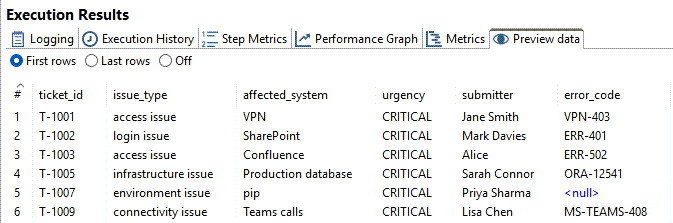
Write one row per ticket to `helpdesk.ticket_triage`.
Expected columns:
* `ticket_id`
* `issue_type`
* `affected_system`
* `urgency`
* `submitter`
* `error_code`
Optionally route critical rows to `helpdesk.escalations`.
***
**Transformation design**
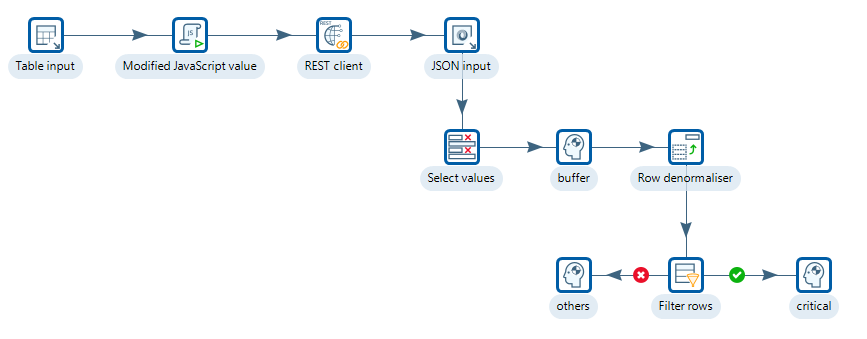
ticket_triage.ktr
{% file src="/files/GJl4YJIQdr7YMkYogVBU" %}
Build `ticket_triage.ktr`.
1. **Table Input**\
Read unprocessed tickets.
2. **Modified JavaScript Value**\
Build `request_json`.
3. **REST Client**\
Call `POST http://localhost:8765/extract`.
4. **JSON Input**\
Parse one row per extraction.
5. **Select values**\
Select the required fields.
6. **Dummy**\
I/O buffer.
7. **Row Denormaliser**\
Pivot extracted fields into one row per ticket.
8. **Filter Rows**\
Route `Critical` tickets to escalations.
9. **Table Output**\
Write triage rows and escalation rows.
***
**Step 1: Table Input**
Use:
```sql
SELECT ticket_id, ticket_text
FROM helpdesk.tickets
WHERE processed = 0
ORDER BY created_at ASC
```
**Step 2: Build** `request_json`
Use **Modified JavaScript Value**.
```javascript
var prompt = 'Extract issue_type, system, urgency, user, and error_code. ' +
'For urgency use only one of: CRITICAL, HIGH, MEDIUM, LOW. ' +
'If a field cannot be found in the text, omit it from the output entirely. ' +
'Do not use placeholder values such as "none", "N/A", or "none mentioned".';
var few_shot = [{
text: 'Cannot access Confluence. Error ERR-502. Urgent! — Alice, DevOps',
extractions: [
{ extraction_class: 'issue_type', extraction_text: 'access issue' },
{ extraction_class: 'system', extraction_text: 'Confluence' },
{ extraction_class: 'urgency', extraction_text: 'Urgent' },
{ extraction_class: 'user', extraction_text: 'Alice' },
{ extraction_class: 'error_code', extraction_text: 'ERR-502' }
]
}];
var request_json = JSON.stringify({
text: ticket_text + '',
prompt: prompt,
examples: few_shot,
model_id: 'llama3.1:8b',
max_char_buffer: 1200,
extraction_passes: 2
});
```
**Step 3: REST Client**
Set:
* **URL:** `http://localhost:8765/extract`
* **Method:** `POST`
* **Body field:** `request_json`
* **Result field:** `response_json`
* **Content-Type:** `JSON`
* **Connection timeout:** `30000`
* **Socket timeout:** `60000`
**Step 4: Parse the response**
Use **JSON Input** with source field `response_json`.
Parse these paths:
* `$.extractions[*].class` → `class`
* `$.extractions[*].text` → `text`
* `$.extractions[*].start` → `start`
* `$.extractions[*].end` → `end`
{% hint style="info" %}
The response field names are generic by design.
Use the `class` field to map values into ticket-specific columns.
{% endhint %}
**Step 5: Select required fields**
Use **Select values**.
Under Select & Alter tab:
Fieldname:
* ticket\_id
* class
* text
**Step 6: Buffer**
Use **Dummy**.
Nothing to configure. If `ticket_id` is already ordered ascending from Table Input - `ORDER BY created_at ASC`), and the REST Client processes rows sequentially (single copy, no parallelism), then the extractions coming out of JSON Input will already be grouped by `ticket_id`.
In that case you can replace Sort Rows with a **Dummy** step and the Row Denormaliser will work correctly because consecutive rows for the same `ticket_id` are already contiguous.
**Step 7: Pivot extracted fields**
Use **Row Denormaliser**.
Set:
* **Key field:** `class`
* **Value field:** `text`
* **Group field:** `ticket_id`
Map these values:
* `issue_type` → `issue_type`
* `system` → `affected_system`
* `urgency` → `urgency`
* `user` → `submitter`
* `error_code` → `error_code`
**Step 6: Route critical tickets**
Use **Filter Rows**.
Condition:
```
urgency = CRITICAL
```
Send:
* `true` → `Insert Escalations`
* `false` → `Insert Ticket Triage`
**Step 7: Write results**
Write standard rows to `helpdesk.ticket_triage`.
Write critical rows to `helpdesk.escalations`.
CRITICAL
***
**Quick validation**
Check results after the run:
```sql
SELECT ticket_id, issue_type, affected_system, urgency, submitter, error_code
FROM helpdesk.ticket_triage
ORDER BY ticket_id;
```
Critical escalations:
```sql
SELECT ticket_id, urgency
FROM helpdesk.escalations
ORDER BY ticket_id;
```
Optional alternative: call a local Python wrapper with a Shell step
Use this only for local prototyping.
Pass `request_json` into a wrapper script on stdin.
Capture stdout into `response_json`.
Keep the downstream JSON Input and pivot steps unchanged.
{% endtab %}
{% tab title="Clinical Notes" %}
{% hint style="info" %}
#### Clinical Notes
Use LangExtract to turn narrative clinical notes into structured medical facts.
This helps with coding, reconciliation, and downstream review workflows.
{% endhint %}

{% hint style="info" %}
### Business case
Northbridge NHS Foundation Trust runs eight hospitals and 34 outpatient clinics.
Clinical staff produce about 3,200 encounter notes per day.
Key facts such as medications, diagnoses, symptoms, and allergies are buried in narrative text.
{% endhint %}
**Sample clinical note**
```
Patient: Mary Johnson DOB: 12/03/1965 MRN: NB-004821
Visit Date: 15/11/2024 Attending: Dr. Samuel Lee, Internal Medicine
Chief Complaint:
Patient presents with persistent fatigue, shortness of breath on exertion, and
occasional chest tightness over the past three weeks.
Medical History:
Known Type 2 Diabetes Mellitus diagnosed 2014, Hypertension since 2018,
Hyperlipidaemia. Non-smoker. Occasional alcohol.
Allergies:
Penicillin — rash and urticaria. Sulfa drugs — anaphylaxis.
Current Medications:
Metformin 1000mg twice daily with meals.
Lisinopril 10mg once daily in the morning.
Atorvastatin 40mg at bedtime.
Aspirin 81mg once daily.
```
**Target output**
Write one row per extraction to `staging.patient_extractions`.
Expected columns:
* `patient_id`
* `class`
* `text`
* `start`
* `end`
* `extracted_at`
Common classes:
* `medication`
* `symptom`
* `diagnosis`
* `allergy`
***
**Transformation design**
Build `clinical_notes.ktr`.
1. **Get File Names**\
Read all note files from `/data/clinical_notes/`.
2. **Text File Input**\
Read each file into `note_text`.
3. **Modified JavaScript Value**\
Build `request_json`.
4. **REST Client**\
Call LangExtract.
5. **JSON Input**\
Parse extraction rows.
6. **Modified JavaScript Value**\
Add `patient_id` and validation flags.
7. **Filter Rows**\
Drop unknown classes.
8. **Table Output**\
Write to `staging.patient_extractions`.
**Step 1: Get file names**
**Step 2: Text file input**
**Step 3: Build** `request_json`
```javascript
var patient_id = (short_filename + '').replace('.txt', '');
var few_shot = [{
text: 'Patient takes Ramipril 5mg daily. Dizziness. CKD Stage 3. Allergic to NSAIDs.',
extractions: [
{ extraction_class: 'medication', extraction_text: 'Ramipril 5mg daily' },
{ extraction_class: 'symptom', extraction_text: 'dizziness' },
{ extraction_class: 'diagnosis', extraction_text: 'CKD Stage 3' },
{ extraction_class: 'allergy', extraction_text: 'NSAIDs' }
]
}];
var request_json = JSON.stringify({
text: note_text + '',
prompt: 'Extract medications with dosage, symptoms, diagnoses, and allergies with reactions where present.',
examples: few_shot,
model_id: 'llama3.1:8b',
max_char_buffer: 1200,
extraction_passes: 2
});
```
**Step 4: REST Client settings**
Set:
* **URL:** `http://localhost:8765/extract`
* **Method:** `POST`
* **Body field:** `request_json`
* **Result field:** `response_json`
* **Content-Type:** `application/json`
* **Connection timeout:** `30000`
* **Socket timeout:** `120000`
**Step 5: JSON Input paths**
Parse from `response_json`:
* `$.extractions[*].class` → `class`
* `$.extractions[*].text` → `text`
* `$.extractions[*].start` → `start`
* `$.extractions[*].end` → `end`
**Step 6:**
**Step 7: Validate classes**
After parsing, keep only expected classes:
* `medication`
* `symptom`
* `diagnosis`
* `allergy`
Use a **Filter Rows** step to discard anything else or route it to review.
### Example load table
Use a staging table like this:
```sql
CREATE TABLE staging.patient_extractions (
id SERIAL PRIMARY KEY,
patient_id VARCHAR(20),
class VARCHAR(30),
text TEXT,
start INT,
end INT,
extracted_at TIMESTAMP DEFAULT NOW()
);
```
### Quick validation
```sql
SELECT patient_id, class, text
FROM staging.patient_extractions
ORDER BY patient_id, class;
```
{% hint style="warning" %}
Clinical notes often contain repeated facts.
If you see duplicates, deduplicate on `patient_id + class + text + start + end`.
{% endhint %}
{% endtab %}
{% tab title="Contract Documents" %}
{% hint style="info" %}
#### Contract Documents
Use LangExtract to pull critical legal and commercial terms from long contracts.
This is useful for due diligence, review queues, and clause indexing.
{% endhint %}

### Business case
Meridian Capital Partners reviews about 220 contracts per quarter.
Documents range from 8 to 140 pages.
Key terms such as liability caps and governing law appear in inconsistent locations.
### Sample contract text
```
SERVICE AGREEMENT
This Service Agreement ("Agreement") is entered into as of 1st January 2025
("Effective Date") by and between:
Acme Corporation Ltd ... ("Service Provider")
and
GlobalTech Holdings PLC ... ("Client").
The Service Provider shall provide software development and consultancy services.
This Agreement shall commence on the Effective Date and continue for 24 months.
```
### Target outputs
Use two outputs:
#### Branch A: clause details
Write one row per extraction to `staging.clause_details`.
Columns:
* `contract_id`
* `class`
* `text`
* `start`
* `end`
* `extracted_at`
#### Branch B: contract master
Write one wide row per contract to `staging.contract_master`.
Columns:
* `contract_id`
* `party_a`
* `party_b`
* `effective_date`
* `termination`
* `payment_terms`
* `liability_cap`
* `governing_law`
* `validation_status`
* `extracted_at`
### Transformation design
Build `langextract_contracts.ktr`.
1. **Get File Names**\
Read all `*.txt` contracts from `/data/contracts/`.
2. **Text File Input**\
Load each file into `contract_text`.
3. **Modified JavaScript Value**\
Build `request_json`.
4. **REST Client**\
Call LangExtract.
5. **JSON Input**\
Parse clause rows.
6. **Add Constants**\
Stamp `extracted_at`.
7. **Table Output**\
Write normalized clause rows.
8. **Row Denormaliser**\
Pivot target classes into a wide contract row.
9. **Modified JavaScript Value**\
Validate required fields.
10. **Filter Rows**\
Route valid rows to master and invalid rows to review.
### Build `request_json`
```javascript
var contract_id = (short_filename + '').replace('.txt', '');
var few_shot = [{
text: 'Agreement between Acme Ltd and BetaCorp PLC as of 1 March 2024. Terminate with 60 days notice. Payment within 30 days. Liability capped at £250,000. Governed by laws of England.',
extractions: [
{ extraction_class: 'party_a', extraction_text: 'Acme Ltd' },
{ extraction_class: 'party_b', extraction_text: 'BetaCorp PLC' },
{ extraction_class: 'effective_date', extraction_text: '1 March 2024' },
{ extraction_class: 'termination', extraction_text: '60 days notice' },
{ extraction_class: 'payment_terms', extraction_text: 'Payment within 30 days' },
{ extraction_class: 'liability_cap', extraction_text: '£250,000' },
{ extraction_class: 'governing_law', extraction_text: 'laws of England' }
]
}];
var request_json = JSON.stringify({
text: contract_text + '',
prompt: 'Extract party_a, party_b, effective_date, termination, payment_terms, liability_cap, and governing_law.',
examples: few_shot,
model_id: 'llama3.1:8b',
max_char_buffer: 1500,
overlap: 200,
extraction_passes: 2
});
```
### REST Client settings
Set:
* **URL:** `http://localhost:8765/extract`
* **Method:** `POST`
* **Body field:** `request_json`
* **Result field:** `response_json`
* **Content-Type:** `application/json`
* **Connection timeout:** `30000`
* **Socket timeout:** `180000`
### JSON Input paths
Parse from `response_json`:
* `$.extractions[*].class` → `class`
* `$.extractions[*].text` → `text`
* `$.extractions[*].start` → `start`
* `$.extractions[*].end` → `end`
### Pivot classes into contract columns
Use **Row Denormaliser** with:
* **Key field:** `class`
* **Value field:** `text`
* **Group field:** `contract_id`
Map:
* `party_a` → `party_a`
* `party_b` → `party_b`
* `effective_date` → `effective_date`
* `termination` → `termination`
* `payment_terms` → `payment_terms`
* `liability_cap` → `liability_cap`
* `governing_law` → `governing_law`
### Validate required fields
Set `validation_status = 'Y'` only when these fields exist:
* `party_a`
* `party_b`
* `effective_date`
* `governing_law`
Route everything else to `staging.contract_review_queue`.
### Example staging tables
```sql
CREATE TABLE staging.clause_details (
id SERIAL PRIMARY KEY,
contract_id VARCHAR(50),
class VARCHAR(50),
text TEXT,
start INT,
end INT,
extracted_at TIMESTAMP DEFAULT NOW()
);
CREATE TABLE staging.contract_master (
contract_id VARCHAR(50) PRIMARY KEY,
party_a TEXT,
party_b TEXT,
effective_date VARCHAR(100),
termination TEXT,
payment_terms TEXT,
liability_cap TEXT,
governing_law TEXT,
validation_status CHAR(1) DEFAULT 'Y',
extracted_at TIMESTAMP DEFAULT NOW()
);
```
### Quick validation
Normalized clause rows:
```sql
SELECT contract_id, class, text
FROM staging.clause_details
ORDER BY contract_id, class;
```
Wide contract rows:
```sql
SELECT contract_id, party_a, party_b, effective_date, liability_cap, governing_law
FROM staging.contract_master
ORDER BY contract_id;
```
{% hint style="warning" %}
Long contracts need chunk overlap.
If clauses are split at boundaries, increase `overlap` before raising model size.
{% endhint %}
{% endtab %}
{% endtabs %}
**Troubleshooting**
{% hint style="warning" %}
Common issues:
* **Connection refused on `8765`**\
Start the LangExtract API and verify `curl http://localhost:8765/docs`.
* **Empty extractions**\
Tighten the prompt and improve few-shot examples.
* **Wrong JSON paths**\
Parse `class`, `text`, `start`, and `end`.
* **Weak long-document recall**\
Increase `extraction_passes` or add `overlap`.
* **Too many duplicates**\
Deduplicate before final load.
{% endhint %}
---
# Agent Instructions
This documentation is published with GitBook. GitBook is the documentation platform designed so that both humans and AI agents can read, navigate, and reason over technical content effectively. Learn more at gitbook.com.
## Querying This Documentation
If you need additional information that is not directly available in this page, you can query the documentation dynamically by asking a question.
Perform an HTTP GET request on the current page URL with the `ask` query parameter, and the optional `goal` query parameter:
```
GET https://academy.pentaho.com/pentaho-data-integration/use-cases/ai-pdi-pipelines/langextract.md?ask=&goal=
```
`ask` is the immediate question: it should be specific, self-contained, and written in natural language.
`goal` is optional and describes the broader end goal you are ultimately trying to accomplish on behalf of the user. GitBook uses it to tailor the answer towards what is most useful for that goal.
The response will contain a direct answer to the question and relevant excerpts and sources from the documentation.
Use this mechanism when the answer is not explicitly present in the current page, you need clarification or additional context, or you want to retrieve related documentation sections.