> For the complete documentation index, see [llms.txt](https://academy.pentaho.com/llms.txt). Markdown versions of documentation pages are available by appending `.md` to page URLs; this page is available as [Markdown](https://academy.pentaho.com/pentaho-data-integration/data-integration/enrich-data/merge/merge-streams.md).
# Merge Streams
{% hint style="warning" %}
**Workshop - Merge data streams**
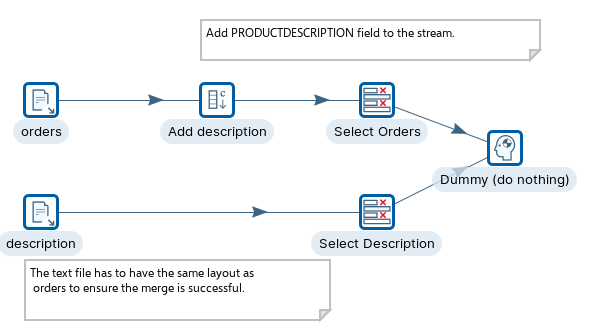
The transformation underlines the ‘rules’ for manipulating data streams. Each data stream must have the same data stream fields / order / data type, before they can be merged.
In this workshop, you will need to add a 'description' to the data stream:
* Add constant step
{% endhint %}
Merge data streams
***
{% tabs %}
{% tab title="English" %}
{% endtab %}
{% tab title="Second Tab" %}
{% endtab %}
{% endtabs %}
{% hint style="info" %}
**Create a new Transformation**
Any one of these actions opens a new Transformation tab for you to begin designing your transformation.
* By clicking File > New > Transformation
* By using the CTRL-N hot key
{% endhint %}
{% tabs %}
{% tab title="1. Text File Input" %}
{% hint style="info" %}
**Text File input**
The Text File Input step is used to read data from a variety of different text-file types. The most commonly used formats include Comma Separated Values (CSV files) generated by spreadsheets and fixed width flat files.
The Text File Input step provides you with the ability to specify a list of files to read, or a list of directories with wild cards in the form of regular expressions. In addition, you can accept filenames from a previous step making filename handling more even more generic.
{% endhint %}
1. Examine both the orders.txt and description.txt.
2. Configure the Text file input steps to point to, and retrieve the data from each of the files.
{% endtab %}
{% tab title="2. Add Constant" %}
{% hint style="info" %}
**Add Constant**
The Add constant values step is a simple and high performance way to add constant values to the stream.
Why - in order to merge the streams each stream has to have the same layout.
{% endhint %}
1. The PRODUCTDESCRIPTION field is added to the ‘orders stream’ to ensure the data stream matches the ‘description’ data stream.
{% endtab %}
{% tab title="3. Select Values" %}
{% hint style="info" %}
**Select Values**
The Select Values step is useful for selecting, removing, renaming, changing data types and configuring the length and precision of the fields on the stream. These operations are organized into different categories:
* Select and Alter - Specify the exact order and name in which the fields could be placed in the output rows
* Remove - Specify the fields that could be removed from the output rows
* Meta-data - Change the name, type, length and precision (the metadata) of one or more fields
{% endhint %}
{% hint style="info" %}
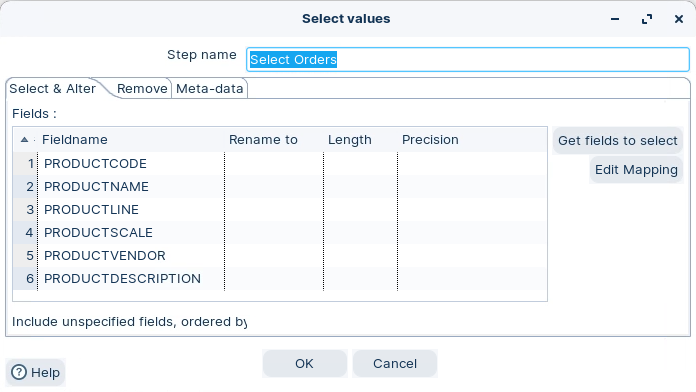
Each of the Select values ensures that each data stream is consistent in layout before merging. Each field must be in the correct order within the data stream so that mappings are successful.
{% endhint %}
Select values
{% endtab %}
{% tab title="4. RUN" %}
{% hint style="info" %}
**RUN**
{% endhint %}
1. Run the Transformation.
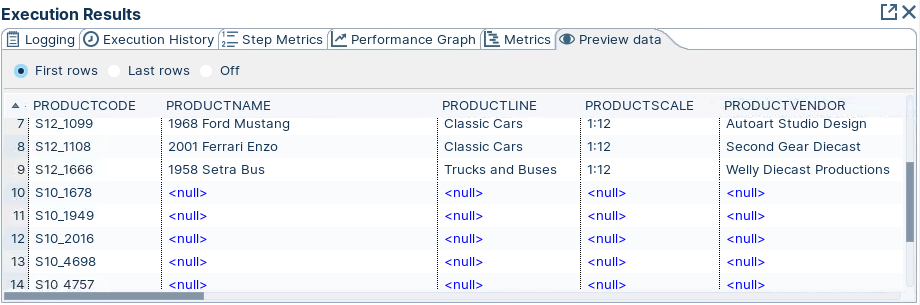
2. Click on the Dummy step and ‘Preview’.
Preview data
{% hint style="info" %}
As you can see we have 2 merged streams ..
{% endhint %}
{% endtab %}
{% endtabs %}
---
# Agent Instructions
This documentation is published with GitBook. GitBook is the documentation platform designed so that both humans and AI agents can read, navigate, and reason over technical content effectively. Learn more at gitbook.com.
## Querying This Documentation
If you need additional information that is not directly available in this page, you can query the documentation dynamically by asking a question.
Perform an HTTP GET request on the current page URL with the `ask` query parameter, and the optional `goal` query parameter:
```
GET https://academy.pentaho.com/pentaho-data-integration/data-integration/enrich-data/merge/merge-streams.md?ask=&goal=
```
`ask` is the immediate question: it should be specific, self-contained, and written in natural language.
`goal` is optional and describes the broader end goal you are ultimately trying to accomplish on behalf of the user. GitBook uses it to tailor the answer towards what is most useful for that goal.
The response will contain a direct answer to the question and relevant excerpts and sources from the documentation.
Use this mechanism when the answer is not explicitly present in the current page, you need clarification or additional context, or you want to retrieve related documentation sections.