> For the complete documentation index, see [llms.txt](https://academy.pentaho.com/llms.txt). Markdown versions of documentation pages are available by appending `.md` to page URLs; this page is available as [Markdown](https://academy.pentaho.com/pdi-developer-path/speciality-courses/streaming-data.md). Agents can also search and read this documentation through its [MCP server](https://academy.pentaho.com/~gitbook/mcp).

# Streaming Data

Real-time streaming data integration with Pentaho Data Integration. Consume and process unbounded event streams over MQTT, AMQP and Apache Kafka.

{% hint style="warning" icon="eye" %}
**Preview: the new Pentaho Academy launches in January 2027.**

This page is an early draft, shared now so Pentaho users can see where the Academy is heading: technical enablement built on learning paths that match your job role, from your first course to certification. Until launch, some links, labs and resources are still being put in place.

Items marked REPLACE-ME need an owner's confirmation.
{% endhint %}

Process unbounded, real-time event streams with Pentaho Data Integration. Three protocols, four brokers and a data lake — delivery-truck predictive maintenance and industrial robot telemetry over MQTT, room-sensor data over AMQP, and a live user-activity stream over Kafka, checked against a data contract and landed in a MinIO data lake — all built on PDI's parent/child streaming pattern.

{% columns %}
{% column %}

<p align="center"><i class="fa-file-lines" style="color:green;">:file-lines:</i><br><strong>12 lessons</strong><br><em>across 6 modules</em></p>
{% endcolumn %}

{% column %}

<p align="center"><i class="fa-flask" style="color:orange;">:flask:</i><br><strong>7 workshops</strong><br><em>including a capstone</em></p>
{% endcolumn %}

{% column %}

<p align="center"><i class="fa-clock" style="color:cyan;">:clock:</i><br><strong>~7h 20m</strong><br><em>6h 15m of workshops</em></p>
{% endcolumn %}
{% endcolumns %}

{% hint style="success" icon="cloud-arrow-up" %}
Every workshop is hands-on and runs on Pentaho's hosting platform. The Lab Guide is embedded in each lab and loads automatically when you open it — nothing to install.
{% endhint %}

***

<h3 align="center">Before you start</h3>

{% columns %}
{% column %}
{% hint style="success" icon="circle-check" %}
**What you'll need**

Comfortable building transformations and jobs in Pentaho Data Integration. The labs provide Podman Desktop, all four brokers, MySQL, a MinIO object store (SILO, a community build of MinIO) and Python for the publisher scripts — one command brings HiveMQ, EMQX, RabbitMQ and Kafka up together.
{% endhint %}
{% endcolumn %}

{% column %}
{% hint style="info" icon="tag" %}
**Built against**

Pentaho Enterprise Edition **11.0.0.3 (SP3)**, the build nearly every course on the Academy runs, with its MQTT, AMQP and Kafka steps. The brokers, HiveMQ 4.57, EMQX 6.3, RabbitMQ 4.4 and Kafka 4.4, and the MinIO object store run in containers alongside the lab, so you see real message flow rather than a simulation.
{% endhint %}
{% endcolumn %}
{% endcolumns %}

***

{% hint style="info" icon="trophy" %}

#### What you'll build

Working streaming pipelines, then a capstone that joins them. A delivery-truck predictive-maintenance pipeline on EMQX, scaled out with a shared subscription and locked with a login; industrial robot-sensor telemetry from HiveMQ on a Unified Namespace topic; room-sensor readings pulled from RabbitMQ; a real-time user-activity stream loaded from Kafka into MySQL; the same kind of stream checked against a data contract, with rejects on their own topic and the table rebuilt by replay; and a stream landed in a MinIO data lake as Avro files. The capstone is a plant-floor alert feed: MQTT in, alerts out through a keyed Kafka topic, each one stored once.
{% endhint %}

***

<h3 align="center">Skills you'll gain</h3>

<table data-view="cards"><thead><tr><th></th><th></th></tr></thead><tbody><tr><td><i class="fa-wave-pulse" style="color:blue;">:wave-pulse:</i> <strong>Streaming fundamentals</strong></td><td>Batch versus streaming · the parent/child transformation pattern · Get records from stream · batch size and duration to window a stream · where PDI fits beside a stream processor</td></tr><tr><td><i class="fa-tower-broadcast" style="color:blue;">:tower-broadcast:</i> <strong>MQTT</strong></td><td>EMQX and HiveMQ brokers · MQTT consumer and MQTT producer steps · QoS, retained messages and Last Will · shared subscriptions and broker authentication · Unified Namespace topics and Sparkplug B</td></tr><tr><td><i class="fa-inbox" style="color:blue;">:inbox:</i> <strong>AMQP</strong></td><td>RabbitMQ · exchanges, bindings and durable queues · AMQP consumer step · acknowledgments · room-sensor readings appended to a file</td></tr><tr><td><i class="fa-bolt" style="color:blue;">:bolt:</i> <strong>Kafka</strong></td><td>Apache Kafka 4 in KRaft mode · Kafka consumer and Kafka producer steps · consumer groups, offsets and lag · loading a stream into MySQL, each record once · data contracts, a rejects topic and replay · landing a stream in a data lake as Avro</td></tr></tbody></table>

***

<h3 align="center">Course outline</h3>

<p align="center"><i class="fa-file-lines" style="color:green;">:file-lines:</i> reading · <i class="fa-flask" style="color:orange;">:flask:</i> hands-on workshop</p>

<table data-search="false"><thead><tr><th>Module</th><th width="100" align="center">Reading</th><th width="110" align="center">Workshops</th><th width="100" align="right">Time</th></tr></thead><tbody><tr><td>Getting Started</td><td align="center">1</td><td align="center">—</td><td align="right">~5m</td></tr><tr><td>Streaming Data</td><td align="center">1</td><td align="center">—</td><td align="right">~10m</td></tr><tr><td>MQTT</td><td align="center">1</td><td align="center">2</td><td align="right">~1h 40m</td></tr><tr><td>AMQP</td><td align="center">1</td><td align="center">1</td><td align="right">~45m</td></tr><tr><td>Kafka</td><td align="center">1</td><td align="center">3</td><td align="right">~2h 40m</td></tr><tr><td>Capstone Project</td><td align="center">—</td><td align="center">1</td><td align="right">~2h</td></tr><tr><td><strong>Total</strong></td><td align="center"><strong>5</strong></td><td align="center"><strong>7</strong></td><td align="right"><strong>~7h 20m</strong></td></tr></tbody></table>

{% stepper %}
{% step %}

### <i class="fa-rocket" style="color:blue;">:rocket:</i> Getting Started

`1 reading · ~5m`

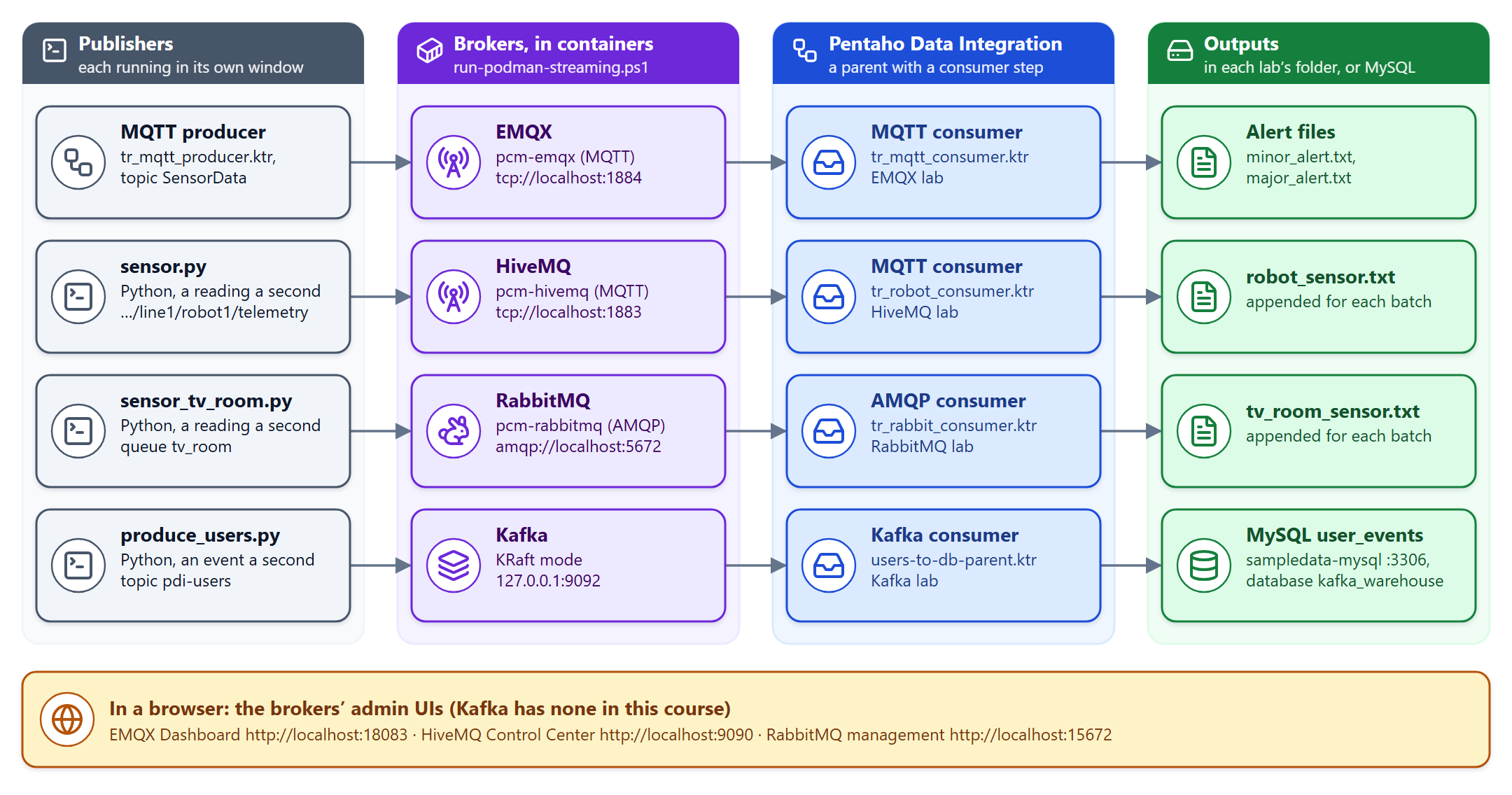
How to get the most out of this guide, and how to set your own machine up if you are not on a lab — Podman Desktop, one command for all four brokers (HiveMQ, EMQX, RabbitMQ, Kafka), the MySQL kit, the MinIO kit (SILO), and Python for the publisher scripts.

<figure><img src="https://raw.githubusercontent.com/jporeilly/Pentaho-Courses/main/developer-sd-specialty/_assets/images/sd-lab-setup.png" alt="Four rows, one per workshop: the MQTT producer to EMQX on 1884 to an MQTT consumer writing the alert files; sensor.py to HiveMQ on 1883 to an MQTT consumer writing robot_sensor.txt; sensor_tv_room.py to RabbitMQ on 5672 to an AMQP consumer writing tv_room_sensor.txt; produce_users.py to Kafka on 9092 to a Kafka consumer loading MySQL user_events on 3306. A bar lists the admin UIs on 18083, 9090 and 15672"><figcaption><p>The lab map: publishers, broker containers, consumers and outputs</p></figcaption></figure>

<details>

<summary>See the reading</summary>

<table data-search="false"><thead><tr><th width="79"></th><th>Lesson</th><th width="90">Time</th></tr></thead><tbody><tr><td><i class="fa-file-lines" style="color:green;">:file-lines:</i></td><td>Before You Start</td><td>~5m</td></tr></tbody></table>

</details>
{% endstep %}

{% step %}

### <i class="fa-wave-pulse" style="color:blue;">:wave-pulse:</i> Streaming Data

`1 reading · ~10m`

Process unbounded, real-time event streams with Pentaho Data Integration's streaming steps. Batch versus streaming, the parent/child transformation pattern, the **Get records from stream** step that underpins every streaming source, and where Pentaho Data Integration fits beside a stream processor such as Flink.

<figure><img src="https://1407627559-files.gitbook.io/~/files/v0/b/gitbook-x-prod.appspot.com/o/spaces%2F3zO083cdmEBCaZG8U9P2%2Fuploads%2FttF89QLoAaLnqHidW1QZ%2Fparent-child-streaming.svg?alt=media" alt="A broker, HiveMQ, EMQX, RabbitMQ or Kafka, feeds the consumer step in the parent transformation, which closes a batch at Duration (ms) or Number of records, whichever comes first. Each batch runs the child: Get records from stream, JSON input, Select values and Formula, then Table output."><figcaption><p>One pattern for every protocol: the parent batches, the child runs once per batch</p></figcaption></figure>

<details>

<summary>See the reading</summary>

<table data-search="false"><thead><tr><th width="79"></th><th>Lesson</th><th width="90">Time</th></tr></thead><tbody><tr><td><i class="fa-file-lines" style="color:green;">:file-lines:</i></td><td>Overview</td><td>~10m</td></tr></tbody></table>

</details>
{% endstep %}

{% step %}

### <i class="fa-tower-broadcast" style="color:blue;">:tower-broadcast:</i> MQTT

`1 reading · 2 workshops · ~1h 40m`

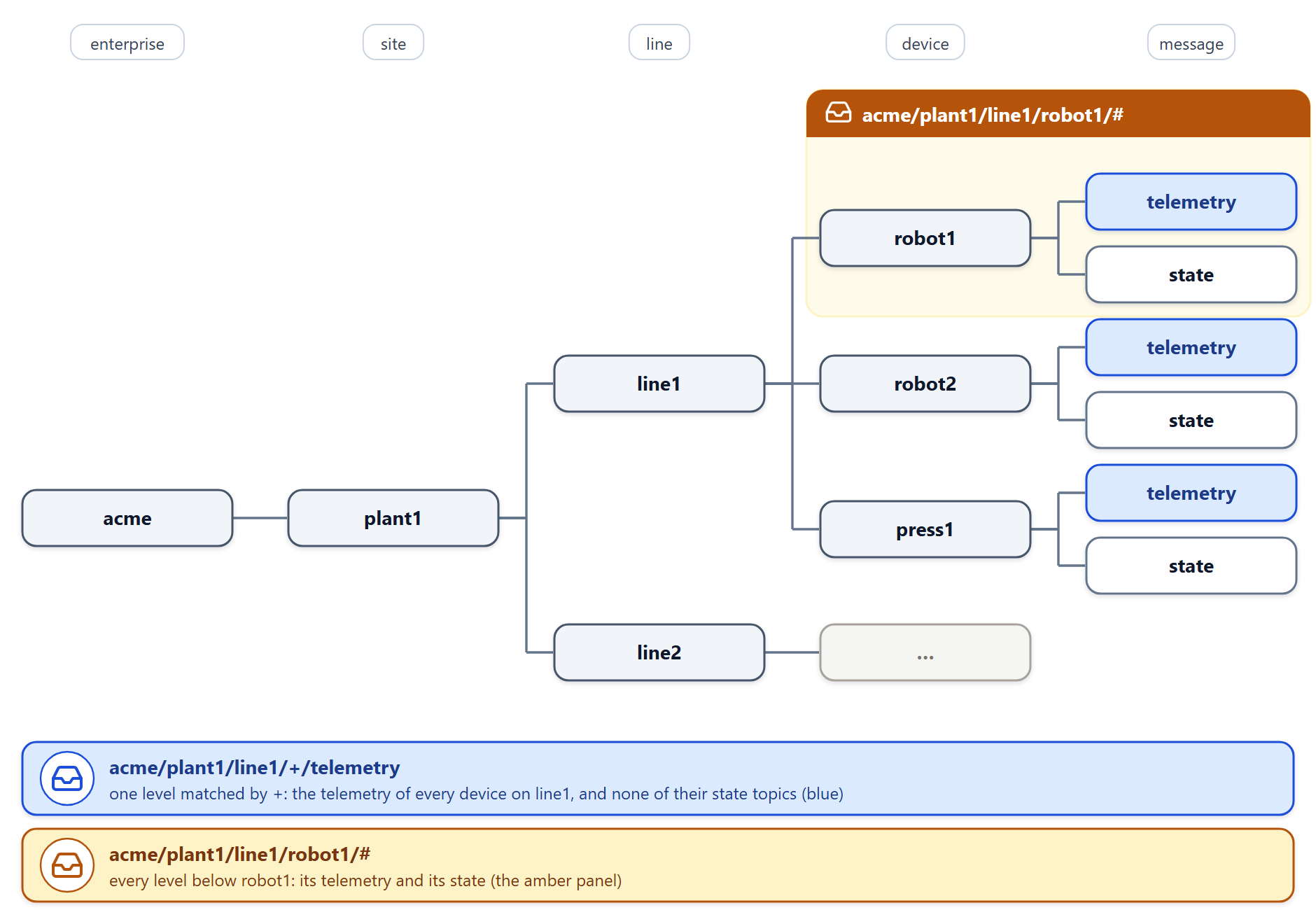
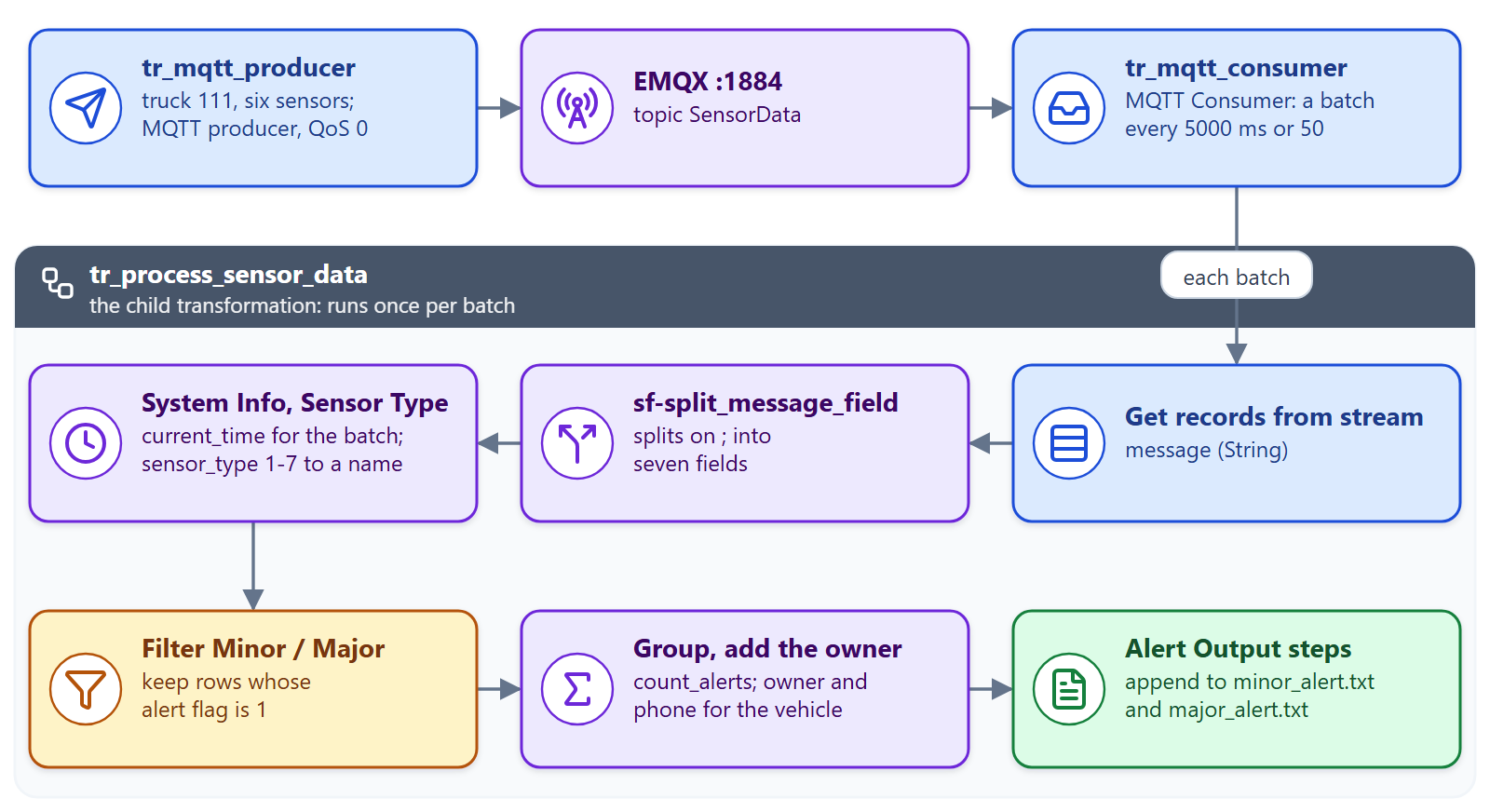
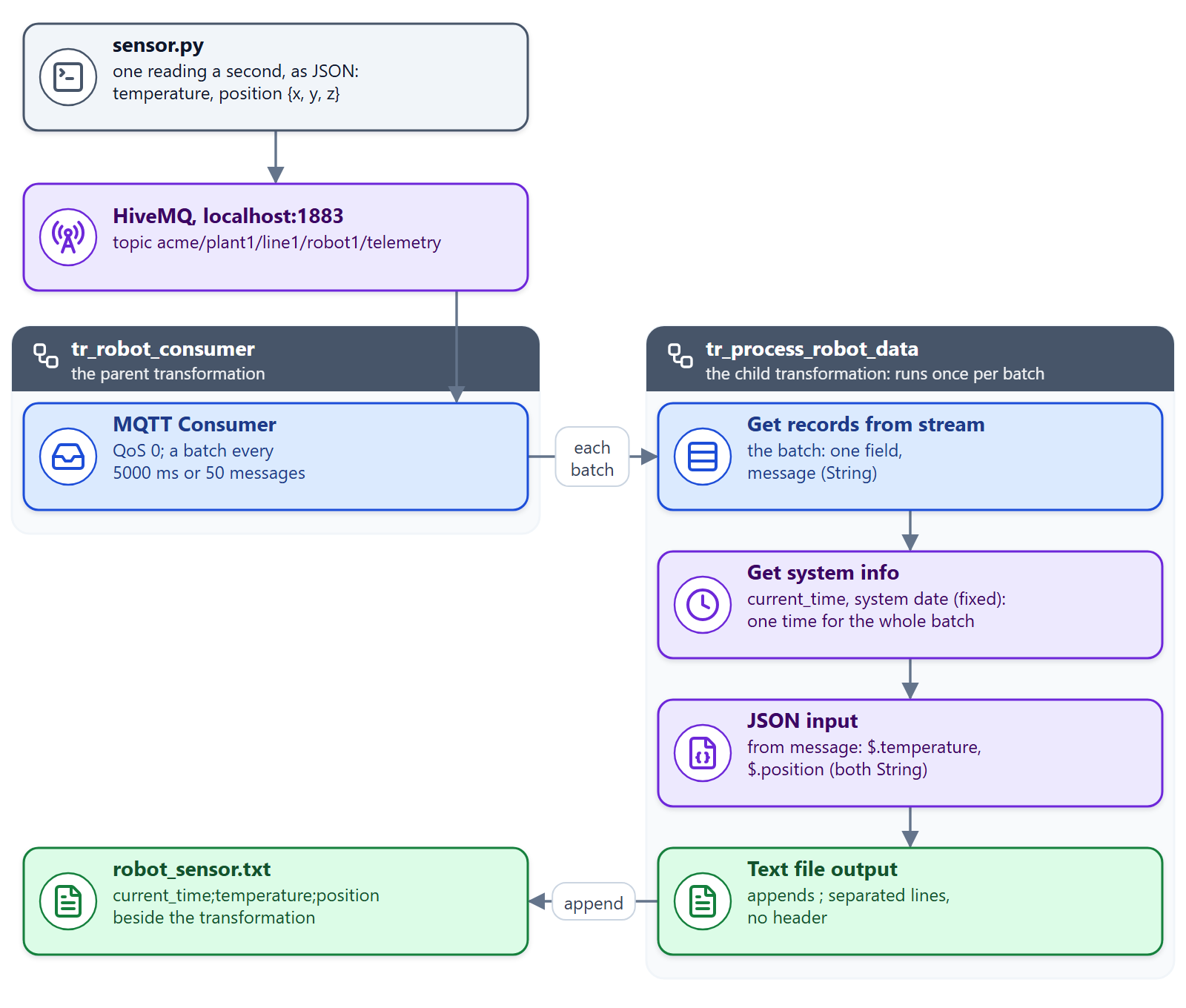
Message Queuing Telemetry Transport — the lightweight publish/subscribe protocol for IoT, with a Unified Namespace topic tree and Sparkplug B. Two workshops: plain publish/subscribe with a delivery-truck predictive-maintenance use case on EMQX, then a shared subscription and a broker login; and industrial robot-sensor telemetry from HiveMQ on a Unified Namespace topic, with a Last Will.

<figure><img src="https://raw.githubusercontent.com/jporeilly/Pentaho-Courses/main/developer-sd-specialty/_assets/images/mqtt-uns-tree.png" alt="A Unified Namespace topic tree: acme, then plant1, then line1 and line2; under line1 the devices robot1, robot2 and press1, each with telemetry and state. The subscription acme/plant1/line1/+/telemetry takes the telemetry of every device on line1; acme/plant1/line1/robot1/# takes everything robot1 publishes"><figcaption><p>One topic tree for the plant: a wildcard picks a slice of it</p></figcaption></figure>

<figure><img src="https://raw.githubusercontent.com/jporeilly/Pentaho-Courses/main/developer-sd-specialty/_assets/images/emqx-truck-pipeline.png" alt="Across the top: tr_mqtt_producer (truck 111, six sensors, MQTT producer QoS 0) publishes to EMQX on port 1884, topic SensorData, and tr_mqtt_consumer&#x27;s MQTT Consumer reads a batch every 5000 ms or 50 messages. Below, each batch runs tr_process_sensor_data: Get records from stream, sf-split_message_field into seven fields, System Info and Sensor Type, Filter Minor and Major on an alert flag of 1, Group and add the owner, and the Alert Output steps appending to minor_alert.txt and major_alert.txt"><figcaption><p>EMQX: Pentaho Data Integration publishes as well as consumes</p></figcaption></figure>

<figure><img src="https://raw.githubusercontent.com/jporeilly/Pentaho-Courses/main/developer-sd-specialty/_assets/images/hivemq-robot-pipeline.png" alt="sensor.py publishes one JSON reading a second to HiveMQ on localhost:1883, topic acme/plant1/line1/robot1/telemetry. In tr_robot_consumer, MQTT Consumer reads it with QoS 0, a batch every 5000 ms or 50 messages. Each batch runs tr_process_robot_data: Get records from stream (message), Get system info (current_time, system date fixed), JSON input ($.temperature and $.position) and Text file output, which appends semicolon-separated lines with no header to robot_sensor.txt"><figcaption><p>HiveMQ: the parent hands each batch of robot readings to the child</p></figcaption></figure>

<figure><img src="https://1407627559-files.gitbook.io/~/files/v0/b/gitbook-x-prod.appspot.com/o/spaces%2F3zO083cdmEBCaZG8U9P2%2Fuploads%2FB04M1ypAWHUUBOduRSiD%2Fmqtt-qos-levels.svg?alt=media" alt="Three sequences between the publisher and the broker. QoS 0: one PUBLISH and no reply; a message may be lost. QoS 1: PUBLISH, a re-send while no PUBACK has come back, which gives the broker a duplicate, then PUBACK. QoS 2: PUBLISH, PUBREC, PUBREL and PUBCOMP; delivered once, at the most overhead."><figcaption><p>The three QoS levels, packet by packet</p></figcaption></figure>

<figure><img src="https://1407627559-files.gitbook.io/~/files/v0/b/gitbook-x-prod.appspot.com/o/spaces%2F3zO083cdmEBCaZG8U9P2%2Fuploads%2FhrOZm0XnCVybRRrXuNKA%2Fmqtt-lwt-retained.svg?alt=media" alt="sensor.py, HiveMQ on localhost:1883, a subscriber and a later subscriber. sensor.py connects with a will (offline, QoS 1, retained) and publishes a retained online. The window is closed without DISCONNECT, so HiveMQ publishes the will: the subscriber gets offline, and a later subscriber gets the retained offline. A clean disconnect() would discard the will."><figcaption><p>The will and the retained status topic, from connect to crash</p></figcaption></figure>

<details>

<summary>See all 3 lessons</summary>

<table data-search="false"><thead><tr><th width="79"></th><th>Lesson</th><th width="90">Time</th></tr></thead><tbody><tr><td><i class="fa-file-lines" style="color:green;">:file-lines:</i></td><td>Overview</td><td>~15m</td></tr><tr><td><i class="fa-flask" style="color:orange;">:flask:</i></td><td>EMQX — delivery-truck predictive maintenance, a shared subscription and a broker login</td><td>~55m</td></tr><tr><td><i class="fa-flask" style="color:orange;">:flask:</i></td><td>HiveMQ — robot telemetry on a Unified Namespace, with a Last Will</td><td>~30m</td></tr></tbody></table>

</details>
{% endstep %}

{% step %}

### <i class="fa-inbox" style="color:blue;">:inbox:</i> AMQP

`1 reading · 1 workshop · ~45m`

Advanced Message Queuing Protocol — reliable, decoupled messaging via exchanges, bindings and queues. Consume room-sensor data from a RabbitMQ broker with the **AMQP consumer** step and append it to a file.

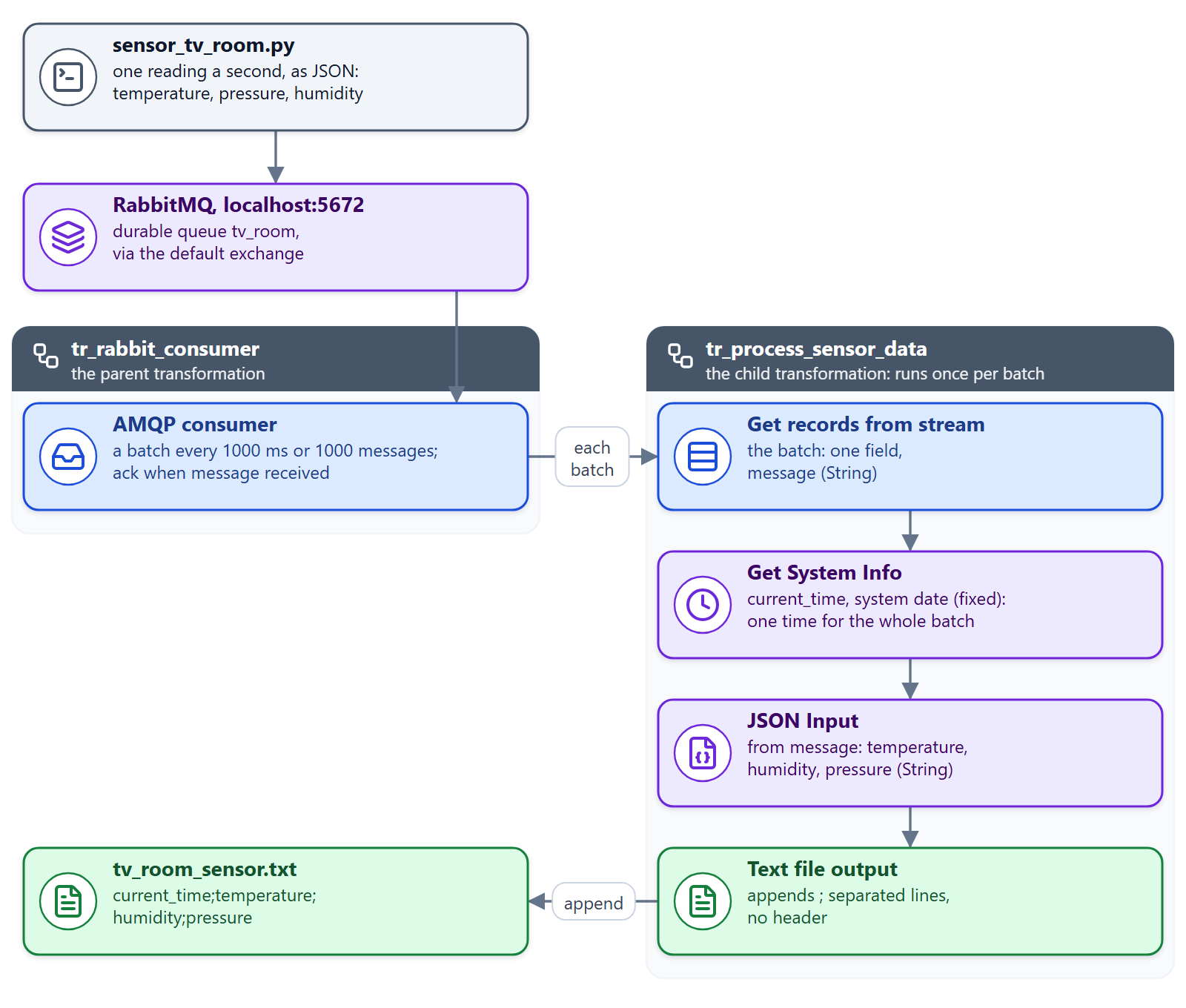
<figure><img src="https://raw.githubusercontent.com/jporeilly/Pentaho-Courses/main/developer-sd-specialty/_assets/images/rabbitmq-tv-room-pipeline.png" alt="sensor_tv_room.py publishes to the durable queue tv_room on RabbitMQ, port 5672; tr_rabbit_consumer&#x27;s AMQP consumer takes a batch every 1000 ms or 1000 messages and runs tr_process_sensor_data, which appends temperature, humidity and pressure to tv_room_sensor.txt"><figcaption><p>RabbitMQ: a durable queue, read in batches</p></figcaption></figure>

<details>

<summary>See all 2 lessons</summary>

<table data-search="false"><thead><tr><th width="79"></th><th>Lesson</th><th width="90">Time</th></tr></thead><tbody><tr><td><i class="fa-file-lines" style="color:green;">:file-lines:</i></td><td>Overview</td><td>~15m</td></tr><tr><td><i class="fa-flask" style="color:orange;">:flask:</i></td><td>RabbitMQ — room-sensor data to a file</td><td>~30m</td></tr></tbody></table>

</details>
{% endstep %}

{% step %}

### <i class="fa-bolt" style="color:blue;">:bolt:</i> Kafka

`1 reading · 3 workshops · ~2h 40m`

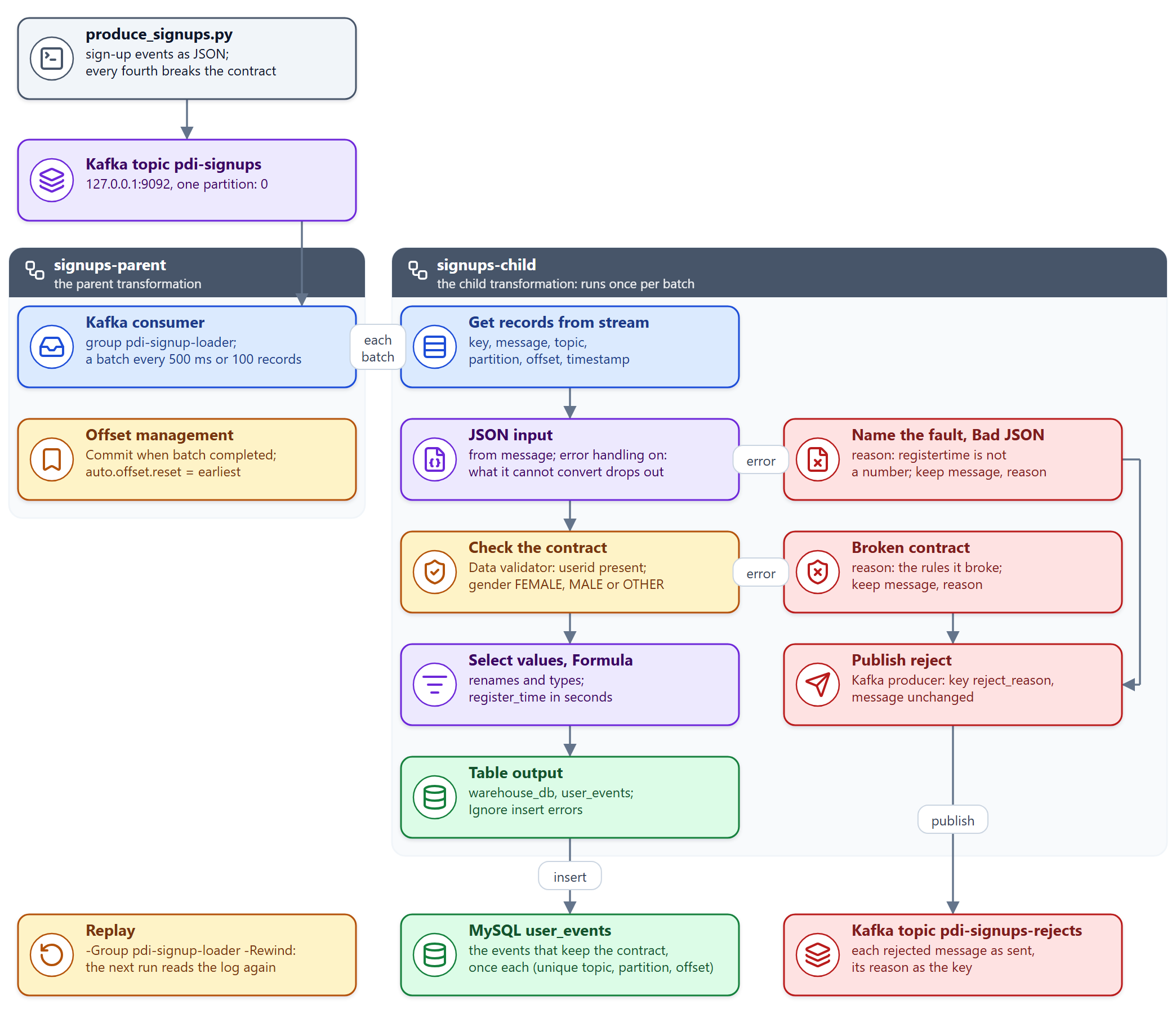
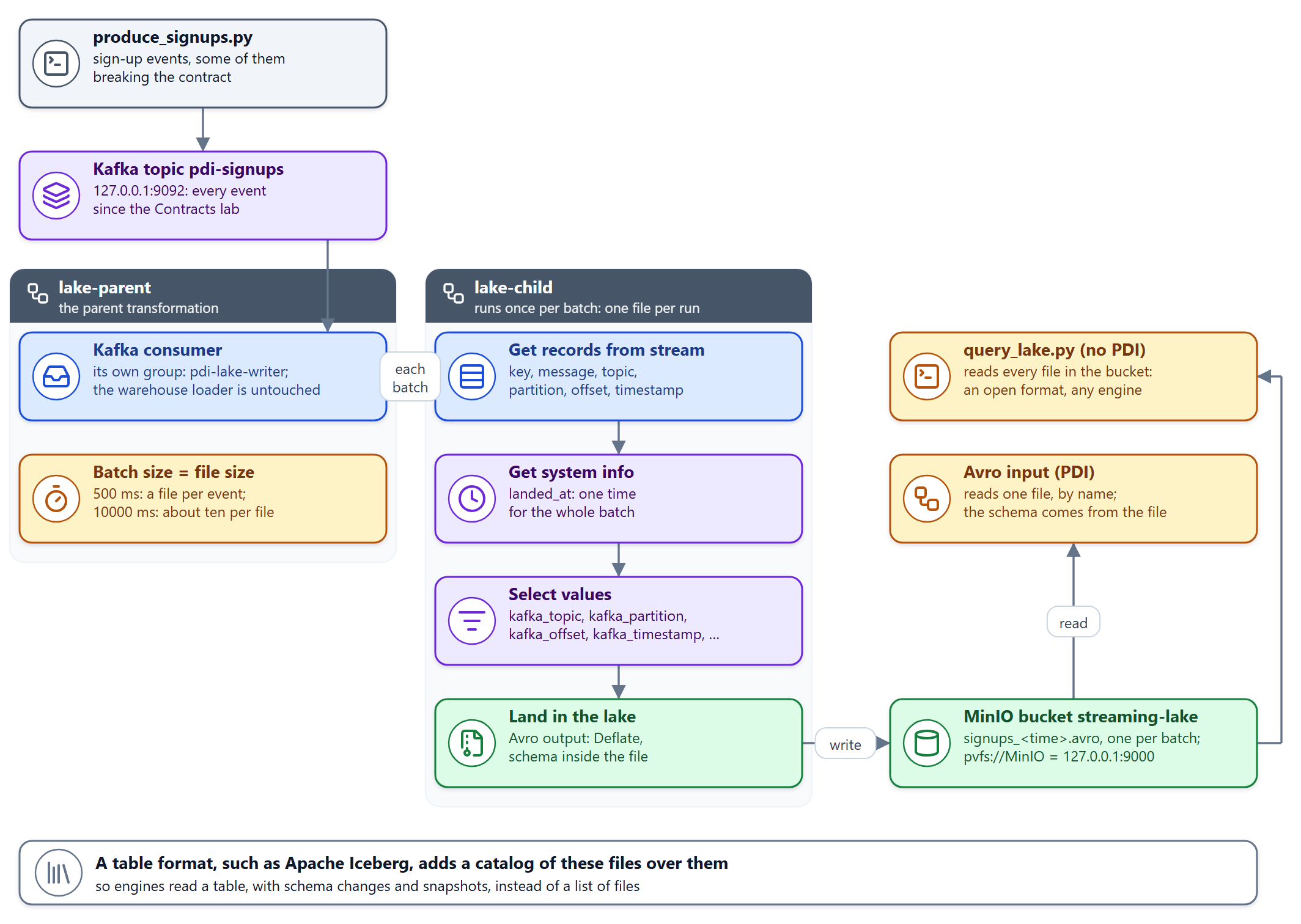
Apache Kafka — a distributed event-streaming platform; since Kafka 4.0 it runs in KRaft mode only. Consume a real-time user-activity stream with the **Kafka consumer** step and load it into a MySQL warehouse, each event once, even after a restart. Then give the pipeline a data contract — step error handling, **Data validator** and a rejects topic — read consumer lag and rebuild the table by replaying the log; and land the stream in a MinIO data lake as Avro files that any engine can read. The module closes on change data capture, the next source of such streams.

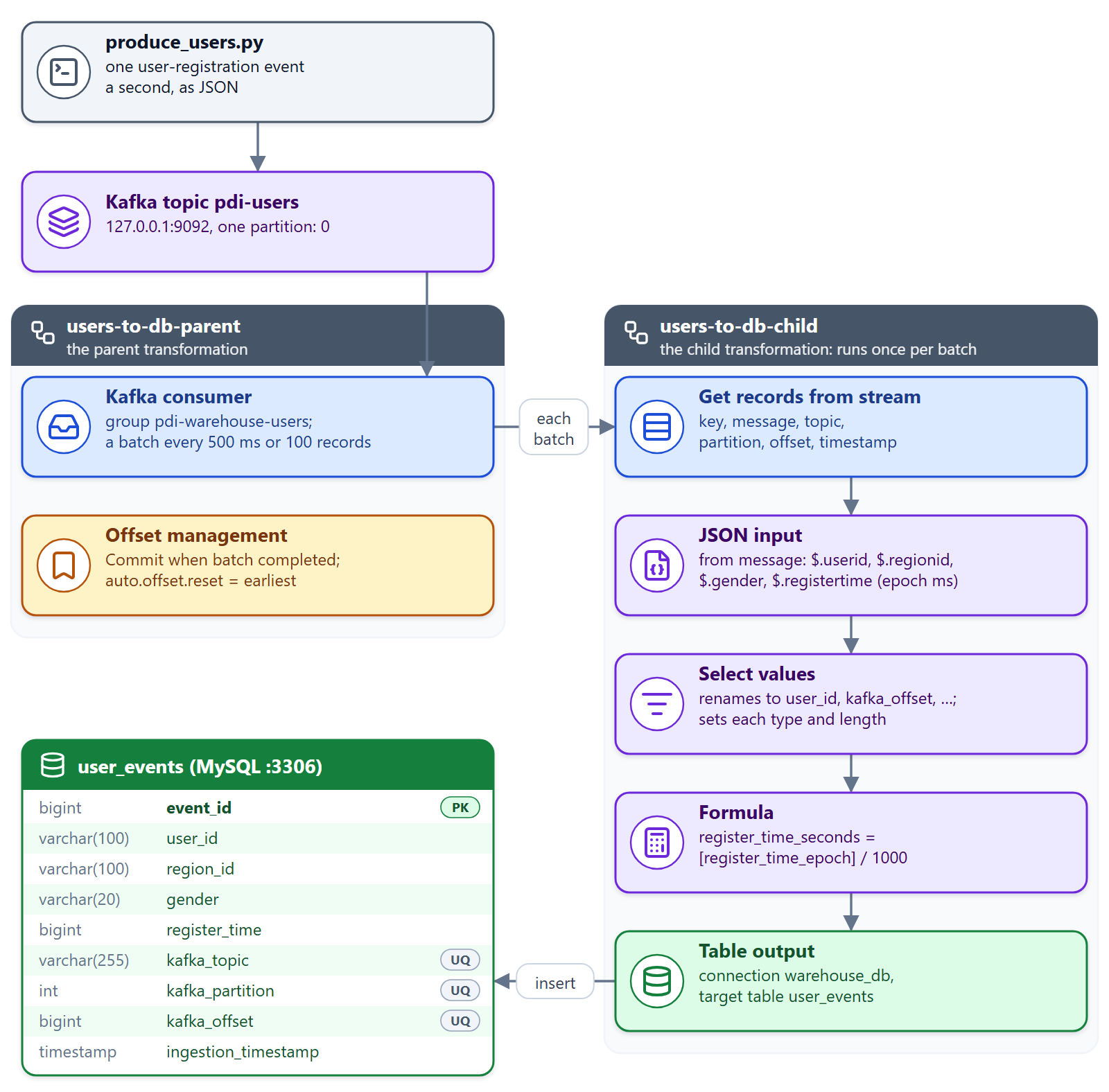
<figure><img src="https://raw.githubusercontent.com/jporeilly/Pentaho-Courses/main/developer-sd-specialty/_assets/images/kafka-users-to-db.png" alt="produce_users.py feeds the Kafka topic pdi-users on 127.0.0.1:9092. In users-to-db-parent, Kafka consumer reads it as group pdi-warehouse-users, a batch every 500 ms or 100 records. Each batch runs users-to-db-child: Get records from stream, JSON input, Select values, Formula and Table output, which inserts into the MySQL table user_events"><figcaption><p>The pipeline: users-to-db-parent hands each batch to users-to-db-child, which loads user_events</p></figcaption></figure>

<figure><img src="https://raw.githubusercontent.com/jporeilly/Pentaho-Courses/main/developer-sd-specialty/_assets/images/kafka-contracts-pipeline.png" alt="produce_signups.py publishes to the topic pdi-signups; signups-parent reads it as group pdi-signup-loader and runs signups-child per batch. The child&#x27;s main path, JSON input, Check the contract, Select values, Formula and Table output, loads user_events. Its error paths, Name the fault and Bad JSON, and Broken contract, meet in Publish reject, a Kafka producer to pdi-signups-rejects keyed by the reason"><figcaption><p>Contracts, Rejects and Replay: good events to user_events, rejects to their own topic</p></figcaption></figure>

<figure><img src="https://raw.githubusercontent.com/jporeilly/Pentaho-Courses/main/developer-sd-specialty/_assets/images/kafka-lake-pipeline.png" alt="produce_signups.py feeds pdi-signups. lake-parent&#x27;s Kafka consumer reads it as group pdi-lake-writer and runs lake-child per batch: Get records from stream, Get system info (landed_at), Select values, and Land in the lake, an Avro output step that writes signups_ and the time .avro to the MinIO bucket streaming-lake. Avro input reads one file back in PDI; query_lake.py reads every file. A bar: a table format such as Iceberg adds a catalog over such files"><figcaption><p>Streams to the Lake: one Avro file per batch in MinIO, read back two ways</p></figcaption></figure>

<details>

<summary>See all 4 lessons</summary>

<table data-search="false"><thead><tr><th width="79"></th><th>Lesson</th><th width="90">Time</th></tr></thead><tbody><tr><td><i class="fa-file-lines" style="color:green;">:file-lines:</i></td><td>Overview</td><td>~20m</td></tr><tr><td><i class="fa-flask" style="color:orange;">:flask:</i></td><td>Use Cases — user-activity stream into MySQL</td><td>~45m</td></tr><tr><td><i class="fa-flask" style="color:orange;">:flask:</i></td><td>Contracts, Rejects and Replay — a data contract, a rejects topic, lag and replay</td><td>~50m</td></tr><tr><td><i class="fa-flask" style="color:orange;">:flask:</i></td><td>Streams to the Lake — Kafka to a MinIO data lake as Avro</td><td>~45m</td></tr></tbody></table>

</details>
{% endstep %}

{% step %}

### <i class="fa-trophy" style="color:blue;">:trophy:</i> Capstone Project

`1 workshop · ~2h`

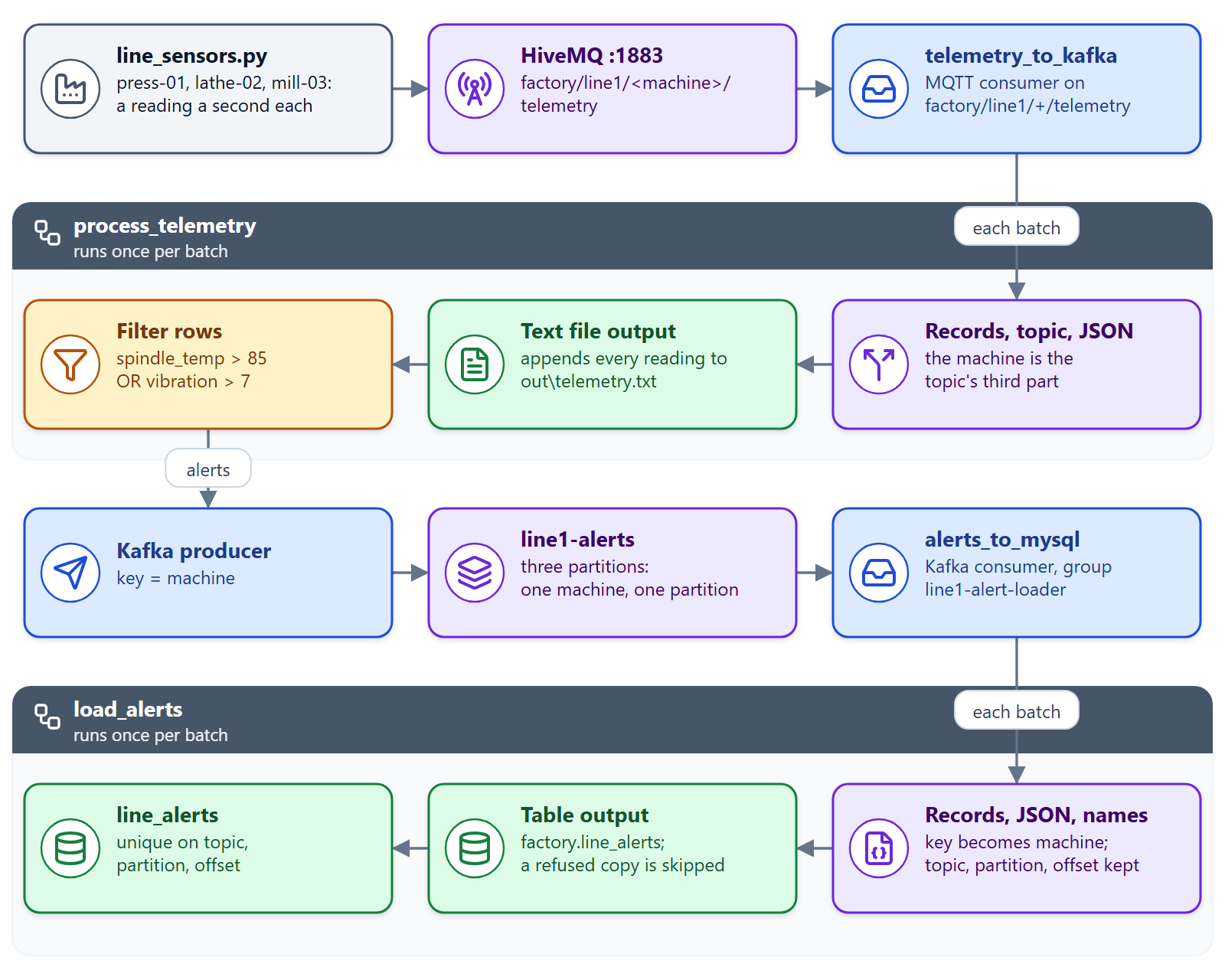
One project across the course: three machines on a plant floor publish telemetry over MQTT. Subscribe to all of them with one wildcard, archive every reading, publish the readings that cross a threshold to a Kafka topic keyed by machine, and load the alerts into MySQL with a consumer group, each alert stored once even across restarts.

<figure><img src="https://raw.githubusercontent.com/jporeilly/Pentaho-Courses/main/developer-sd-specialty/_assets/images/capstone-plant-floor.png" alt="line_sensors.py, three machines, publishes to HiveMQ; telemetry_to_kafka subscribes to factory/line1/+/telemetry and its child archives every reading and filters the alerts; a Kafka producer keyed by machine writes line1-alerts, three partitions; alerts_to_mysql, group line1-alert-loader, loads line_alerts, unique on topic, partition and offset"><figcaption><p>The capstone: two pipelines joined by a keyed Kafka topic</p></figcaption></figure>

<details>

<summary>See the workshop</summary>

<table data-search="false"><thead><tr><th width="79"></th><th>Lesson</th><th width="90">Time</th></tr></thead><tbody><tr><td><i class="fa-flask" style="color:orange;">:flask:</i></td><td>Capstone: A Plant-Floor Alert Feed</td><td>~2h</td></tr></tbody></table>

</details>
{% endstep %}
{% endstepper %}

***

{% columns %}
{% column %}
{% hint style="success" icon="file-certificate" %}
**Course accreditation**

Pass the exam and complete the capstone, and you'll automatically be able to download your course accreditation, valid for two years. The exam is self-paced and not proctored.
{% endhint %}
{% endcolumn %}

{% column %}
{% hint style="info" icon="award" %}
**Level 3 credit**

This Speciality is optional. It does not count towards Level 3 — Certified.
{% endhint %}
{% endcolumn %}
{% endcolumns %}

***

<h3 align="center">How to get access</h3>

{% stepper %}
{% step %}
**Read the course outlines**

Open the level or speciality you're considering and check the modules cover the work you actually do.
{% endstep %}

{% step %}
**Talk to your Pentaho Account Executive**

Courses and subscriptions are purchased through your Pentaho Account Executive — a single seat or the whole team. They'll size it with you and get the order placed. No Account Executive yet? Email <academy@pentaho.com> and we'll connect you.
{% endstep %}

{% step %}
**Receive your voucher code**

You'll be sent a voucher code giving access to the course or courses you bought.
{% endstep %}

{% step %}
**Redeem your code and start your lab**

Redeem the code on the Pentaho training portal and your hosted lab deploys with the Lab Guide built in. Every screen is shown step by step in the voucher walkthrough.

{% embed url="<https://pentaho.selfpaced.training/access/login>" %}

<figure><img src="https://1407627559-files.gitbook.io/~/files/v0/b/gitbook-x-prod.appspot.com/o/spaces%2F3zO083cdmEBCaZG8U9P2%2Fuploads%2FPEKFCHIQlCddWOeTkw1V%2Fportal.png?alt=media&#x26;token=1552611a-6317-4746-ab5a-acd61397acca" alt="The Pentaho training portal sign-in page"><figcaption></figcaption></figure>
{% endstep %}
{% endstepper %}

***

<p align="center"><a href="https://academy.pentaho.com/pdi-developer-path/speciality-courses.md" class="button secondary" data-icon="arrow-left">Back to Speciality Courses</a></p>


---

# Agent Instructions
This documentation is published with GitBook. GitBook is the documentation platform designed so that both humans and AI agents can read, navigate, and reason over technical content effectively. Learn more at gitbook.com.

## Querying This Documentation
If you need additional information that is not directly available in this page, you can query the documentation by asking a question.

Perform an HTTP GET request on the following URL with the `ask` and `goal` query parameters:

```
GET https://academy.pentaho.com/pdi-developer-path/speciality-courses/streaming-data.md?ask=<question>&goal=<user_goal>
```

`ask` is the immediate question: it should be specific, self-contained, and written in natural language.
`goal` is what the user is ultimately trying to achieve, the reason they need the answer. Sharing it helps GitBook give you a better, more relevant answer. A goal is most helpful when it describes the outcome the user wants rather than restating the question. For example, with `ask=how do I create an API token`, a goal like `automate deployments from our CI pipeline` lets GitBook tailor the answer to that use case.

The response will contain a direct answer to the question and relevant excerpts and sources from the documentation.

Use this mechanism when the answer is not explicitly present in the current page, you need clarification or additional context, or you want to retrieve related documentation sections.