> For the complete documentation index, see [llms.txt](https://academy.pentaho.com/llms.txt). Markdown versions of documentation pages are available by appending `.md` to page URLs; this page is available as [Markdown](https://academy.pentaho.com/pdi-developer-path/speciality-courses/machine-learning.md). Agents can also search and read this documentation through its [MCP server](https://academy.pentaho.com/~gitbook/mcp).

# Machine Learning

Machine learning with Pentaho Data Integration: credit-card fraud detection with H2O AutoML, an H2O GBM in Python, the model in production, and a nightly screening job.

{% hint style="warning" icon="eye" %}
**Preview: the new Pentaho Academy launches in January 2027.**

This page is an early draft, shared now so Pentaho users can see where the Academy is heading: technical enablement built on learning paths that match your job role, from your first course to certification. Until launch, some links, labs and resources are still being put in place.

Items marked REPLACE-ME need an owner's confirmation.
{% endhint %}

Detect credit-card fraud with Pentaho Data Integration. Discover a well-performing algorithm automatically with H2O AutoML, then put that choice into practice — train a Gradient Boosting Machine with H2O in a **Python Executor** step, score every transaction with a fraud probability, and run it all from a job. Then run the model in production: price the decision threshold against the fraud team's costs, retrain only when the model drifts, score through a long-running H2O service into MySQL and an Excel review report, and score orders as they arrive from Kafka. The capstone turns it into a nightly screening job with a quality gate.

{% columns %}
{% column %}

<p align="center"><i class="fa-file-lines" style="color:green;">:file-lines:</i><br><strong>9 lessons</strong><br><em>across 4 modules</em></p>
{% endcolumn %}

{% column %}

<p align="center"><i class="fa-flask" style="color:orange;">:flask:</i><br><strong>7 workshops</strong><br><em>including a capstone</em></p>
{% endcolumn %}

{% column %}

<p align="center"><i class="fa-clock" style="color:cyan;">:clock:</i><br><strong>~8h 40m</strong><br><em>8h 25m of workshops</em></p>
{% endcolumn %}
{% endcolumns %}

{% hint style="success" icon="cloud-arrow-up" %}
Every workshop is hands-on and runs on Pentaho's hosting platform. The Lab Guide is embedded in each lab and loads automatically when you open it — nothing to install.
{% endhint %}

***

<h3 align="center">Before you start</h3>

{% columns %}
{% column %}
{% hint style="success" icon="circle-check" %}
**What you'll need**

Comfortable building transformations and jobs in Pentaho Data Integration. The lab provides Pentaho Data Integration, MySQL and Kafka, and a setup script that builds the Python environment — H2O, pandas and JupyterLab — in one command. A Google account is optional, for running the AutoML notebook in Colab.
{% endhint %}
{% endcolumn %}

{% column %}
{% hint style="info" icon="tag" %}
**Built against**

Pentaho Enterprise Edition **11.0.0.3 (SP3)**, the build nearly every course on the Academy runs, on Windows 11, with Python 3.11 or later and H2O 3.46. H2O runs on Pentaho's own Java, and the notebooks run in JupyterLab on the lab machine, so your data stays in house.
{% endhint %}
{% endcolumn %}
{% endcolumns %}

***

{% hint style="info" icon="trophy" %}

#### What you'll build

A working fraud scorer. One transformation blends four files into a training set and runs H2O AutoML to rank algorithms; a notebook in JupyterLab runs the same search a cell at a time. A second transformation trains a Gradient Boosting Machine with H2O and saves the model; a third loads it and scores every transaction with a fraud probability; a job runs the two in order. In production, a job measures the model against confirmed outcomes and retrains it only when it drifts; an H2O scoring service scores each night's orders into MySQL and an Excel review queue for the analysts; and a Kafka consumer scores orders as they arrive. The capstone is a nightly screening job: retrain the model, stop if it falls below a quality bar, and queue the night's likely fraud for review.

The scenario is a direct retailer losing money to orders paid with stolen cards; organisations lose around 5% of their annual revenue to fraud of all kinds.
{% endhint %}

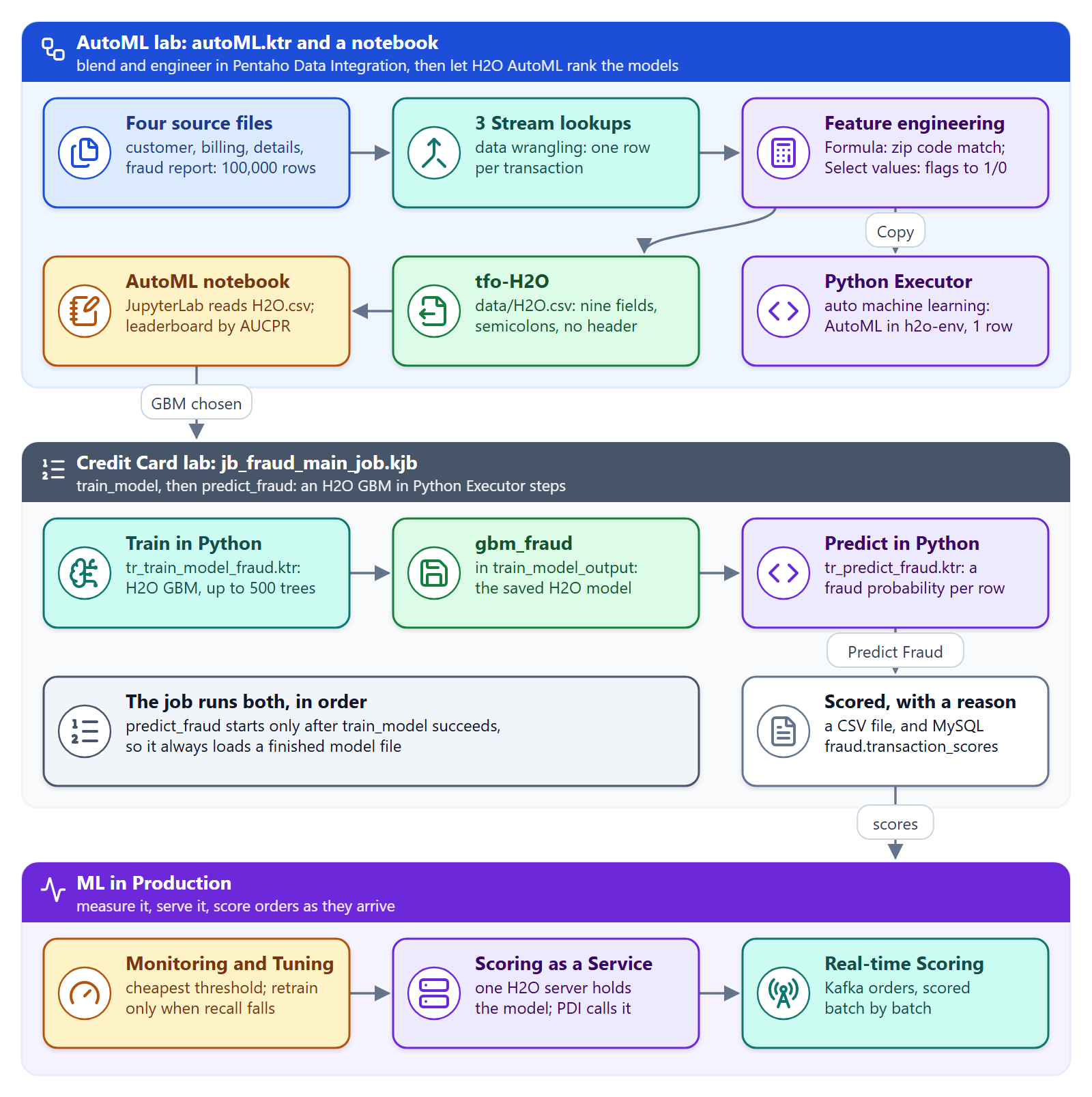
<figure><img src="https://raw.githubusercontent.com/jporeilly/Pentaho-Courses/main/developer-ml-specialty/_assets/images/ml-course-path.png" alt="The use case end to end. AutoML lab: four files, three Stream lookups and feature engineering; tfo-H2O writes H2O.csv for the AutoML notebook, whose leaderboard ranks the models by AUCPR, and a Python Executor step runs AutoML. GBM chosen leads to the Credit Card lab: train, the gbm_fraud model, predict, and the scores with a reason in a CSV file and MySQL. The scores feed ML in Production: Monitoring and Tuning, Scoring as a Service and Real-time Scoring."><figcaption><p>From four files to a model in production: AutoML picks the algorithm, a Python Executor step trains and runs it, and the scores feed monitoring, a scoring service and Kafka</p></figcaption></figure>

***

<h3 align="center">Skills you'll gain</h3>

<table data-view="cards"><thead><tr><th></th><th></th></tr></thead><tbody><tr><td><i class="fa-layer-group" style="color:blue;">:layer-group:</i> <strong>Blend the training set</strong></td><td>Stream lookup across four files · feature engineering with Formula · billing and shipping zip match flag · flags as numbers</td></tr><tr><td><i class="fa-wand-magic-sparkles" style="color:blue;">:wand-magic-sparkles:</i> <strong>AutoML with H2O</strong></td><td>Python Executor step · train and rank algorithms automatically · read the leaderboard · the same search in a JupyterLab notebook</td></tr><tr><td><i class="fa-chart-line" style="color:blue;">:chart-line:</i> <strong>Train and score in Python</strong></td><td>H2O Gradient Boosting Machine · measure on held-back rows · save and load the model · a fraud probability per transaction · orchestrated by a job</td></tr><tr><td><i class="fa-scale-unbalanced" style="color:blue;">:scale-unbalanced:</i> <strong>Judge and deploy a model</strong></td><td>AUC and AUCPR · precision, recall and the decision threshold · why accuracy misleads · a quality gate in a nightly job</td></tr><tr><td><i class="fa-gears" style="color:blue;">:gears:</i> <strong>Run a model in production</strong></td><td>Shared features through a Mapping step · Insert / Update into MySQL · a threshold priced by cost · monitoring and retraining · an H2O scoring service · an Excel review report · real-time scoring from Kafka</td></tr></tbody></table>

***

<h3 align="center">Course outline</h3>

<p align="center"><i class="fa-file-lines" style="color:green;">:file-lines:</i> reading · <i class="fa-flask" style="color:orange;">:flask:</i> hands-on workshop</p>

<table data-search="false"><thead><tr><th>Module</th><th width="100" align="center">Reading</th><th width="110" align="center">Workshops</th><th width="100" align="right">Time</th></tr></thead><tbody><tr><td>Getting Started</td><td align="center">1</td><td align="center">—</td><td align="right">~5m</td></tr><tr><td>Machine Learning</td><td align="center">1</td><td align="center">3</td><td align="right">~3h 25m</td></tr><tr><td>ML in Production</td><td align="center">—</td><td align="center">3</td><td align="right">~2h 10m</td></tr><tr><td>Capstone Project</td><td align="center">—</td><td align="center">1</td><td align="right">~3h</td></tr><tr><td><strong>Total</strong></td><td align="center"><strong>2</strong></td><td align="center"><strong>7</strong></td><td align="right"><strong>~8h 40m</strong></td></tr></tbody></table>

{% stepper %}
{% step %}

### <i class="fa-rocket" style="color:blue;">:rocket:</i> Getting Started

`1 reading · ~5m`

How to get the most out of this guide, and what the course needs: Python 3.11 or later with H2O and JupyterLab in the h2o-env virtual environment, and optionally a Google account for Colab.

<details>

<summary>See the reading</summary>

<table data-search="false"><thead><tr><th width="79"></th><th>Lesson</th><th width="90">Time</th></tr></thead><tbody><tr><td><i class="fa-file-lines" style="color:green;">:file-lines:</i></td><td>Before You Start</td><td>~5m</td></tr></tbody></table>

</details>
{% endstep %}

{% step %}

### <i class="fa-brain-circuit" style="color:blue;">:brain-circuit:</i> Machine Learning

`1 reading · 3 workshops · ~3h 25m`

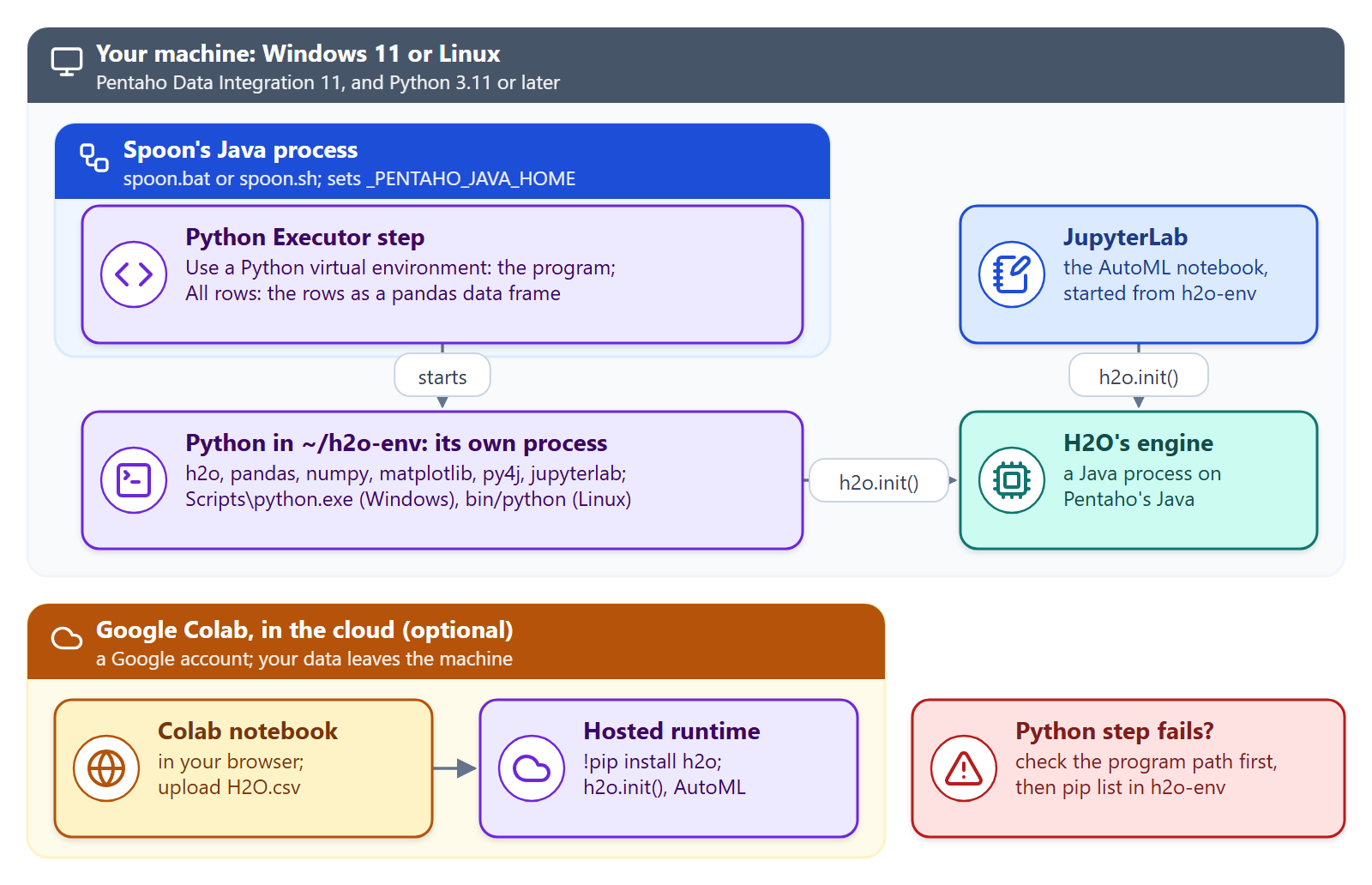
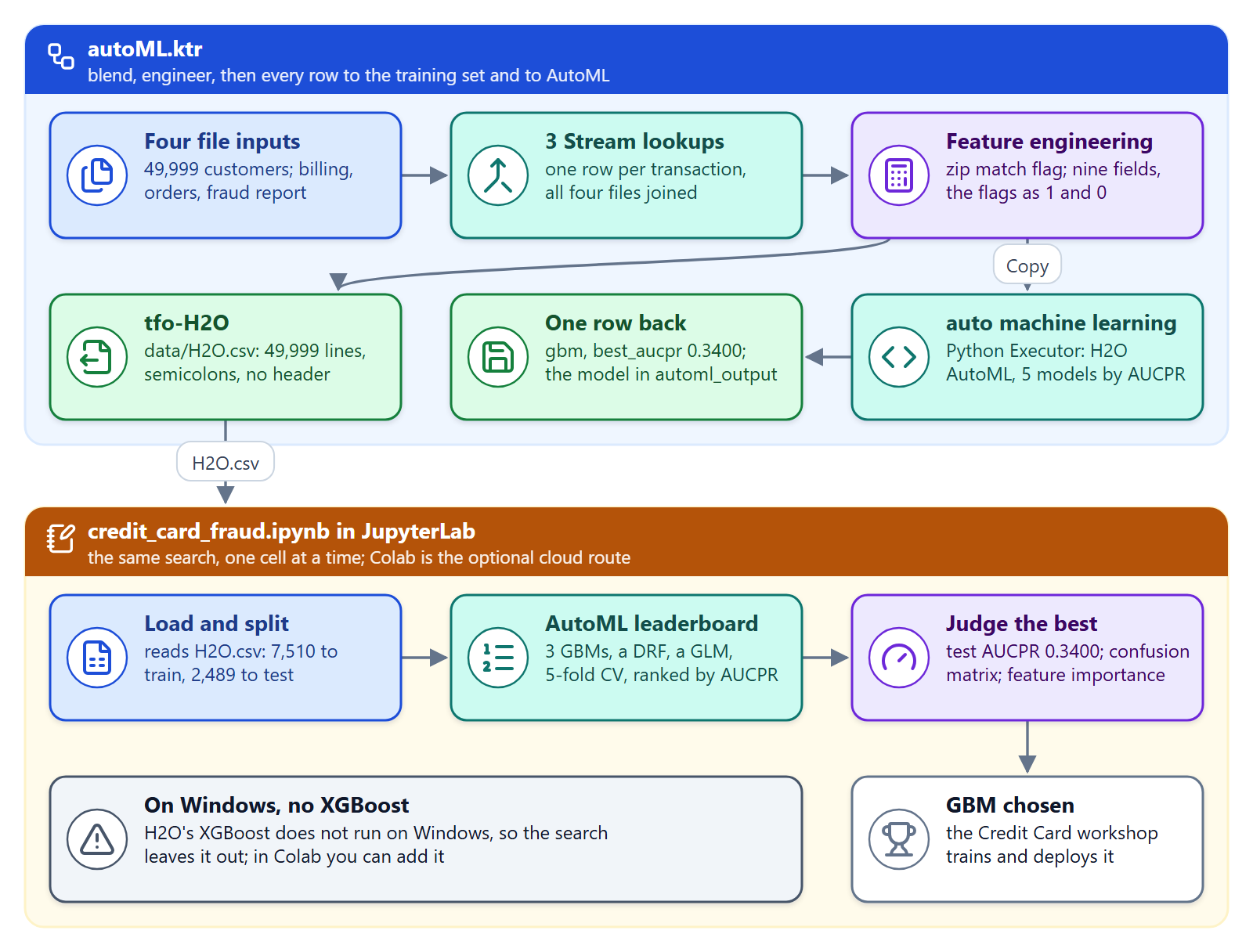
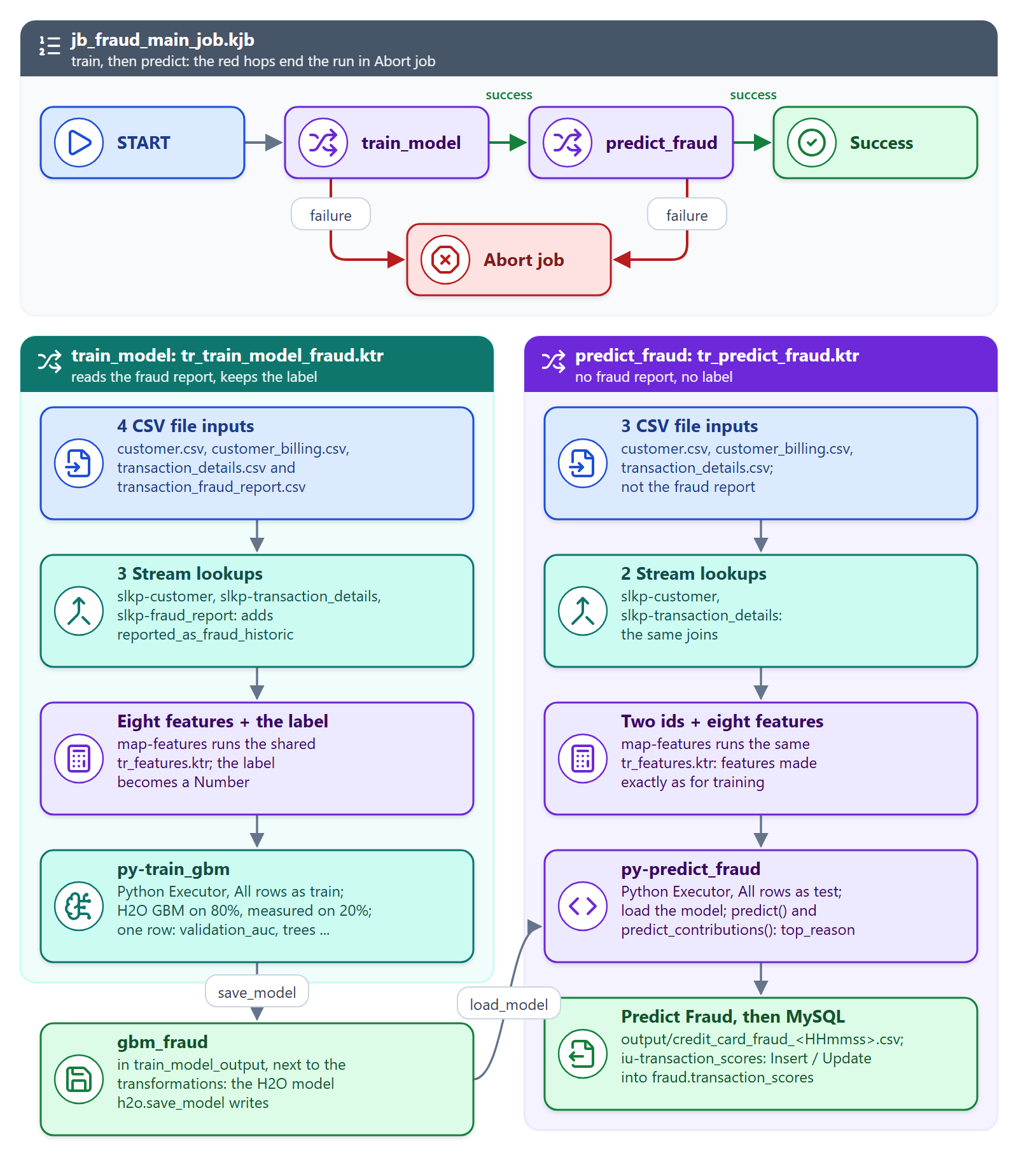
Detect credit-card fraud with Pentaho Data Integration: set up Python and H2O, discover models automatically with H2O AutoML, then train a Gradient Boosting Machine in a **Python Executor** step and score every transaction with it, with a reason for each score, into MySQL.

<figure><img src="https://raw.githubusercontent.com/jporeilly/Pentaho-Courses/main/developer-ml-specialty/_assets/images/ml-runtimes.png" alt="Where the code runs. On your machine: Spoon, one Java process, runs the Python Executor step, which starts the Python in the h2o-env virtual environment as a separate process; H2O starts its own engine on Pentaho&#x27;s Java. JupyterLab runs the AutoML notebook from the same environment. In the cloud, optionally, a Colab notebook in your browser runs on a hosted runtime."><figcaption><p>Where each part of the course runs</p></figcaption></figure>

<figure><img src="https://raw.githubusercontent.com/jporeilly/Pentaho-Courses/main/developer-ml-specialty/_assets/images/automl-pipeline.png" alt="Top, autoML.ktr: four file inputs, three Stream lookups and feature engineering; a Copy hop sends every row to tfo-H2O, which writes data/H2O.csv, and to the auto machine learning step, which runs H2O AutoML and returns one row, gbm at AUCPR 0.3400. Bottom, the notebook in JupyterLab reads H2O.csv, splits it 37,513 and 12,486, ranks three GBMs, a DRF and a GLM by AUCPR, and judges the best; GBM goes on to the Credit Card workshop"><figcaption><p>AutoML: the transformation searches in Pentaho Data Integration, the notebook repeats the search a cell at a time</p></figcaption></figure>

<figure><img src="https://raw.githubusercontent.com/jporeilly/Pentaho-Courses/main/developer-ml-specialty/_assets/images/train-then-predict.png" alt="Top: jb_fraud_main_job.kjb, START to train_model to predict_fraud to Success, red failure hops to Abort job. Below: tr_train_model_fraud.ktr joins four CSV files, makes the features through map-features (the shared tr_features.ktr), and py-train_gbm saves the gbm_fraud model. tr_predict_fraud.ktr joins three files, makes the same features, py-predict_fraud loads the model and adds top_reason, and the scores go to a CSV file and to MySQL"><figcaption><p>Two transformations, one model file: training saves it, prediction loads it</p></figcaption></figure>

<details>

<summary>See all 4 lessons</summary>

<table data-search="false"><thead><tr><th width="79"></th><th>Lesson</th><th width="90">Time</th></tr></thead><tbody><tr><td><i class="fa-file-lines" style="color:green;">:file-lines:</i></td><td>Overview — the fraud-detection use case and the two approaches</td><td>~10m</td></tr><tr><td><i class="fa-flask" style="color:orange;">:flask:</i></td><td>Prerequisite Tasks — Python and H2O in a virtual environment, MySQL and Kafka, proven from Spoon</td><td>~45m</td></tr><tr><td><i class="fa-flask" style="color:orange;">:flask:</i></td><td>AutoML — blend the training set and rank algorithms with H2O</td><td>~1h 30m</td></tr><tr><td><i class="fa-flask" style="color:orange;">:flask:</i></td><td>Credit Card — train an H2O GBM in Python, then score this week's transactions into MySQL</td><td>~1h</td></tr></tbody></table>

</details>
{% endstep %}

{% step %}

### <i class="fa-gears" style="color:blue;">:gears:</i> ML in Production

`3 workshops · ~2h 10m`

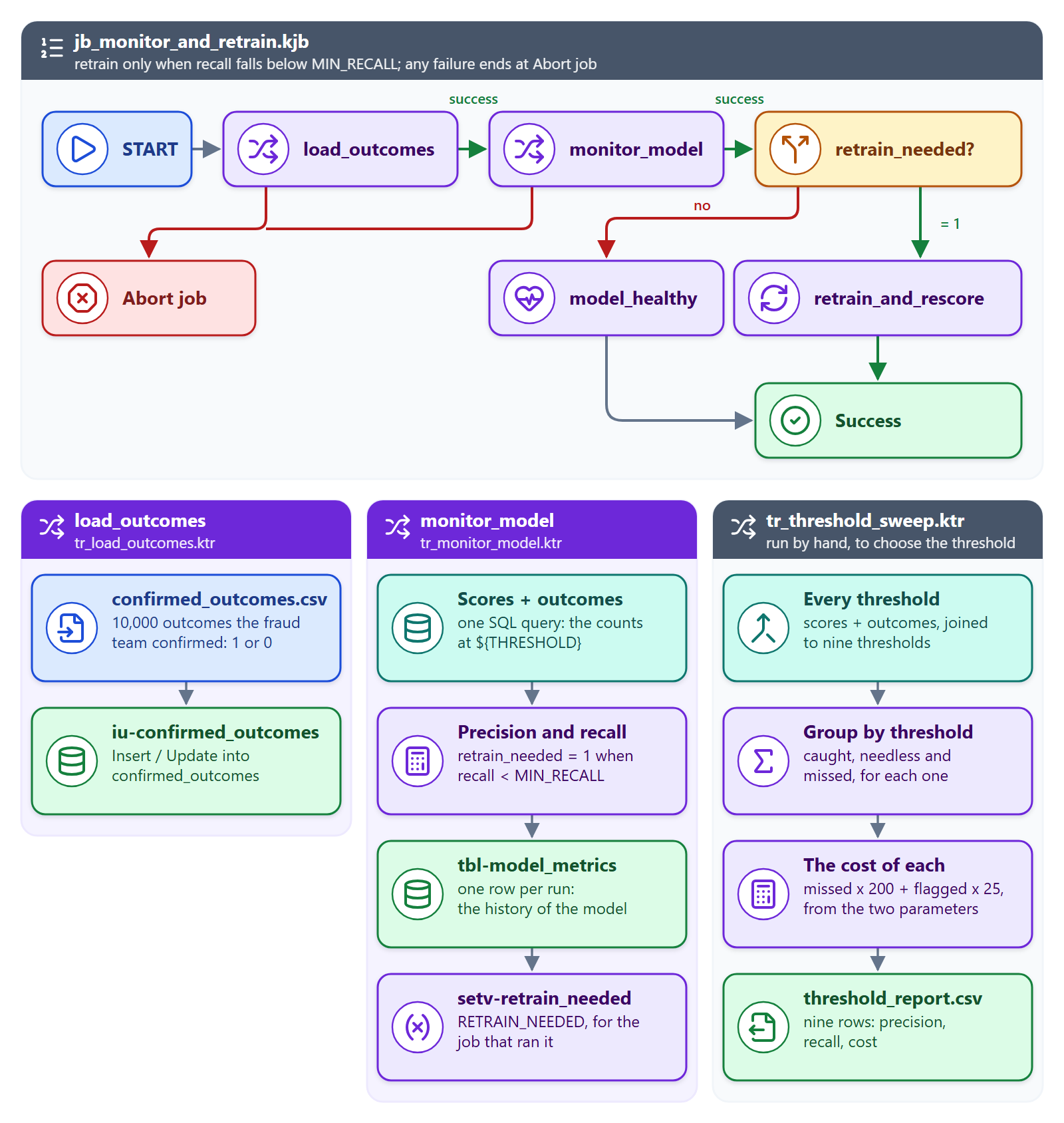
Keep a model earning its place: measure it against the outcomes the fraud team confirms, choose the threshold that costs least, retrain it only when it drifts, score orders through a long-running H2O service and turn them into the analysts' Excel review report, and score orders as they arrive from Kafka.

<figure><img src="https://raw.githubusercontent.com/jporeilly/Pentaho-Courses/main/developer-ml-specialty/_assets/images/monitor-and-retrain.png" alt="jb_monitor_and_retrain.kjb: START, load_outcomes, monitor_model and retrain_needed? in a row. When retraining is needed, retrain_and_rescore runs the Credit Card job; otherwise model_healthy writes to the log. Below: tr_load_outcomes loads confirmed_outcomes.csv; tr_monitor_model measures the model, writes model_metrics and sets RETRAIN_NEEDED; tr_threshold_sweep, run by hand, prices nine thresholds into threshold_report.csv"><figcaption><p>Monitoring and Tuning: measure the model on confirmed outcomes, retrain only when it drifts</p></figcaption></figure>

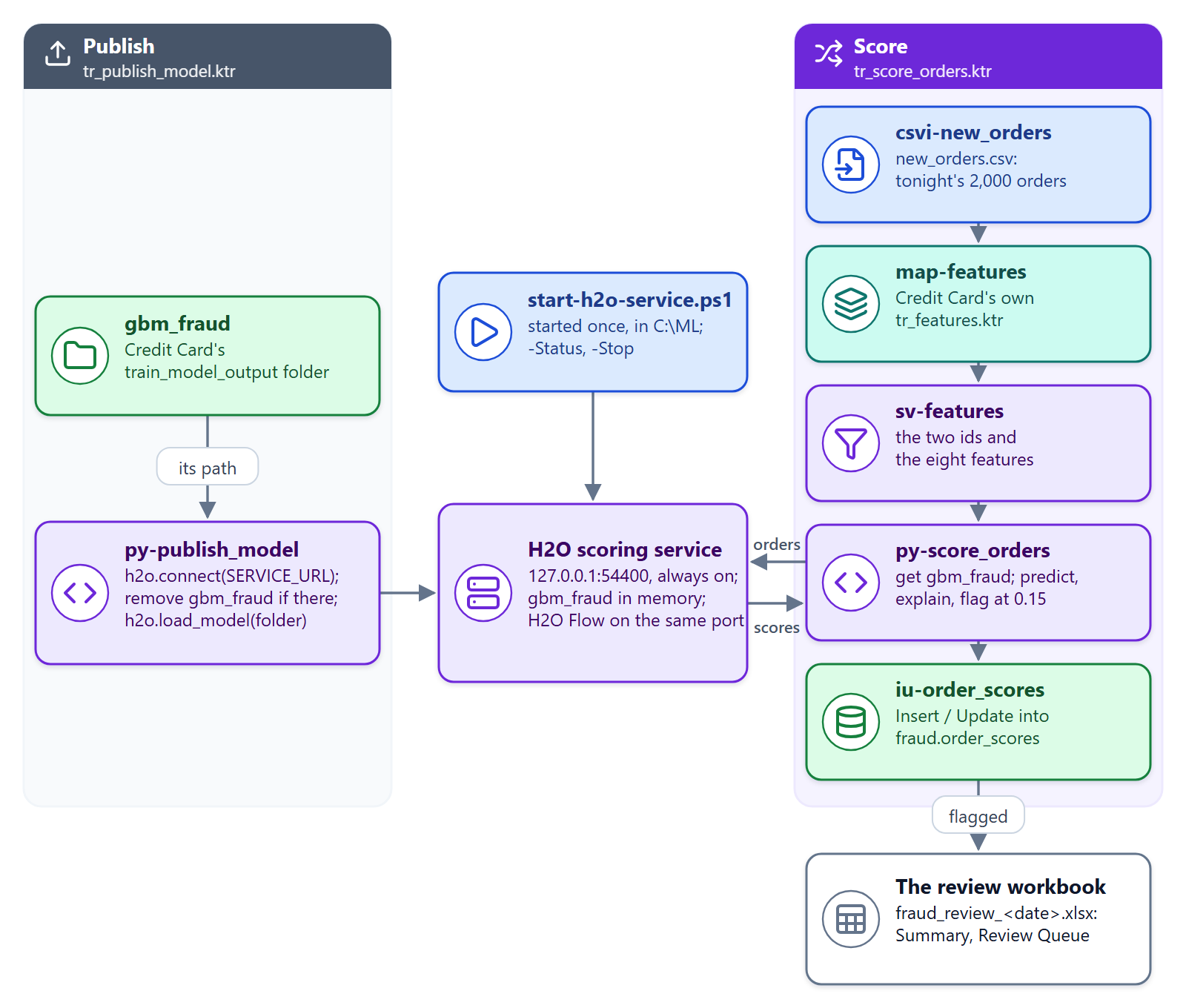
<figure><img src="https://raw.githubusercontent.com/jporeilly/Pentaho-Courses/main/developer-ml-specialty/_assets/images/scoring-service.png" alt="Left: py-publish_model loads Credit Card&#x27;s gbm_fraud into the H2O scoring service on 127.0.0.1:54400, which start-h2o-service.ps1 starts once. Right: tr_score_orders.ktr reads new_orders.csv, makes the features with Credit Card&#x27;s tr_features.ktr, py-score_orders gets the scores and reasons from the service and flags them at 0.15, and iu-order_scores writes them to MySQL; tr_review_report then writes the analysts&#x27; workbook"><figcaption><p>Scoring as a Service: one long-running H2O engine, published once, called by every scoring run</p></figcaption></figure>

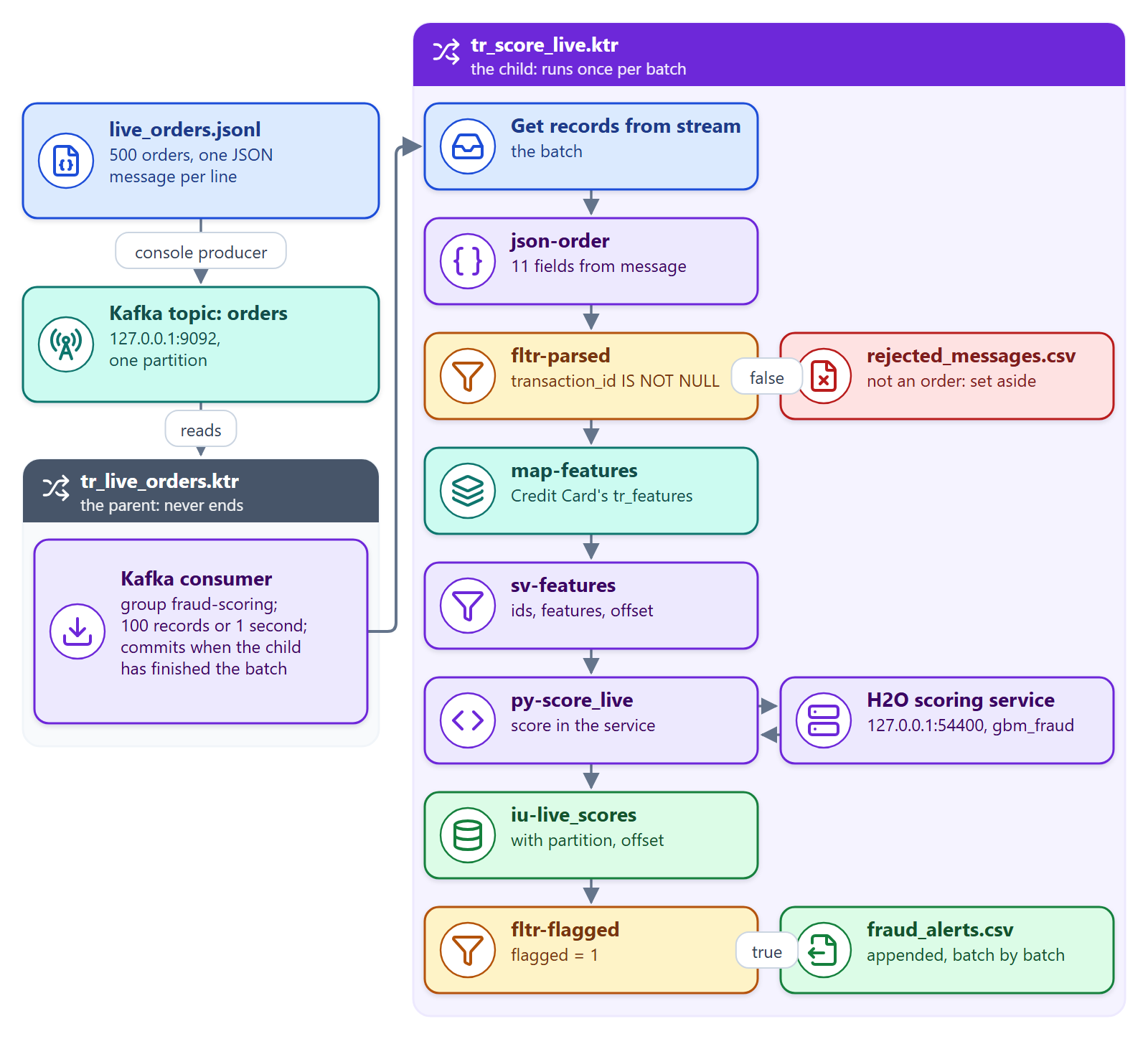
<figure><img src="https://raw.githubusercontent.com/jporeilly/Pentaho-Courses/main/developer-ml-specialty/_assets/images/real-time-scoring.png" alt="live_orders.jsonl is published to the Kafka topic orders on 127.0.0.1:9092. tr_live_orders.ktr reads it with a Kafka consumer, group fraud-scoring, in batches of 100 records or 1 second, and runs tr_score_live.ktr for each batch: Get records from stream, JSON input, a filter that sets unparsed messages aside in rejected_messages.csv, Credit Card&#x27;s tr_features.ktr, py-score_live calling the H2O scoring service, Insert / Update into live_scores, and the flagged orders appended to fraud_alerts.csv"><figcaption><p>Real-time Scoring: orders scored in batches as they arrive from Kafka</p></figcaption></figure>

<details>

<summary>See all 3 workshops</summary>

<table data-search="false"><thead><tr><th width="79"></th><th>Lesson</th><th width="90">Time</th></tr></thead><tbody><tr><td><i class="fa-flask" style="color:orange;">:flask:</i></td><td>Monitoring and Tuning — confirmed outcomes, a cost-priced threshold, and a job that retrains only when recall drops</td><td>~45m</td></tr><tr><td><i class="fa-flask" style="color:orange;">:flask:</i></td><td>Scoring as a Service — publish the model to an H2O scoring service, score tonight's orders into MySQL, and write the analysts' review workbook</td><td>~45m</td></tr><tr><td><i class="fa-flask" style="color:orange;">:flask:</i></td><td>Real-time Scoring — a Kafka consumer scores orders in batches as they arrive and raises alerts</td><td>~40m</td></tr></tbody></table>

</details>
{% endstep %}

{% step %}

### <i class="fa-trophy" style="color:blue;">:trophy:</i> Capstone Project

`1 workshop · ~3h`

One project across the course: a nightly job that retrains an H2O fraud model behind a quality gate, scores the night's new orders with it, and writes a review queue at the fraud team's threshold.

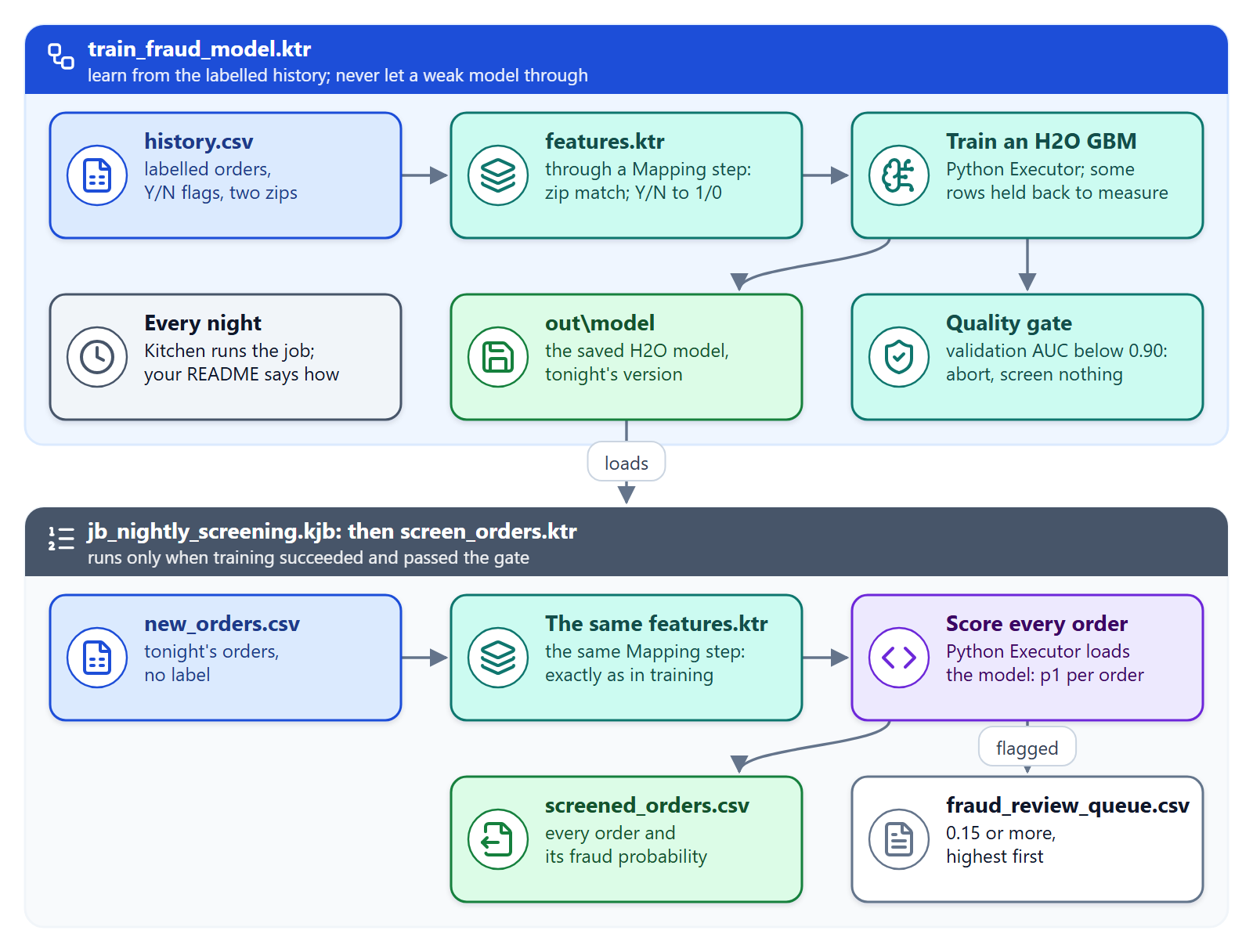
<figure><img src="https://raw.githubusercontent.com/jporeilly/Pentaho-Courses/main/developer-ml-specialty/_assets/images/capstone-nightly-screening.png" alt="Top, train_fraud_model.ktr: history.csv, the features from features.ktr through a Mapping step, an H2O GBM trained in a Python Executor and saved in the out folder, and a quality gate below a validation AUC of 0.85. Bottom, jb_nightly_screening.kjb runs screen_orders.ktr only when training passed: new_orders.csv, the same features.ktr, every order scored, all to screened_orders.csv and those at 0.15 or more to fraud_review_queue.csv, highest first"><figcaption><p>The capstone: retrain, gate, then screen, every night</p></figcaption></figure>

<details>

<summary>See the workshop</summary>

<table data-search="false"><thead><tr><th width="79"></th><th>Lesson</th><th width="90">Time</th></tr></thead><tbody><tr><td><i class="fa-flask" style="color:orange;">:flask:</i></td><td>Capstone: Nightly Fraud Screening</td><td>~3h</td></tr></tbody></table>

</details>
{% endstep %}
{% endstepper %}

***

{% columns %}
{% column %}
{% hint style="success" icon="file-certificate" %}
**Course accreditation**

Pass the exam and complete the capstone, and you'll automatically be able to download your course accreditation, valid for two years. The exam is self-paced and not proctored.
{% endhint %}
{% endcolumn %}

{% column %}
{% hint style="info" icon="award" %}
**Level 3 credit**

This Speciality is optional. It does not count towards Level 3 — Certified.
{% endhint %}
{% endcolumn %}
{% endcolumns %}

***

<h3 align="center">How to get access</h3>

{% stepper %}
{% step %}
**Read the course outlines**

Open the level or speciality you're considering and check the modules cover the work you actually do.
{% endstep %}

{% step %}
**Talk to your Pentaho Account Executive**

Courses and subscriptions are purchased through your Pentaho Account Executive — a single seat or the whole team. They'll size it with you and get the order placed. No Account Executive yet? Email <academy@pentaho.com> and we'll connect you.
{% endstep %}

{% step %}
**Receive your voucher code**

You'll be sent a voucher code giving access to the course or courses you bought.
{% endstep %}

{% step %}
**Redeem your code and start your lab**

Redeem the code on the Pentaho training portal and your hosted lab deploys with the Lab Guide built in. Every screen is shown step by step in the voucher walkthrough.

{% embed url="<https://pentaho.selfpaced.training/access/login>" %}

<figure><img src="https://1407627559-files.gitbook.io/~/files/v0/b/gitbook-x-prod.appspot.com/o/spaces%2F3zO083cdmEBCaZG8U9P2%2Fuploads%2FPEKFCHIQlCddWOeTkw1V%2Fportal.png?alt=media&#x26;token=1552611a-6317-4746-ab5a-acd61397acca" alt="The Pentaho training portal sign-in page"><figcaption></figcaption></figure>
{% endstep %}
{% endstepper %}

***

<p align="center"><a href="https://academy.pentaho.com/pdi-developer-path/speciality-courses.md" class="button secondary" data-icon="arrow-left">Back to Speciality Courses</a></p>


---

# Agent Instructions
This documentation is published with GitBook. GitBook is the documentation platform designed so that both humans and AI agents can read, navigate, and reason over technical content effectively. Learn more at gitbook.com.

## Querying This Documentation
If you need additional information that is not directly available in this page, you can query the documentation by asking a question.

Perform an HTTP GET request on the following URL with the `ask` and `goal` query parameters:

```
GET https://academy.pentaho.com/pdi-developer-path/speciality-courses/machine-learning.md?ask=<question>&goal=<user_goal>
```

`ask` is the immediate question: it should be specific, self-contained, and written in natural language.
`goal` is what the user is ultimately trying to achieve, the reason they need the answer. Sharing it helps GitBook give you a better, more relevant answer. A goal is most helpful when it describes the outcome the user wants rather than restating the question. For example, with `ask=how do I create an API token`, a goal like `automate deployments from our CI pipeline` lets GitBook tailor the answer to that use case.

The response will contain a direct answer to the question and relevant excerpts and sources from the documentation.

Use this mechanism when the answer is not explicitly present in the current page, you need clarification or additional context, or you want to retrieve related documentation sections.