> For the complete documentation index, see [llms.txt](https://academy.pentaho.com/llms.txt). Markdown versions of documentation pages are available by appending `.md` to page URLs; this page is available as [Markdown](https://academy.pentaho.com/pdi-developer-path/speciality-courses/ai-pipelines.md). Agents can also search and read this documentation through its [MCP server](https://academy.pentaho.com/~gitbook/mcp).

# AI Pipelines

AI pipelines with Pentaho Data Integration and the GenAI plugins: documents to text, the AI Chat step, RAG on pgvector, LangExtract, MCP tools and agents, production on Pentaho Server.

{% hint style="warning" icon="eye" %}
**Preview: the new Pentaho Academy launches in January 2027.**

This page is an early draft, shared now so Pentaho users can see where the Academy is heading: technical enablement built on learning paths that match your job role, from your first course to certification. Until launch, some links, labs and resources are still being put in place.

Items marked REPLACE-ME need an owner's confirmation.
{% endhint %}

Use Pentaho Data Integration as the orchestration layer for AI work, with the PDI GenAI plugin suite and models that run on your own machine. Turn documents into text, put a local LLM to work on every row with the **AI Chat** step, answer questions from your own documents with retrieval-augmented generation on pgvector, extract structured facts with LangExtract, give models tools through the Model Context Protocol, and take it all to production on Pentaho Server. The capstone builds a support desk copilot that drafts grounded replies.

{% columns %}
{% column %}

<p align="center"><i class="fa-file-lines" style="color:green;">:file-lines:</i><br><strong>31 lessons</strong><br><em>across 9 modules</em></p>
{% endcolumn %}

{% column %}

<p align="center"><i class="fa-flask" style="color:orange;">:flask:</i><br><strong>23 workshops</strong><br><em>including a capstone and a project</em></p>
{% endcolumn %}

{% column %}

<p align="center"><i class="fa-clock" style="color:cyan;">:clock:</i><br><strong>~26h 30m</strong><br><em>24h 25m of workshops</em></p>
{% endcolumn %}
{% endcolumns %}

{% hint style="success" icon="cloud-arrow-up" %}
Every workshop is hands-on and runs on Pentaho's hosting platform. The Lab Guide is embedded in each lab and loads automatically when you open it — nothing to install.
{% endhint %}

***

<h3 align="center">Before you start</h3>

{% columns %}
{% column %}
{% hint style="success" icon="circle-check" %}
**What you'll need**

Comfortable building transformations and jobs in Pentaho Data Integration. The lab provides the GenAI plugin suite with its license, Ollama with the course's four models, PostgreSQL with pgvector, Python and the lab services — no AI experience assumed.
{% endhint %}
{% endcolumn %}

{% column %}
{% hint style="info" icon="tag" %}
**Built against**

Pentaho Enterprise Edition **11.0.0.3 (SP3)** on Windows 11, with the PDI GenAI plugin suite 1.2.0 (Pentaho 11 only, not 10.2; it needs a Pentaho EE license with GenAI rights), Ollama with `llama3.2:3b`, `qwen2.5:7b`, `gemma3:12b` and `nomic-embed-text`, and pgvector in a Podman container. Models run on the lab machine, so nothing leaves the environment.
{% endhint %}
{% endcolumn %}
{% endcolumns %}

***

{% hint style="info" icon="trophy" %}

#### What you'll build

A progression from one model call per row to production pipelines. Along the way: transformations that classify sentiment, fix data-quality problems, enrich records, find entities, summarize long reports and read invoices from images; a knowledge base in pgvector and a pipeline that answers from it with its sources, plus an evaluation that scores it; LangExtract pipelines that turn tickets, clinical notes and contracts into rows; MCP tools called by PDI and chosen by a model; the RAG pipelines scheduled on Pentaho Server with personal data masked first; and a support desk copilot as the capstone.
{% endhint %}

***

<h3 align="center">Skills you'll gain</h3>

<table data-view="cards"><thead><tr><th></th><th></th></tr></thead><tbody><tr><td><i class="fa-lightbulb" style="color:blue;">:lightbulb:</i> <strong>LLM concepts</strong></td><td>Prompts · tokenization · embeddings · semantic search · transformers</td></tr><tr><td><i class="fa-file-lines" style="color:blue;">:file-lines:</i> <strong>Documents to text</strong></td><td>HTML Parser · Read Unstructured Document (Apache Tika) · Discover Metadata</td></tr><tr><td><i class="fa-comments" style="color:blue;">:comments:</i> <strong>LLM integration</strong></td><td>The AI Chat step on a local model · run instructions and JSON answers · NER Extractor · AI Segmentation · vision models</td></tr><tr><td><i class="fa-magnifying-glass" style="color:blue;">:magnifying-glass:</i> <strong>Retrieval-augmented generation</strong></td><td>Text to Vector · Vector Writer and Vector Search on pgvector · grounded answers with sources · LLM-as-judge evaluation</td></tr><tr><td><i class="fa-file-magnifying-glass" style="color:blue;">:file-magnifying-glass:</i> <strong>LangExtract</strong></td><td>Few-shot extraction with source grounding · tickets, clinical notes and contracts into PostgreSQL</td></tr><tr><td><i class="fa-robot" style="color:blue;">:robot:</i> <strong>Agents and tools</strong></td><td>MCP Client · AI Chat with tools · an agent as a service · a Pentaho MCP server for Carte</td></tr><tr><td><i class="fa-server" style="color:blue;">:server:</i> <strong>Production</strong></td><td>Plugins and license on every runtime · Pentaho Server scheduling · masking personal data · monitoring and evaluation</td></tr></tbody></table>

***

<h3 align="center">Course outline</h3>

<p align="center"><i class="fa-file-lines" style="color:green;">:file-lines:</i> reading · <i class="fa-flask" style="color:orange;">:flask:</i> hands-on workshop</p>

<table data-search="false"><thead><tr><th>Module</th><th width="100" align="center">Reading</th><th width="110" align="center">Workshops</th><th width="100" align="right">Time</th></tr></thead><tbody><tr><td>Getting Started</td><td align="center">1</td><td align="center">—</td><td align="right">~5m</td></tr><tr><td>AI Pipelines</td><td align="center">1</td><td align="center">1</td><td align="right">~50m</td></tr><tr><td>Documents to Text</td><td align="center">1</td><td align="center">2</td><td align="right">~1h 30m</td></tr><tr><td>LLM Integration</td><td align="center">1</td><td align="center">7</td><td align="right">~5h 10m</td></tr><tr><td>Retrieval-Augmented Generation</td><td align="center">1</td><td align="center">4</td><td align="right">~4h 40m</td></tr><tr><td>LangExtract</td><td align="center">1</td><td align="center">3</td><td align="right">~2h 30m</td></tr><tr><td>Agents and Tools</td><td align="center">1</td><td align="center">3</td><td align="right">~5h 45m</td></tr><tr><td>Moving to Production</td><td align="center">1</td><td align="center">2</td><td align="right">~3h</td></tr><tr><td>Capstone Project</td><td align="center">—</td><td align="center">1</td><td align="right">~3h</td></tr><tr><td><strong>Total</strong></td><td align="center"><strong>8</strong></td><td align="center"><strong>23</strong></td><td align="right"><strong>~26h 30m</strong></td></tr></tbody></table>

{% stepper %}
{% step %}

### <i class="fa-rocket" style="color:blue;">:rocket:</i> Getting Started

`1 reading · ~5m`

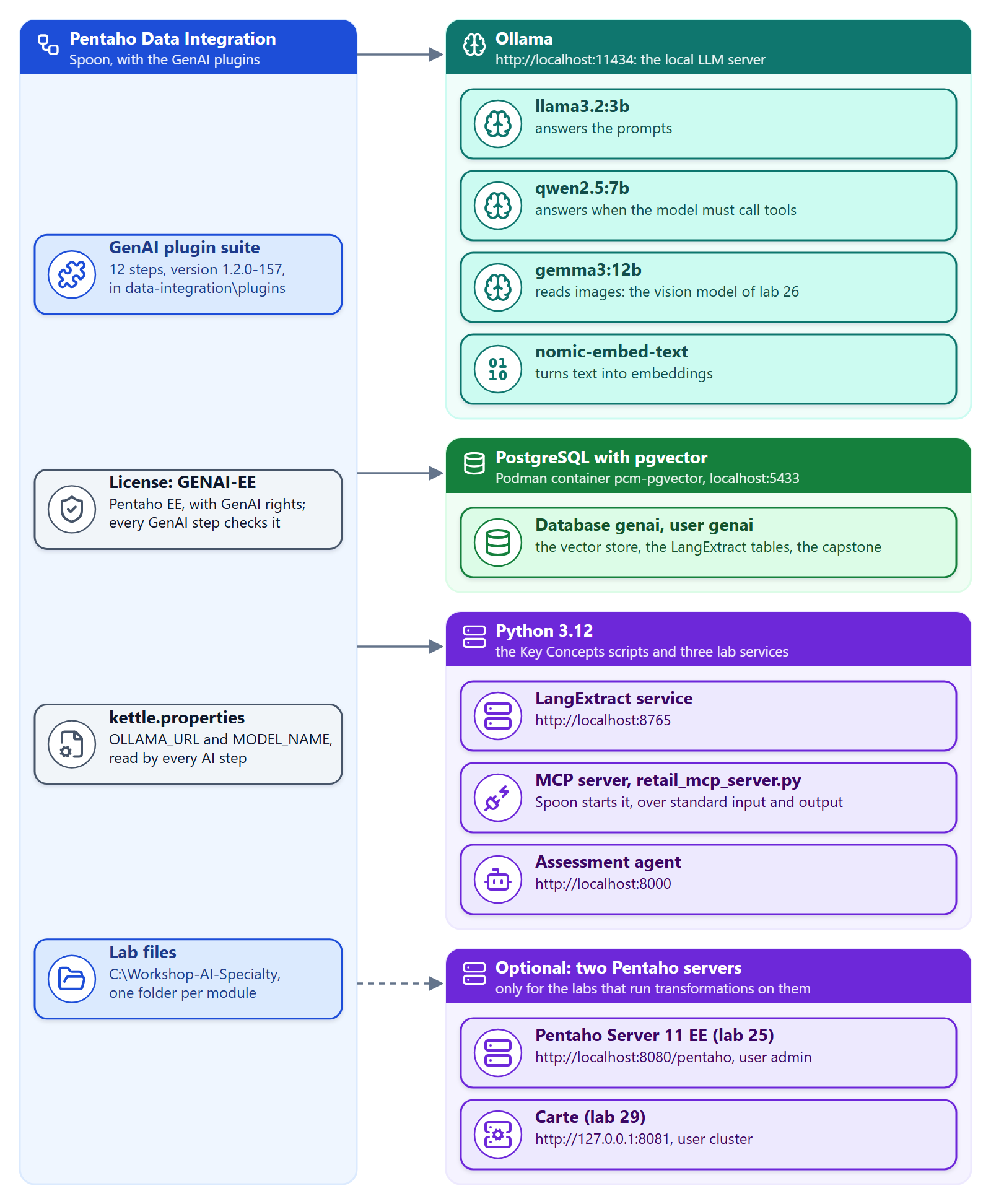
How to get the most out of this guide, and how the lab machine is set up: Pentaho Data Integration with the GenAI plugin suite and its license, local Ollama models, PostgreSQL with pgvector, and Python.

<figure><img src="https://raw.githubusercontent.com/jporeilly/Pentaho-Courses/main/developer-ai-specialty/_assets/images/00-the-machine.png" alt="Spoon, with the GenAI plugin suite (12 steps), the GENAI-EE license, kettle.properties and the lab files, calls Ollama on localhost:11434 (llama3.2:3b for prompts, qwen2.5:7b for tool calls, gemma3:12b for images, nomic-embed-text for embeddings), pgvector in pcm-pgvector on localhost:5433, and the Python 3.12 services: LangExtract on 8765, the MCP server and the agent on 8000. Optional: Pentaho Server on 8080 (lab 25) and Carte on 8081 (lab 29)"><figcaption><p>How the pieces of the lab machine fit together</p></figcaption></figure>

<details>

<summary>See the reading</summary>

<table data-search="false"><thead><tr><th width="79"></th><th>Lesson</th><th width="90">Time</th></tr></thead><tbody><tr><td><i class="fa-file-lines" style="color:green;">:file-lines:</i></td><td>Before You Start</td><td>~5m</td></tr></tbody></table>

</details>
{% endstep %}

{% step %}

### <i class="fa-lightbulb" style="color:blue;">:lightbulb:</i> AI Pipelines

`1 reading · 1 workshop · ~50m`

Key concepts behind LLM-powered pipelines: prompts, tokenization, embeddings, semantic search and transformers, tried hands-on in Python.

<details>

<summary>See all 2 lessons</summary>

<table data-search="false"><thead><tr><th width="79"></th><th>Lesson</th><th width="90">Time</th></tr></thead><tbody><tr><td><i class="fa-file-lines" style="color:green;">:file-lines:</i></td><td>Overview of a Prompt</td><td>~5m</td></tr><tr><td><i class="fa-flask" style="color:orange;">:flask:</i></td><td>Key Concepts Workshop</td><td>~45m</td></tr></tbody></table>

</details>
{% endstep %}

{% step %}

### <i class="fa-file-lines" style="color:blue;">:file-lines:</i> Documents to Text

`1 reading · 2 workshops · ~1h 30m`

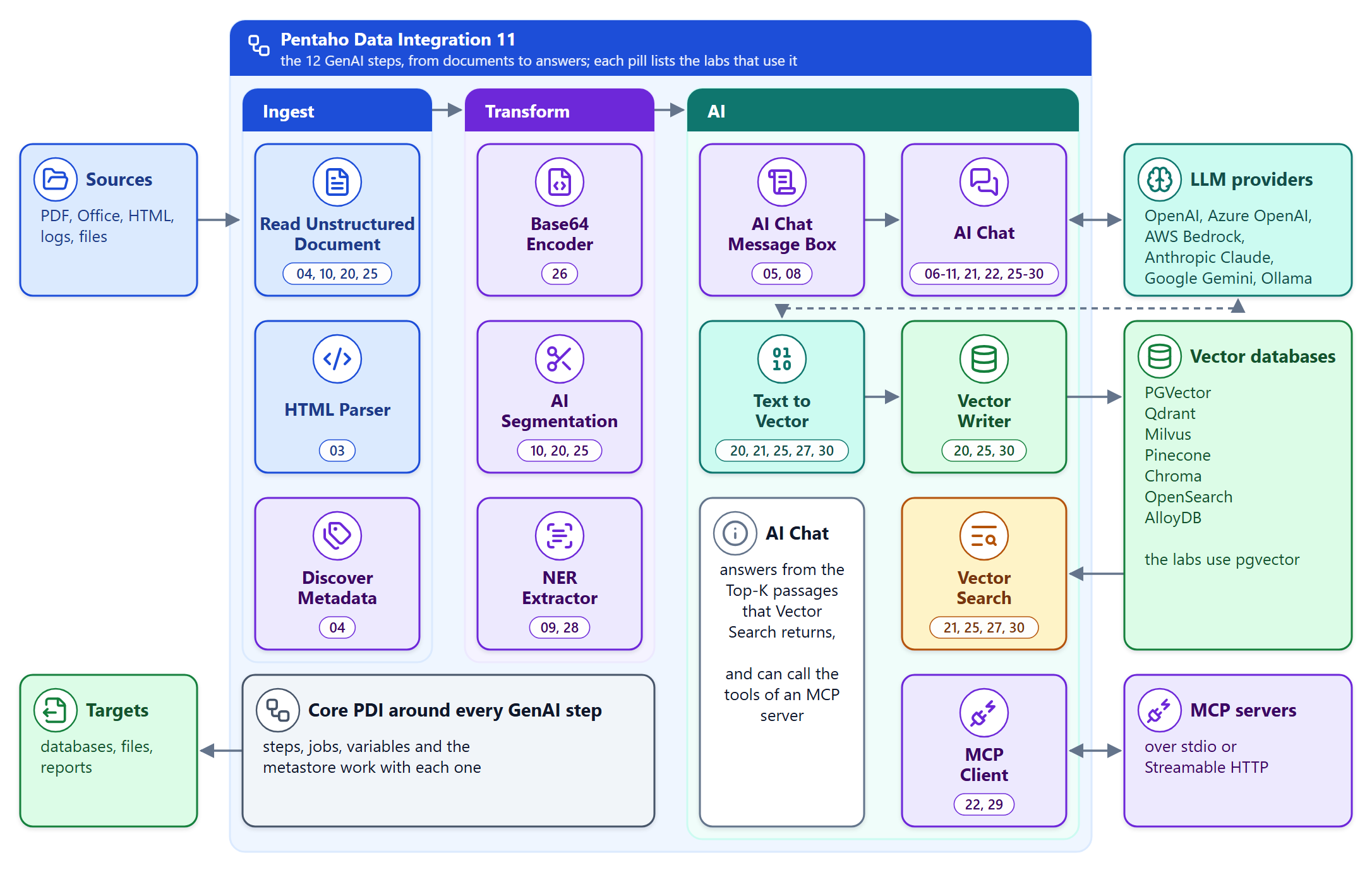
The GenAI plugin suite, and its first job: turning HTML pages, Word documents, PDFs and slides into text, and reading their metadata, with HTML Parser, Read Unstructured Document and Discover Metadata.

<figure><img src="https://raw.githubusercontent.com/jporeilly/Pentaho-Courses/main/developer-ai-specialty/_assets/images/02-genai-suite.png" alt="Pentaho Data Integration 11 with its 12 GenAI steps in three stages, Ingest, Transform and AI, each step with the labs that use it. Sources flow into Ingest; AI Chat talks to the LLM providers, Vector Writer and Vector Search to the seven vector databases, MCP Client to MCP servers; results go to targets such as databases, files and reports."><figcaption><p>The twelve GenAI steps from ingest to AI, with the providers, vector databases and MCP servers they talk to</p></figcaption></figure>

<details>

<summary>See all 3 lessons</summary>

<table data-search="false"><thead><tr><th width="79"></th><th>Lesson</th><th width="90">Time</th></tr></thead><tbody><tr><td><i class="fa-file-lines" style="color:green;">:file-lines:</i></td><td>Overview</td><td>~15m</td></tr><tr><td><i class="fa-flask" style="color:orange;">:flask:</i></td><td>HTML Parser</td><td>~35m</td></tr><tr><td><i class="fa-flask" style="color:orange;">:flask:</i></td><td>Apache Tika</td><td>~40m</td></tr></tbody></table>

</details>
{% endstep %}

{% step %}

### <i class="fa-comments" style="color:blue;">:comments:</i> LLM Integration

`1 reading · 7 workshops · ~5h 10m`

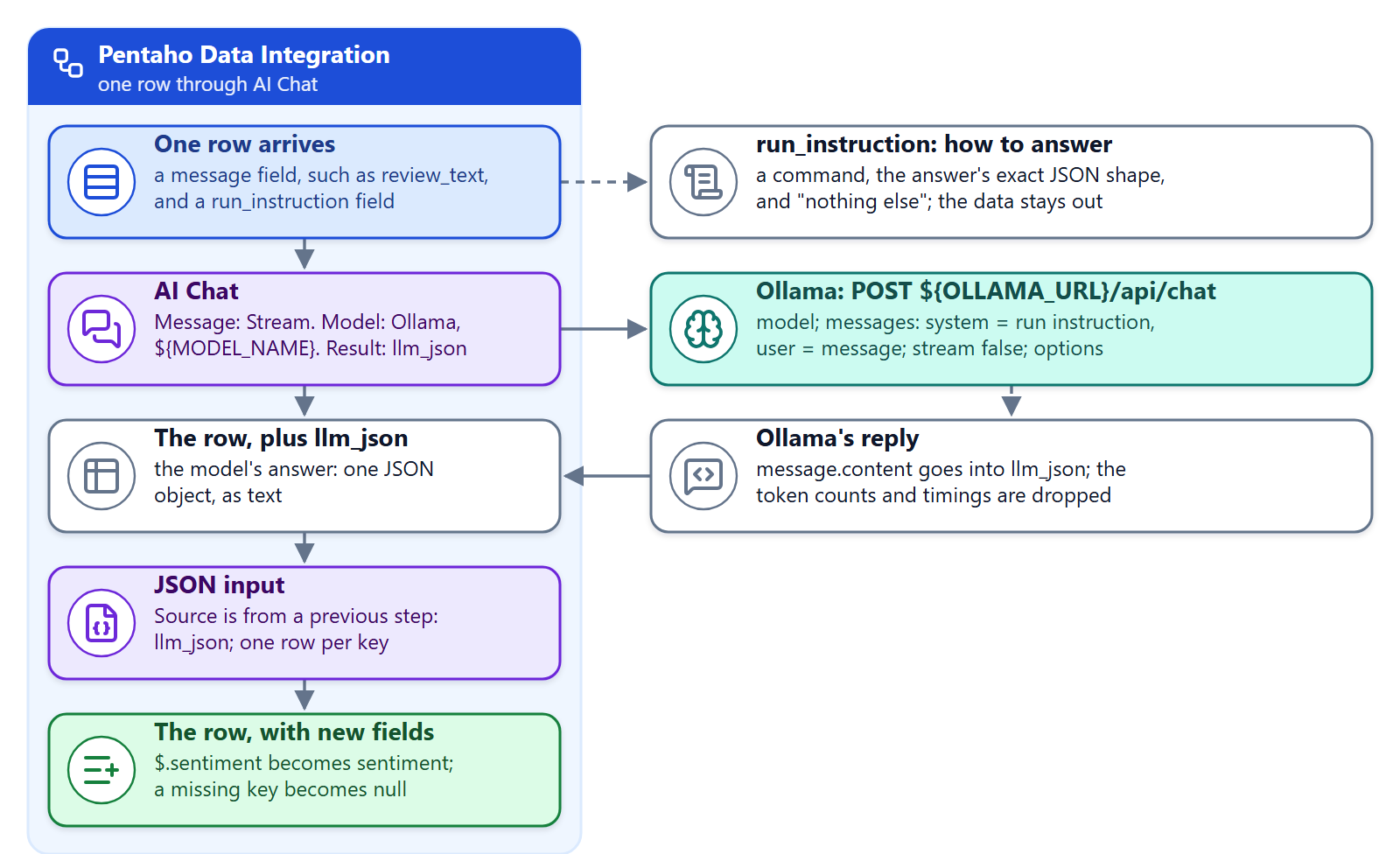
The AI Chat step on a local model: sentiment, data quality, enrichment, entity recognition with the NER Extractor and with an LLM, summaries of long documents with AI Segmentation, multi-stage pipelines, and invoices read by a vision model.

<figure><img src="https://raw.githubusercontent.com/jporeilly/Pentaho-Courses/main/developer-ai-specialty/_assets/images/05-ai-chat-row.png" alt="One row through AI Chat: a row with a message field, such as review_text, and a run_instruction that gives the exact JSON shape; AI Chat posts to ${OLLAMA_URL}/api/chat with the model, the run instruction as the system message and the message as the user message, stream false; the reply&#x27;s message.content goes into llm_json and its token counts are dropped; JSON input reads llm_json, so $.sentiment becomes sentiment and a missing key becomes null"><figcaption><p>One row through AI Chat: a run instruction and a message in, the model's answer out</p></figcaption></figure>

<details>

<summary>See all 8 lessons</summary>

<table data-search="false"><thead><tr><th width="79"></th><th>Lesson</th><th width="90">Time</th></tr></thead><tbody><tr><td><i class="fa-file-lines" style="color:green;">:file-lines:</i></td><td>Overview</td><td>~20m</td></tr><tr><td><i class="fa-flask" style="color:orange;">:flask:</i></td><td>Sentiment Analysis</td><td>~40m</td></tr><tr><td><i class="fa-flask" style="color:orange;">:flask:</i></td><td>Data Quality</td><td>~35m</td></tr><tr><td><i class="fa-flask" style="color:orange;">:flask:</i></td><td>Data Enrichment</td><td>~30m</td></tr><tr><td><i class="fa-flask" style="color:orange;">:flask:</i></td><td>Named Entity Recognition</td><td>~40m</td></tr><tr><td><i class="fa-flask" style="color:orange;">:flask:</i></td><td>Text Summarization</td><td>~45m</td></tr><tr><td><i class="fa-flask" style="color:orange;">:flask:</i></td><td>Multi-staged</td><td>~50m</td></tr><tr><td><i class="fa-flask" style="color:orange;">:flask:</i></td><td>Invoices with a Vision Model</td><td>~50m</td></tr></tbody></table>

</details>
{% endstep %}

{% step %}

### <i class="fa-magnifying-glass" style="color:blue;">:magnifying-glass:</i> Retrieval-Augmented Generation

`1 reading · 4 workshops · ~4h 40m`

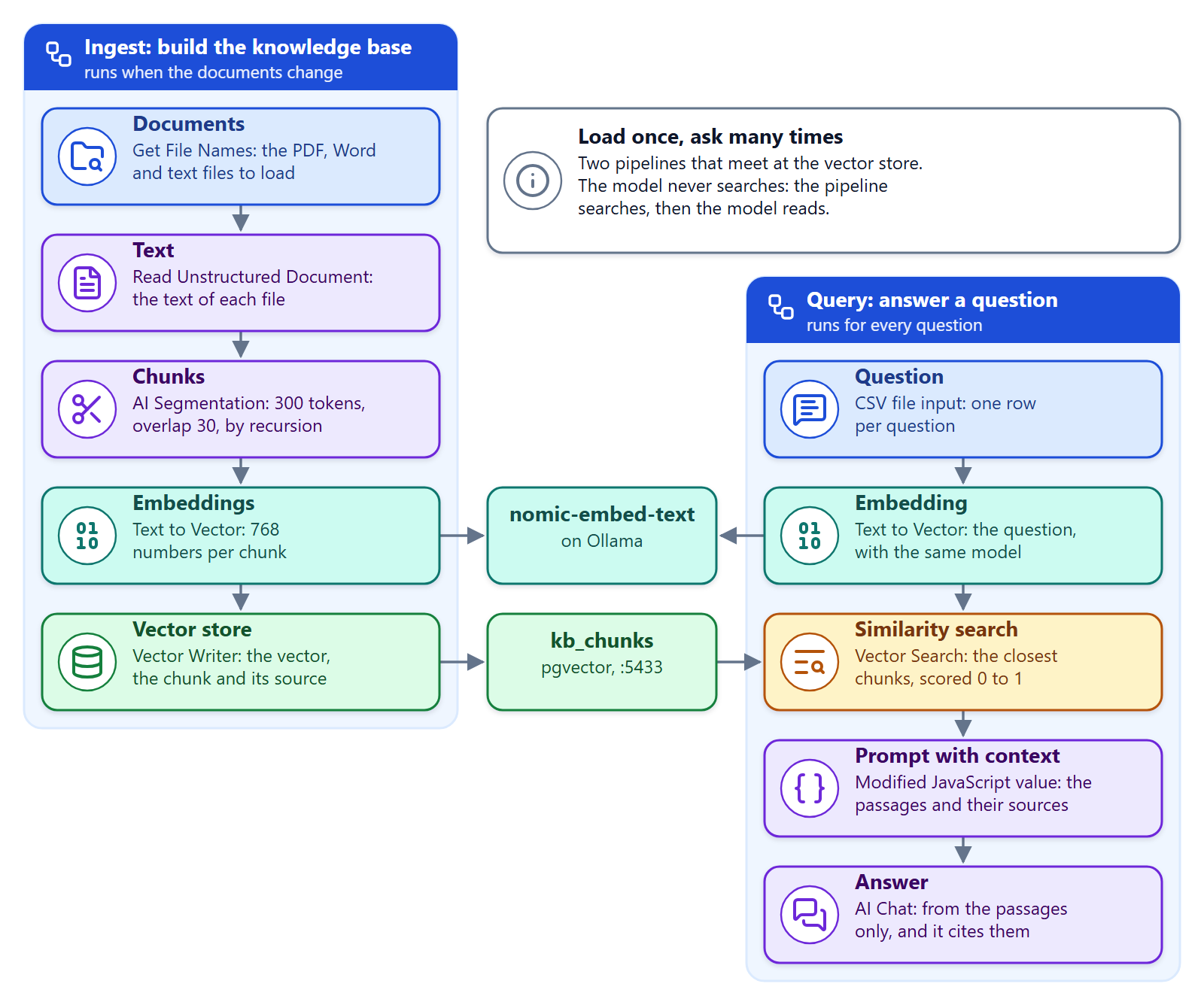
Answer questions from your own documents: chunk them with AI Segmentation, embed them with Text to Vector, load pgvector with Vector Writer, then retrieve with Vector Search and answer with AI Chat, citing the sources. Then measure it: an LLM judge grades the answers and a scorecard compares settings. The same embeddings find the near-duplicate products in a catalog, and AI Chat rewrites weak descriptions from the facts alone.

<figure><img src="https://raw.githubusercontent.com/jporeilly/Pentaho-Courses/main/developer-ai-specialty/_assets/images/19-two-pipelines.png" alt="Two pipelines that meet at the vector store. Ingest, when the documents change: Get File Names, Read Unstructured Document, AI Segmentation (300 tokens, overlap 30), Text to Vector and Vector Writer. Query, for every question: CSV file input, Text to Vector with the same model, Vector Search, Modified JavaScript value for the prompt, and AI Chat answering from the passages only, citing them. Both embed with nomic-embed-text; Vector Writer loads kb_chunks in pgvector and Vector Search reads it"><figcaption><p>Two pipelines: load the knowledge base, then answer from it</p></figcaption></figure>

<details>

<summary>See all 5 lessons</summary>

<table data-search="false"><thead><tr><th width="79"></th><th>Lesson</th><th width="90">Time</th></tr></thead><tbody><tr><td><i class="fa-file-lines" style="color:green;">:file-lines:</i></td><td>Overview</td><td>~20m</td></tr><tr><td><i class="fa-flask" style="color:orange;">:flask:</i></td><td>Build the Knowledge Base</td><td>~50m</td></tr><tr><td><i class="fa-flask" style="color:orange;">:flask:</i></td><td>Answer Questions</td><td>~1h</td></tr><tr><td><i class="fa-flask" style="color:orange;">:flask:</i></td><td>Evaluate the Answers</td><td>~1h 15m</td></tr><tr><td><i class="fa-flask" style="color:orange;">:flask:</i></td><td>Catalog Duplicates and Enrichment</td><td>~1h 15m</td></tr></tbody></table>

</details>
{% endstep %}

{% step %}

### <i class="fa-file-magnifying-glass" style="color:blue;">:file-magnifying-glass:</i> LangExtract

`1 reading · 3 workshops · ~2h 30m`

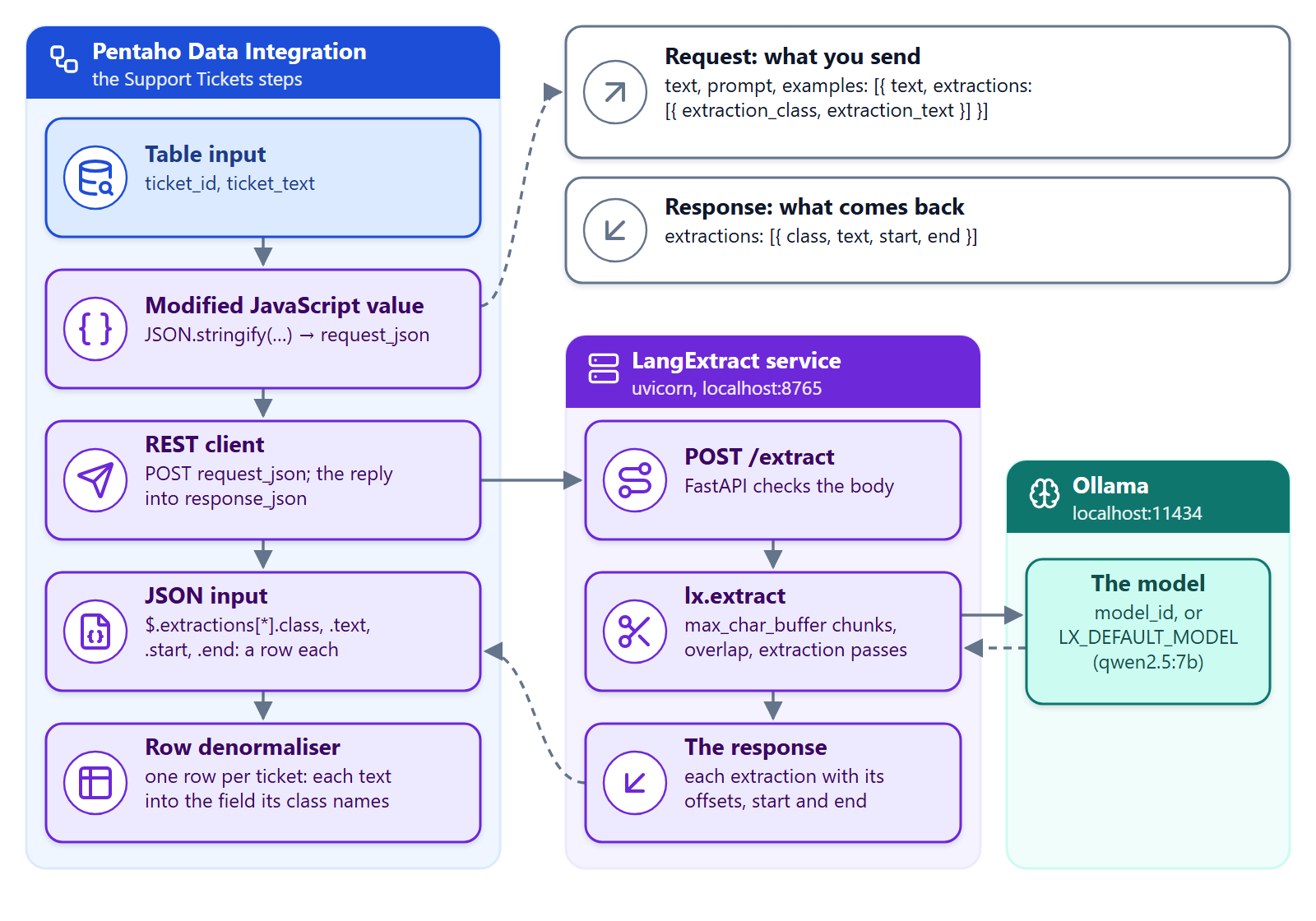
Structured extraction with source grounding: support tickets, clinical notes and contracts turned into rows in PostgreSQL through a local LangExtract service.

<figure><img src="https://raw.githubusercontent.com/jporeilly/Pentaho-Courses/main/developer-ai-specialty/_assets/images/12-langextract-architecture.png" alt="Pentaho Data Integration steps from Table input to Row denormaliser; REST client posts request_json to the LangExtract service on localhost:8765, whose lx.extract calls the model on Ollama, model_id or LX_DEFAULT_MODEL, qwen2.5:7b. The request sends extraction_class and extraction_text; the response returns class, text, start and end"><figcaption><p>Pentaho Data Integration calls the LangExtract service, which calls the local model</p></figcaption></figure>

<details>

<summary>See all 4 lessons</summary>

<table data-search="false"><thead><tr><th width="79"></th><th>Lesson</th><th width="90">Time</th></tr></thead><tbody><tr><td><i class="fa-file-lines" style="color:green;">:file-lines:</i></td><td>Overview</td><td>~15m</td></tr><tr><td><i class="fa-flask" style="color:orange;">:flask:</i></td><td>Support Tickets</td><td>~45m</td></tr><tr><td><i class="fa-flask" style="color:orange;">:flask:</i></td><td>Clinical Notes</td><td>~40m</td></tr><tr><td><i class="fa-flask" style="color:orange;">:flask:</i></td><td>Contract Documents</td><td>~50m</td></tr></tbody></table>

</details>
{% endstep %}

{% step %}

### <i class="fa-robot" style="color:blue;">:robot:</i> Agents and Tools

`1 reading · 3 workshops · ~5h 45m`

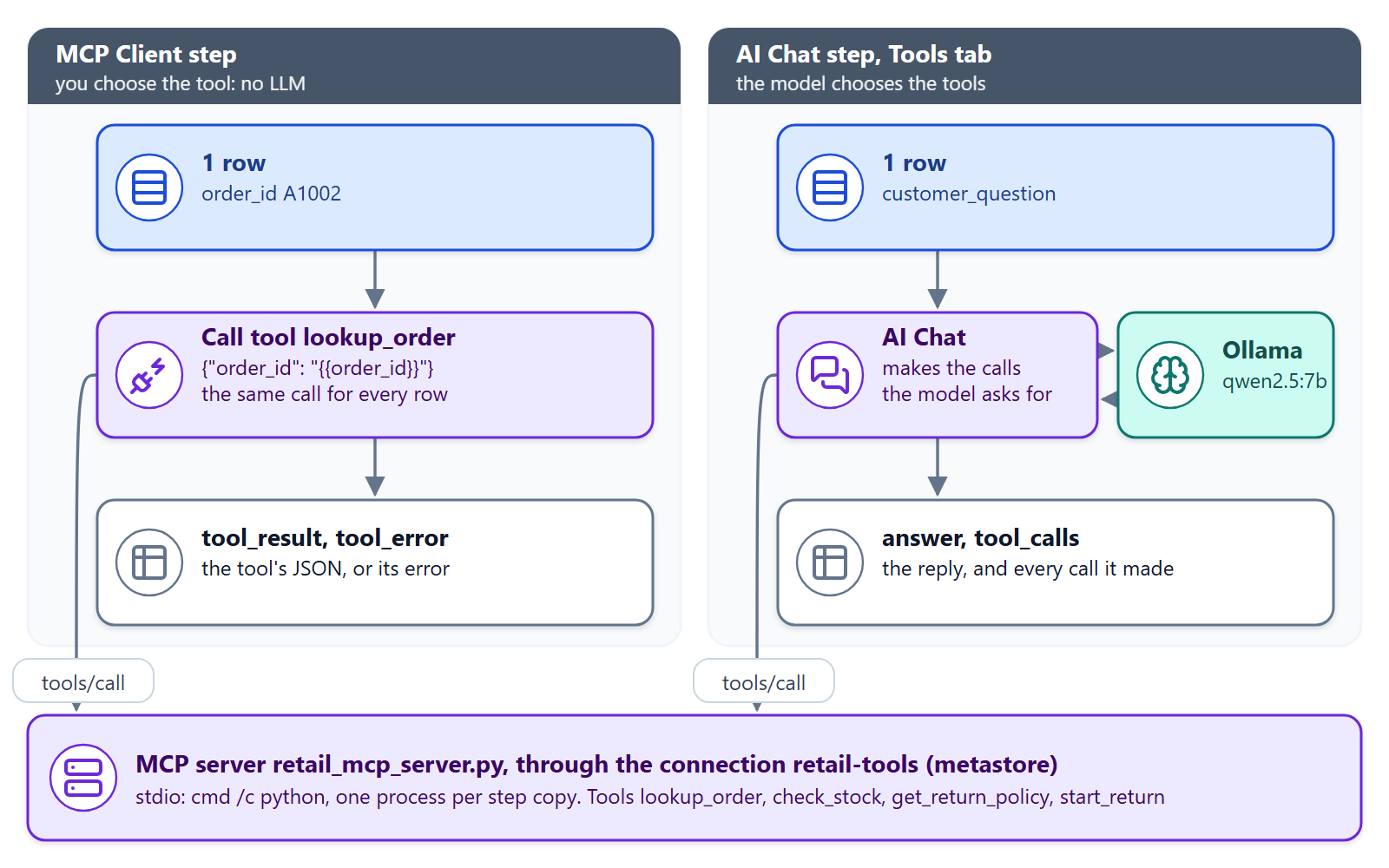
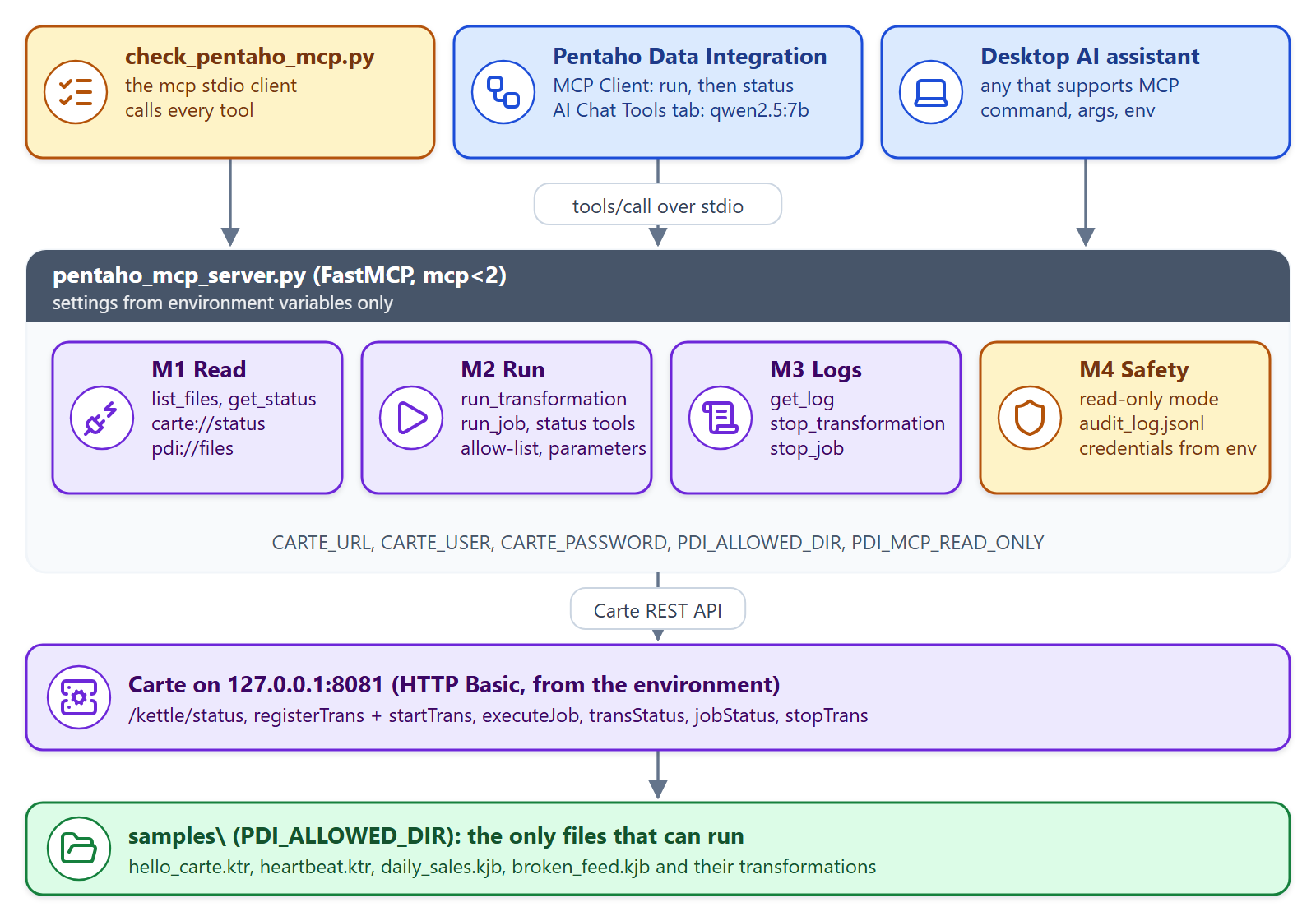
The Model Context Protocol: call a server's tools with the MCP Client step or let AI Chat choose them, deploy an agent as a service that a transformation calls, and, as a project, build a Pentaho MCP server that lets AI assistants run and monitor PDI work on Carte.

<figure><img src="https://raw.githubusercontent.com/jporeilly/Pentaho-Courses/main/developer-ai-specialty/_assets/images/22-mcp-two-ways.png" alt="Two panels over one MCP server. Left, MCP Client step: a row with order_id goes to Call tool lookup_order with an arguments template, the same call for every row, giving tool_result and tool_error, no LLM. Right, AI Chat step, Tools tab: a row with customer_question goes to AI Chat, which talks to Ollama (qwen2.5:7b) and makes the calls the model asks for, giving answer and tool_calls. Both call the server through the connection retail-tools"><figcaption><p>Two ways to use MCP tools from Pentaho Data Integration</p></figcaption></figure>

<figure><img src="https://raw.githubusercontent.com/jporeilly/Pentaho-Courses/main/developer-ai-specialty/_assets/images/29-pentaho-mcp-shape.png" alt="Three MCP clients, check_pentaho_mcp.py, Pentaho Data Integration (MCP Client and AI Chat with qwen2.5:7b) and a desktop AI assistant, call tools over stdio on pentaho_mcp_server.py. Its four milestones: M1 Read, M2 Run, M3 Logs, M4 Safety. Settings come from environment variables only. It calls the Carte REST API on 127.0.0.1:8081, and Carte runs only the files in samples, the allowed folder"><figcaption><p>The project: a Pentaho MCP server in front of Carte</p></figcaption></figure>

<details>

<summary>See all 4 lessons</summary>

<table data-search="false"><thead><tr><th width="79"></th><th>Lesson</th><th width="90">Time</th></tr></thead><tbody><tr><td><i class="fa-file-lines" style="color:green;">:file-lines:</i></td><td>Overview</td><td>~15m</td></tr><tr><td><i class="fa-flask" style="color:orange;">:flask:</i></td><td>MCP Tools</td><td>~1h</td></tr><tr><td><i class="fa-flask" style="color:orange;">:flask:</i></td><td>Deploy &#x26; Run the Agent</td><td>~1h 30m</td></tr><tr><td><i class="fa-flask" style="color:orange;">:flask:</i></td><td>Project: Pentaho MCP Server</td><td>~3h</td></tr></tbody></table>

</details>
{% endstep %}

{% step %}

### <i class="fa-server" style="color:blue;">:server:</i> Moving to Production

`1 reading · 2 workshops · ~3h`

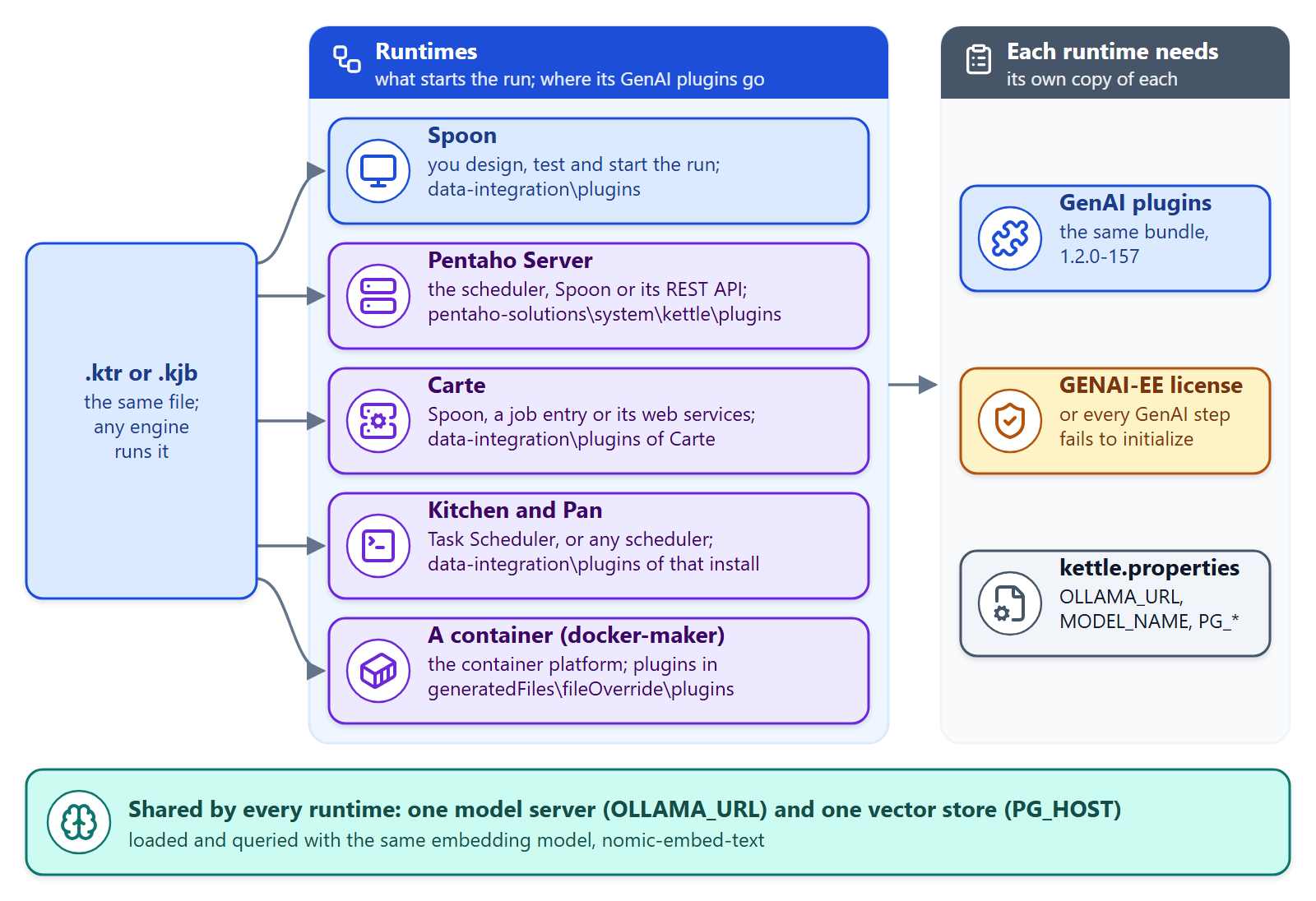
What changes when the pipelines leave Spoon: the plugins and their license on every runtime, settings by environment, the model server and vector store in production, reliability, monitoring and evaluation; then the RAG pipelines run and scheduled on Pentaho Server, and personal data masked before it reaches a model.

<figure><img src="https://raw.githubusercontent.com/jporeilly/Pentaho-Courses/main/developer-ai-specialty/_assets/images/24-where-pipelines-run.png" alt="One .ktr or .kjb file runs on five runtimes, each with its own plugins folder: Spoon (data-integration\plugins), Pentaho Server (pentaho-solutions\system\kettle\plugins), Carte, Kitchen and Pan (data-integration\plugins of their installation) and a docker-maker container (generatedFiles\fileOverride\plugins). Each needs the same GenAI bundle, a GENAI-EE license and its own kettle.properties. All share one model server (OLLAMA_URL) and one vector store (PG_HOST), with nomic-embed-text"><figcaption><p>Where the pipelines run, and what each runtime needs</p></figcaption></figure>

<details>

<summary>See all 3 lessons</summary>

<table data-search="false"><thead><tr><th width="79"></th><th>Lesson</th><th width="90">Time</th></tr></thead><tbody><tr><td><i class="fa-file-lines" style="color:green;">:file-lines:</i></td><td>Overview</td><td>~30m</td></tr><tr><td><i class="fa-flask" style="color:orange;">:flask:</i></td><td>Run on Pentaho Server</td><td>~1h 15m</td></tr><tr><td><i class="fa-flask" style="color:orange;">:flask:</i></td><td>Guard Personal Data</td><td>~1h 15m</td></tr></tbody></table>

</details>
{% endstep %}

{% step %}

### <i class="fa-trophy" style="color:blue;">:trophy:</i> Capstone Project

`1 workshop · ~3h`

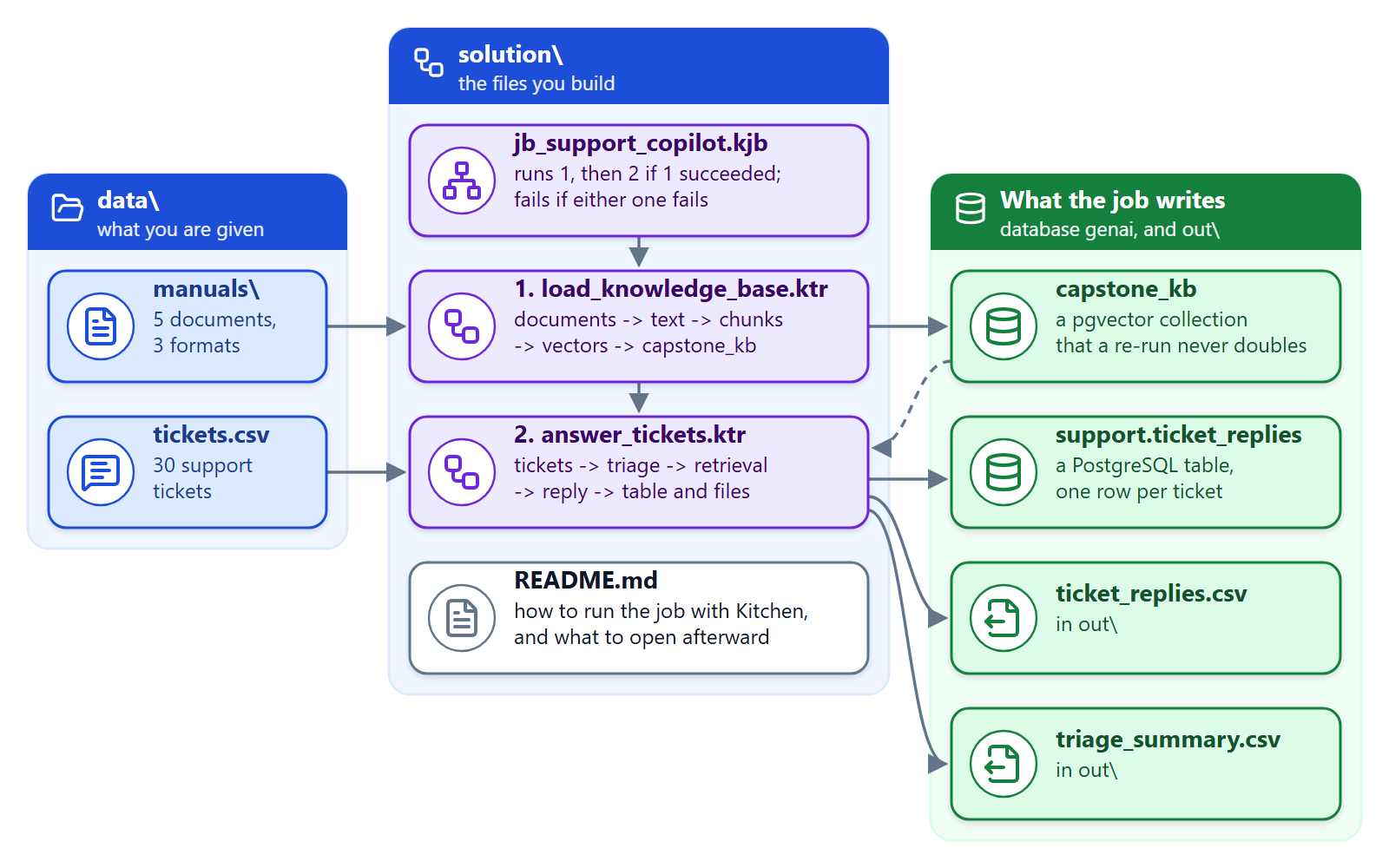
One project across the course: a support desk copilot that triages tickets, retrieves the right manual passages from a vector store and drafts grounded replies into PostgreSQL, from one job.

<figure><img src="https://raw.githubusercontent.com/jporeilly/Pentaho-Courses/main/developer-ai-specialty/_assets/images/23-capstone-shape.png" alt="The suggested shape: data\ holds manuals\, five documents, and tickets.csv, 30 tickets. In solution\, jb_support_copilot.kjb runs load_knowledge_base.ktr, then answer_tickets.ktr if it succeeded, and fails if either fails; README.md says how to run it. load_knowledge_base.ktr takes the documents to text, chunks and vectors in capstone_kb. answer_tickets.ktr takes the tickets through triage, retrieval and a reply into support.ticket_replies, and ticket_replies.csv and triage_summary.csv in out\"><figcaption><p>The capstone's shape: three files, its folders, and where the results land</p></figcaption></figure>

<details>

<summary>See the workshop</summary>

<table data-search="false"><thead><tr><th width="79"></th><th>Lesson</th><th width="90">Time</th></tr></thead><tbody><tr><td><i class="fa-flask" style="color:orange;">:flask:</i></td><td>Capstone: Support Desk Copilot</td><td>~3h</td></tr></tbody></table>

</details>
{% endstep %}
{% endstepper %}

***

{% columns %}
{% column %}
{% hint style="success" icon="file-certificate" %}
**Course accreditation**

Pass the exam and complete the capstone, and you'll automatically be able to download your course accreditation, valid for two years. The exam is self-paced and not proctored.
{% endhint %}
{% endcolumn %}

{% column %}
{% hint style="info" icon="award" %}
**Level 3 credit**

This Speciality is optional. It does not count towards Level 3 — Certified.
{% endhint %}
{% endcolumn %}
{% endcolumns %}

***

<h3 align="center">How to get access</h3>

{% stepper %}
{% step %}
**Read the course outlines**

Open the level or speciality you're considering and check the modules cover the work you actually do.
{% endstep %}

{% step %}
**Talk to your Pentaho Account Executive**

Courses and subscriptions are purchased through your Pentaho Account Executive — a single seat or the whole team. They'll size it with you and get the order placed. No Account Executive yet? Email <academy@pentaho.com> and we'll connect you.
{% endstep %}

{% step %}
**Receive your voucher code**

You'll be sent a voucher code giving access to the course or courses you bought.
{% endstep %}

{% step %}
**Redeem your code and start your lab**

Redeem the code on the Pentaho training portal and your hosted lab deploys with the Lab Guide built in. Every screen is shown step by step in the voucher walkthrough.

{% embed url="<https://pentaho.selfpaced.training/access/login>" %}

<figure><img src="https://1407627559-files.gitbook.io/~/files/v0/b/gitbook-x-prod.appspot.com/o/spaces%2F3zO083cdmEBCaZG8U9P2%2Fuploads%2FPEKFCHIQlCddWOeTkw1V%2Fportal.png?alt=media&#x26;token=1552611a-6317-4746-ab5a-acd61397acca" alt="The Pentaho training portal sign-in page"><figcaption></figcaption></figure>
{% endstep %}
{% endstepper %}

***

<p align="center"><a href="https://academy.pentaho.com/pdi-developer-path/speciality-courses.md" class="button secondary" data-icon="arrow-left">Back to Speciality Courses</a></p>


---

# Agent Instructions
This documentation is published with GitBook. GitBook is the documentation platform designed so that both humans and AI agents can read, navigate, and reason over technical content effectively. Learn more at gitbook.com.

## Querying This Documentation
If you need additional information that is not directly available in this page, you can query the documentation by asking a question.

Perform an HTTP GET request on the following URL with the `ask` and `goal` query parameters:

```
GET https://academy.pentaho.com/pdi-developer-path/speciality-courses/ai-pipelines.md?ask=<question>&goal=<user_goal>
```

`ask` is the immediate question: it should be specific, self-contained, and written in natural language.
`goal` is what the user is ultimately trying to achieve, the reason they need the answer. Sharing it helps GitBook give you a better, more relevant answer. A goal is most helpful when it describes the outcome the user wants rather than restating the question. For example, with `ask=how do I create an API token`, a goal like `automate deployments from our CI pipeline` lets GitBook tailor the answer to that use case.

The response will contain a direct answer to the question and relevant excerpts and sources from the documentation.

Use this mechanism when the answer is not explicitly present in the current page, you need clarification or additional context, or you want to retrieve related documentation sections.